


Question: I like SELECT *, but I don’t really want ALL the columns. Is there a better way? Side Note: People are giving me crap on the ‘SPLAT’ – it’s perfectly acceptable! To me at least… There’s a few better ways, and with an IDE like SQL Developer, you should expect lots of help in this area. drag and drop cols from the tree * expansion the Query Builder code insight I have how-to’s on…
Our Database Insider Newsletter folks asked me to share some resolutions I had for 2016. 2015 was a great year for me, personally and professionally. I’m also continuously reminded of the things I don’t do so well and need to get better at. So here goes… Find new ways to reach and help our users. Not everyone gets to attend a conference. Not everyone has time to read blogs. Our team wants our customers to…
These were the stories published this year that enjoyed the most readers. Sadly, an article I wrote many years ago on how to import data from Excel to Oracle, remains the #1 post overall. Stupid Excel. 10. SQL Developer version 4.1 Feature Recap So we released version 4.1 of SQL Developer this past May. This post summarizes the new features with detailed stories on each. One of my favorites is the Diagram page we added…
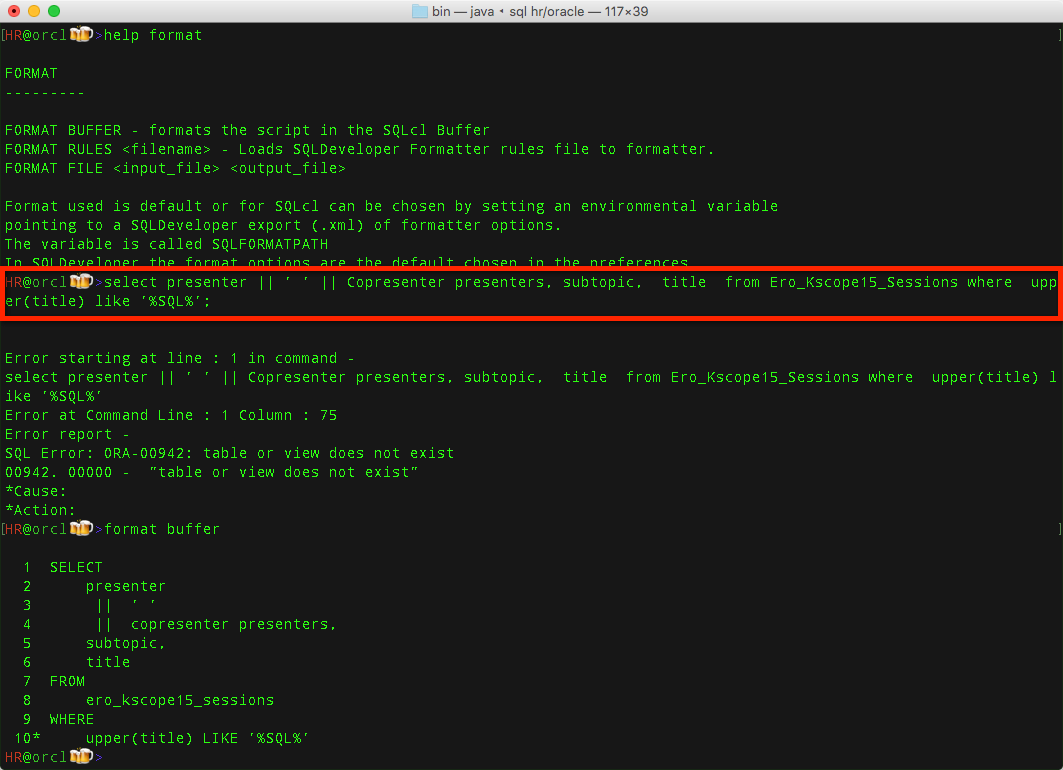
Here’s how to format your sql and plsql code from the command line using Oracle SQLcl.
Doing the math, SQL Developer is officially 10 years old. Or should I say, 10 years young? I remember VERY clearly when this came out. It was seen as a very disruptive move by Oracle – a company for which I did not work at the time, so this is my personal recollection 🙂 It was also not the first developer tool to come from Oracle. But this one had a lot of people excited.…
Updated 25 May 2022 This is formerly a trick. We made this just a simple action of opening the User and going to the SQL panel in the DBA, Security section. If this isn’t working for you, it’s because you’re on an older version of SQL Developer…in which case, read on. The Trick, if you’re on an older copy of SQLDev This challenge has come up a few times recently for me. Just HOW can…
I hope this post isn’t too cheesy. But it’s Turkey-week here in the USA, and the theme demands that homage be paid. So here are 5 features in Oracle SQL Developer that I use all the time, and am truly thankful for. They help me conserve energy, AND they make my job easier. I want to make sure YOU’RE aware of them too. In no particular order, mostly… 1. The Statements Panel I use this…
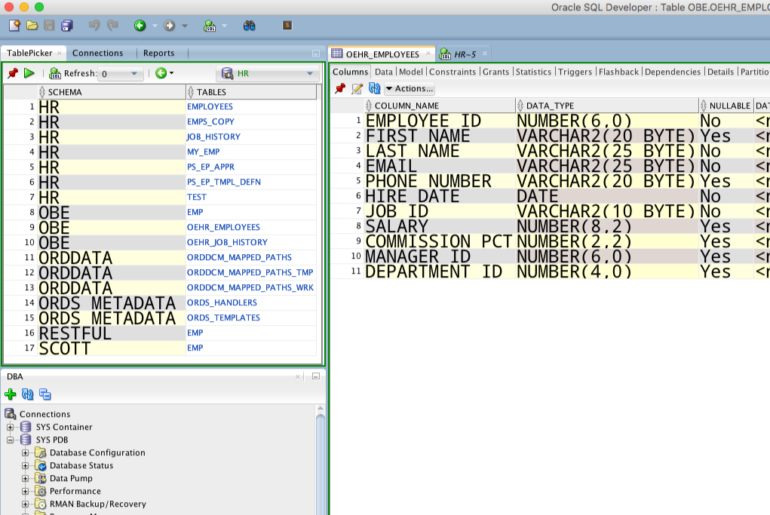
The Connection Tree and Schema Browser make pretty nifty object navigators. But maybe you want your own custom list of objects. Perhaps you’re working on a project and you only want to see objects that pertain to Project XYZ. And you’re able to ID these objects by a common column ID – or use your imagination and think of some other meta bit or byte. It could look a little something like this: I simply…
I’m always looking for things. I love the ALT+G trick in SQL Developer. But what about the command-line? One of the really nice things about SQLcl is that if you can’t do what you want with the available commands, you can just build your own. That’s especially true now that we have JavaScript support. But this is just plain, straight up SQL. To build your own command, use ‘ALIAS’. 3166734866aae85d64d966_000004 You can probably guess what…
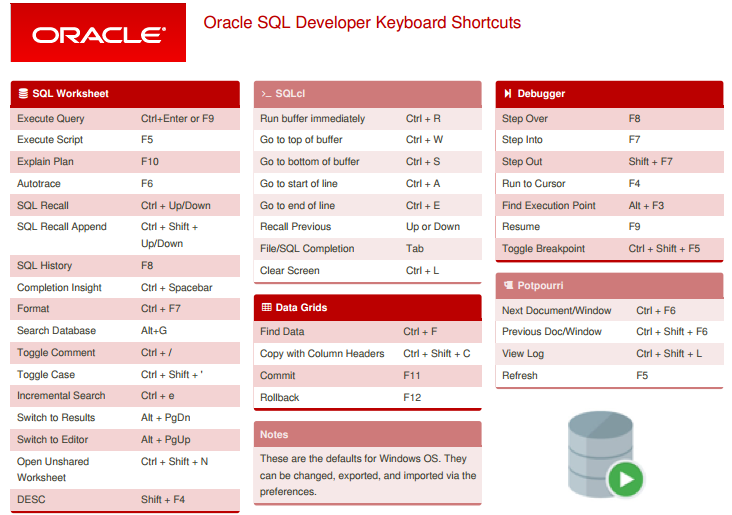
Remember back when Corel first released WordPerfect? Remember how it had like a bazillion keyboard shortcuts, and you needed help remembering them all? No? You probably also don’t remember a world sans e-mail and smart phones either. Oh well. Anyways, we have lots of keyboard shortcuts in SQL Developer and a few in SQLcl. You might need help remembering them. Cue the ‘nerd stick.’ Or at least that’s what I’ve always called these. Maybe I’ll…