
With AI, ‘context is everything.’ To get the best results, you need to provide AI Skills, the right MCP Servers, Agent Memory, the world’s best prompt, and whatever else the context engineering prophets bring down next.
What if you could shortcut a whole bunch of that, and use existing kit you have developed over the past few years, and just train your Agents on how to use that, vs asking it to generate code, or generate SQL to answer your questions?
OCI SQL Reports allow just that
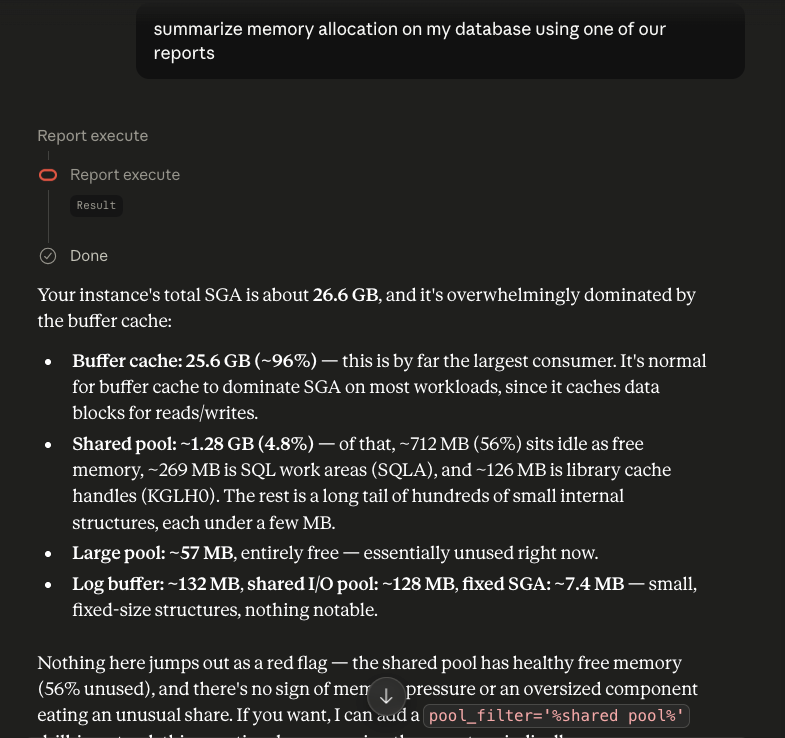
Our managed MCP Servers for Oracle AI Database include the ability to deliver information via SQL Reports. So your agent and LLM do not need to learn your schema to see how to generate the right SQL, they just already have that SQL ready to go, at their fingertips, via MCP Tools.
Need a refresher? You can read more about:
- Announcement: our OCI MCP Servers for Oracle AI Database
- Deep Dive: SQL Reports, and how AI can use them via MCP
Cool, but now I have to generate AND load a ton of reports. See you in 3 months.
WRONG! You probably already have these reports in use at your org in various formats. You can automate the transformation and loading of those reports! And that’s what I want to walk your through now.
AI is good at many things, and generating code for doing basic utility type stuff is definitely one of those things, esp if it’s not for a commercial grade enterprise application!
I asked my Agent to study up on the ‘create-sql-report-oracle-database‘ OCI command-line utility docs, and also to read my co-worker’s Terraform automation post for batch-loading SQL reports.
I then asked it to take my EXISTING AWESOME REPORTS, and re-factor them for this use case. We wrote these reports to help DBAs do diagnostics on their databases. They look at things like expensive SQL, memory allocation/usage, and wait events.
So if I have questions about my system, and it falls into these buckets, my Agent can simply call the report to get that info, vs falling back to generating (and executing) the SQL to get that data.
This means I can be sure that the answers will be ‘known’ and consistent. It should also save us on resources – my agent won’t be consuming tokens to ‘think’ and generate code.
Before I share the OCI script I used, let me talk about the instructions I shared with my Agent
*Keep the SQL as lean as the question demands, tell the agent exactly when to reach for this report (with real example questions), and name your parameters like you’re handing them to a coworker, not a compiler.*
I also prompted it remember (consider) our AI Skills around SQL and performance tuning.
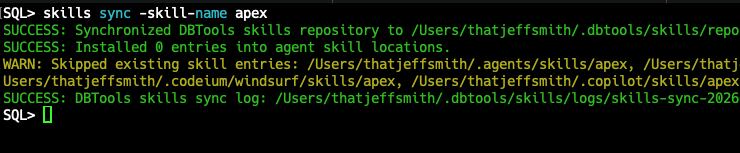
My agent was able to look at my old reports, stored as XML, and convert those to JSON files having the structure that the OCI command would expect.
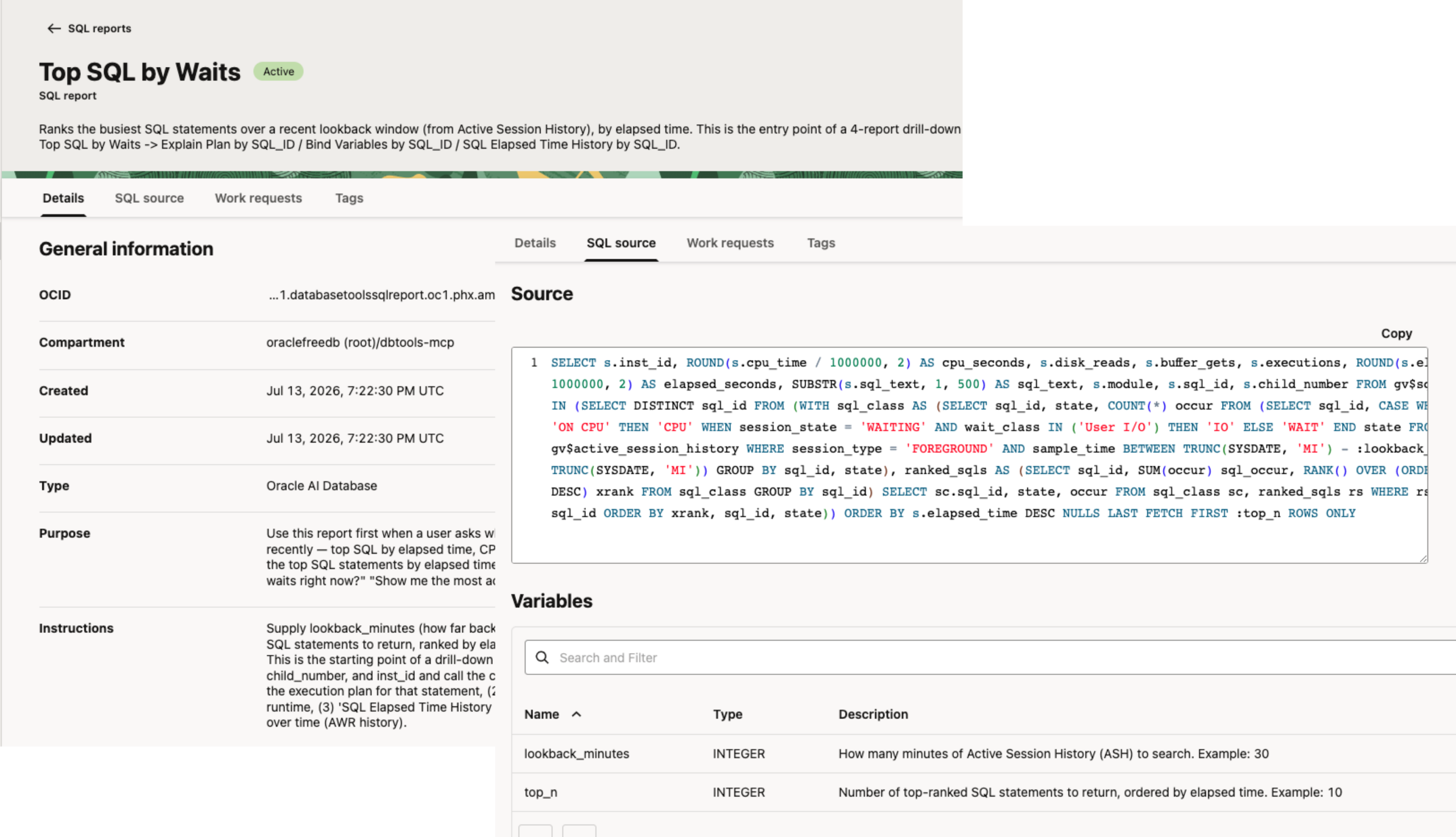
Here’s an example of before and after –
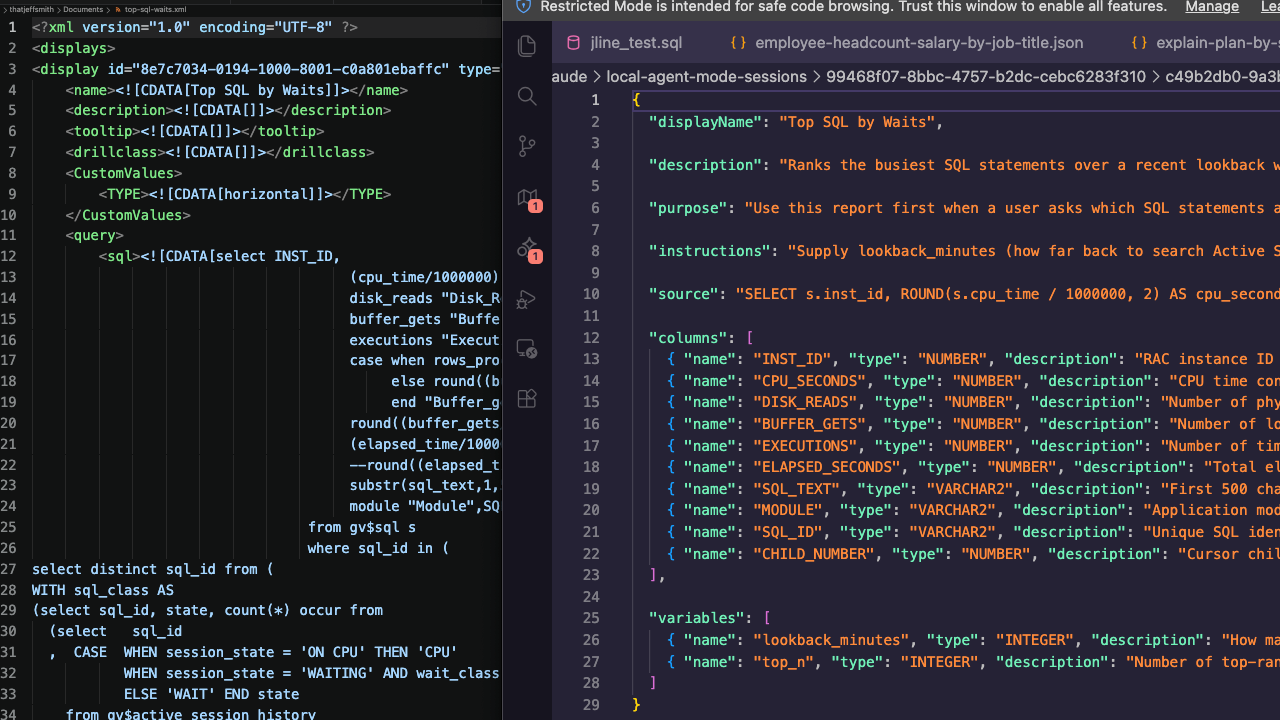
The biggest difference is the documentation, the instructions built into the report. The report TEACHES the MCP Clients how to call the report. It even includes example questions that the report can address!
  "description": "Ranks the busiest SQL statements over a recent lookback window (from Active Session History), by elapsed time. This is the entry point of a 4-report drill-down family migrated from top-sql-waits.xml: Top SQL by Waits -> Explain Plan by SQL_ID / Bind Variables by SQL_ID / SQL Elapsed Time History by SQL_ID.",

  "purpose": "Use this report first when a user asks which SQL statements are consuming the most resources or time recently — top SQL by elapsed time, CPU-heavy queries, or high-wait SQL. Sample questions: \"What are the top SQL statements by elapsed time in the last 30 minutes?\" \"Which queries are causing the most waits right now?\" \"Show me the most active SQL over the last hour.\"",

"instructions": "Supply lookback_minutes (how far back to search Active Session History, e.g. 30) and top_n (how many SQL statements to return, ranked by elapsed time, e.g. 10). Example: lookback_minutes=30, top_n=10. This is the starting point of a drill-down family — once you have a row of interest, take its sql_id, child_number, and inst_id and call the companion reports in sequence: (1) 'Explain Plan by SQL_ID' to see the execution plan for that statement, (2) 'Bind Variables by SQL_ID' to see the actual values bound at runtime, (3) 'SQL Elapsed Time History by SQL_ID' to see how that statement's performance has trended over time (AWR history).",Just batch loading your reports, as is, might be OK, but I think it’s worth the time to validate the reports still do what you think they do, AND augment their metadata so it’s clear for a person or agent, when that report would be applicable to the question at hand.
Some of the reports are parameterized, those parameters need to be documented, too!
Instead of point-and-clicking 97x and copy-pasting 36 more…I generated a script to do it all for me in just a few seconds.
I have my OCI profile ($HOME/.profile) set on my machine. I can work from my machine to work with my OCI tenancy from code vs in my browser and the console.
My bash script has a couple of things specific to ‘me,’ namely –
DEFAULT_COMPARTMENT_ID="ocid1.compartment.oc1.abcdefghijklmnop.123"
DEFAULT_OCI_PROFILE="dbtools"I’m putting my SQL Reports into a specific compartment, and I’m using a secondary OCI Profile (not the DEFAULT), so I set those up as defaults.
Otherwise the script is pretty straightforward:
- One JSON file per report, mapped straight to `oci dbtools sql-report create-sql-report-oracle-database` flags
- A small bash loop that handles multiple profiles, dry-run mode, and doesn’t stop on the first failure
- Parses the resulting OCID for the new report object, back out of an async CLI response
What it looks like to run
I have 5 or 6 reports in a folder, and I simply call my script.
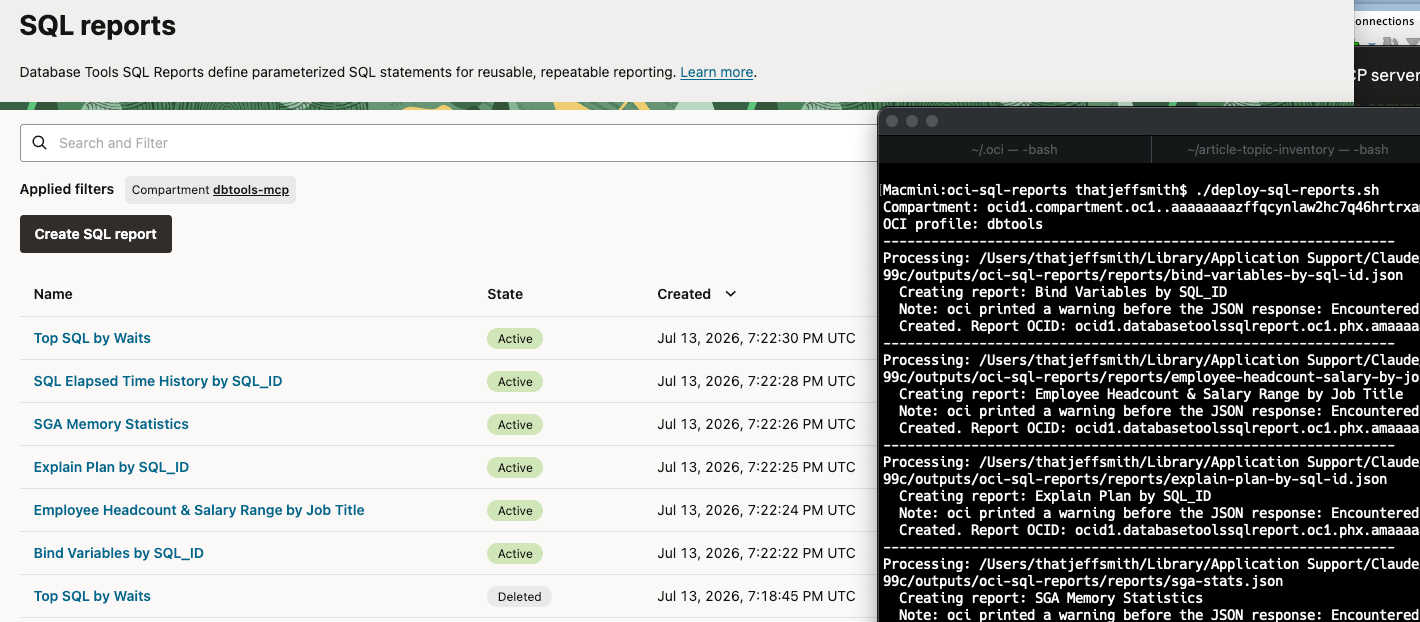
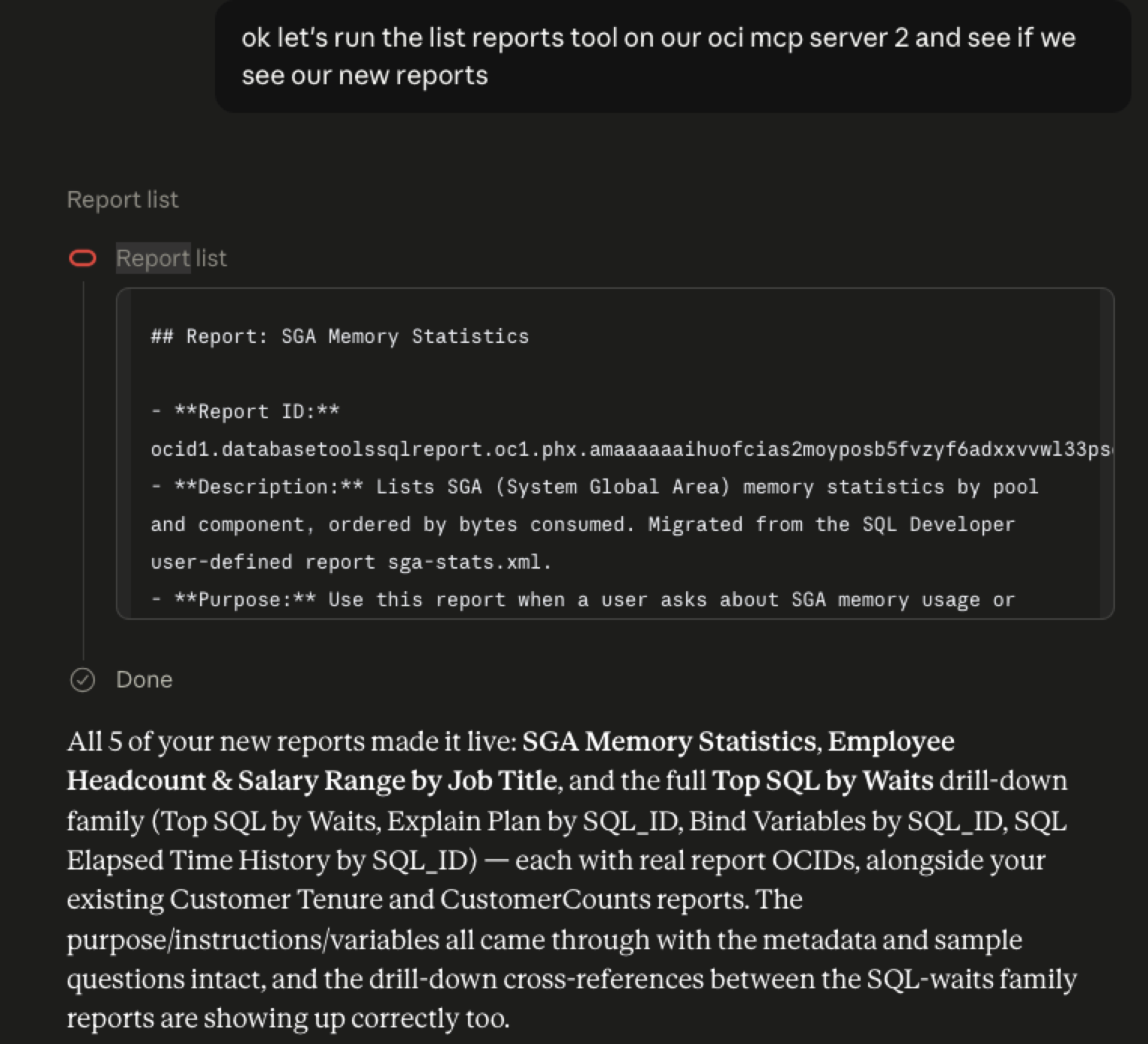
These reports are NOT usable from our MCP Server, yet.
I can pull up a report in the Console, just to do a sanity check, make sure everything came over as expected.
I had to split 1 report into 5
I had a Parent-Child report. But our OCI Tools service doesn’t support this. No problem! I simply had that 1 BIG report split out into separate ones, with the supporting descriptions and instructions updated to instruct the Agent how to ‘walk’ the reports from a top to bottom level.
Setting it up to be callable from my Agent
I need to add these new reports to my MCP Server and a new or existing MCP Toolset. At that time I also setup the required Role membership required to access said reports.
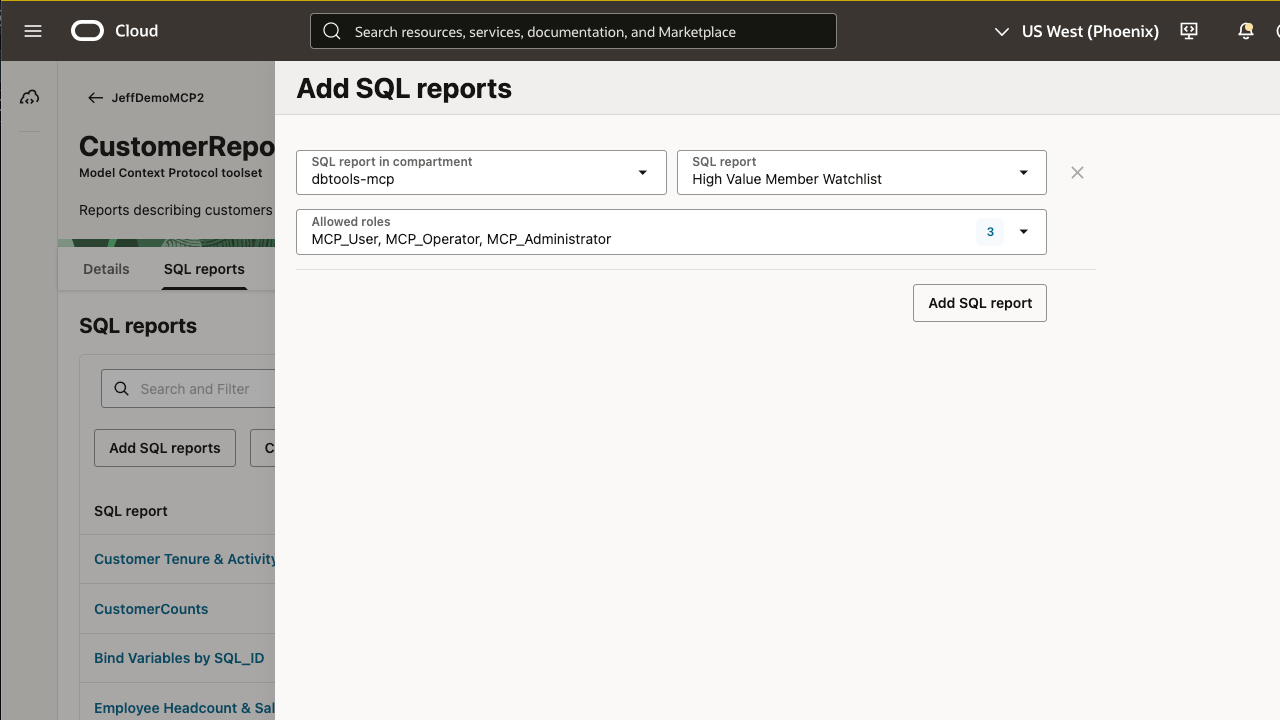
Once I do this, they are available, IMMEDIATELY.
The Script
Hint: the actual command instruction starts at line 105.
#!/usr/bin/env bash
#
# deploy-sql-reports.sh
#
# Batch-loads Database Tools SQL Report definitions into an OCI compartment
# using the OCI CLI. Each report is defined as a single JSON file (see
# templates/report-template.json for the schema).
#
# Usage:
#   ./deploy-sql-reports.sh                      # deploy every *.json in ./reports
#   ./deploy-sql-reports.sh reports/foo.json      # deploy one specific report file
#   ./deploy-sql-reports.sh --dry-run             # print the oci commands, don't run them
#   ./deploy-sql-reports.sh --profile=OTHER_NAME  # override the OCI CLI profile for this run
#   COMPARTMENT_ID=ocid1.compartment.oc1..xxx ./deploy-sql-reports.sh
#   OCI_PROFILE=OTHER_NAME ./deploy-sql-reports.sh
#
# By default this uses the "dbtools" OCI CLI profile (from ~/.oci/config),
# since this tenancy has multiple profiles configured. Override with
# OCI_PROFILE env var or --profile=NAME.
#
# Requirements: oci CLI (configured/authenticated), jq
#
# Note: this always CREATES a new report resource. It does not check for
# existing reports with the same display name, so re-running against the
# same files will create duplicates in OCI.

set -uo pipefail

SCRIPT_DIR="$(cd "$(dirname "${BASH_SOURCE[0]}")" && pwd)"
REPORTS_DIR="${SCRIPT_DIR}/reports"
DEFAULT_COMPARTMENT_ID="ocid1.compartment.oc1..abcdefghijklmnop.123"
COMPARTMENT_ID="${COMPARTMENT_ID:-$DEFAULT_COMPARTMENT_ID}"
DEFAULT_OCI_PROFILE="dbtools"
OCI_PROFILE="${OCI_PROFILE:-$DEFAULT_OCI_PROFILE}"
DRY_RUN=0
WAIT_FOR_STATE="SUCCEEDED"
WAIT_INTERVAL_SECONDS=5
TMP_DIR="$(mktemp -d)"
trap 'rm -rf "$TMP_DIR"' EXIT

log() { printf '%s\n' "$*" >&2; }
die() { log "ERROR: $*"; exit 1; }

# --- dependency checks ----------------------------------------------------
command -v oci >/dev/null 2>&1 || die "oci CLI not found in PATH. Install/configure it first."
command -v jq  >/dev/null 2>&1 || die "jq not found in PATH. Install it (e.g. 'brew install jq') and re-run."

# --- arg parsing -----------------------------------------------------------
FILES=()
for arg in "$@"; do
  case "$arg" in
    --dry-run) DRY_RUN=1 ;;
    --profile=*) OCI_PROFILE="${arg#--profile=}" ;;
    -h|--help)
      grep '^#' "$0" | sed 's/^#//'
      exit 0
      ;;
    *) FILES+=("$arg") ;;
  esac
done

if [ ${#FILES[@]} -eq 0 ]; then
  [ -d "$REPORTS_DIR" ] || die "No reports directory found at $REPORTS_DIR"
  while IFS= read -r -d '' f; do FILES+=("$f"); done < <(find "$REPORTS_DIR" -maxdepth 1 -name '*.json' -print0 | sort -z)
fi

[ ${#FILES[@]} -eq 0 ] && die "No report JSON files to deploy. Drop report definitions into ${REPORTS_DIR}/ (see templates/report-template.json)."

log "Compartment: $COMPARTMENT_ID"
log "OCI profile: $OCI_PROFILE"
[ "$DRY_RUN" -eq 1 ] && log "(dry-run mode: no reports will actually be created)"

SUCCESS=()
FAILED=()

for file in "${FILES[@]}"; do
  [ -f "$file" ] || { log "Skipping missing file: $file"; FAILED+=("$file (missing)"); continue; }

  log "----------------------------------------------------------------"
  log "Processing: $file"

  if ! jq empty "$file" >/dev/null 2>&1; then
    log "  Invalid JSON, skipping."
    FAILED+=("$file (invalid JSON)")
    continue
  fi

  display_name=$(jq -r '.displayName // empty' "$file")
  description=$(jq -r '.description // empty' "$file")
  purpose=$(jq -r '.purpose // empty' "$file")
  instructions=$(jq -r '.instructions // empty' "$file")
  source_sql=$(jq -r '.source // empty' "$file")

  if [ -z "$display_name" ] || [ -z "$source_sql" ]; then
    log "  Missing required field(s) (displayName, source), skipping."
    FAILED+=("$file (missing required fields)")
    continue
  fi

  columns_file="${TMP_DIR}/$(basename "$file").columns.json"
  variables_file="${TMP_DIR}/$(basename "$file").variables.json"
  jq -c '.columns // []' "$file" > "$columns_file"
  jq -c '.variables // []' "$file" > "$variables_file"

  cmd=(oci dbtools sql-report create-sql-report-oracle-database
       --profile "$OCI_PROFILE"
       --compartment-id "$COMPARTMENT_ID"
       --display-name "$display_name"
       --source "$source_sql"
       --wait-for-state "$WAIT_FOR_STATE"
       --wait-interval-seconds "$WAIT_INTERVAL_SECONDS"
       --output json)

  [ -n "$description" ]  && cmd+=(--description "$description")
  [ -n "$purpose" ]      && cmd+=(--purpose "$purpose")
  [ -n "$instructions" ] && cmd+=(--instructions "$instructions")
  [ "$(jq 'length' "$columns_file")" -gt 0 ]   && cmd+=(--columns "file://${columns_file}")
  [ "$(jq 'length' "$variables_file")" -gt 0 ] && cmd+=(--variables "file://${variables_file}")

  if [ "$DRY_RUN" -eq 1 ]; then
    log "  [dry-run] ${cmd[*]}"
    SUCCESS+=("$file (dry-run)")
    continue
  fi

  log "  Creating report: $display_name"
  stderr_log="${TMP_DIR}/$(basename "$file").stderr.log"
  if stdout=$("${cmd[@]}" 2>"$stderr_log"); then
    # oci sometimes prints a plain-text warning to stdout BEFORE the JSON,
    # e.g. "Encountered error while waiting for work request to enter the
    # specified state. Outputting last known resource state" -- this
    # happens even on an otherwise-successful create, and breaks JSON
    # parsing if we don't strip it first. Take everything from the first
    # line that starts with '{' onward.
    json_start=$(printf '%s\n' "$stdout" | grep -n '^{' | head -1 | cut -d: -f1)
    if [ -n "$json_start" ]; then
      json_part=$(printf '%s\n' "$stdout" | tail -n +"$json_start")
    else
      json_part="$stdout"
    fi

    # The report OCID can show up in different places depending on whether
    # oci returned the async work-request object (data.resources[0].identifier)
    # or the resource directly (data.id), which is what we get on the
    # "outputting last known resource state" fallback path above.
    report_id=$(printf '%s' "$json_part" | jq -r '.data.resources[0].identifier // .data.identifier // .data.id // empty' 2>/dev/null)

    if [ "$stdout" != "$json_part" ]; then
      log "  Note: oci printed a warning before the JSON response: $(printf '%s\n' "$stdout" | sed -n "1,$((json_start-1))p")"
    fi

    if [ -n "$report_id" ]; then
      log "  Created. Report OCID: $report_id"
      SUCCESS+=("$file -> $report_id")
    else
      log "  Created, but couldn't parse the report OCID out of the response."
      log "  Raw oci output (first 500 chars): $(printf '%s' "$stdout" | head -c 500)"
      log "  If that doesn't look like JSON, check whether your OCI CLI profile/config forces --output table (this script now passes --output json explicitly, but a config file default can still interfere in some CLI versions)."
      SUCCESS+=("$file -> unknown (see raw output above)")
    fi
  else
    log "  FAILED: $(cat "$stderr_log") $stdout"
    FAILED+=("$file (oci error)")
  fi
done

log "----------------------------------------------------------------"
log "Summary: ${#SUCCESS[@]} succeeded, ${#FAILED[@]} failed."
for s in "${SUCCESS[@]:-}"; do [ -n "$s" ] && log "  OK   $s"; done
for f in "${FAILED[@]:-}"; do [ -n "$f" ] && log "  FAIL $f"; done

[ ${#FAILED[@]} -eq 0 ]
Summary and takeways
You know your data, data model, and how your business logic is implemented in your databases much better than any AI can know. You’ve written reports that take this knowledge into account, and deliver real value to your internal users.
You can now use those existing reports, and bring them to a much bigger audience now. An AI/LLM can navigate those reports and summarize their results, and do so, SAFELY, with full database/business level security fully accounted for.
And since our MCP Servers and SQL Reports are OCI first-level objects, they come with their own APIs and CLI commands – so you can mange these by script or stack, vs point-and-click in the console.
Are you an OCI customer running one or more Oracle AI Databases? Are you wanting to take advantage of the power of AI, but are afraid on how reliable or safe it might be? Then this technology is worth checking out! Free to connect with me on LinkedIn or email ([email protected]) to get started.