

Method 1: Traditional, relational tables with VECTOR columns – ORDS AutoREST + 26ai makes vectorSearch EASY
I have…
- Oracle AI Database 23.26.x
- ORDS 26.2
- An existing REST Enabled Table
- with a VECTOR column, describing all the comments from my blog
- A local web app allowing me to browse/search my comments
I had to write Zero code to enable the proximity/similarity search.
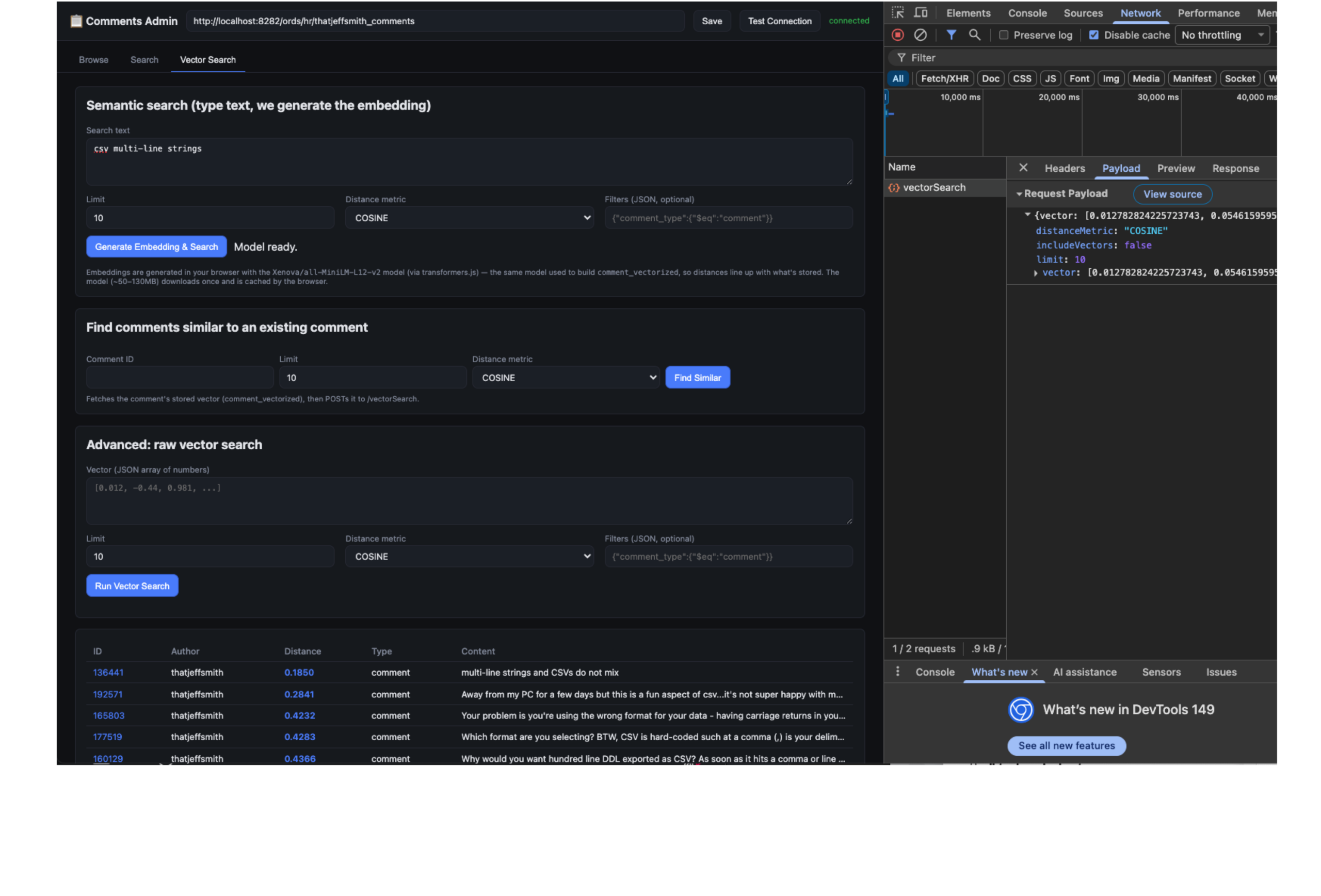
All I needed was to share the OpenAPI spec describing my ORDS maintained REST APIs with my Agent (Claude Desktop), and it built the web app for me, simply calling those APIs.
Here’s the one we added earlier this year that makes all of this possible –
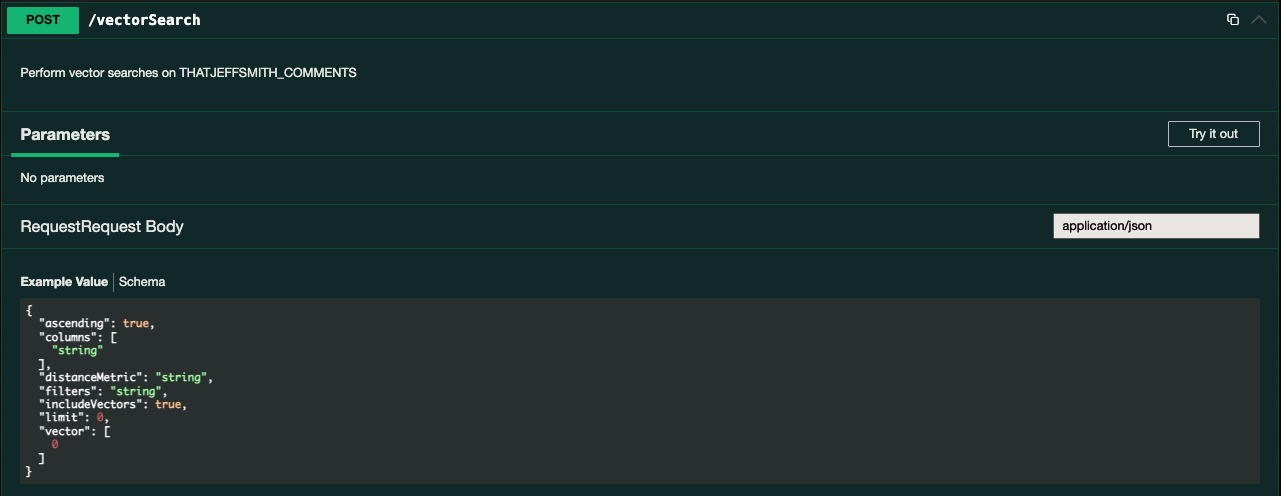
the cURL would look like this –
curl -X 'POST' \
  'http://localhost:8282/ords/hr/thatjeffsmith_comments/vectorSearch' \
  -H 'accept: application/json' \
  -H 'Content-Type: application/json' \
  -d '{
  "ascending": true,
  "columns": [
    "string"
  ],
  "distanceMetric": "string",
  "filters": "string",
  "includeVectors": true,
  "limit": 0,
  "vector": [
    0
  ]
}'And my local web app calls that, it comes across as as –

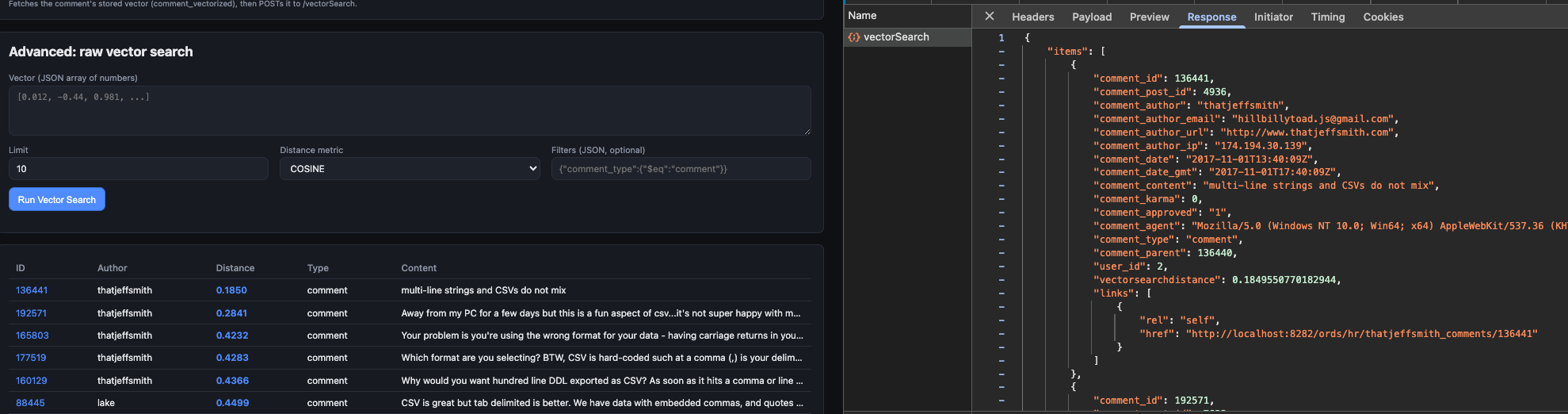
The REST API returns the corresponding records –
Note the Vector array stored in the ‘close’ or ‘similar’ records are NOT included, as I had ‘includeVectors’ set to false in the HTTPS POST request.
The only meaningful code was my web search had to generate the Search Vector input string, and for that to happen I needed to know how the vectors stored in my database were generated in the first place (transformer model all-MiniLM-L12-v2).
The database doesn’t have to generate these vectors, it can just be used to store/query them – that’s your choice.
Our AutoREST APIs now recognize you have a VECTOR column in an 26ai database, and now include the new POST action item, in addition to batchLoad.
So my javascript can be as simple as –
const data = await api("/vectorSearch", { method:"POST", body: JSON.stringify(body) });And I have no code in my web app or mid-tier or database that I have to maintain to make that endpoint available. It’s just a toggle switch in ORDS!
Yes, this supports Hybrid-Search.
I can include search predicates on my call to the /vectorSearch endpoint. This is VERY important, but I’m going to show why in my next example.
Method 2: JSON objects with VECTOR attributes – Vector Database REST APIs for full Vector CRUD management
I have…
- Oracle AI Database 23.26.x
- ORDS 26.2
- no data in my database, yet
- no application, yet
What if you really like the ‘schema on read’ or NoSQL approach like we’ve done for JSON in the database, but you also really want to be able to do VECTOR similarity search? Then this feature might be right up your alley!
ORDS includes a TON of REST APIs now for managing the VECTOR features of your Oracle AI database. So many in fact it was hard for me to fit them all in a single screenshot –

The features covered include:
- transformer model management – the ONNX models loaded INTO the database
- vector tables – list, create, update, delete (DDL) database managed tables, has your data (JSON) including an attribute you specify that has a VECTOR value computed
- vector search
- vector tables – query/load (DML) database managed VECTOR tables
- vector index management, create vector indexes, manage vector index jobs
With that many endpoints set aside for managing and working with VECTORs in your database, you might think we could do even more…
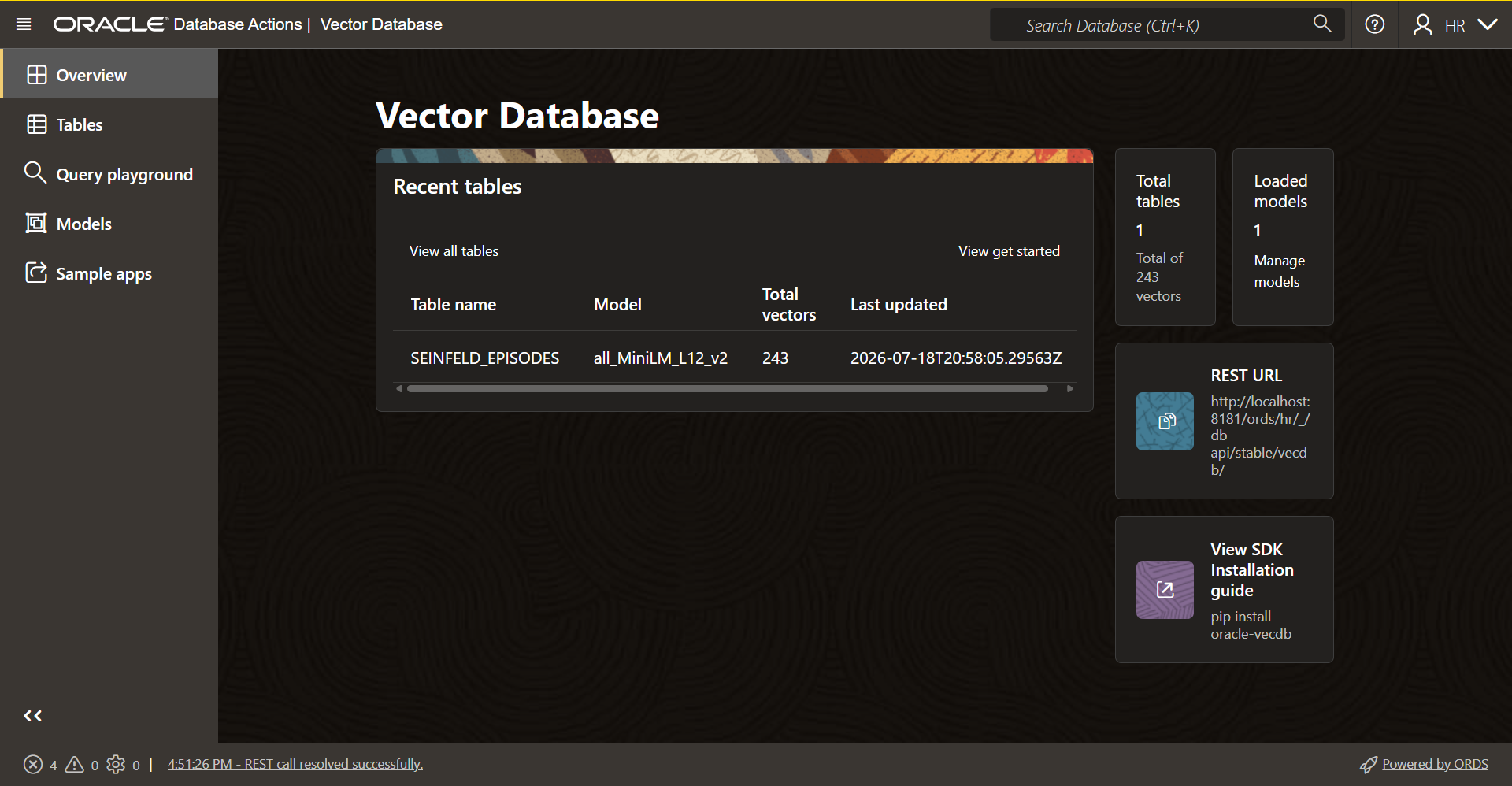
We also include a Web GUI!
If your database user has the DB_DEVELOPER_ROLE role and CREATE MINING MODEL privilege (don’t ask, it’s a long story), then when you login to SQL Developer Web and a 26ai database, you’ll see this –
Let’s build something, silly
My favorite character on the US television show SEINFELD is George Costanza. I’m going to create a VECTOR table that includes a synopsis of every episode of Seinfeld, PLUS all of George’s dialog. And in that JSON object, I’ll have a VECTOR describing his lines.
So, I can search and easily find exactly when/where George said something to make me laugh, but I can’t remember the EXACT quote.
I have a Kaggle account, and they conveniently have the exact data set I need.
I wrote some python code to transform/combine the two data sets into JSON. I also needed to chunk up the records, because in some episodes, George has more than 4,000 characters worth of dialog, and that’s the max size for the character/text content we want the database to generate and maintain the VECTORS for.
Consideration #1: Where are we going to generate the Vector values?
The all-inclusive solution for the database is to load up the ONNX model into the database and let the database handle it. The other option is to generate these yourself and you maintain the VECTOR values.
I’ve already loaded up an ONNX model, so I’m just going to the all-inclusive route.
My Source Data Looks like this –
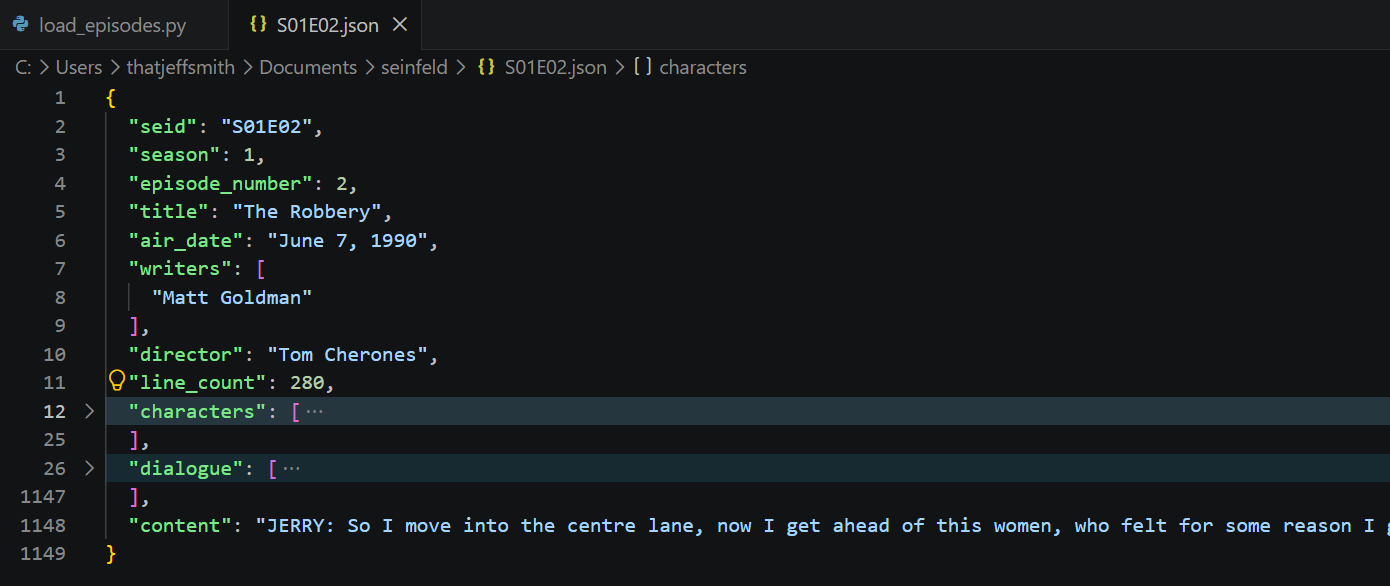
“content” is a concatenation of all the string arrays from “dialog,” but also only GEORGE’s dialog. If the text exceeds 4k characters, we have to chunk it into multiple records, and I wanted to limit that as much as possible. So I can’t search on what Kramer said, only George’s lines.
That “content” attribute is important.
When we go to create my new VECTOR table, we have to identify the JSON mapping pattern for what we want vectorized.

So for embedding metadata JSON path *, I’m going to simply say, ‘content.’ I can provide optional Annotations if I’d like – this could be VERY useful for LLMs needing to work with my data later, but I”m going to leave those blank. I’m also going to check ‘Auto-generate ID’, so the database will maintain the primary key values for me.
I can click ‘Create,’ and my table will show up in the TABLES page. I can of course also see it in the database –
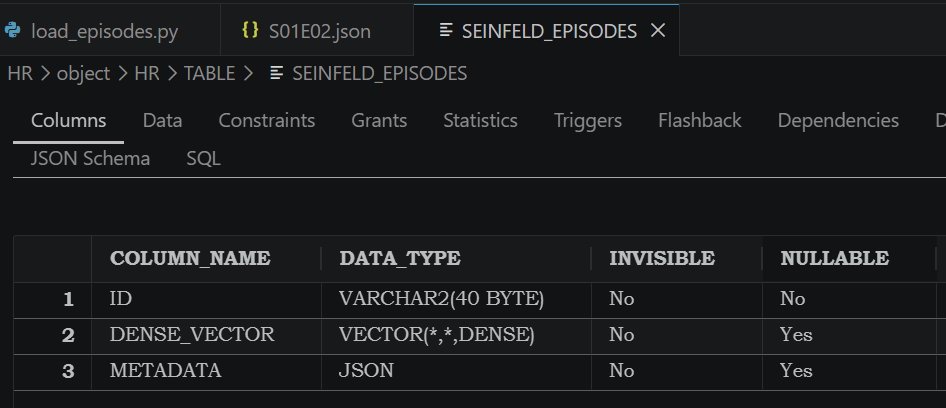
Time to load my data
The UI happily shares some sample cURL I can use to batch load my records. I took that and built some python to do the same, all at once for me, and it handled chunking the records for me, but in general I uploaded one JSON file per episode.
As each record is loaded, the database grabs the text from the “content” attribute, and computes the VECTOR using the defined transformer model for that table. That data goes into the DENSE_VECTOR column.

On my piddly windows laptop, it took several minutes for it to process the 200 or so records.
Once it was done, we’re ready to query!
Playing in the Vector Search Playground
One of George’s more famous dialogs is when he rescues a whale choking on a golf ball that Kramer drove into the ocean.
“The sea was angry that day, my friends – like an old man trying to send back soup in a deli”
I can pull up the Query playground, select our table, input the text I want to search “The ocean was very angry”, select ‘Text search’ – the db will convert it to a vector for the comparison, and then I can also say only give me the top 3 records.

The results come back, and the top hit as we expect, “The Marine Biologist” from season 5, episode 14.
It can be a bit unreliable to ONLY rely on a VECTOR similarity search, ESPECIALLY when we have more qualifiers or search predicates.
For example, I know there’s a famous speech where George talks about every single decision he makes is wrong, and I KNOW that came from season 5. So to increase my odds we get it right, I can add season = 5 in the Filters.
The search is ‘Every idea I have is wrong,’ and that helps us find “The Opposite” where George says – “Every instinct I have, in every aspect of life, be it something to wear, something to eat – it’s all been wrong.”

Here’s what the REST API call looks like –
POST http://...ords/hr/_db-api/stable/vecdb/vector-tables/SEINFELD_EPISODES/query
{"queryBy":{"text":"Every idea I have is wrong."},"topK":3,"includeVectors":true,"filters":{"$and":[{"$or":[{"season":{"$eq":"5"}},{"season":{"$eq":5}}]}]}}
Is this example silly? Yes. But I put this together in my free time over the weekend, and I chose to go the silly route. I guess we could have lived with yet another HR.EMPLOYEES table, but I chose not to.
How about some real examples?
What makes our approach interesting? What would you get from having vector similarity + structured JSON metadata filtering in the same query, vs a separate vector DB bolted onto the data?
Here are some ideas by sector (note I got help from my LLM here):
Banking — SAR/fraud investigation triage. Investigators write freeform case notes on suspicious activity. Similarity search over past case narratives surfaces “here are 8 prior cases that read like this one,” filtered by metadata (transaction amount range, customer risk tier, geography, date window). Cuts investigation time by reusing institutional memory instead of re-deriving it — and because it’s the same DB as the transaction data, you’re not shipping PII to an external vector store.
Retail — supplier catalog dedup/matching. When onboarding feeds from multiple suppliers, product descriptions rarely match verbatim (“Men’s Slim Fit Oxford” vs “Slim Oxford Shirt, Male”). Vector similarity on description + attributes catches near-duplicate SKUs that keyword matching misses, while JSON metadata filters (category, price band, in-stock status) keep matches from drifting into irrelevant categories. Useful for both catalog cleanup and “customers also considered” recommendations.
Government — 311/constituent complaint routing. Citizens describe the same underlying issue in wildly different language (“pothole on my street” vs “road surface damage near intersection”). Similarity search clusters these to the same case/department automatically and flags recurring problem locations, filtered by ward/district and date metadata — useful both for routing and for spotting infrastructure patterns nobody explicitly reported as linked.
Non-profits — grant/funder matching. Match a nonprofit’s program description against a database of funder RFP language to surface relevant grant opportunities (or the inverse: funders matching applicant programs to their giving priorities), filtered by metadata like award size, deadline, and geographic scope. Turns “search 200 RFPs by hand” into “here are the 6 that actually fit.”
Takeaways
Two options, both with a single concept: you don’t need a separate vector database to do vector search well. Whether your data already lives in relational tables or you’re building fresh with JSON, ORDS gives you similarity search and structured filtering in the same call, against the database you already trust with everything else.


4 Comments
thanks Jeff, i got the ords 26.2.1 downloaded to my local database and able to get the “vector database” tab in the SQL Developer web.
Great!
Hi Jeff,
thanks for the nice blog post.
….CREATE DATA MINING privilege (don’t ask, it’s a long story),…..
the privilege is “CREATE MINING model” and not “CREATE DATA MINING” privilege.
I’ve an ADBS account, where the schema is granted with db_developer_role and CREATE MINING model privileges, but still i dont see the “Query playground” options in the Database action’s page.
can you help us how to navigate to that ?
Ah,thank you Rajesh, fixing that now!
It’s disabled in ASB-S for the moment. Stay tuned.