

Oracle REST Data Services version 26.2 is now available.
Let me quickly share the highlights.

Completing the Trifecta of Oracle AI Database MCP Servers
I’m going to be answering this question, a lot: “which MCP Server should we choose?” And my answer will inevitably fall down to, ‘it depends.’
I think starting with SQLcl is a great choice, esp for any proof of concept. Once you get the flow, you’ll have a better idea of what you’re going to want for security implementations. Regardless of which delivery vehicle you choose, the DATABASE CONNECTION (and the user tied to that connection) remains the most important part of your security stance.
But yes, we now offer THREE MCP Servers for Oracle AI Database.
With ORDS version 26.2, we now offer
the following MCP Servers:
- SQLcl – local, STDIO
- OCI Database Tools – managed, serverless streaming HTTPS with OCI IAM auth
- ORDS – remote, streaming HTTPS, with your preferred identity provider (JWT)
Comparing our Oracle AI Database MCP Servers
| SQLcl | ORDS | OCI Managed MCP | |
| Best fit | Devs, DBAs, power users | Devs, DBAs, power users across the enterprise | Business users, analysts, shared AI agents, developers, devOps |
| Ideal workflow | Local DB exploration, dev tasks, troubleshooting | Local DB exploration, dev tasks, troubleshooting | Governed natural language access to approved databases, validated reports, and SQL tools |
| Transport | STDIO | Streaming HTTPs | Streaming HTTPS |
| Access model | DB credentials avail to the local OS user | OAuth2.0, JWT w/scopes or roles from your identity provider of choice | Oauth 2.0, OCI IAM groups, federated or local users, MCP roles |
| Tools | list-connections, connect, run-sql, run-sqlcl, schema-information | list-databases, run-sql, schema-information | run-sql, list-reports, run-reports, schema-information, any number of custom tools |
| Operational model | lightweight local setup | customer managed mid-tiers | Oracle managed OCI service |
| Database reach | Oracle databases with network access from local machine | Oracle databases with network access from mid-tier | Any Oracle AI Database in OCI, Oracle @ AWS, Azure, & GCP (requires OCI connectivity) |
The ORDS MCP Architecture
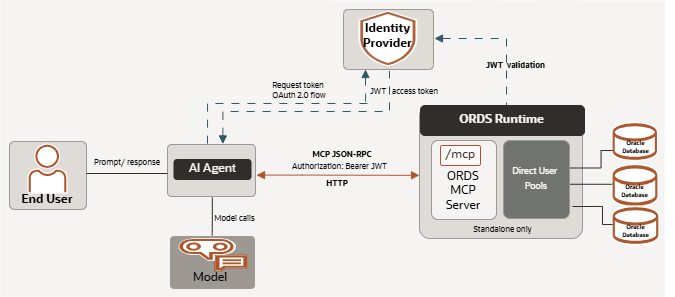
It’s VERY similar to the architecture we have for ORDS when it comes to REST and APEX, however with the following caveats:
- It’s only offered when ORDS is running in standalone – that means no MCP feature if ORDS is deployed as a Tomcat or WebLogic servlet
- The database connection pools are DIRECT user connections, not proxy. That means there’s no ORDS_PUBLIC_USER, if you create an MCP pool with user, ‘HR’, all of the authorized MCP Client Tool requests executed with that pool will be done so with an HR database connection.
- ORDS doesn’t need to be installed in your database. No SYS connection required, no ORDS_METADATA schema to be maintained.
- ORDS and the database are NOT available as your identity provider, so no database credentials or not ORDS maintained OAuth2 clients can be employed to access MCP pools, you MUST setup an external identity resource, and it MUST be able to return JSON Web Tokens (JWT).
Points 3 and 4 simplify things. Deploying ORDS got much simpler, AND you can hook up your agentic workflows with your existing single sign-on (SSO) security infrastructure.
A quick look at how this might look with Auth0 and ORDS running on localhost
On the ORDS Side
This isn’t a REAL world environment, but someone can setup ORDS on their laptop and quickly have a go with it to see what’s what before planning out your enterprise deployments.
ORDS Global Settings
<properties>
<comment>Saved on Fri Jun 26 15:14:09 UTC 2026</comment>
<entry key="feature.mcp">true</entry>
<entry key="mcp.security.jwt.profile.audience">http://localhost:8585/mcp</entry>
<entry key="mcp.security.jwt.profile.authorization.server.url">https://my-autho0-server.us.auth0.com</entry>
<entry key="mcp.security.jwt.profile.issuer">https://my-auth0-server.us.auth0.com/</entry>
<entry key="mcp.security.jwt.profile.jwk.url">https://dev-my-auth0-server.us.auth0.com/.well-known/jwks.json</entry>
<entry key="mcp.security.jwt.profile.role.claim.name">/roles2</entry>
</properties>
If you run the ORDS installer, don’t expect any prompts to guide you through this. The Installer is there to help you out with database side installs for the REST feature. You can simply edit the XML files or use the ORDS CLI to add these configurations.
If feature.mcp isn’t set to ‘true,’ then nothing else matters.
The role claim setting is optional, and comes down to whether you want to use role claims or scopes, and that can be done at a global ords layer or at the pool layer.
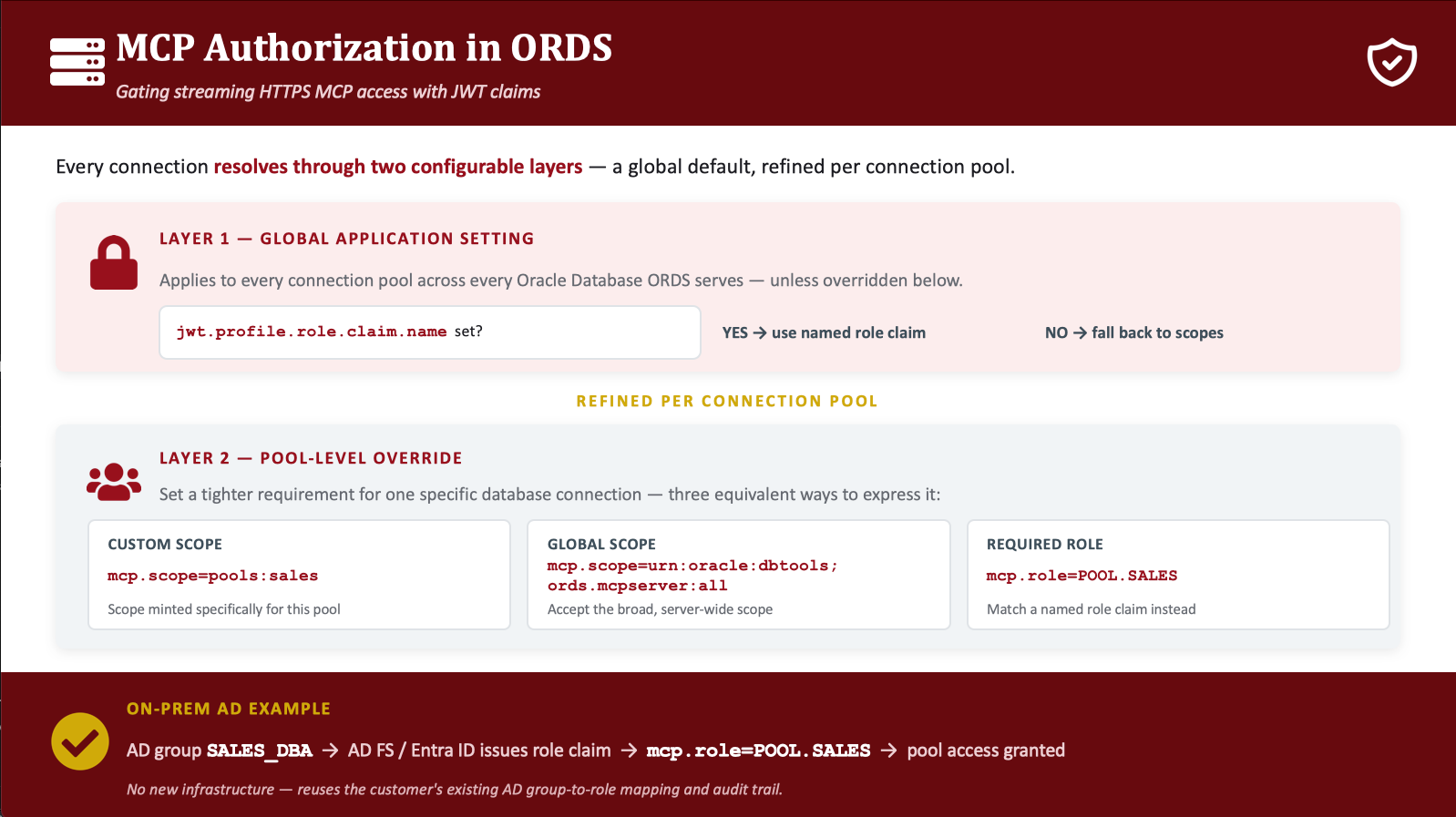
Please, please read the docs before attempting this, unless you like running with scissors.
My MCP Pool Settings
<properties>
<comment>Saved on Fri Jun 26 12:35:35 UTC 2026</comment>
<entry key="db.connectionType">basic</entry>
<entry key="db.description">Human Resources MCP Acccess</entry>
<entry key="db.hostname">localhost</entry>
<entry key="db.port">1521</entry>
<entry key="db.servicename">freepdb1</entry>
<entry key="db.username">HR</entry>
<entry key="mcp.role">POOL.HR</entry>
</properties>Couple of new things here. The description is now VERY important. When your Agent calls ‘list-databases’, it will get a list of names and descriptions. Make those ‘good,’ so it’s easy for your agents to pick the CORRECT database connections to work with!
mcp.role is optional. If I want, I can have Auth0 return a list of ‘roles’ my user has, and those can be used to gate/grant access to one or more MCP pools that ORDS is maintaining.
The role claim name is ‘roles2’ because Auth0 reserves ‘roles’ for itself, and won’t let you inject this into your JWTs. I found that out the hard way.
If an authenticated user’s JWT includes the ‘POOL.HR’ role name, then they get to access the MCP pool that I’m running. These role names are completely up to you and your org. I real world role might look like ‘security-analysts-ERP-db-access.’
So in Azure Entra ID or Okta or whatever, if you’re using these roles, just match that up to what you have configured in ORDS, and you should be good to go.
On the Auth0 Side
You can use WHATEVER identity provider you want, you could even write your own! I went with Auth0 because it’s well-known and has a free offering. Caveats on the free, it’s for a limited time and supports a limited amount of approved clients.
This is NOT a comprehensive list or set of steps you must take to setup your Auth and JWT issuing. Most companies will have ALREADY had this sorted. So I’m just showing a few important bits.
My user had to be created, and given the appopriate role.

My APIs needed the following set:
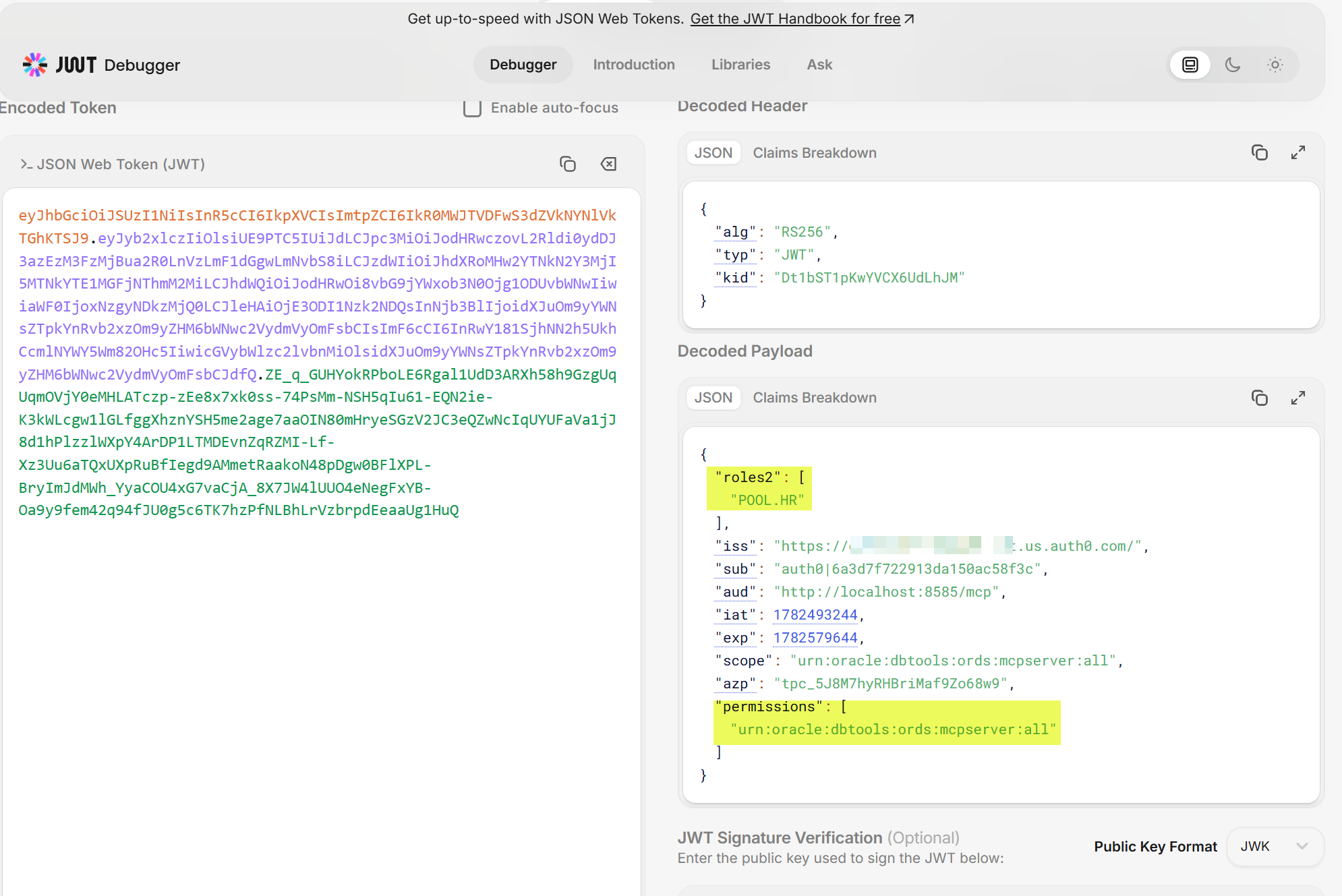
- Identifier set to ‘http://localhost:8585/mcp’ – this is the AUDIENCE, it must match EXACTLY to what ORDS has set for mcp.security.jwt.profile.audience. if you have a trailing / on one side and not the other, requests will FAIL.
- Enable RBAC, ON
- default permission for 3rd party apps, ‘urn:oracle:dbtools:ords:mcpserver:all’ – this ensures the scope is available so ORDS will even listen or bother to requests
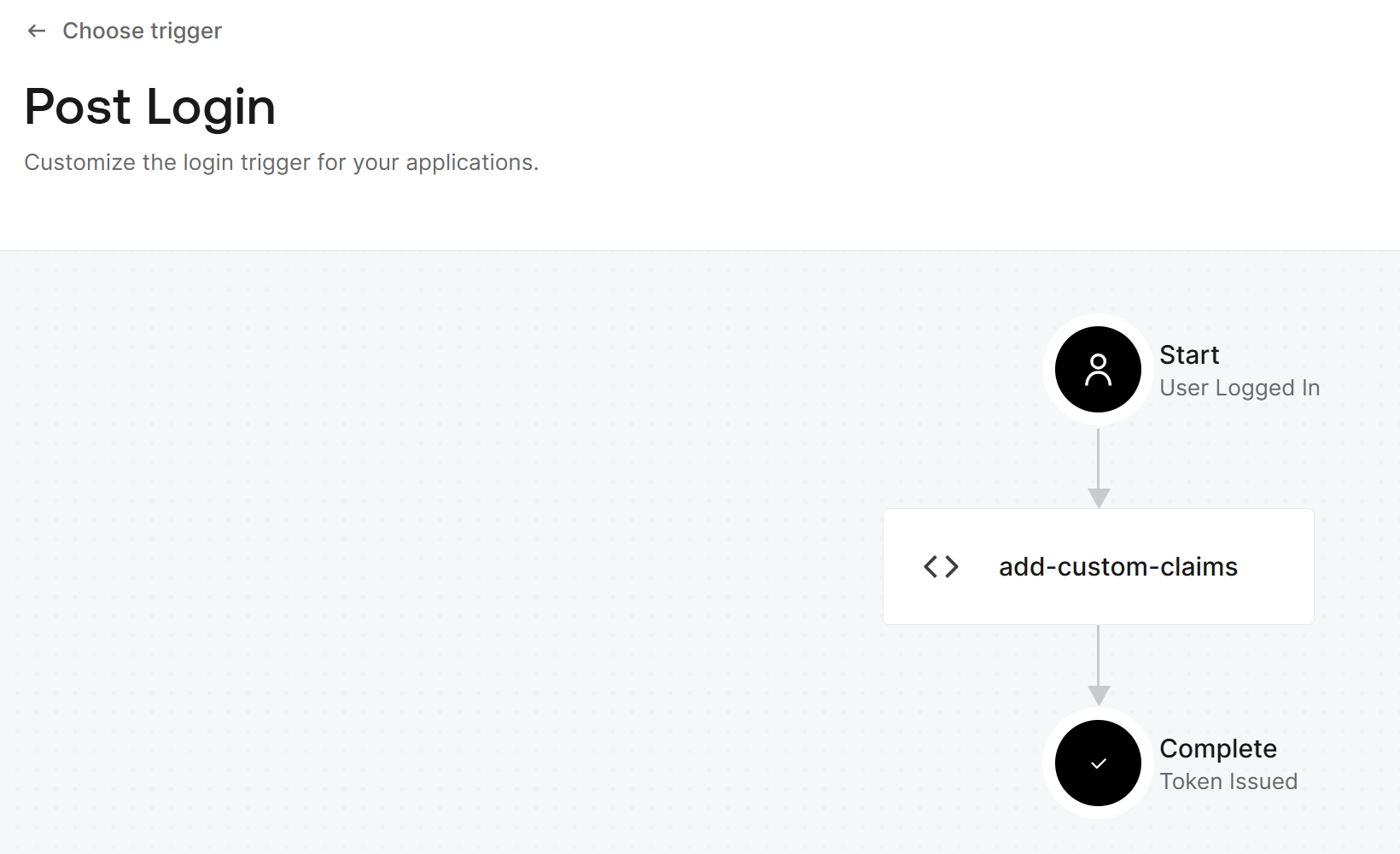
- the following custom claim defined
exports.onExecutePostLogin = async (event, api) => {
  const namespace = 'http://localhost:8585/mcp';
  if (event.authorization) {
    api.idToken.setCustomClaim(`roles2`, event.authorization.roles);
    api.accessToken.setCustomClaim(`roles2`, event.authorization.roles);
  }
};This allows Auth0 to add my ‘roles2’ claim to the JWT that’s issued.
But to make that happen, I have to have this custom action added via a Trigger –
What it looks like from my AI Agent
I simply need to point to the ORDS https address, which in my case is
http://localhost:8585/mcp
Note there’s no ‘ords’ in that URL. And if I have 1 or 300 MCP server pools, you’ll want to point to the base ‘mcp’ endpoint. That will deliver the tools, which will describe the pools (database connections) you can use.
If everything goes as planned, when I attempt to use my MCP Client to talk to ORDS MCP, I will get asked to authorize my new Client –
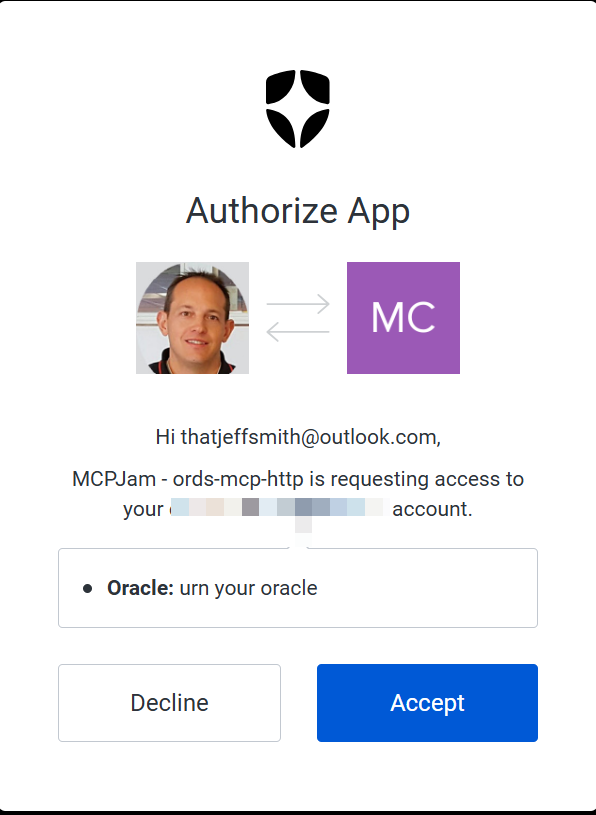
And assuming the OAuth2 workflow goes as planned –

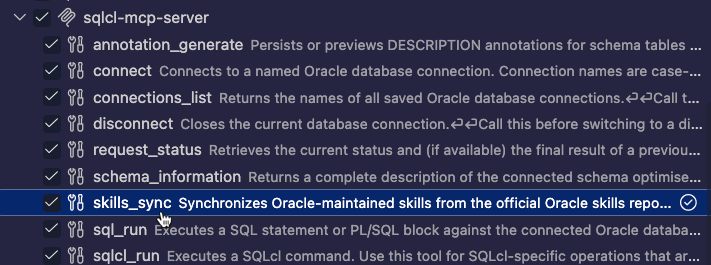
Then I’ll get back my list of tools and tool descriptions!
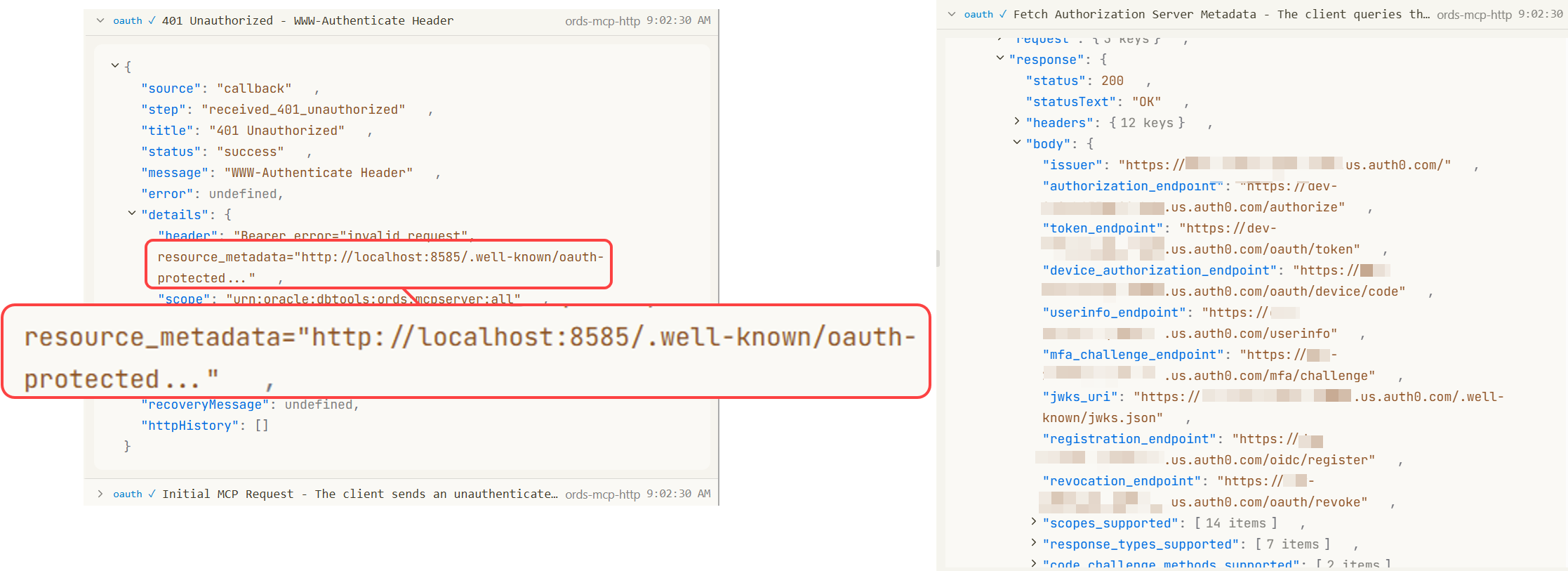
But maybe the most interesting part here is that the OAuth2 portion of the MCP spec, says that a ‘well-known’ URI can be relied on to hand off the entire OAuth2 workflow. My cilent can simply go to ORDS/mcp, with no credentials, and we can ‘follow the links’ to go get authorized via our JWT. That’s assuming that you WANT to enable auto-registration of clients. You can disable that in auth0, or in my case, i had to enable it.
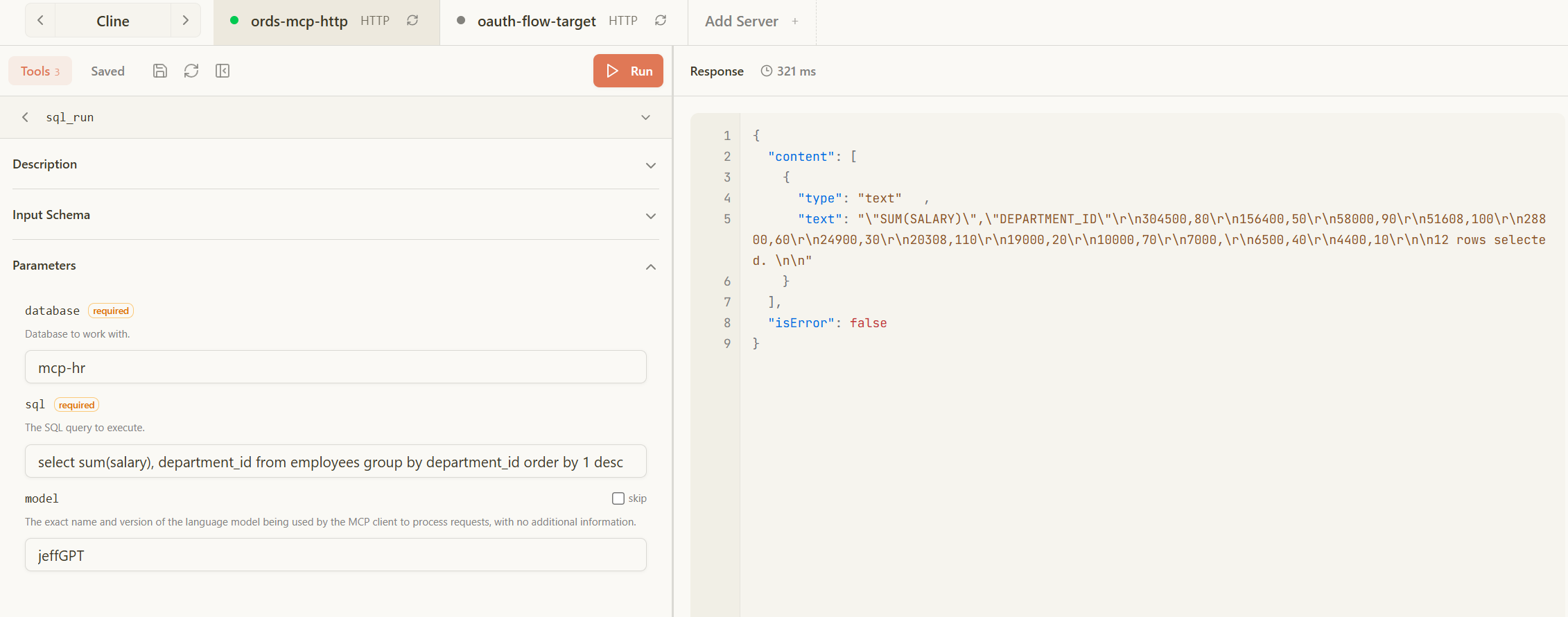
Ok, our tools.

And I can run a tool, first I’ll get a list of databases, and then i’ll use that as an input to ‘sql_run.’
I’m using an MCP Client with this amazing included OAuth2 debugger, because it took me a bit of back and forth to get everything working, so it was VERY handy. It’s how I knew my settings were wrong, and how I was able to easily see my JWT, and then decode it.
What this looks like in the database –
So just like SQLcl, we advertise ourselves to the database, and the tool includes attributes for the agent to supply their LLM. I generated my own SQL here..
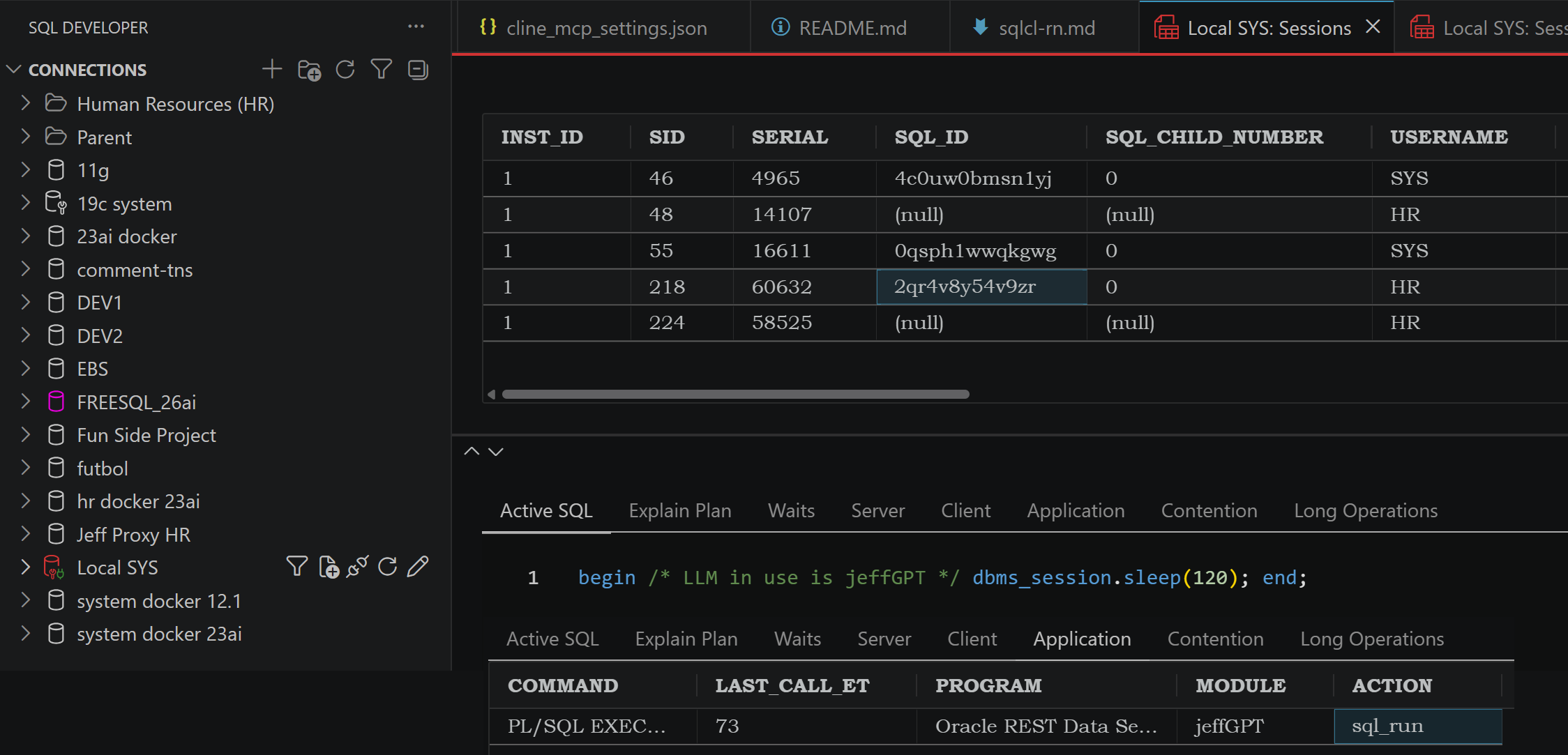
And also like SQLcl, we write the tool requests in a local table in your schema.
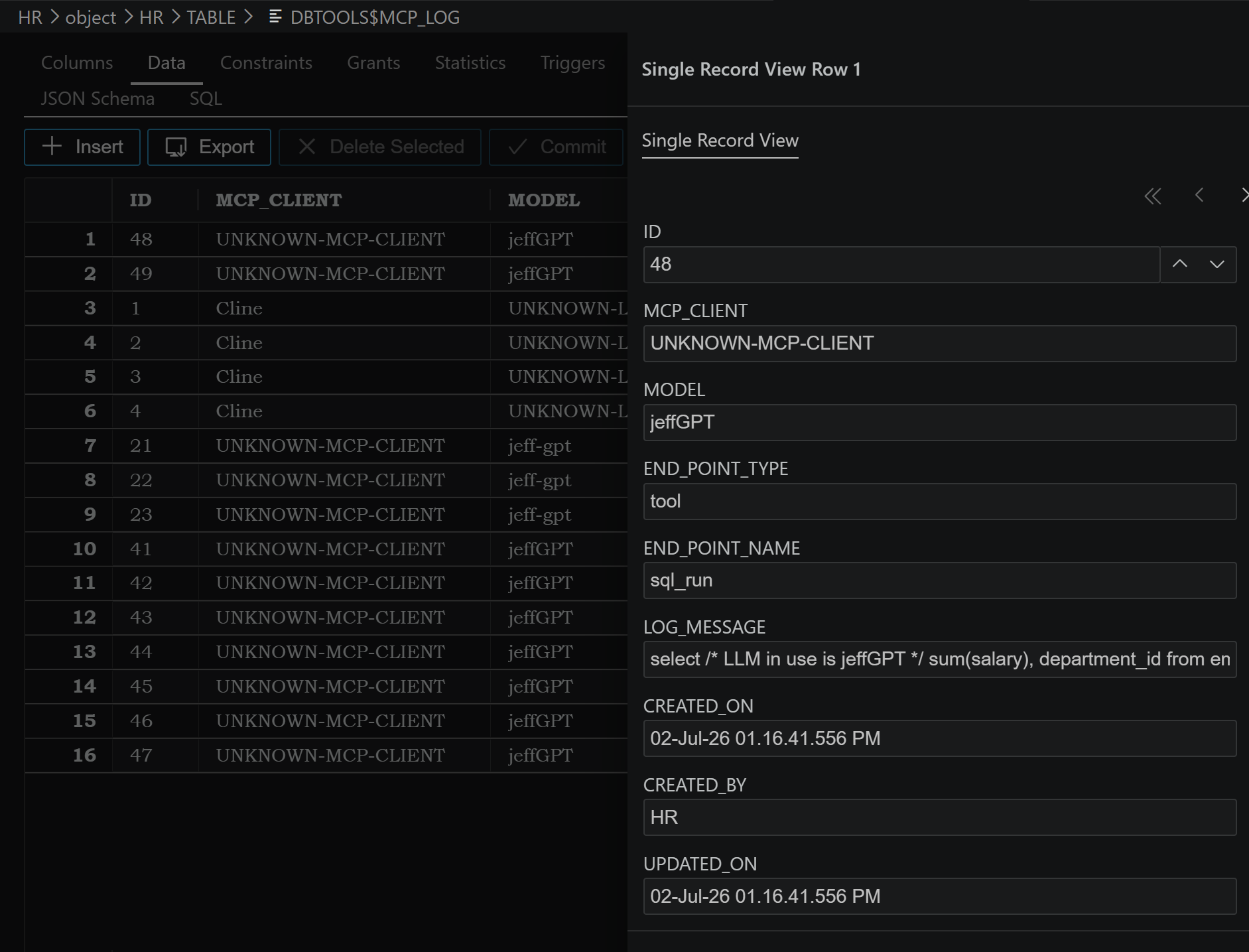
ORDS provides to the database some very important information
Just who is this user? We make sure the SYS_CONTEXT information is provided.
Let’s look at this query, if we were to run it via our Agent –
select sys_context(
     'CLIENTCONTEXT',
     'OAUTH_ISSUER'
) as oauth_issuer,
       sys_context(
            'CLIENTCONTEXT',
            'OAUTH_PRINCIPAL'
       ) as oauth_principal,
       sys_context(
            'CLIENTCONTEXT',
            'OAUTH_APP_ROLES'
       ) as oauth_app_roles,
       sys_context(
            'CLIENTCONTEXT',
            'OAUTH_SUB'
       ) as oauth_sub
from dual;What comes back is this –
{
  "content": [
    {
      "type": "text",
      "text": "\"OAUTH_ISSUER\",\"OAUTH_PRINCIPAL\",\"OAUTH_APP_ROLES\",\"OAUTH_SUB\"\r\n\"https://my-auth0-server.us.auth0.com/\",\"auth0|6a3d7f722913da150ac58f3c\",\"POOL.HR\",\"auth0|6a3d7f722913da150ac58f3c\"\r\n\n"
    }
  ],
  "isError": false
}What is ‘auth0|6a3d7f722913da150ac58f3c’?
That’s me!
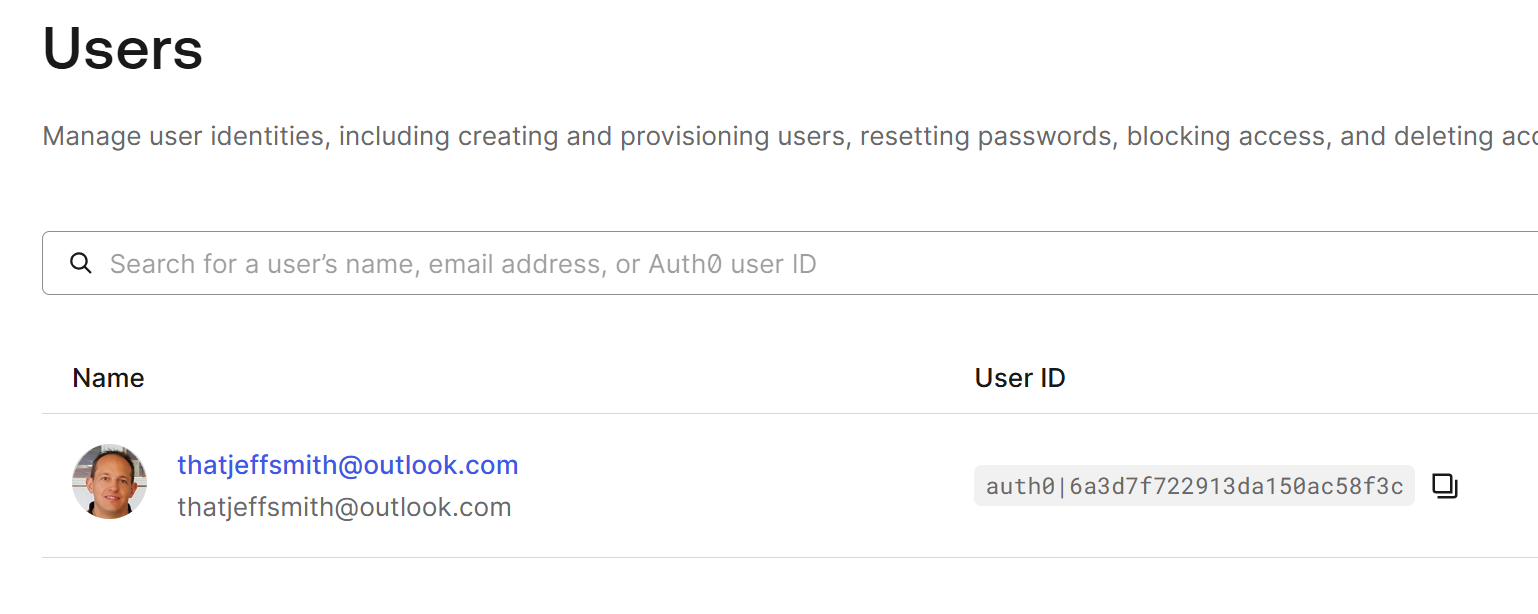
This means we could have database security policies enabled and triggered by say the role name (POOL.HR), or by my actual user entity.
What’s coming next?
We’ll be adding more features, especially things like Reports, so you can start to trust your natural language questions versus hoping your LLM generates good SQL.


8 Comments
Jeff what if we want to make a call to the HR database but only records for my account should return?
Then you setup row level security.
You can have trigger functions fire off session sys_context values to have the session setup for individual users.
Are there plans to make this available for ORDS running on tomcat? That’s our current deployment model but we are getting requests to support MCP. Was hoping to use our existing installs.
Wayne
No, we need to own the HTTPS stack for MCP.
And even, probably makes sense to have separate pools/instances for MCP. They could be ‘noisy’ – dont want to impact your ords rest consumers.
Jeff, how is this licensed? Since this is like an MCP gateway any plans to support other DB platforms like MSSQL?
The ORDS licensing has not changed, it’s FUTC – our most liberal (Free) license.
Why would Oracle create an MCP Server for MS SQL? Now, we may look at extending to MySQL, but that’s it. Oracle Database is big enough for us to manage on its own.
Hi Jeff,
Where is this part “Interprets the natural language request” in The ORDS MCP Architecture? I mean a “system prompt”—or, in other words, information for an AI model that can generate currect SQL.
The agent/llm does all of the reasoning and interpreting. The MCP Server just provides APIs/Tools it can call.