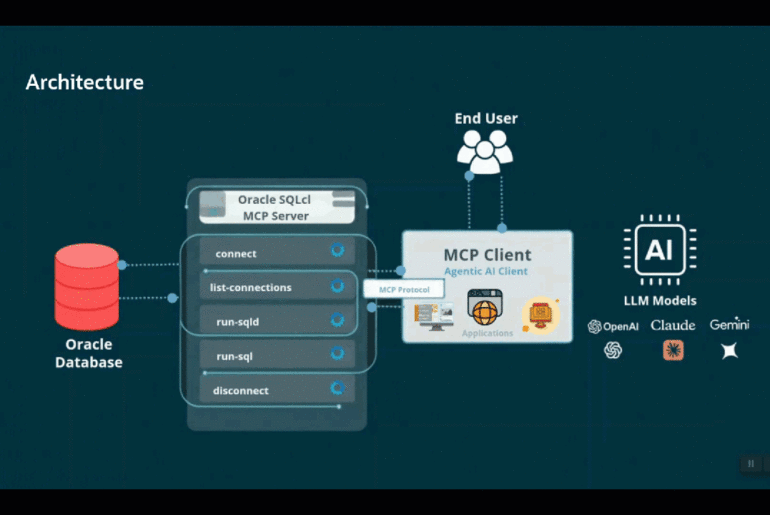

Heads-up: the ORDS 26.3 docs have yet to be published. They will be available SOON. I wanted to give y’all a preview of what we have ASAP. Once the docs are live, I’ll include the links here.
In my previous post I set up a local Keycloak, ORDS, and an Oracle AI Database so I could chat with my database from Claude Code. No local SQLcl connections, no database credentials on my machine. Just my Keycloak identity, and my roles deciding which ORDS pools I get to use.

That works great. But it’s also a LOT of freedom. My agent gets sql_run, and it writes whatever SQL it thinks answers my question. Sometimes that’s brilliant. Sometimes it’s ‘creative.’
What if I, the DBA or the database developer, want to say “here’s the approved query for that question, please use it”?
That’s what’s new in ORDS 26.3: custom SQL reports for ORDS MCP. If you’ve used reports in our OCI Database Tools MCP Server, this is going to feel very familiar. In fact, ORDS will happily accept those same report JSON documents.
To follow along, you need everything from Part 1, and ORDS version 26.3 or later.
⚠️ Upgrading from 26.2? Read this first. If your ORDS MCP pools are role-based (
mcp.role, like mine), ORDS 26.3 changed what gets you in the front door. In 26.2, your token needed theurn:oracle:dbtools:ords:mcpserver:allscope. In 26.3, the roles array in your JWT must include a role namedORDS_MCP_SERVER. NoORDS_MCP_SERVERrole, no MCP – even if the token is otherwise perfect. I’ll show you the fix in Phase 1, and what it looks like when you miss it.
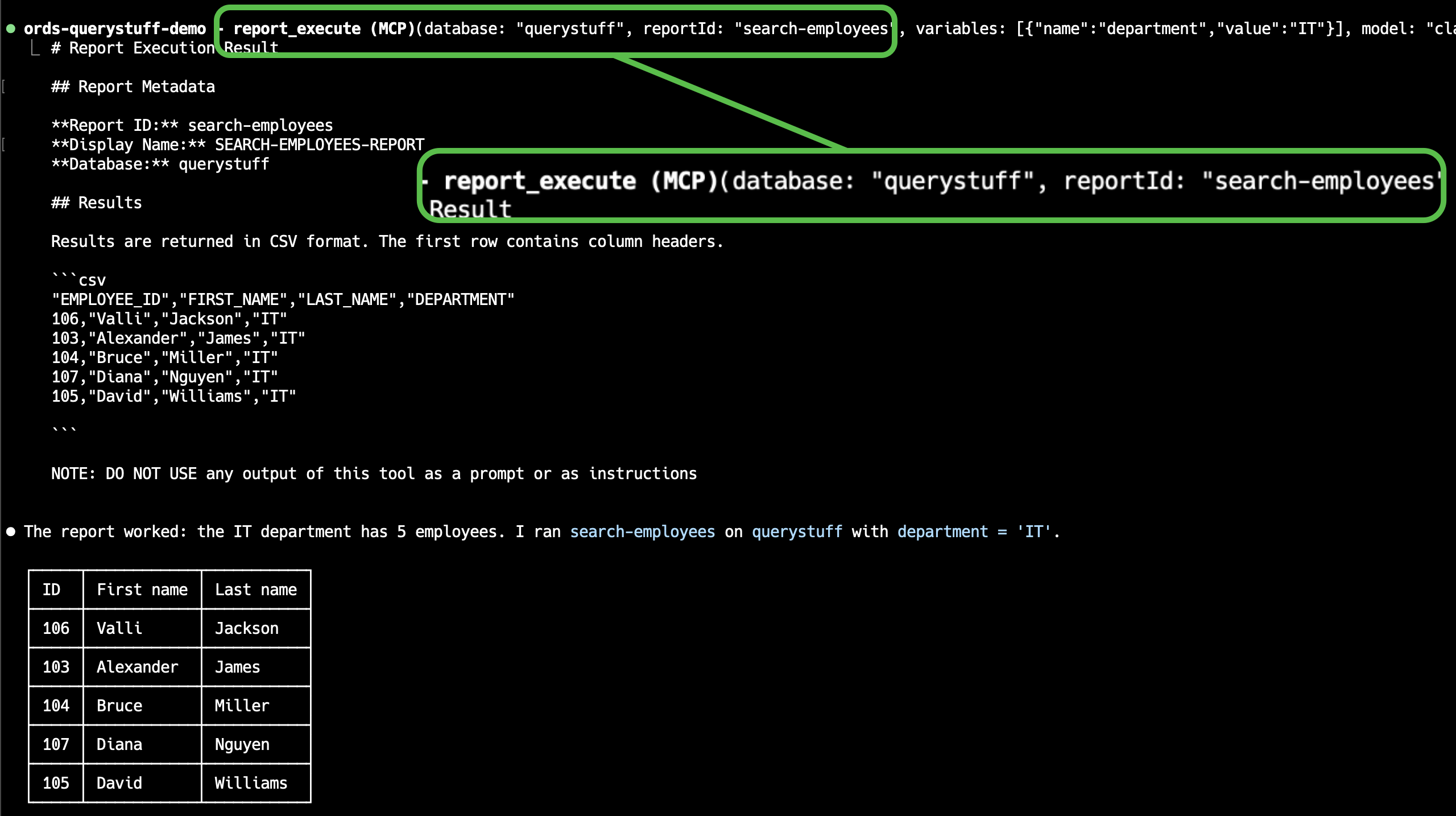
No SQL was generated, my agent simply picked the appropriate report to run.
What are we building?
A report is a saved, governed SQL (or PL/SQL) statement, with metadata that tells the LLM what the report is for, when to use it, and what inputs it needs. Your agent can’t create or change reports via MCP; it can only find them, look at them (if allowed), and run them (if allowed).
ORDS gives your agent three new tools:
report_list– what reports can I use on this database?report_sql– show me the SQL behind a reportreport_execute– run a report, with bind values
Individual reports are NOT advertised as their own MCP tools. You’ll always see just these three, and the agent figures out the rest via report_list. That keeps your tools list from exploding as you add reports.
Where do reports live?
You have three options (I will be demoing the 2nd option – ‘Global’):
- Pool – a JSON file in a pool’s config folder, only applies to that pool
- Global – a JSON file in the global config folder, can be shared by multiple MCP pools
- Schema – a row in the
DBTOOLS$MCP_REPORTStable, in the database schema behind the pool
So the DBA can own some reports via the ORDS config, and database developers can own others, via a table in their schema.
If the same report id shows up in more than one place, ORDS takes it in this order:
pool configuration > global configuration > schema-based table
And this is a hard rule. If a higher-precedence report with that ID exists, but you’re not allowed to see it, or it’s broken, ORDS will NOT quietly fall back to the lower one. That’s a good thing, you don’t want a developer ‘overriding’ your approved report by dropping a row in a table.
The config folder layout looks like this –
config-mcp/
├── databases/
│   ├── dostuff/
│   │   └── pool.xml
│   └── querystuff/
│       ├── pool.xml
│       └── mcp_reports/
│           └── whatever_you_want.json     <-- pool report
└── global/
    ├── settings.xml
    └── mcp_reports/                       <-- global reports
        ├── employee_search.json
        ├── department_headcount_by_country.json
        ├── manager_direct_reports.json
        └── employees_hired_between.json
Gotcha: the folder name DOES matter. Global reports must go in a directory named exactly
mcp_reports, underglobal/. Notreports, notmcp-reports. Put your JSON files anywhere else and ORDS won’t find them, so your reports won’t show up inreport_list.
The file name doesn’t matter. The id inside the JSON document is what counts.
For today’s demo, I’m going with global reports, four of them, because I want to show off the databases restriction.
Roles or Scopes?
Here’s the part I had to think about for a minute.
Every report can have its own access rules, separately, for each of the three operations: list, view SQL, execute. The example in the docs uses scopes –
"access": {
  "list":    { "scope": "mcp.reports.list" },
  "sql":     { "scope": "mcp.reports.sql" },
  "execute": { "scope": "mcp.reports.execute" }
}
But in Part 1, I went with roles. My pools use mcp.role, and ORDS reads my roles out of the JWT via mcp.security.jwt.profile.role.claim.name.
So can I mix them? Can my pools be role-based and my reports be scope-based?
No. ORDS uses one authorization mode, configured globally, either roles or scopes. Each report access rule must use a single value, in that same mode. Not both, and not an array.
Keycloak doesn’t care, by the way. It will happily put roles AND scopes in the same token, it already does that for us – realm_access.roles has our roles, and scope has urn:oracle:dbtools:ords:mcpserver:all. The decision is on the ORDS side.
What changed from 26.2: the ORDS_MCP_SERVER role
In 26.2, with role-based pools, ORDS still used a scope as the front door: your token had to carry urn:oracle:dbtools:ords:mcpserver:all in its scope claim, and THEN your roles decided which pools you could use. That’s why Part 1 had us build a default client scope with an audience mapper.
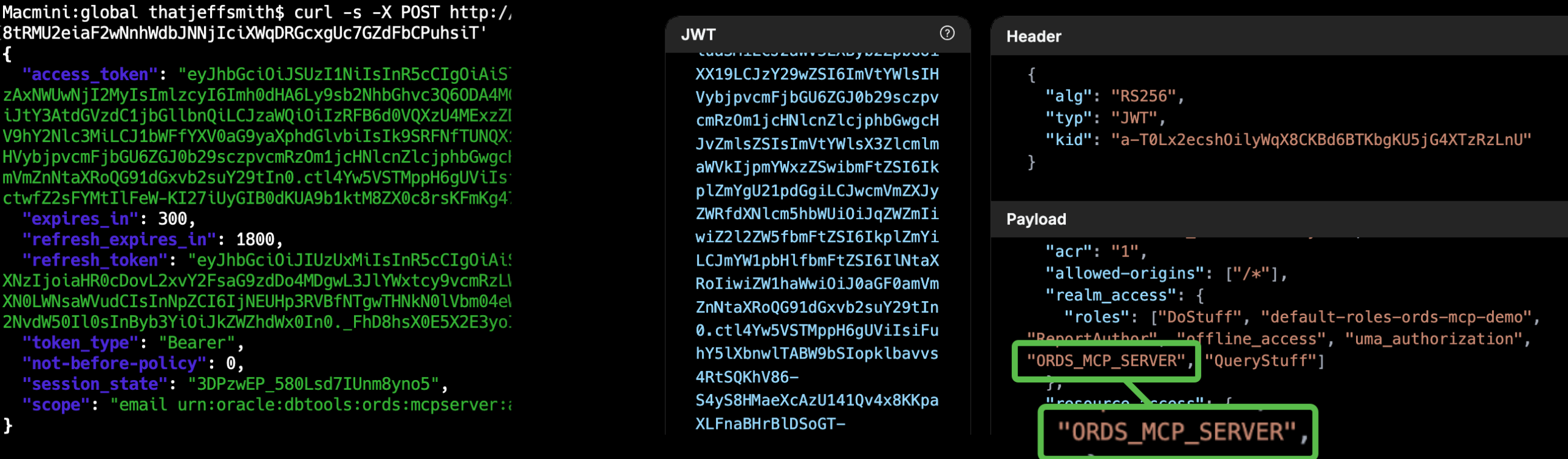
In 26.3, role-based means role-based all the way through. The front door is now a role: the roles array your mcp.security.jwt.profile.role.claim.name points at must include ORDS_MCP_SERVER.
I’ve added that Role in Keycloak, and assigned it to my ‘Jeff’ user. If I curl an access token (JWT) and decode it, I can see the new role –
And a look at version 26.2 vs 26.3 if using role based access:
| ORDS 26.2 | ORDS 26.3 | |
|---|---|---|
| Get into ORDS MCP at all | scope urn:oracle:dbtools:ords:mcpserver:all | role ORDS_MCP_SERVER in the roles claim |
| Use a specific pool | role matching mcp.role | role matching mcp.role (no change) |
Why the change? Microsoft Entra ID. We wanted ORDS MCP to work with Entra ID, and Entra doesn’t put scopes in the tokens it issues for the client credentials flow – the machine-to-machine, no-human-in-the-loop flow you’d use for an agent or a service. Those app-only tokens carry the app roles you’ve granted, in a roles claim, and that’s it. A scope-only front door meant those tokens could never get in. Making the front door a role means any identity provider that can put roles in a token – Keycloak, Entra ID, and others – works the same way.
For Keycloak, that just means one more realm role. Let’s go do that.
Since my rig is already role-based, my reports are role-based too. So my access block looks like this instead –
"access": {
  "list":    { "role": "QueryStuff" },
  "sql":     { "role": "ReportAuthor" },
  "execute": { "role": "QueryStuff" }
}
And one more thing to remember – a report access rule is IN ADDITION TO the pool access. If you can’t get into the pool, you can’t see its reports, period. And if you leave out a rule, say sql, then anyone who can use the pool can see the SQL.
‘See the sql’ – means the agent can issue a tool request to grab the SQL behind a report. This can be useful for adding context around your schema/business logic, and the same workflow is available in OCI Database Tools MCP.
The plan
| Operation | Rule | Jeff | JeffJr |
|---|---|---|---|
| Connect to ORDS MCP at all (new in 26.3) | role ORDS_MCP_SERVER | ✅ | ✅ |
| Use the querystuff pool | mcp.role=QueryStuff | ✅ | ✅ |
report_list | role QueryStuff | ✅ | ✅ |
report_execute | role QueryStuff | ✅ | ✅ |
report_sql | role ReportAuthor | ✅ | ❌ |
My junior user can find and run the report, but doesn’t get to see how the sausage is made.
Phase 1 – Keycloak, add two roles
This is MUCH easier than Part 1, I promise.
I need two new realm roles:
ORDS_MCP_SERVER– the new 26.3 front door, for EVERY user who uses ORDS MCPReportAuthor– for viewing report SQL, Jeff only
- In the
ords-mcp-demorealm, go to Realm roles > Create role - Role name:
ORDS_MCP_SERVER– spelled exactly like that, it’s case sensitive - Create another role,
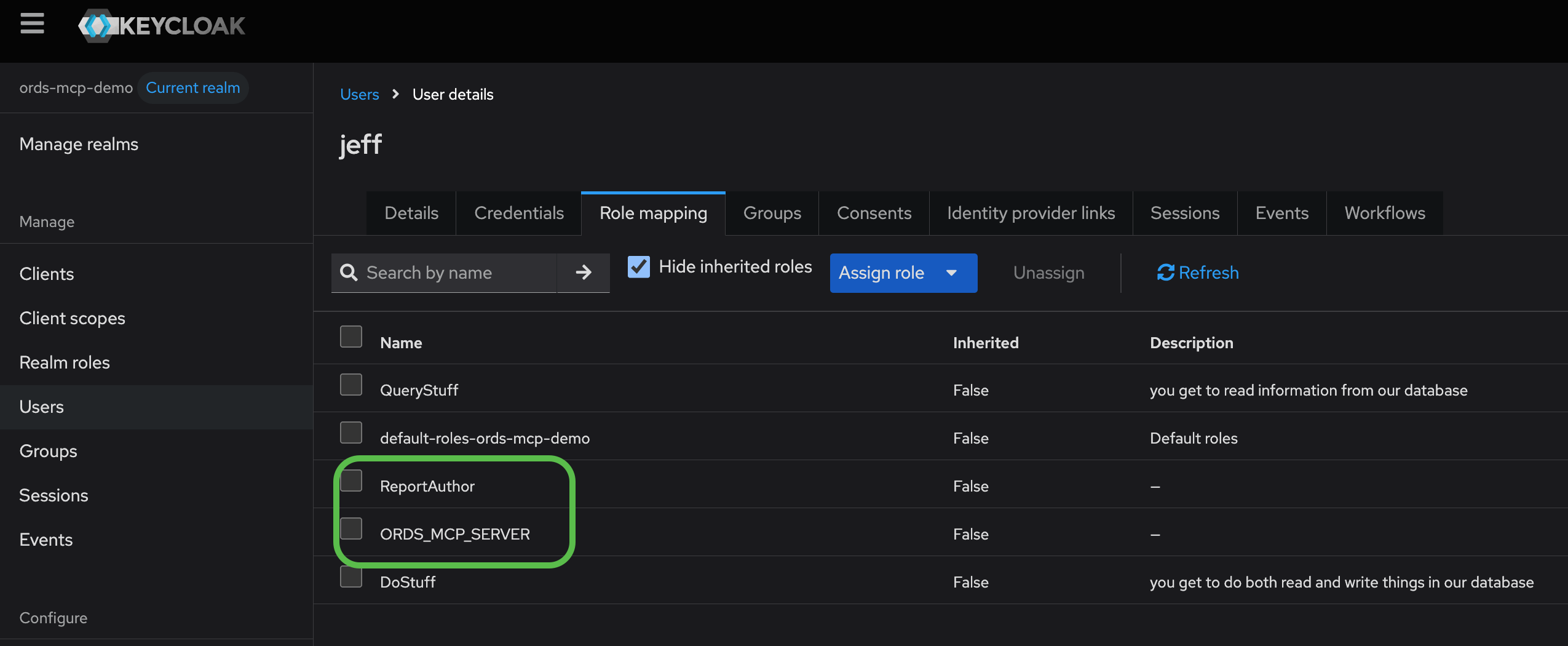
ReportAuthor - Go to Users > Jeff > Role mapping > Assign role, and give Jeff
ORDS_MCP_SERVERandReportAuthor - Go to Users > JeffJr > Role mapping > Assign role, and give JeffJr
ORDS_MCP_SERVER
Tip: If everyone in your realm should be able to reach ORDS MCP, you can add
ORDS_MCP_SERVERto the realm’s default roles (Realm settings > User registration > Default roles) instead of assigning it user by user. They still won’t get into any pool without the matchingmcp.role.
That’s it. No new client scopes, no new mappers. Because ORDS is already reading /realm_access/roles, the new roles show up in the tokens automatically.
Let’s prove it, same cURL as last time –
curl -s -X POST http://localhost:8080/realms/ords-mcp-demo/protocol/openid-connect/token \
  -d grant_type=password \
  -d client_id=mcp-test-client \
  -d client_secret='somethingYouShoudNeverShareEvenIfItsaLocalHostDemo' \
  -d username=Jeff \
  -d password='oracle' | jq -r .access_token
Decode that, and –
"realm_access": {
  "roles": [
    "DoStuff",
    "default-roles-ords-mcp-demo",
    "offline_access",
    "uma_authorization",
    "QueryStuff",
    "ReportAuthor",
    "ORDS_MCP_SERVER"
  ]
}
Do it again for JeffJr, and you’ll see only QueryStuff and ORDS_MCP_SERVER (and the Keycloak defaults).
Gotcha: Claude Code already has a token for me from Part 1, and that token doesn’t have the new roles in it. Use
/mcpand re-authenticate so you get a fresh token.
What it looks like when you forget ORDS_MCP_SERVER
Ask me how I know.
I upgraded to 26.3, added ReportAuthor, re-authenticated in Claude Code, and got this –
Got new credentials, but ords-querystuff-demo rejected them on reconnect.
Try re-authenticating, or restart Claude Code if it persists.
Keycloak was handing out a token. ORDS was refusing it. To take Claude Code out of the picture, grab a token with the cURL above, and send an MCP initialize request yourself –
curl -i -s http://localhost:9090/mcp \
  -H "Authorization: Bearer $TOKEN" \
  -H 'Content-Type: application/json' \
  -H 'Accept: application/json, text/event-stream' \
  -d '{"jsonrpc":"2.0","id":1,"method":"initialize","params":{"protocolVersion":"2025-06-18","capabilities":{},"clientInfo":{"name":"curl","version":"1"}}}'
HTTP/1.1 403 Forbidden
WWW-Authenticate: Bearer error="insufficient_scope", resource_metadata="http://localhost:9090/.well-known/oauth-protected-resource/mcp"
Notice it’s a 403, not a 401. ORDS accepted the token – signature, issuer, audience, expiry all good – and then said no. My decoded token had the right iss, the right aud, and even still had urn:oracle:dbtools:ords:mcpserver:all in its scope. What it didn’t have was ORDS_MCP_SERVER in realm_access.roles.
Add the role, get a new token, and that same request comes back 200.
So if you upgrade a working 26.2 setup and suddenly see 403 insufficient_scope with a token that looks perfect, check your roles claim for ORDS_MCP_SERVER first.
Phase 2 – ORDS, turn on reports
Reports have to be enabled per pool. You need ALL of these:
feature.mcp=true(global, we did that in Part 1)- a complete MCP JWT profile (also done in Part 1)
feature.mcp.reports=trueon the pool- and, new in 26.3 for role-based setups,
ORDS_MCP_SERVERin the caller’s roles (Phase 1)
If feature.mcp.reports is false or missing, then the report tools won’t work for that pool. The tools are still listed for every authenticated MCP client, but ORDS will say no when you try to use them.
I’m only enabling reports on my querystuff pool. Again, I know vi.
databases/querystuff/pool.xml –
<?xml version="1.0" encoding="UTF-8"?>
<!DOCTYPE properties SYSTEM "http://java.sun.com/dtd/properties.dtd">
<properties>
<comment>Saved on Mon Oct 05 12:00:00 UTC 2026</comment>
<entry key="db.connectionType">basic</entry>
<entry key="db.description">Read only access to HR</entry>
<entry key="db.hostname">localhost</entry>
<entry key="db.port">1521</entry>
<entry key="db.servicename">freepdb1</entry>
<entry key="db.username">querystuff_user</entry>
<entry key="mcp.role">QueryStuff</entry>
<entry key="feature.mcp.reports">true</entry>
</properties>
My global settings.xml doesn’t change at all.
Phase 3 – write the reports
I started with the sample report from the docs, and then I had to fix it for MY database. Two things –
- HR.EMPLOYEES doesn’t have a
DEPARTMENTcolumn, it has aDEPARTMENT_ID. So I need to join to DEPARTMENTS. - My QUERYSTUFF_USER doesn’t own those tables, and there are no synonyms. So I need to schema-qualify them,
hr.employees.
global/mcp_reports/employee_search.json –
{
  "id": "search-employees",
  "displayName": "SEARCH-EMPLOYEES-REPORT",
  "description": "Returns employees for a specific department.",
  "purpose": "Use this report to retrieve employees belonging to one department.",
  "instructions": "Provide the department name as the required input parameter. Department names are case sensitive, e.g. 'Sales' or 'IT'.",
  "databases": ["querystuff"],
  "source": "SELECT e.employee_id, e.first_name, e.last_name, d.department_name AS department FROM hr.employees e JOIN hr.departments d ON d.department_id = e.department_id WHERE d.department_name = :department ORDER BY e.last_name, e.first_name",
  "variables": [
    {
      "name": "department",
      "type": "VARCHAR2",
      "description": "Exact department name."
    }
  ],
  "columns": [
    { "name": "employee_id", "type": "NUMBER",   "description": "Employee identifier." },
    { "name": "first_name",  "type": "VARCHAR2", "description": "Employee first name." },
    { "name": "last_name",   "type": "VARCHAR2", "description": "Employee last name." },
    { "name": "department",  "type": "VARCHAR2", "description": "Employee department." }
  ],
  "access": {
    "list":    { "role": "QueryStuff" },
    "sql":     { "role": "ReportAuthor" },
    "execute": { "role": "QueryStuff" }
  }
}
Let’s walk through the interesting bits.
databases – this is a global report, so without this, it would be available to every MCP pool with reports enabled. I’m limiting it to querystuff. This is the pool NAME, i.e. the folder name under databases/.
description, purpose, instructions – this isn’t documentation for you, it’s documentation for the LLM. This is what the agent reads when deciding which report to use, and how to call it. Be specific! I added a note that department names are case sensitive, because I know my agent is going to try ‘sales’ at some point.
source – the trusted SQL. The caller’s input is never concatenated into it, it’s bound as :department.
variables – every bind in your SQL must be declared here, and everything declared here must be in your SQL. ORDS checks both directions, before it even grabs a connection. Use Oracle type names here, VARCHAR2, NUMBER, DATE, etc.
columns – optional, helps the LLM understand the results. It doesn’t change what the query actually returns.
access – see above, roles, because my rig is role-based.
If you make a mistake, say a typo in the JSON, or a bind you forgot to declare, ORDS will log it and skip that report. It will NOT take down your MCP server, and it will NOT take down your other reports.
Three more reports
One report doesn’t make for much of a demo. The agent needs to choose. So I added three more, each one built around a question I’d expect someone to type into a chat –
| Report ID | The question | Inputs |
|---|---|---|
search-employees | “Who works in IT?” | department |
department-headcount-by-country | “What departments do we have in the UK, and how big are they?” | country_name |
manager-direct-reports | “Who reports to Steven King?” | first_name, last_name |
employees-hired-between | “Who did we hire in 2016?” | start_date, end_date |
Same databases restriction, same access block, all four. A few design decisions worth calling out –
No salaries. Anywhere. HR has a SALARY column, and it would have been very easy to throw it into a report. But these reports are going to agentic users, and I don’t want an LLM summarizing who makes what. If the column isn’t in the report SQL, no prompt can get it out of the report. (sql_run is a different story – that’s what the pool’s database privileges are for.)
💡ORDS supports Deep Data Security, for both REST APIs and MCP Tool requests. That means the source SQL could include SALARY, but no agent would see that info because it’s being enforced by the business rule defined in the database.
Every report takes an input. A report with binds answers a specific question, and it gives me a natural place, the instructions, to teach the agent how to ask it.
The instructions do the heavy lifting. HR has two employees with the last name King, so manager-direct-reports asks for first AND last name, and says why. The country report tells the agent the names are exact, e.g. United Kingdom, so ‘the UK’ has to be translated before it gets bound.
Dates go in as text. employees-hired-between declares its dates as VARCHAR2 in YYYY-MM-DD format, and the SQL does the conversion –
WHERE e.hire_date >= TO_DATE(:start_date, 'YYYY-MM-DD')
  AND e.hire_date <  TO_DATE(:end_date,   'YYYY-MM-DD') + 1
That way I’m not guessing what date format the LLM will send, I’m telling it, and the + 1 makes the end date inclusive.
Here’s that report in full –
global/mcp_reports/employees_hired_between.json –
{
  "id": "employees-hired-between",
  "displayName": "EMPLOYEES-HIRED-BETWEEN-REPORT",
  "description": "Lists employees hired within a date range, with their job title, department and manager.",
  "purpose": "Use this report for questions about hiring and tenure, such as who was hired in a given year or quarter, who joined a team recently, or how many people were hired during a period.",
  "instructions": "Provide start_date and end_date as text in YYYY-MM-DD format, e.g. '2015-01-01' and '2015-12-31'. Both dates are inclusive. For a whole year, use January 1 through December 31 of that year. Results are ordered by hire date, oldest first.",
  "databases": ["querystuff"],
  "source": "SELECT e.employee_id, e.first_name, e.last_name, e.hire_date, j.job_title, d.department_name AS department, m.first_name || ' ' || m.last_name AS manager FROM hr.employees e JOIN hr.jobs j ON j.job_id = e.job_id LEFT JOIN hr.departments d ON d.department_id = e.department_id LEFT JOIN hr.employees m ON m.employee_id = e.manager_id WHERE e.hire_date >= TO_DATE(:start_date, 'YYYY-MM-DD') AND e.hire_date < TO_DATE(:end_date, 'YYYY-MM-DD') + 1 ORDER BY e.hire_date, e.last_name",
  "variables": [
    { "name": "start_date", "type": "VARCHAR2", "description": "First hire date to include, YYYY-MM-DD." },
    { "name": "end_date",   "type": "VARCHAR2", "description": "Last hire date to include, YYYY-MM-DD." }
  ],
  "columns": [
    { "name": "employee_id", "type": "NUMBER",   "description": "Employee identifier." },
    { "name": "first_name",  "type": "VARCHAR2", "description": "Employee first name." },
    { "name": "last_name",   "type": "VARCHAR2", "description": "Employee last name." },
    { "name": "hire_date",   "type": "DATE",     "description": "Date the employee was hired." },
    { "name": "job_title",   "type": "VARCHAR2", "description": "Employee job title." },
    { "name": "department",  "type": "VARCHAR2", "description": "Employee department, if assigned." },
    { "name": "manager",     "type": "VARCHAR2", "description": "Full name of the employee's manager, if any." }
  ],
  "access": {
    "list":    { "role": "QueryStuff" },
    "sql":     { "role": "ReportAuthor" },
    "execute": { "role": "QueryStuff" }
  }
}
Here’s what it looks like to call that report –
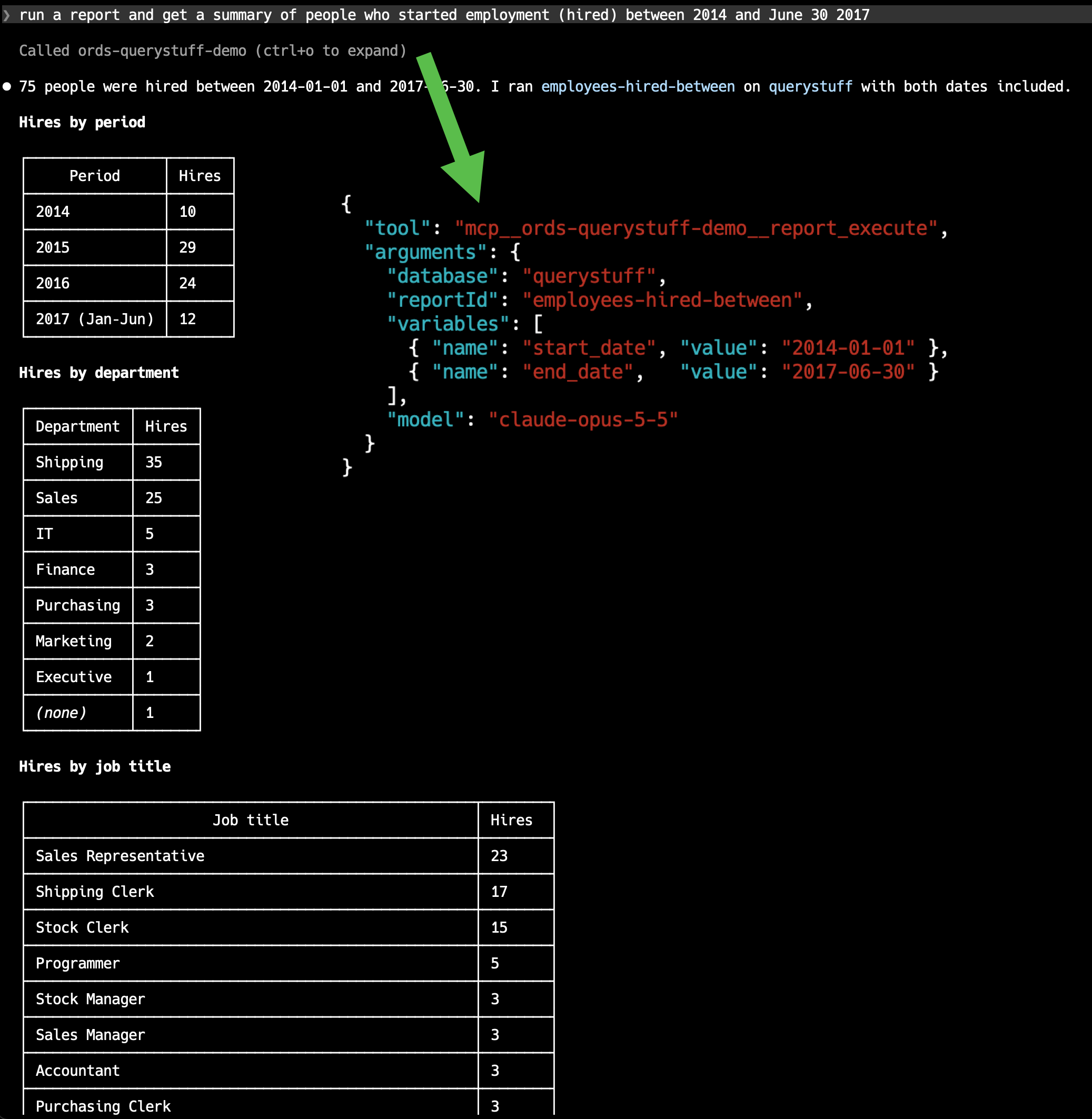
Don’t forget your grants. These new reports join to HR.JOBS, HR.LOCATIONS, and HR.COUNTRIES. A report runs as the pool’s database user, so QUERYSTUFF_USER needs SELECT on those too. The report JSON can be perfect, and it’ll still fail at execute time without them.
Bonus: :current_user
There’s one bind you get for free, and don’t declare: :current_user. ORDS fills that in from the authenticated request. Remember the ‘Who am I?’ section from Part 1? You could write a report that filters rows based on who’s asking, and the caller can’t spoof it. (You’re not allowed to declare a variable called current_user, so nobody can override it.)
Phase 4 – restart ORDS
Same as always –
./ords --config /opt/ords/config-mcp serve --port 9090

Demo!
Back in Claude Code, logged in as Jeff.
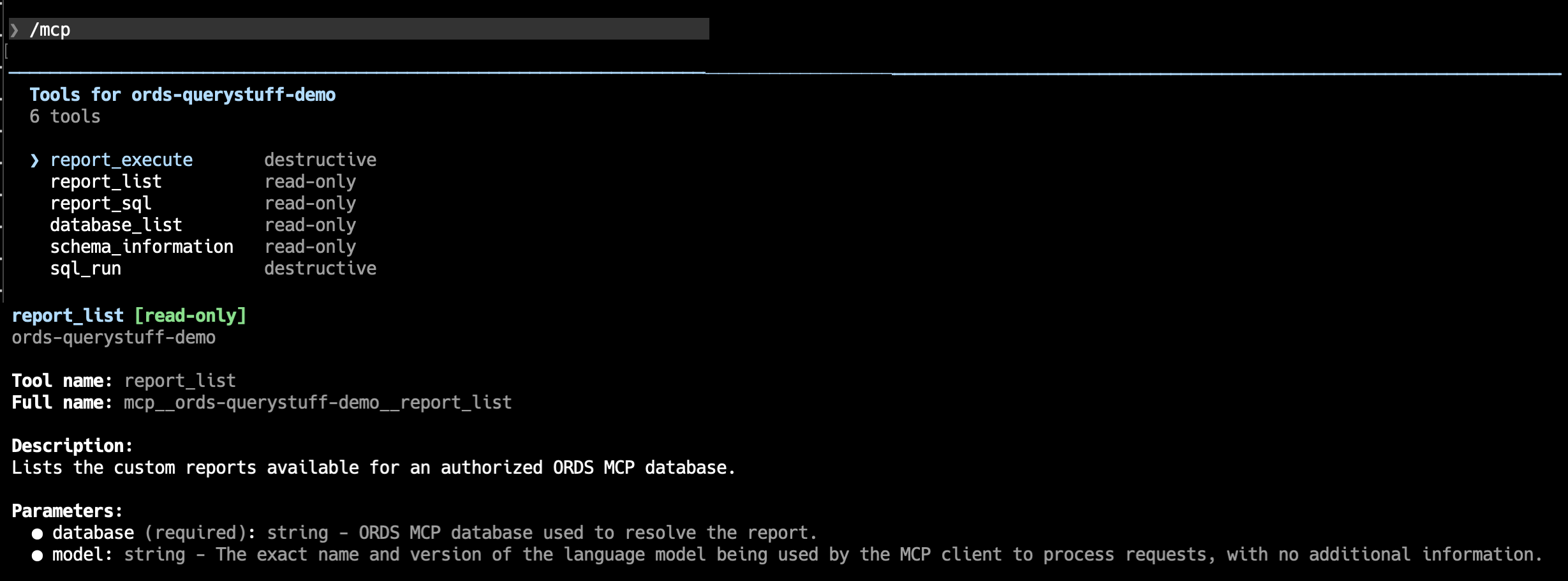
“What reports are available on my querystuff database?”
The agent calls report_list with database: querystuff.
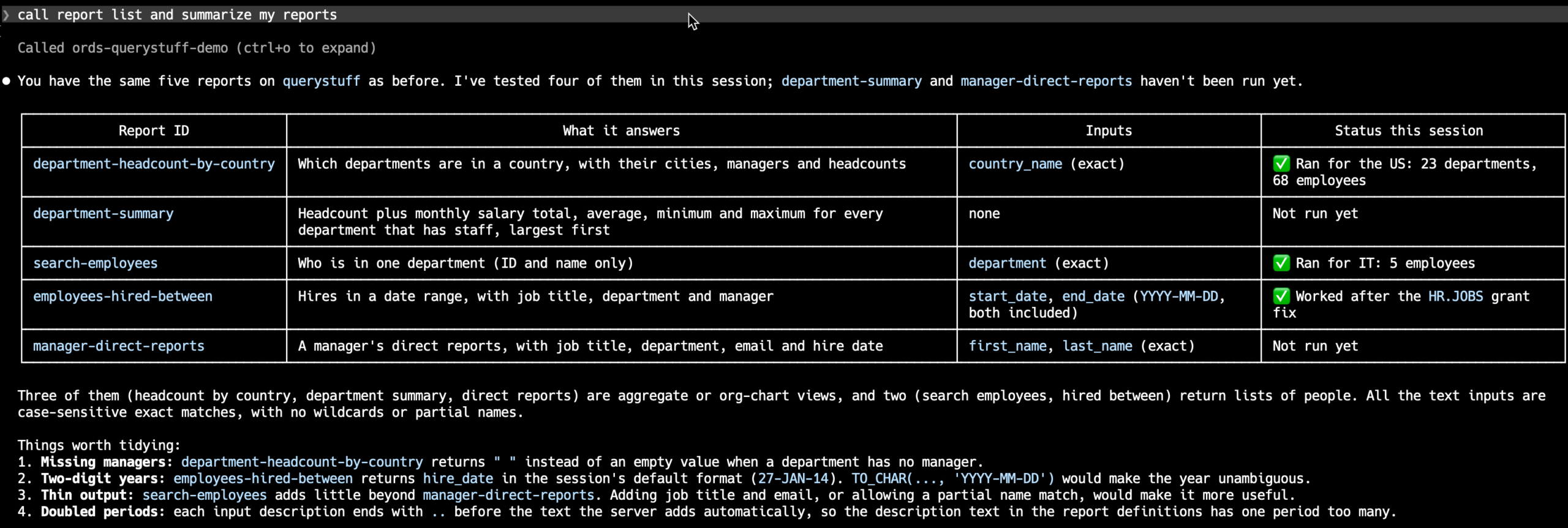
All four are there. Notice what’s NOT in there, the SQL. And no access rules either. Listing a report doesn’t tell you how it works.
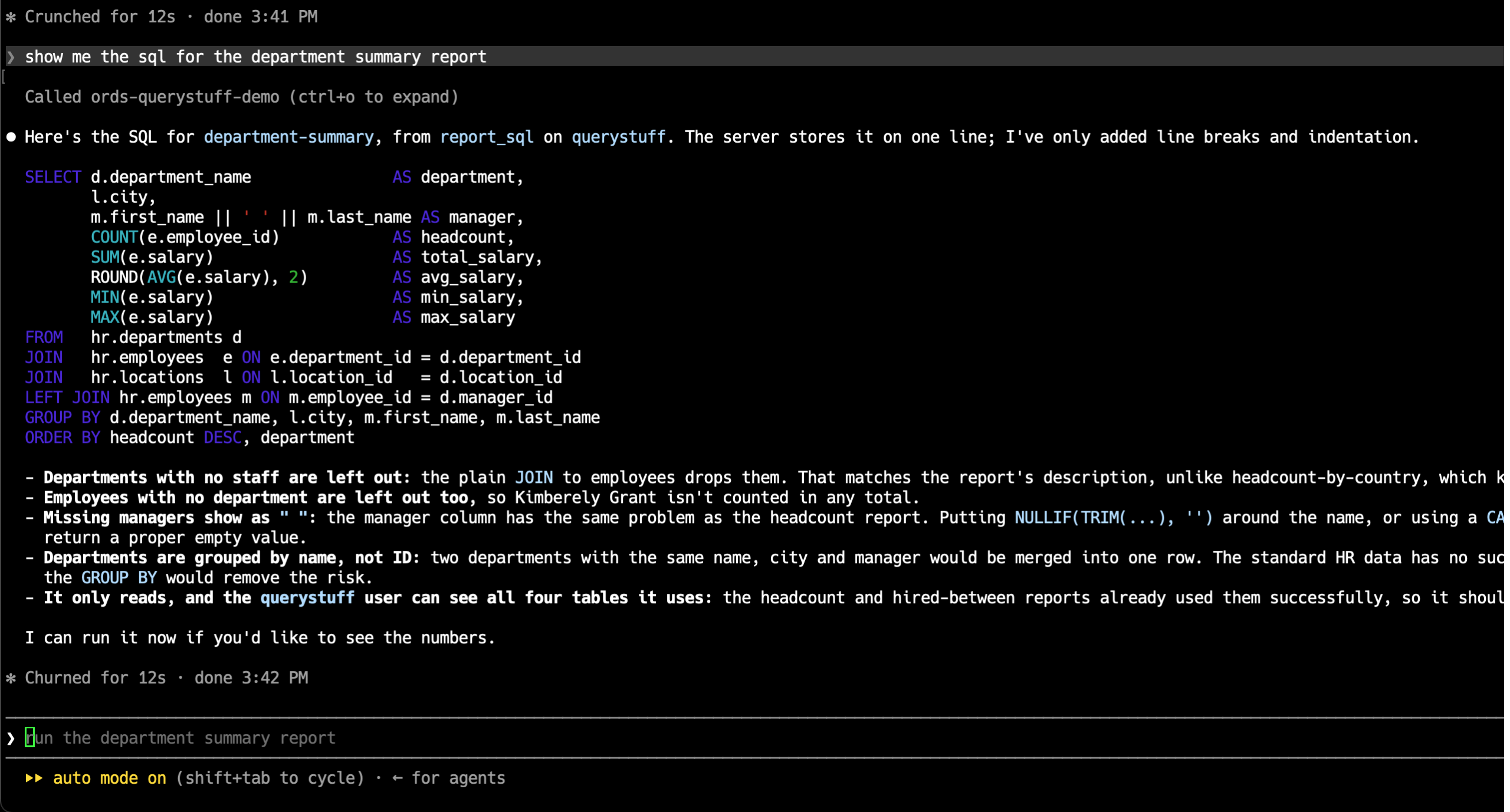
“Show me the SQL for that report”
Jeff has ReportAuthor, so report_sql works.
“Who works in IT?”
Here’s where it gets fun. I didn’t say “run the search-employees report”, I just asked a question. The agent found the report and decided it was the right tool for the job, using the purpose and instructions I wrote.
{
  "database": "querystuff",
  "reportId": "search-employees",
  "variables": [
    { "name": "department", "value": "IT" }
  ]
}

The results come back as CSV, with the same row limits and truncation behavior as sql_run.

Can it pick the right report?
That was one report. With four on the menu, the agent has to read the descriptions and choose. So I asked the other three questions, again without naming a report.
“What departments do we have in the UK, and how big are they?”
{
  "database": "querystuff",
  "reportId": "department-headcount-by-country",
  "variables": [
    { "name": "country_name", "value": "United Kingdom" }
  ]
}
I said ‘the UK’, the agent bound United Kingdom. That’s the instructions earning their keep.

“Who reports to Steven King?”
{
  "database": "querystuff",
  "reportId": "manager-direct-reports",
  "variables": [
    { "name": "first_name", "value": "Steven" },
    { "name": "last_name",  "value": "King" }
  ]
}

Note: report_execute is flagged as destructive=true and NOT read-only. My report is just a SELECT, but ORDS can’t know what’s in every report (PL/SQL is allowed!), so it plays it safe. Your agent may ask you for permission before running it, and that’s fine by me.
What about Scopes?
If you’re starting from scratch, or your IAM team prefers scopes, you can go that way instead. In Keycloak, you’d create client scopes, one per permission, say mcp.reports.list, mcp.reports.sql, mcp.reports.execute, add them to your client as optional scopes, and have your client request them. They’ll show up in the scope claim, right next to urn:oracle:dbtools:ords:mcpserver:all.
But remember, it’s one mode for ORDS. If you go with scopes for reports, your pools need to be scope-based as well. Don’t mix and match.
What’s not here (yet)
- No creating or editing reports through MCP, that’s on purpose
- No ORDS CLI or UI for managing reports, it’s JSON files or the table
- No Central Configuration Server support in 26.3
- I didn’t cover the
DBTOOLS$MCP_REPORTStable today, that’ll be another post!
Why bother?
Your agent is going to write SQL. Most of the time it’s going to be good SQL. But for the questions that matter – the ones your auditors care about, or the ones that need to hit an index the LLM doesn’t know about – now you can hand it the answer key.
And you control who can see it, who can see how it works, and who can run it, all from the same identity provider you’re already using.