

As of today, the support window for version 24.3 of Oracle SQL Developer has been updated to April of 2027.

We’re additionally looking at a minor update for the 24.3.1 current offering that will address a few 3rd party libraries that need updated along with the embedded Java home. However, no new features are planned for Oracle SQL Developer.
All new features, enhancements, and improvements are being delivered via our Oracle SQL Developer Extension for VS Code.
2026 Feature Plans
In general i can share that we’re working on the following VS Code Extension features including but NOT limited to:
- create / edit database object dialogs – we just added these for tables (25.4), you’ll see things like VIEWS, INDEXES, and more added in the next few releases
- Excel imports – we just added support for CSV (25.4)
- DBA stuff! Yes, DBA features are coming, we’ll start with security features, specifically user management
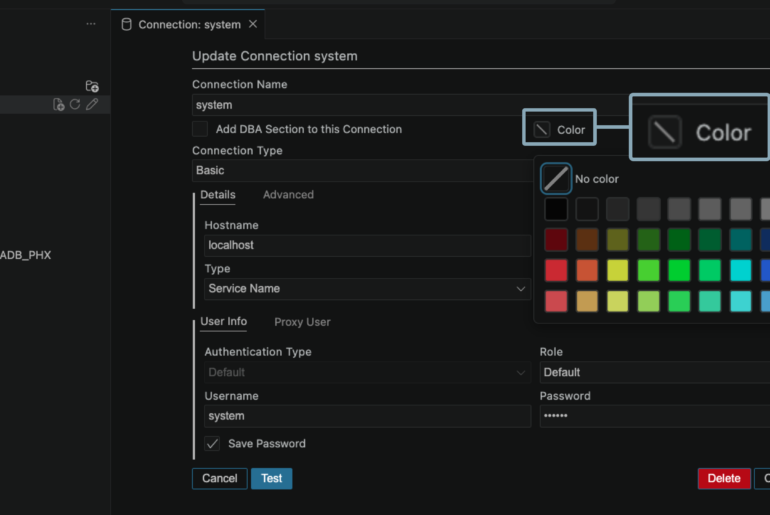
- lots of connection stuff – better Kerberos support, Windows logon credentials as Kerberos client credentials (MSLSA), importing your sqldev classic connections, and support for adding coloring indicators for your editors
- more fun with SQL Notebooks – i would say more but i’ll get in trouble for teasing y’all
Our next update will be 26.1, and it’ll be due around the end of March.


7 Comments
Please add the “Cart” or export feature, like in the old app.
Well, actually I don’t need it really, so it doesn’t matter much, that even though the “Test” succeeds, it doesn’t work:
Quoted from you (https://www.thatjeffsmith.com/archive/2019/04/sql-developer-19-1-connections-thick-or-thin/):
“If you see Success and all OK’s, you should be good to go.”
However, I am getting this message, when I try to open a connection:
Status: Nicht erfolgreich -Test nicht erfolgreich: oracle/jdbc/datasource/impl/OracleDataSource
So, I won’t use it anyways.
what, excatly, doesn’t work?
The Test button fails on the connection dialog, or the test button fails in the preferences dialog where you setup the Instance/Full client – that you don’t need, anyway 🙂
The Test succeeds in the preferenmces dialog, and it fails in the connection dialog.
Finally, I found what is working: SQL Developer 22.2.1 with Oracle Home v21 (incl. latest patchset).
“Our next update will be 26.1, and it’ll be due around the end of March.”
When will this be, already three months passed since March 2026, can you please give an update?
Because:
I was not able to get 24.3 running with OCI thick driver, I tried with a 19.31 client and a 21c database free installation.
So actually I want to spread the information, that SQL Developer 24.3.1 (issue was starting with version 23.1.0) still is seriously broken, besides the issue, that database homes doesn’t include the correct JDBC driver, which was easy to resolve, it doesn’t work with OCI thick driver.
I verified, that OCI thick driver is working well with SQL Developer versions 21.2.1, 21.4.3, 22.2.0, 22.2.1, starting with version 23.1.0 I am getting this error:
Oracle Home bei C:\oracle\product\21 wird getestet
Clientverzeichnis wird getestet… OK
Oracle-JDBC-Treiber wird geladen wird getestet… OK
Oracle-JDBC-Treiberversion wird geprüft wird getestet… OK
Treiberversion: 23.26.2.0.0
Laden der nativen OCI-Library wird getestet wird getestet… Nicht erfolgreich:
Fehler beim Laden der nativen OCI-Library
Der native OCI-Treiber konnte nicht geladen werden. Die Systemeigenschaft java.library.path enthält die Einträge aus der Umgebungsvariable PATH. Prüfen Sie diese, um sicherzustellen, dass
das erwartete native Library-Verzeichnis C:\oracle\product\21\bin vorhanden ist und vor allen anderen Clientinstallationen steht.
java.library.path = C:\oracle\sqldeveloper\sqldeveloper\bin;C:\WINDOWS\Sun\Java\bin;C:\WINDOWS\system32;C:\WINDOWS;C:\oracle\product\21\bin;C:\oracle\product\19\bin;C:\WINDOWS\system32;C:\WINDOWS;C:\WINDOWS\System32\Wbem;C:\WINDOWS\System32\WindowsPowerShell\v1.0\;C:\WINDOWS\System32\OpenSSH\;C:\Program Files\dotnet\;C:\Program Files\PowerToys\DSCModules\;C:\Users\gerrit.haase\AppData\Local\Microsoft\WindowsApps;C:\Users\gerrit.haase\AppData\Local\Programs\Microsoft VS Code\bin;C:\Users\gerrit.haase\AppData\Local\Programs\Git\cmd;;.
26.2, next week hopefully.
What do you need the thick driver for, exactly?
Fantastic lineup — really looking forward to it. Thanks!