

In an earlier blog post I listed my ‘Top 10 Preferences to Tweak…’ Instead of amending that to Top 14, I wanted to give a fresh and updated take on some features that directly impact productivity and data quality.
After doing three customer calls in three consecutive days, I realized I was spending a lot of time on these preferences and figured the rest of y’all might need a reminder as well!
1. Click but Don’t Open the Object!
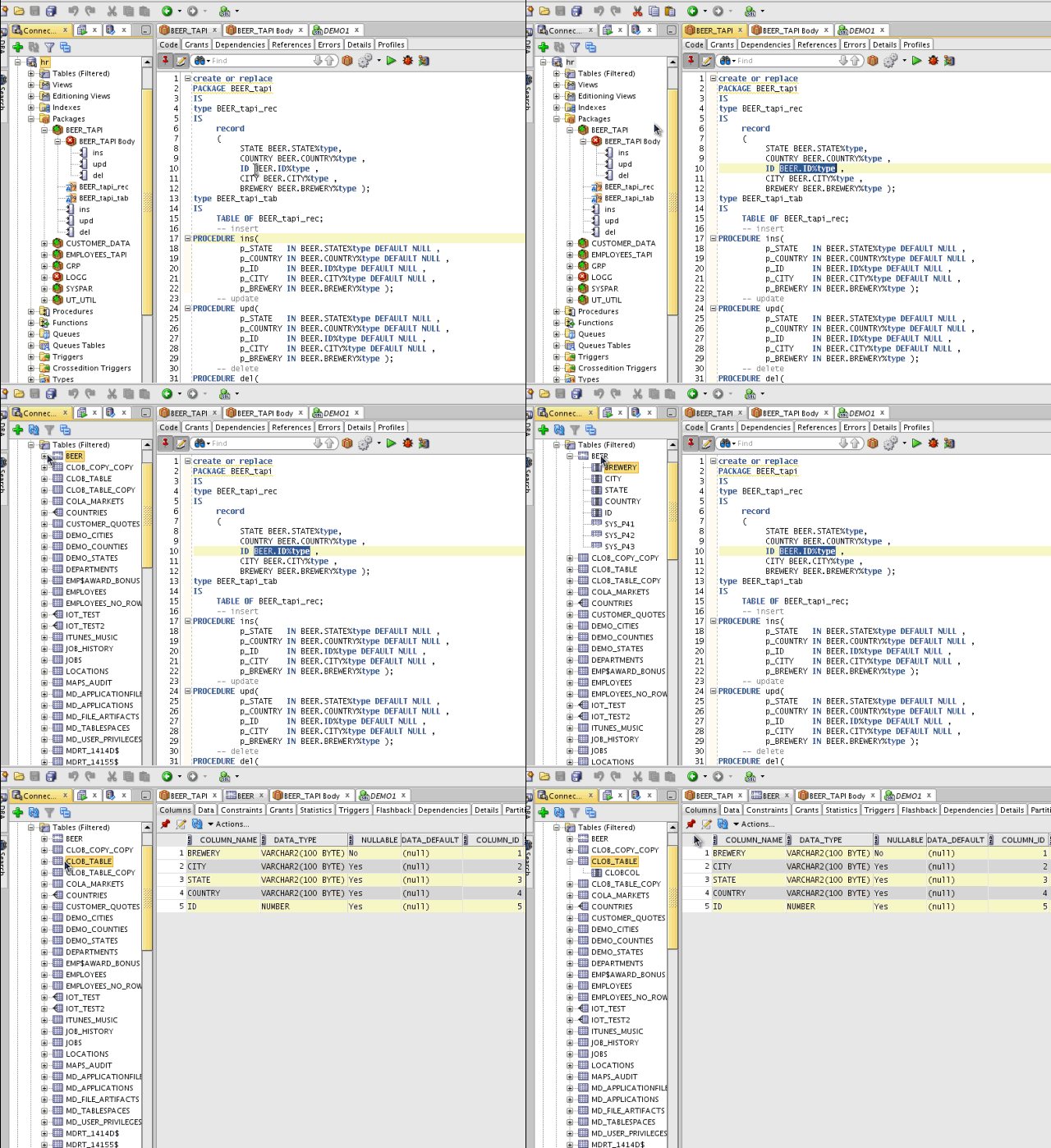
Sometimes you want to drag and drop a table into a Model Diagram or into the Worksheet. But instead, as soon as you click on the object, you lose focus as the object editor opens instead. Yes, you can ‘make that stop!’
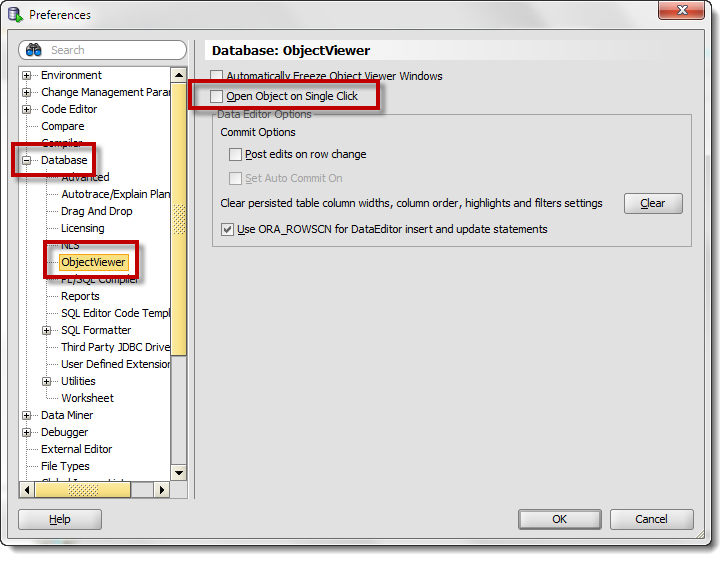
Not sure what I’m talking about? You can read my post dedicated to the subject or just watch the movie 🙂 Here’s a quick animated GIF of the behavior with the option disabled.
2-3. Just Let Me Type!
There are 2 sets of Code Insight feature preferences I suggest you tweak. Either disable the ‘automatic’ bit and invoke the popups with the keyboard (Ctrl+Spacebar) or increase the delay to something that feels more comfortable to you.
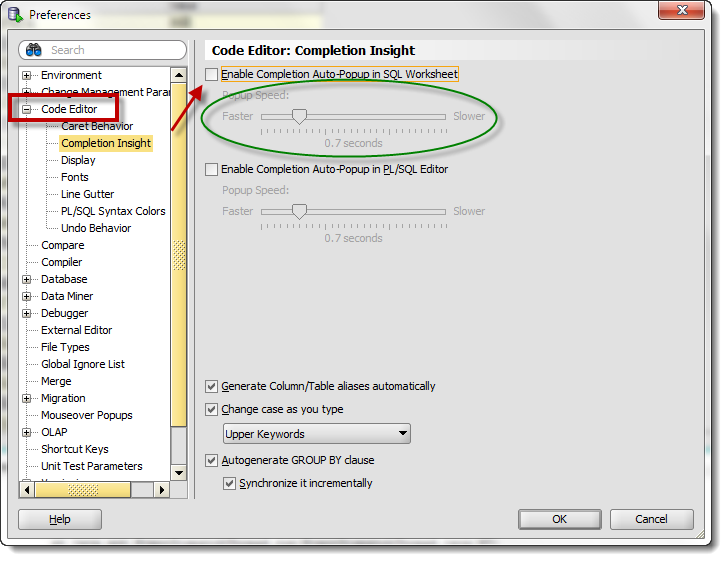
You can read more about our Code Insight feature here.
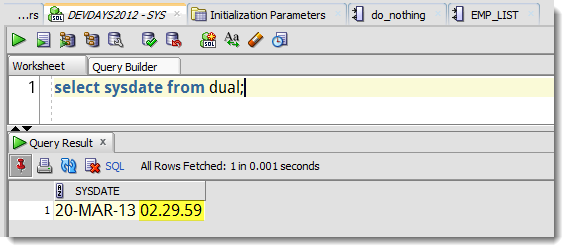
4. See Complete Date Values
By default, DATE values always include a time component. The default time, if none is supplied, is Midnight:00:00. By the way, I’m talking about the core Database product, not just SQL Developer – we’re just the messenger.
Display format of DATEs and TIMESTAMPs in Oracle SQL Developer (and other tools probably) is determined by the NLS preferences. We default, where we can, to your local and regional settings on your computer. For NLS_DATE_FORMAT we default to just show the month, day, and year. I recommend you go into the preferences and add the time component.
Should We Change the Defaults?
This is a tough debate. I tend to agree with both sides of the argument – and I’m mostly sane, mostly. Setting it one way is bound to upset half the folks out there and vice versa. Disabling the ‘Automatic’ code insight feature means that many users would never realize the tool even has an insight feature. And I could spend the rest of eternity screaming that dates always include times, even if you don’t see them. The debate continues…



18 Comments
Hi Jeff,
Our group currently uses Toad 10 for PL/SQL development, table data editing, adhoc queries etc. I want to use SQL Developer 4.0.0.13 (13.80) in its place.
Toad has some command keys, such as Flush SGA, which simply issues a line of SQL (alter system flush shared_pool).
Is there any way to create buttons on the SQL Developer interface that we can assign SQL code to, which, when clicked, runs that SQL within the current session (whichever session is being viewed, or in a ‘selected’ state, within SQL Developer) ?
Thanks
To create a button, you’d have to build a java extension – lots of work. You could just build these types of things into Code Templates. So you could type ‘flush’ ctrl+space, and that would expand out to your alter system….
Wonderful, good enough. Didn’t know I could add my own 🙂 🙂
Thank you for the great articles/blogs.
You’re very welcome! Example of that custom sql template stuff is here.
Jeff,
Is there anyway to eliminate the “ambiguous context” popup in the pl/sql editor? I get it repeatedly when I’m trying to cut and paste.
Thanks!
Beth, exactly what version are you running? Mind the ctrl-key if you’re using that to select text…a ctrl click will try to do a object lookup/navigation, but we might be getting confused as you’re only trying to select text. I thought the developer had killed that warning message before the Early Adopter process for version 4 was finished.
Thanks for your quick response!
I’m using Version 4.0.0.12, Build MAIN-12.84. Other info:
Java(TM) Platform 1.7.0_40
Oracle IDE 4.0.0.12.84
Versioning Support 4.0.0.12.84
I don’t use ctrl/click much (though I may start now that you’ve reminded me what it does). I typically doubleclick to select a word or click and drag for a phase to cut-and-paste or copy.
“Ambiguous Context” is the the popup title. An example popup message is “Please amend your code to something like this: “select * from IMMEDIATE”, or “begin IMMEDIATE; end;”
Oh good news – 4.0.0.12 is one of the EA builds. Go get 4.0.0.13 – that’s the GA ‘official’ build and I’ll think you’ll be happier.
Those of us who like to keep their fingers on the keys and not the mouse would add to your list assigning a tab number to a tab (SHIFT-ALT-1…9) and being able to switch between tabs (ALT-1…9) easily. Not a well known feature but useful, I think.
When you say ‘tabs’ do you mean the ‘document tabs’ that translate to ‘Worksheet1’, ‘Worksheet2’, ‘TableXYY’, ‘ProcedureEditorA’, … ?
i really enjoy you cool writing style , oh you don’t believe me, look what i copied in my cheat sheet ….
figured the rest of y’all might need a reminder as well, Not sure what I’m talking about?
By the way, I’m talking about the core Database product, not just SQL Developer – we’re just the messenger. And I could spend the rest of eternity screaming that …..
Getting the Windows ‘busy’ hourglass cursor is sure to raise anyone’s blood pressure.
pretty much massage it to do whatever you want. so feel free to go crazy!
I do think the defaults should be changed. My guess is that most SQL Dev users would rather see time portion than to not. It is better to see too much info than not enough, and I think you’d get less confusion from n00bs. I can see your point regarding “Disabling the ‘Automatic’ code insight feature means that many users would never realize the tool even has an insight feature.” However, I would argue that auto-popping up so immediately will likely annoy some people who may turn away from the tool altogether before they realize there’s a way to change it. IMO, set the ‘dial’ to medium delay if nothing else. One other idea…how about a setup wizard where some of these ‘hot’ preferences that people love or hate can be set upon installation?
Jeff,
Just a quick note on the NLS settings. I typically alter my date and timestamp (with and without time zone info) to include 4 digit years and 24hour time info down to the second.
However, I do work with some 3rd party applications that expect the NLS_DATE_FORMAT to match the typical default of ‘DD-MON-YY’. For these application, my preferred setting can cause date related errors such as “ORA-01830: date format picture ends before converting entire input string”
I do like having defaults in SQL Developer that affect all connections, but it would also be beneficial if each connection could override the application defaults to either use the databases default settings or specific user defined settings.
It’s a one-setting for all right now, however you could create a LOGON TRIGGER to issue the ALTER SESSION for you and your desired applications?
“The default time, if none is supplied, is 12:00:00”.
Is this 12:00:00 AM (that is, 00:00:00 or midnight) or 12:00:00 PM (that is, noon)? I believe the default time defaults to midnight.
Nitpicking aside, I always encourage my coorkers to add the time component to the date format (possibly using HH24, and maybe replacing RR with YYYY).
Send an insert on a date with only the day portion, and see what comes back when you select it 🙂
SELECT TO_CHAR(TO_DATE(‘1-JAN-13′,’DD-MON-RR’),’DD-MON-YYYY HH24:MI:SS’) JAN1ST
FROM DUAL;
JAN1ST
——————–
01-JAN-2013 00:00:00
It’s a difference of HH12 vs HH24, good catch!