

My alternate title for this post was How to get the DBAs’ attention with lots and lots of connections in her database. But I decided to go with substance over style instead. Anyways, let’s talk about connections in SQL Developer for a bit – you know you need the refresher! By default, connecting to a database in SQL Developer opens 2 connections Main connection Insight connection for figuring out what text is a table and…
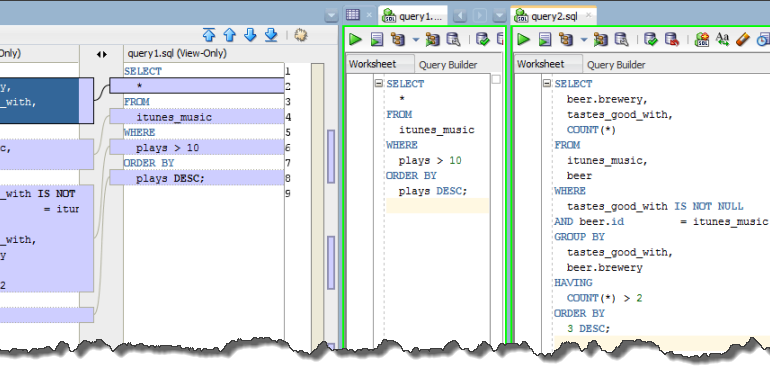
This question has come up a few times recently. One person asked how to compare 2 SQL statements at Open World. In fact, they claimed if I could show them how to do it, it would make the trip to San Francisco worth every penny. Don’t be surprised they left extremely satisfied 🙂 Then just yesterday, someone else asked how to see the differences between their code objects in the database and their file system.…
Another busy, crazy, awesome week is behind us. I’m going to call it a success, but before I completely file it away, I wanted to share a few quick thoughts, and say thanks to a few people for their continued support. Sunday SQL Developer Golden Gate Fun Run We had about 20 people show up – including a few crazies that ran up from the Hilton and back – and the weather was amazing. Yury…
Oracle Database Enterprise Edition customers have the option of extending their functionality set via various optional ‘packs.’ One of the most popular packs is the Oracle Diagnostics Pack. Funny, most people call it the ‘Diagnostic’ Pack, but it’s technically known as the Diagnostics Pack. Anyways, the pack includes a LOT of features. You can see all of them listed here. Now in previous versions of Oracle SQL Developer, we have exposed a few of these…
EA1 dropped in July. Now here we are a little more than a week before Oracle Open World and we are making Early Adopter 2 of Oracle SQL Developer version 4 available for you to download and provide feedback. There’s two big things you need to know about: About 500 bug fixes Support for ADDM/AWR/ASH Bug Fixes Thank you, thank you, thank you for your feedback on the Forums, Twitter, our blogs, and any other…
You think you know Oracle SQL Developer. And you probably know it better than the average user, especially if you’re a subscriber to this blog 😉 But I’m betting there’s a few key things you’ve overlooked. We’re going to fix that today! Skip Ahead to the Slideshare Version 10. We’re not the new kids on the block anymore. Actually, we can’t sing either, but I digress. What started out as Project Raptor in 2005 has…
You may not spend a lot of time creating tables in your database, but if you are performing that task, you don’t want your tool to slow you down. And while many of you may design your tables in a modeling solution or even code them by hand in a worksheet, there are still some of you out there that are using our Create and Alter dialogs. And that’s what I’m here to talk about…
I recently talked about how you could tell the modeler to use custom classification types for your tables. But, I forgot to tell you where you could find these settings in version 4! Surprise – we moved them. Excellent… Sometimes I think developers change stuff because they’re bored or maybe even because they don’t realize even the smallest change can create lots of angst for the end users. However, in this case the changes were…
We recently covered how to set the classification type of multiple tables in a data model, but today I want to show how to make these easier to identify in your model. I’m also going to show you how to set multiple classification types for a single table – a new feature in v4 of the Modeler. By default, the supplied classification types are assigned a color scheme: If you need more classification types, you…
The new editor framework provides a more interactive and rich experience when replacing text. It’s a very simple improvement, but one that I think will make you feel ‘better.’ I know that’s a subjective measurement, but I’m sticking with it. And something I talked about earlier, double-clicking on a ‘word’ in the editor will auto-find and highlight all occurrences of that text. This is then automatically used as the basis of a search and replace…