I’ve shown how to drag and drop database tables from Oracle SQL Developer into a design. But I’ve never done a start-to-finish, blow-by-blow post on how to import your existing database objects into a data model with SQL Developer. So let’s do that now. Warning: Lots of pictures coming up. Want to import from SQL Server (or DB2) instead? Check out this great post from Oracle ACE Director @kentgraziano on how to get SQL Server…
In SQL Developer if you use the Import Data feature from the main tree node, it will create a new table based on a delimited text or Excel file. We’ll look at the data and create some columns for you. In version 4.1, we’ll recognize numbers as numbers, dates as dates, and try to get a best guess for you in terms of the proper date formats, precision, etc. In all version of the tool,…
Yesterday was regular expression day. I got asked by three different people about regex search options in SQL Developer. One of those wanted to know how to use them in the Data Modeler. Scenario: Find all columns which have precision of 9 or less I know, silly scenario. But I’m not that great with regular expressions, and I needed an easy one to play with. So this expression [0-9] will match any text that looks…
While at Open World, I noticed Oracle ACE Director Heli’s desktop was setup very nicely for working with the Data Modeler. I asked if I could share it with you all, and she graciously agreed. So how do you get the panels to dock where you want them to in SQL Developer? By the way, we can thank the Netbeans team for giving us this cool desktop management tech. The trick is all in the…
For the month of September 2014, I published a SQL Developer tip each day. September has 30 days, so that equated to 30 posts. Now normally, I post anywhere from 1-3 posts a week. Going from that to 7 days a week meant a few things: posts were going to be shorter – especially on the weekends there was going to be some retreaded content – but I did try to give everything a fresh…
I had a pretty good week of presenting at Open World this week. 3 solo presentations, all well attended. But in one, I had a technical issue – that’s code for I was having problems because I was using the wrong database connection – when trying to show off the Real Time SQL Monitoring support feature in Oracle SQL Developer. So in case you were there, and left a bit disappointed, I cut this quick…
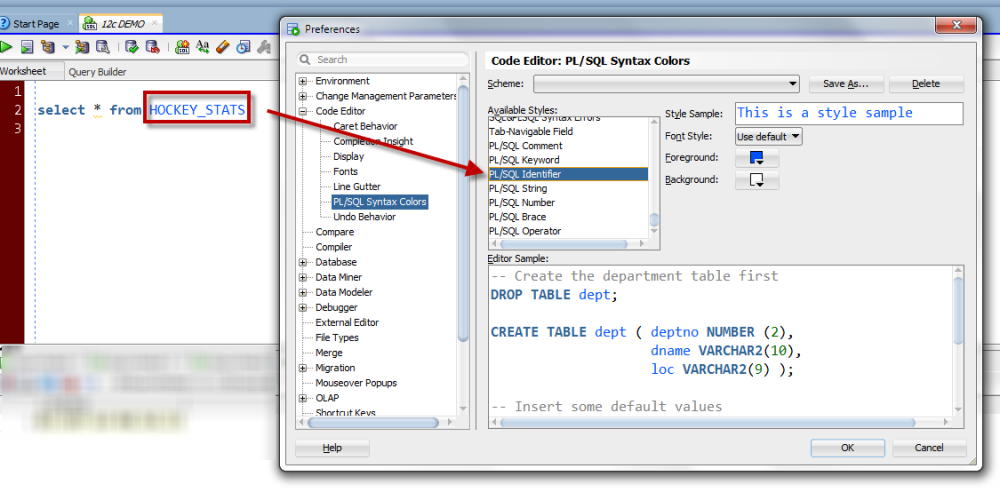
Updated Wednesday, July 6, 2016 Setting up a new install of SQL Developer this morning – exciting stuff as we’ll be teasing some v4.1 features at Open World this week – I found myself immediately tweaking the following preferences. Font – we’ve talked about this a few times, but I make it bigger to make it easier to see in presentation mode I also change the font itself, Dialog is horrible Open Object on Single…
Around 60 of us Oracle folks showed up this morning to take a little run across the Golden Gate Bridge. It took effort to get out, effort to run, and a lot effort to jump for 30 or 40 pictures – thanks Yury! The Database tools team showed up in force – 4 of us SQL Developer types and more than a few of the Oracle APEX developers came out to support the event. We…
Using the mouse sucks. You love the mouse. Leaving the keyboard gives your fingers a wonderful vacation. If you fall in the second camp, this post isn’t for you. But, if you want to be able to get from your query down to your results or explain plans without having to touch your mouse, this post is gonna be your awesome-sauce reward for coming to work on a Friday. You just need to know the…
We get lots of questions around how to model specific partitioning schemes in Oracle SQL Developer Data Modeler, and we do support all of the different ways to part and subpart your data – but today I want to show you: Where to see the partitions in the model How to bring in everything BUT the partitions Where are my partitions? When looking at the table in your data model, you won’t see the partitions…