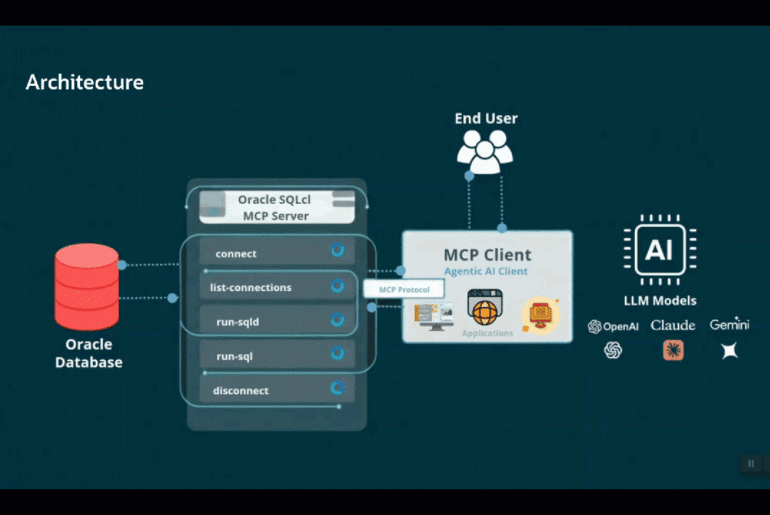


This was post was updated, 7 April 2026.
Quick hits — jump to what you need:
- Start with a locked-down DB user (Security)
- Limit which connections the MCP Server can see
- Monitor Agent activity via V$SESSION
- Use cases
- Fix Agent problems with Context Engineering (Prompts, Skills, etc)
- Use AI Enrichment to help the LLM understand your schema
The pace of change in the AI space isn’t just neck-breaking, it’s downright disorienting. But here’s the thing — that’s actually weirdly comforting. Almost nobody is “caught up,” so you’re in good company if you feel like you’re drinking from a firehose.
That said, falling too far behind isn’t an option either. So let’s not do that.
This post is a collection of what I’ve picked up from talking to customers, watching my teammates work, and just using this stuff myself day-to-day. No grand theory here — just practical things that are actually working. Share what you know, learn from others, and we all move faster together. That’s kind of always been the deal with this community.
Getting started is easy, but
Bringing AI to your Oracle Database (via MCP Servers), is quite simple – it can be setup in less than 5 minutes. And here comes the “but” part – but, for the best experience, and to protect your data, it takes a lot thought and preparation.
💡🏁 Fastest way to get started? Use our FreeSQL.com hosted database with your favorite Agent/LLM, and our MCP Server via our SQL Developer VS Code Extension! Blog || LiveLab
However, just because security requires forethought and planning, doesn’t mean we can’t be successful with using AI to automate and help Oracle database professionals with devOps, development, and business analytics tasks.
Before I get into the tips, I want to share a little video that I think you might enjoy. It shows what this technology (MCP!) is all about, how it works, and what it can do.
I also have a couple of videos you might find useful…
Tip #1: Security, Lockdown the ENV/User
Start in a safe place. No, let me rephrase that. Don’t add AI to a system that hasn’t been prepped and secured for Agents/AI.
💡⚠️ This is both a tip and a word of caution: the SQLcl MCP Server can be used to do more than run queries!
Our MCP Server gives your Agent the opportunity to ALSO:
- create, drop, alter, truncate tables
- create users, change their passwords, grant/revoke privs and roles
- insert, update, delete, merge data
- manage statistics, read an execution plan, suggest and create indexes
What the Agent can do is limited by it’s training data (what it knows how to do, what kind of Oracle SQL/PLSQL code it can generate), by what it’s been asked to do – perhaps you give it the code directly or indirectly, but finally and most importantly, by what the database will allow it to do. So use Oracle Database accounts (users) that can only:
- query specific tables or views, in a different schema*
- execute specific stored procedures, in a different schema*
- only see the portions of data in those tables and views that is not sensitive or PII
- use a limited amount of server resources (memory, CPU)
So if the intent for your Agents is to only be ‘helping with reports’ or ‘answering business questions’ – then the database environment needs prepped with an account that’s setup to do just that.
Theoretical Example database user for Agentic Reporting
*in a different schema
Instead of utilizing a database connection as the application user, instead create a user with limited views/access to the application schema objects, via views, synonyms, and PL/SQL APIs.
💡🔒 Create a dedicated USER account that can only see the things it should be able to see. That’s it.
A user can drop their own table, so…let’s avoid that altogether!
-- THIS IS AN EXAMPLE, ONLY
-- USER will not own anything, only query/execute a controlled list of database objects

-- use great passwords, grant minimum roles
CREATE USER mcp_agent_proxy IDENTIFIED BY "y50}i6D5O8hN";
grant CONNECT;

-- grant only what is needed
grant READ on REPORTING.SALE_BY_QTR_ROLLUP_MV TO mcp_agent_proxy;
grant EXECUTE on REPORTING.REQUEST_REFRESH_SALES_MV TO mcp_agent_proxy;


-- add user to the proper consumer group, guards against runway, bad queries
EXEC DBMS_RESOURCE_MANAGER_PRIVS.GRANT_SWITCH_CONSUMER_GROUP (
        GRANTEE_NAME => 'MCP_AGENT_PROXY',
        CONSUMER_GROUP => 'FIVE_PERCENT_CPU',
        GRANT_OPTION => FALSE
    );

 ALTER USER mcp_agent_proxy
   SET INITIAL_CONSUMER_GROUP = five_percent_cpu;

--enable auditing...Then in SQLcl (or using SQL Developer Extension for VS Code), we’ll save this connection, with a decent name, and our Agents will now be able to interface with the database via our MCP Server.
SQL> connect -save MCP-Reporting -savepwd mcp_agent_proxy@localhost:1521/freepdb1
Password? (**********?)
Name: MCP-Reporting
Connect String: localhost:1521/freepdb1
User: mcp_agent_proxy
Password: ******
Connected.
SQL> In my prompts I can refer to it by name or by reference, as long as it sounds anything like ‘MCP’ or ‘Reporting.’
Tip #2: Security, Limiting Databases by Connections
By default, the MCP Server will serve up connections from whatever you have saved in either SQLcl or via our SQL Developer extension for VS Code.
What might be great for ad hoc work in one env, might be a disaster for another – no AI allowed! For this reason, we allow you to configure SQLcl to load only a specific set of connections, vs ALL of them.

Tip #3: Security, Keeping an eye on things
If you’re a DBA, you’re going to want to know if Agents are mucking around in the systems you’re keeping safe and up-n-running. Our MCP Server sets the Program information for the entries in V$SESSIONS for any connections it creates to ‘SQLcl-MCP.’
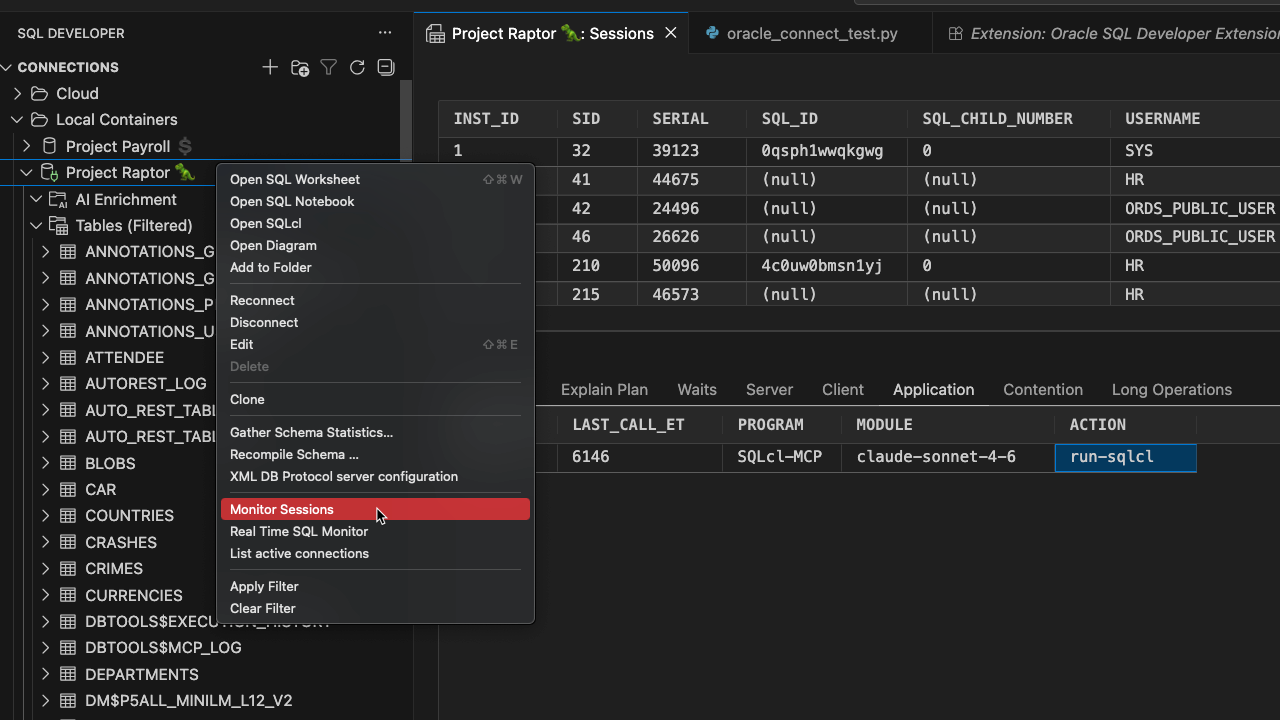
Don’t like? You can have these sessions ‘killed’ at connect time. Otherwise, you can keep an eye on things with Oracle Auditing or via the local DBTOOLS$MCP_LOG tables we keep in each schema that has used our MCP Server.
Don’t forget about the entire suite of database security features and platforms, including but not limited to Oracle Database Vault, SQL Firewall, Virtual Private Databases, Redaction, etc. These each offer unique solutions to help you keep your data safe, and prevent an LLM from generating code for an Agent to harm your system.
Tip #4: Use Cases
💡🐶 🐴 Follow this link to get a list of ALL my MCP posts with deep dive use cases.
This topic ties in directly with security. The uses cases will dictate a big part of how security and locking down the database and its resources will need to be accomplished.
This is the most frequently asked question we encounter – “What kind of stuff can we do with this thing?” I want you to spend a moment and think about what causes you, your team, your organization the most amount stress or difficulty.
Employ Agents as your personal tech assistant!
Example: I needed to generate some test data for an app I’m pretending to build. I perfectly know how to do this, but I also don’t want to spend the 15-20 minutes to setup the code to write the code to do this, nor do I want to research some real looking data.
So with this prompt…
connect to my raptor database

add 25 rows to the table, 'BAD_NAME_42', this data should look like online retail orders

the first column, A is an ID, any unique number will do

the second columb, B, is a string, use this field to store a base64 string, it can be random.

the 3rd column, C, is a JSON object. Use it to create actual order data, with json attributes such as
  "date_of_sale",
  "products: [
   "product_name",
   "quantity".
   "price",
   "description",
   "quantity"
  ],
  "total_price"

each order should have realistic data, mode the data off of popular pokemon cards and characters.

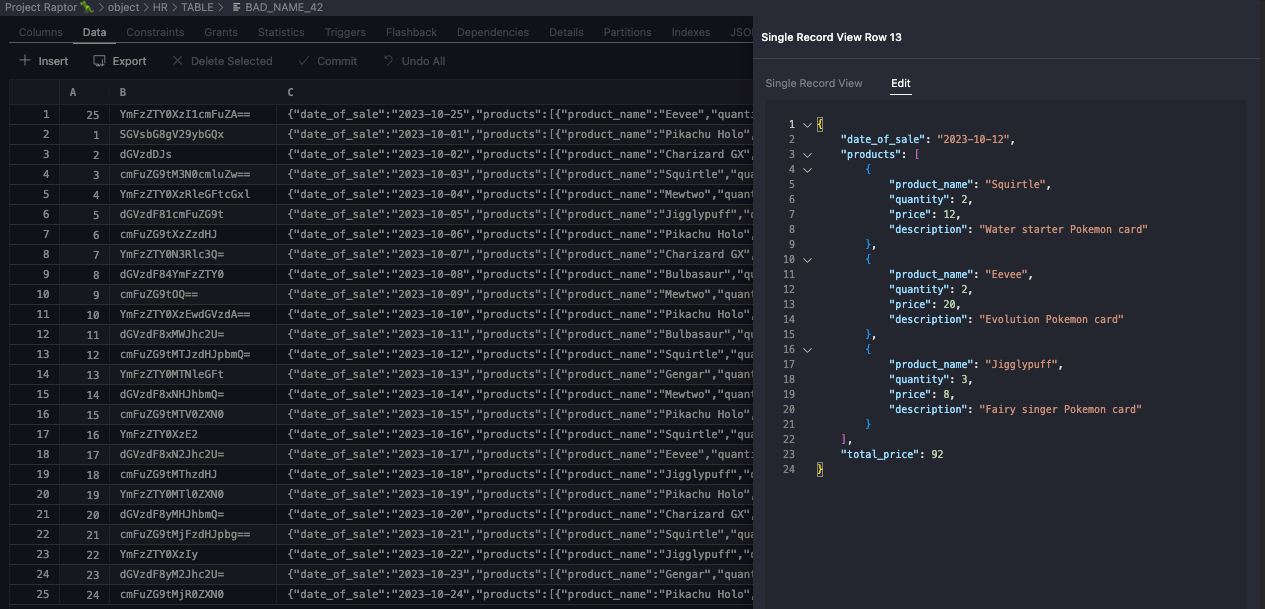
be consistent with the price for each item if you are reusing products across orders. Each order should have at least 1 product, but no more than 10.My agent puts together the plan (My plan, it’s in my prompt!), and engages the LLM to generate the code, and runs it for me. Which I can now browser, via the database…
Let’s look at some examples by persona.
👨💻 Developers
| Pain point | Try this |
|---|---|
| Code reviews taking too long | Engage an agent to do a first-pass review |
| Writing test code is a chore | Agent generates boilerplate test cases for you |
| Onboarding new devs takes forever | Agent answers schema/codebase questions on demand |
| Mysterious ORA- errors eating your afternoon | Paste the error + context — agent diagnoses in minutes |
| Need realistic test data, fast | Describe the shape in a prompt, agent generates and loads it |
⚙️ DevOps & sysadmins
| Pain point | Try this |
|---|---|
| Backup windows creeping, hard to predict | Agent analyzes patterns and flags anomalies |
| System is slow, time to dig through AWR | Agent combs AWR reports, checks indexes and stats for you |
| Too much reactive firefighting, not enough planning | Agent monitors trends and surfaces issues proactively |
| HA/Replication setup issues | Use our Data Guard resources for help – brand new for SQLcl 26.1 |
📊 Analysts
| Pain point | Try this |
|---|---|
| Always waiting on a dev to write a query | Natural Language to SQL — ask in plain English, get SQL back..and have it executed via MCP Server so the agent evaluate the results and pivot as needed |
| Not sure which table has the data you need | AI Enrichment + agent schema exploration handles this |
Natural Language to SQL is real, and actually works. But.
Your agents often need help to generate the RIGHT code to accomplish our tasks in the database, whether that’s SQL, PL/SQL, or MLE JavaScript. And to do that, they need context. And lots of it.
Tip #5: Context Engineering
Almost every quality of life issue Agents, comes down to context engineering.
- why do I have to keep repeating myself?
- the Agent takes a different path every time i do the same task??
- why can’t it just pick up where it left off?
- it hasn’t been trained on X, so I have to write the world’s biggest prompt, ugh!
- why am I spending so many tokens, and taking so much time to do such a simple thing???
And then you’ll see that the AI tooling industry has come up with things like resources, prompts, Skills, Agent Memory, and probably 5 more things I haven’t thought of. All of these things are various ways to add CONTEXT to the Agent session so it can do a better job, in less time, with fewer tokens, and fewer mistakes – if not also hallucinations.
Context Tips

- if you know what you want, and how you want it done – tell the Agent, in great detail, via your prompt or via a skill or… just don’t be vague
- once you have a pattern you like, ask your Agent to convert that to a prompt, or a skill – now it’s much more likely to be repeatable
- we (Oracle) have put together more than a 100 skills for you to take advantage of – try them out! (blog | skills repo)
- take advantage of the information already in your database…
…and this leads me to the topic of AI Enrichment.
Tip #6 AI Enrichment, or more Context engineering
💡🎓 Your database is awesome because it has all of our data, but… the LLM will need context to generate good SQL. Annotate your database objects!
While it’s cool that all of your data is in a database, that could also overwhelm the Agent/LLM as it attempts to understand your schema and generate SQL queries. You see, not everyone has the best designed data models out there, or perhaps folks have purchased applications that didn’t like using plain language table names.
If your schemas has 300 or 3000 tables, then it’s going to be expensive, frustrating, and slow to have your Agent stumble it’s way through your questions.
Solution? You need to provide more context to your agent!
Kris demonstrated how this can be done via our AI Enrichment feature via our VS Code Extension and our MCP Server in Juan Loaiza’s Oracle AI World AI Database Keynote. I’ve fast-forwarded the video, just click the ‘play’ button!
And here’s what that looks like in Slide format –
With version 26.1, SQLcl’s MCP Server now allows you pull data from any schema you have access to, and you can additionally filter that by keyword or specify the objects you want included. And finally you can also have it bring back a brief or detailed summary. I demonstrate how that can work here.
Tip #7: Last but not least, just get started!
While you may not be ready to start using AI directly with your production or ‘real’ databases, you can quickly get up to speed with concepts, terms, and practices by using it in your private, play instances.
Then it’s time to plan a Proof-of-Concept for work, you’ll be better suited to contribute.
The longer you avoid this, the harder it will be for you to catch-up, and more importantly, the more time and energy you’re wasting solving your problems by doing everything by hand!
Disclaimer: I haven’t given up my autonomy or creativity to the AI.
Almost everything you read on this blog is written by me. But I do use AI to help me:
- come up with post titles
- proofread for readability
- suggest topics
- generate sample code
AI isn’t a silver bullet, but it is a very valuable tool in your toolbox. In fact, it might just become the new hammer. Just know when to use it, and how for the best results.