Schema Enrichment is the concept of going back to older database application schemas, and adding additional metadata. This metadata explains the data model, in an effort to make up for any shortcomings.
Perhaps the object names are based on some esoteric system, vs using logical or business entity labels. Like, your products are in SXT_127_01 table, vs a table simply called PRODUCTS. And yes, I’m a BIG fan of PLURAL table names!
So one simple annotation we could add to our schema would be to identify where our products could be found.
We provide a GUI to do this work in our SQL Developer Extension for VS Code, you’ll find it in your connection navigator.

However. Or maybe we want to add a ‘but’ here?
But, the UI is only handling tables at the moment
I prefer for my applications to work primarily via PL/SQL APIs and VIEWs whenever practical. So I need to annotate those objects as well!
Is this a problem?
- the GUI doesn’t support annotating views and procedures, so…
- but I’m using an older version of Oracle Database that doesn’t support annotations, so…
It’s NOT a problem, because –
- we provide a PL/SQL API to do the annotating, and it supports everything you need, even if the GUI isn’t there, yet
- it’s available in any supported version of Oracle Database, not only 26ai for example*
*The SQL Developer VS Code extension will install it for you, as needed.
Let’s give AI a chance at this
Using ChatGPT’s GPT-5 LLM along with my SQLcl MCP server, we inspected the METADATA_ANNOTATIONS package, and looked at one of my views, EMP_DETAILS_VIEW.
I asked CLINE to annotate that view, and then to confirm that information was being included when using the schema-information tool provided by our MCP Server.
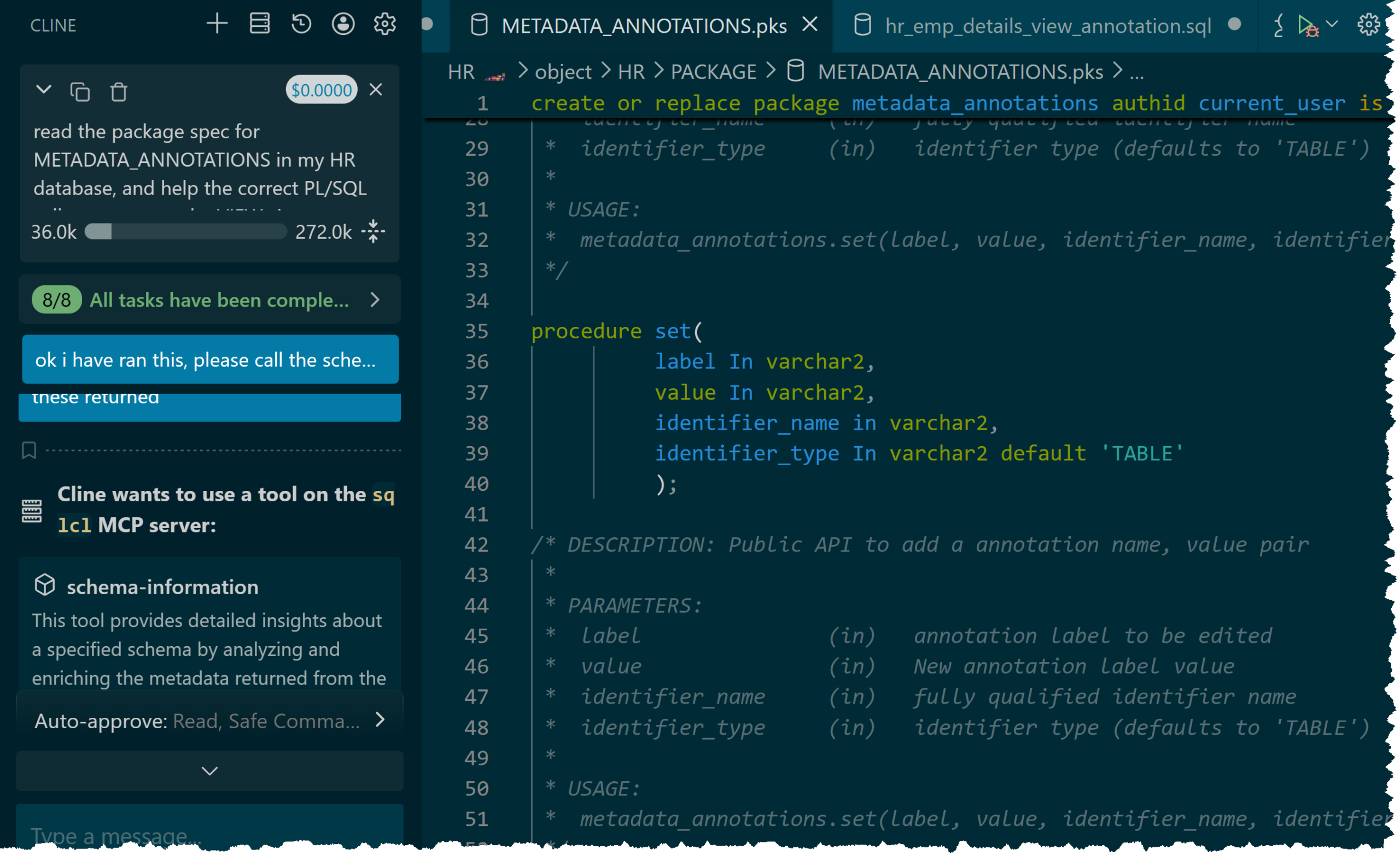
It ripped thru the PL/SQL apis pretty quickly, and then looked at the SQL behind our view, and offered the following call to annotate the view.
declare
     l_label varchar2(1024) := 'business.context';
     l_value varchar2(4000) := q'~{ "name": "EMP_DETAILS_VIEW", "qualified_name": "HR.EMP_DETAILS_VIEW", "grain": "1 row per employee (EMPLOYEES.EMPLOYEE_ID)", "business_purpose": "Employee directory and HR analytics view combining employee, role, department, and geography for reporting.", "primary_use_cases": [ "Look up an employee’s org, job title, and geography", "Departmental and regional headcount/compensation summaries", "Identify commission-based roles and employees" ], "columns_overview": { "employee_id": "Employee key", "first_name": "Given name", "last_name": "Family name", "job_title": "Role title (from JOBS)", "department_name": "Owning department (from DEPARTMENTS)", "city": "City (from LOCATIONS)", "state_province": "State/Province (from LOCATIONS)", "country_name": "Country (from COUNTRIES)", "region_name": "Region (from REGIONS)", "salary": "Base salary", "commission_pct": "Commission percentage if applicable" }, "joins": [ "EMPLOYEES e -> DEPARTMENTS d on e.department_id = d.department_id", "DEPARTMENTS d -> LOCATIONS l on d.location_id = l.location_id", "LOCATIONS l -> COUNTRIES c on l.country_id = c.country_id", "COUNTRIES c -> REGIONS r on c.region_id = r.region_id", "EMPLOYEES e -> JOBS j on e.job_id = j.job_id" ], "typical_questions": [ "What is an employee’s department, job title, and region?", "How many employees are in each department/region?", "List employees in a given city/state/country.", "What is the salary distribution by department or region?", "Which employees earn commission (commission_pct > 0)?", "Who reports to a given manager (by manager_id)?", "What is the average salary by department compared to each employee?" ], "usage_notes": [ "Read-only view; not intended for updates", "Salary and commission are sensitive; apply least-privilege access", "Manager hierarchies may require recursive queries beyond manager_id" ], "version": "v1" }~'
     ;
begin
     metadata_annotations.set(
          label           => l_label,
          value           => l_value,
          identifier_name => 'HR.EMP_DETAILS_VIEW',
          identifier_type => 'VIEW'
     );
end;
/Ugh, that’s a big ugly.
Let’s look at the JSON, pretty-printed.
{
    "name": "EMP_DETAILS_VIEW",
    "qualified_name": "HR.EMP_DETAILS_VIEW",
    "grain": "1 row per employee (EMPLOYEES.EMPLOYEE_ID)",
    "business_purpose": "Employee directory and HR analytics view combining employee, role, department, and geography for reporting.",
    "primary_use_cases": [
        "Look up an employee’s org, job title, and geography",
        "Departmental and regional headcount/compensation summaries",
        "Identify commission-based roles and employees"
    ],
    "columns_overview": {
        "employee_id": "Employee key",
        "first_name": "Given name",
        "last_name": "Family name",
        "job_title": "Role title (from JOBS)",
        "department_name": "Owning department (from DEPARTMENTS)",
        "city": "City (from LOCATIONS)",
        "state_province": "State/Province (from LOCATIONS)",
        "country_name": "Country (from COUNTRIES)",
        "region_name": "Region (from REGIONS)",
        "salary": "Base salary",
        "commission_pct": "Commission percentage if applicable"
    },
    "joins": [
        "EMPLOYEES e -> DEPARTMENTS d on e.department_id = d.department_id",
        "DEPARTMENTS d -> LOCATIONS l on d.location_id = l.location_id",
        "LOCATIONS l -> COUNTRIES c on l.country_id = c.country_id",
        "COUNTRIES c -> REGIONS r on c.region_id = r.region_id",
        "EMPLOYEES e -> JOBS j on e.job_id = j.job_id"
    ],
    "typical_questions": [
        "What is an employee’s department, job title, and region?",
        "How many employees are in each department/region?",
        "List employees in a given city/state/country.",
        "What is the salary distribution by department or region?",
        "Which employees earn commission (commission_pct > 0)?",
        "Who reports to a given manager (by manager_id)?",
        "What is the average salary by department compared to each employee?"
    ],
    "usage_notes": [
        "Read-only view; not intended for updates",
        "Salary and commission are sensitive; apply least-privilege access",
        "Manager hierarchies may require recursive queries beyond manager_id"
    ],
    "version": "v1"
}Ok, that’s better!
Let’s say you don’t have one view, but you have….hundreds, or thousands of them. Using a LLM to help you summarize the business intent behind them could save you a ton of tokens in the future as your LLM’s are then asked to generate SQL to address your business user’s questions via NL2SQL.
Note I specifically asked my Agent to include in the Annotations some questions that could be reasonable answered by querying this view.
Ok, now our final check, what does the MCP Server return about this view when asked via our schema-information tool.
Using schema-information tool to learn more about the view
The tool request includes these optional parameters
{"schema":"HR","level":"DETAILED","filter":"EMP_DETAILS_VIEW","model":"UNKNOWN-LLM","executionType":"SYNCHRONOUS","task_progress":"- [x] Confirm target view (HR.EMP_DETAILS_VIEW)\n- [x] Read SQL text for EMP_DETAILS_VIEW\n- [x] Analyze query intent and usage scenarios\n- [x] Draft annotation payload (purpose, usage, typical questions)\n- [x] Generate PL/SQL block to set annotation (do not execute)\n- [x] User executed annotation block\n- [ ] Retrieve schema-information (DETAILED) for HR EMP_DETAILS_VIEW\n- [ ] Review returned annotations\n- [ ] Provide follow-up verification or adjustments if needed"}Now, let’s look at the response my agent (Cline) received.
Basic Schema Objects Listing:
- Owner: HR, Object Name: EMP_DETAILS_VIEW, Object Type: VIEW


Optimized Table DDL Outline:


Detailed Schema Objects Overview:
EMP_DETAILS_VIEW ((OBJECT_TYPE:VIEW),(business.context:{ "name": "EMP_DETAILS_VIEW", "qualified_name": "HR.EMP_DETAILS_VIEW", "grain": "1 row per employee (EMPLOYEES.EMPLOYEE_ID)", "business_purpose": "Employee directory and HR analytics view combining employee, role, department, and geography for reporting.", "primary_use_cases": [ "Look up an employee’s org, job title, and geography", "Departmental and regional headcount/compensation summaries", "Identify commission-based roles and employees" ], "columns_overview": { "employee_id": "Employee key", "first_name": "Given name", "last_name": "Family name", "job_title": "Role title (from JOBS)", "department_name": "Owning department (from DEPARTMENTS)", "city": "City (from LOCATIONS)", "state_province": "State/Province (from LOCATIONS)", "country_name": "Country (from COUNTRIES)", "region_name": "Region (from REGIONS)", "salary": "Base salary", "commission_pct": "Commission percentage if applicable" }, "joins": [ "EMPLOYEES e -> DEPARTMENTS d on e.department_id = d.department_id", "DEPARTMENTS d -> LOCATIONS l on d.location_id = l.location_id", "LOCATIONS l -> COUNTRIES c on l.country_id = c.country_id", "COUNTRIES c -> REGIONS r on c.region_id = r.region_id", "EMPLOYEES e -> JOBS j on e.job_id = j.job_id" ], "typical_questions": [ "What is an employee’s department, job title, and region?", "How many employees are in each department/region?", "List employees in a given city/state/country.", "What is the salary distribution by department or region?", "Which employees earn commission (commission_pct > 0)?", "Who reports to a given manager (by manager_id)?", "What is the average salary by department compared to each employee?" ], "usage_notes": [ "Read-only view; not intended for updates", "Salary and commission are sensitive; apply least-privilege access", "Manager hierarchies may require recursive queries beyond manager_id" ], "version": "v1" })) : EMPLOYEE_ID(DATA_TYPE:NUMBER) , JOB_ID(DATA_TYPE:VARCHAR2) , MANAGER_ID(DATA_TYPE:NUMBER) , DEPARTMENT_ID(DATA_TYPE:NUMBER) , LOCATION_ID(DATA_TYPE:NUMBER) , COUNTRY_ID(DATA_TYPE:CHAR) , FIRST_NAME(DATA_TYPE:VARCHAR2) , LAST_NAME(DATA_TYPE:VARCHAR2) , SALARY(DATA_TYPE:NUMBER) , COMMISSION_PCT(DATA_TYPE:NUMBER) , DEPARTMENT_NAME(DATA_TYPE:VARCHAR2) , JOB_TITLE(DATA_TYPE:VARCHAR2) , CITY(DATA_TYPE:VARCHAR2) , STATE_PROVINCE(DATA_TYPE:VARCHAR2) , COUNTRY_NAME(DATA_TYPE:VARCHAR2) , REGION_NAME(DATA_TYPE:VARCHAR2)This isn’t just useful for LLM’s, this could be quite handy for the human co-workers dealing with this database on a regular basis as well!
AI Enrichment work going forward
We have big plans to expand on what we’ve done in tools like SQLcl and SQL Developer in this area. I’d love to hear how you’re using it so far, and what you’d like see next!