

Getting the Windows ‘busy’ hourglass cursor is sure to raise anyone’s blood pressure. Sometimes you’re left there waiting because a resource you’re attempting to access is already being used by someone else. So you get to WAIT. You are being BLOCKED because what you want is LOCKED. How can you see what the hold-up is?
And more importantly, how can we figure out who or what is causing the delay so we can go KILL them (their session, cough!)
Tools -> Monitor Sessions
This is an enhanced report. There is a report version of this under the Database Administration and Sessions category. What makes this report ‘enhanced’ is that it has a context menu available that allows me to start a trace, or execute a ‘kill.’
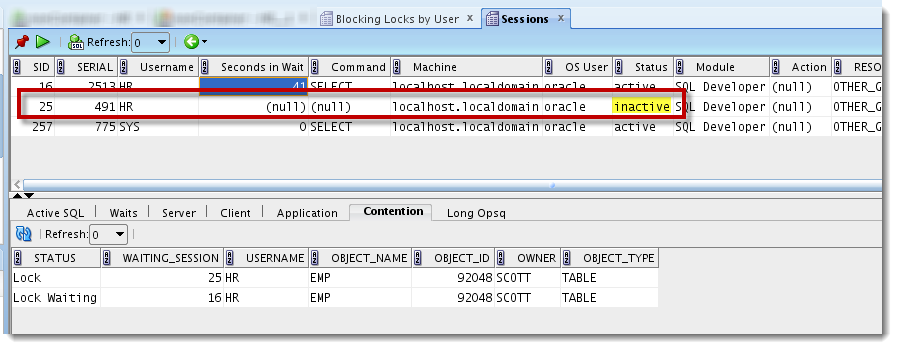
My session is SID #16. SID #25 is holding me up. Maybe I should go check what they’re doing…
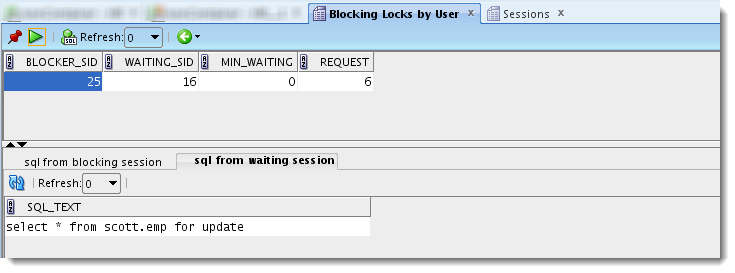
This is a snippet from a handy little report called ‘Blocking Locks by User.’ It’s available under the Database Administration and Locks report category.
Ok, now I know what I need to do 🙂
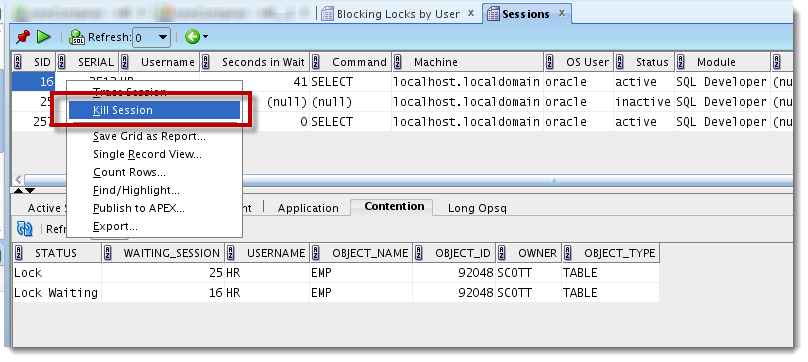
And cue the music…


22 Comments
Blocking session report is real slow.
And?
Hi, Jeff –
Never knew about the copy to User Defined reports method of extracting the SQL. Cool tip!
BTW, happen to know how they create the right-click context menus to perform the Kill Session functions?
Like this 🙂
Yup – that’s the reference I was hunting towards. Thanks again, Jeff!
no problem! if you get it going, send me a screenshot, i’d love to see what you did with it. [email protected]
Hi, in SQL Developer 4.1.3 with connection to Oracle Database 10 G I got the next error:
ORA-00026: missing or invalid session ID
00026. 00000 – “missing or invalid session ID”
*Cause: Missing or invalid session ID string for ALTER SYSTEM KILL SESSION.
*Action: Retry with a valid session ID.
Código de proveedor 26
Do you know the solution of the error?
Thanks
i’m guessing the alter session/system command is being made with syntax not yet available in 10G
we don’t support 10g anymore, but you could copy the report to user defined, and make your own kill/trace commands. i wrote a blog post or 2 on how to do that
Thanks a million. I keep discovering new features in SQL Developer everyday. I never knew this feature was there until I Googled “blocking locks”.
Cool, thanks for sharing that Ola. And let me know if you need help with any other features you’re curious about!
Thanks a bunch for this amazing feature.
When I choose Tools –> Monitor Sessions,I don’t see the “Blocking Locks By User” tab that you showed us,how can I get it?
My SQl Developer verision is 4.0.3.16
3 years later, but perhaps it will help somebody.
In version 4.2.0.16.260 :
If you don’t have the reports window open: View -> Reports
In the All Reports window: Data Dictionary Reports -> Database Administration -> Locks
Hey thanks for the assist! I try to catch everything but stuff still manages to slip through the cracks.
Hi Jeff,
Do you have any alternative to do the same task via SQL?
Thanks in advance
When you say ‘SQL,’ do you mean SQL Server or just plain SQL commands? If the former, no. If the latter, yes, you can just run the selects and alter session disconnects from the SQL Worksheet.
Yes, I meant SQL commands on Oracle. Do you have the scripts? Actually, I’m asking for you ’cause in a lock case on Oracle 10g, for example, when I try to join v$sql and v$session by sql_address or sql_id it does not match ’cause a session responsible for locking these columns stays empties while I can see only data (sql_text) from the session that it’s suffering the lock and not from the originator
Ok, good 🙂
If you copy the Sessions report down to the User reports section – you can then open the report design/properties and get the SQL that we’re using to ID the sessions that are locked or are blocking.
Jeff,
Just like to say I always appreciate your posts. There’s so much in SQLDeveloper that’s available, it’s hard to keep track of all of it. Reminders are always a plus. Ditto on the RATM.
Thanks Tony! Appreciate your support, it inspires me to keep writing 🙂
to look at session activity, do I need to be logged in as sys, sysman, system, the database user?
No, but you need select privs on v$sessions, locks, etc
Kudos for the RATM 🙂
Bombtrack 🙂