

Hate GUIs, want to do this via the command-line?
THIS is your number one question – and it has been here on my blog since the day I posted it.
You have an Excel file – and you want that data put into a table. I’ll show you how, and we’ll document each step of the way with plenty of pictures.
You will be prepared to import data to an existing table from Excel with confidence after reading this post. Want to build a new table from Excel? We can do that, too.
Warning: This post has a LOT of pictures.
For our example I’ll be using the HR.EMPLOYEES table to create the XLS file for our import. We’ll use that Excel file to populate an empty copy of the EMPLOYEES table in another schema.
Step 0: The Empty Oracle Table and your Excel File
You have an Oracle table and you have one or more Excel files.

You do know how to view multiple objects at once in SQL Developer, right?
Step 1: Mouse-right click – Import Data

Step 2: Select your input (XLSX) file and verify the data
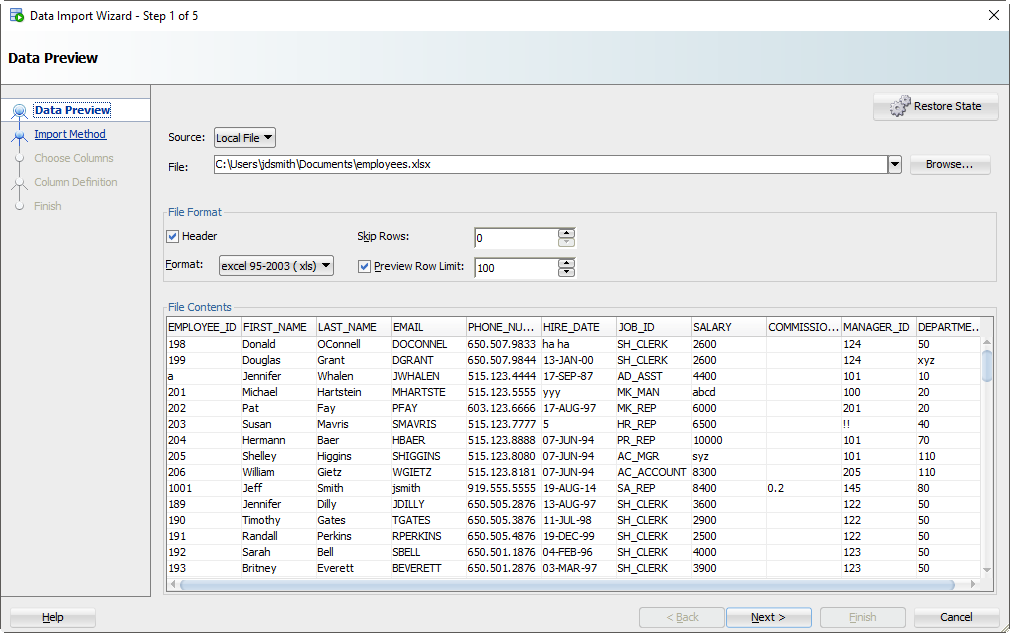
As you select the file, we’ll grab the first 100 rows for you to browse below. This ‘Preview Row Limit’ defines how many rows you can use to verify the IMPORT as we step through the wizard. You can increase it, but that will take more resources, so don’t go crazy.
Also, does your Excel file have column headers? Do we want to treat those as a row to the table? Probably not. If you uncheck the ‘Header’ flag, the column names will become a new row in your table – and probably fail to be inserted.
Sometimes your Excel file has multiple headers, or you may need to only import a certain subset of the spreadsheet. Use the ‘Skip Rows’ option to get the right data.
Step 3: Create a script or import automatically
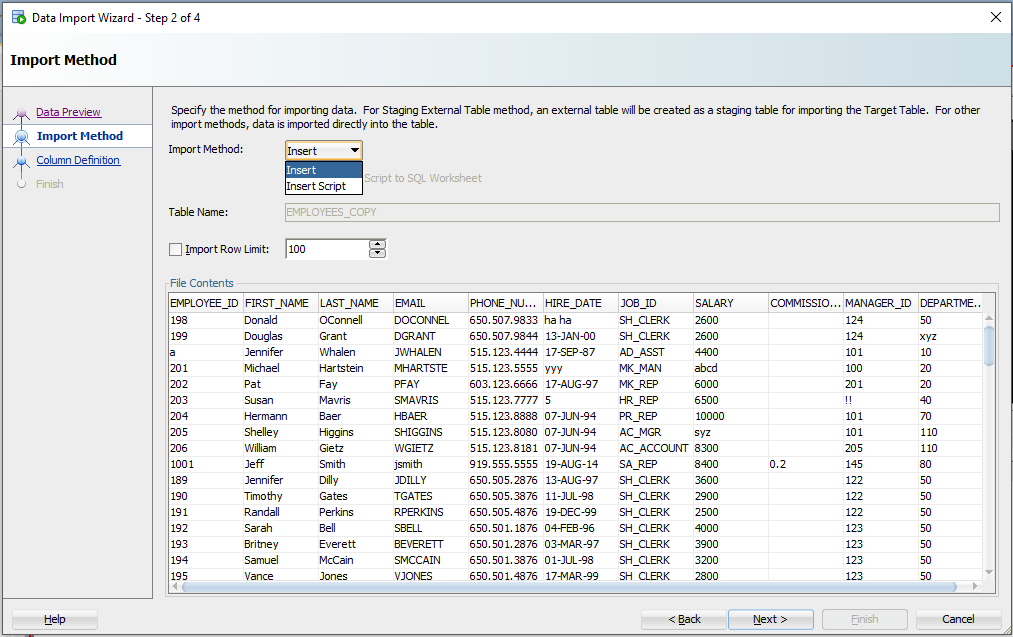
For this exercise the ‘Insert’ method will be used. Each row processed in the Excel file will result in an INSERT statement executed on the table we’re importing to.
If you choose ‘Insert Script’, the wizard will end with an INSERT Script in your SQL Worksheet. This is a nice alternative if you want to customize the SQL, or if you need to debug/see why the ‘Insert’ method isn’t working.
Working with CSV? You’ll get even more methods – great for VERY LARGE data sets.
Step 4: Select the Excel Columns to be Imported
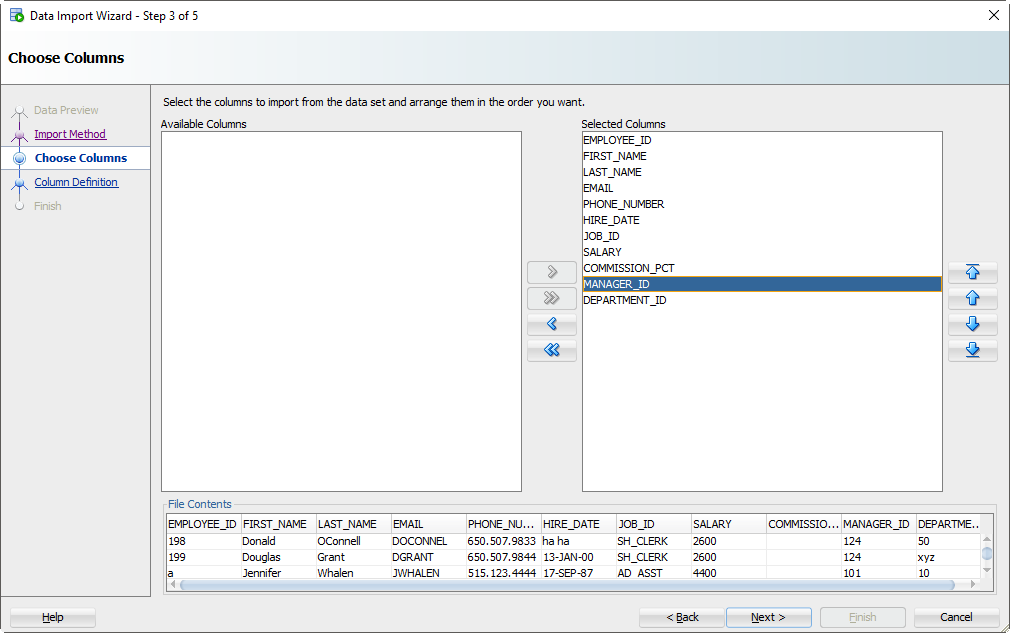
You may have an Excel file with 100 columns but your table only has 30. This is where you tell SQL Developer what columns are to be used for the import. You can also modify the column order, which may make the next step a bit easier.
Step 5: Map the Excel Columns to the Table Columns
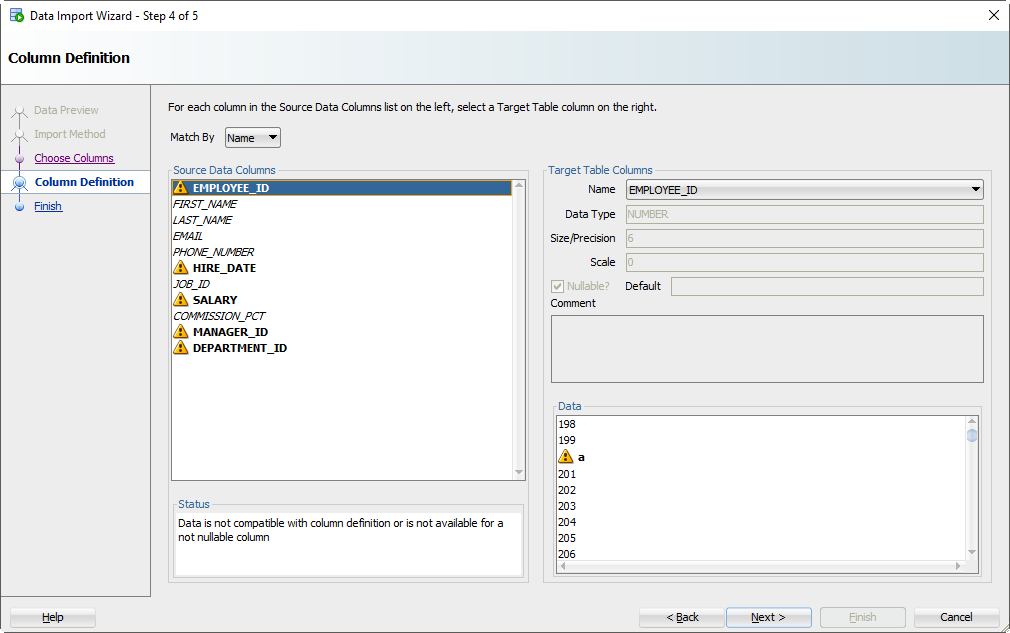
If you’re not paying attention and just letting the wizard guide you home, then now is the time to wake up. There’s a good chance the column order of the Excel file won’t match the definition of your table. This is where you will tell SQL Developer what columns in the spreadsheet match up to what columns in the Oracle table.
And remember how we set that preview window to 100 rows? We’re peaking at the data, looking for problems as we try to fit it into your table column. If we find a problem, we’ll mark the columns with those ‘warning’ symbols.
I’ve polluted my Excel file with some values that I know won’t ‘fit.’ When these rows are encountered in the wizard, they’ll be rejected by the database – but the other rows will come in.
Let’s talk about DATES for a second.
And TIMESTAMPS too. In the excel file, you’re probably going to have some date/time fields you want to move into DATE or TIMESTAMP columns. SQL Developer is treating those value as strings – and YOU need to tell SQL Developer the DATE or TIMESTAMP format to use to be able to convert them.
Let’s look at HIREDATE.
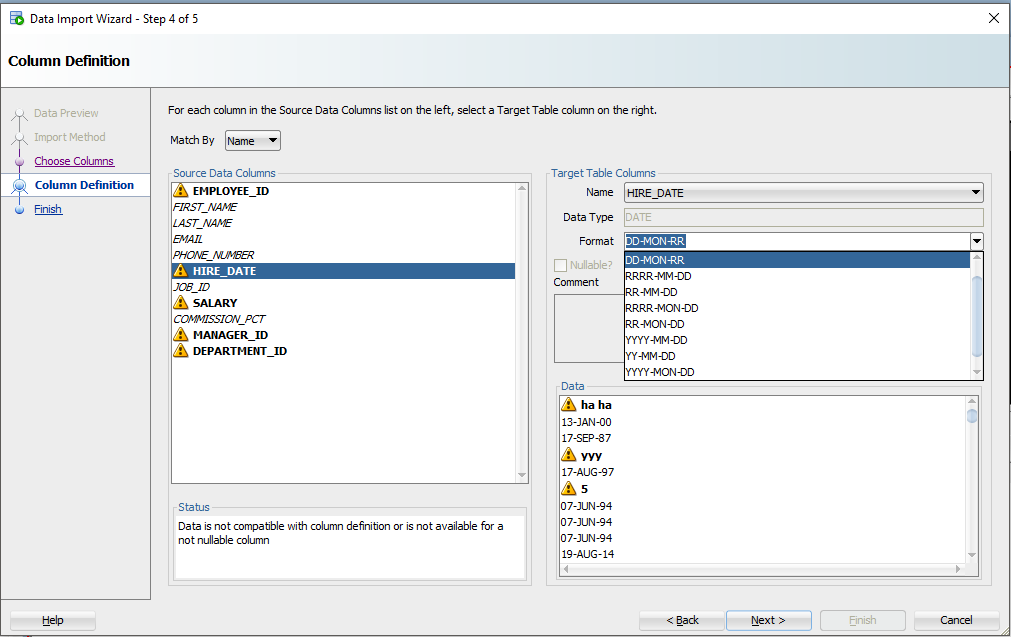
See the ‘Format’ drop down selector? SQL Developer has defaulted the DATE format string to ‘DD-MON-RR’ – we try to guess based on the rows we’re looking at in that 100 preview window.
If we have guessed wrong, or were unable to figure it out, you’ll need to input this yourself. The Oracle Docs can help you define the correct DATE Format Model. If you see the little warning graphics next to your Date values in the Data panel, you might have the wrong format.
Step 6: Verify your settings and GO!
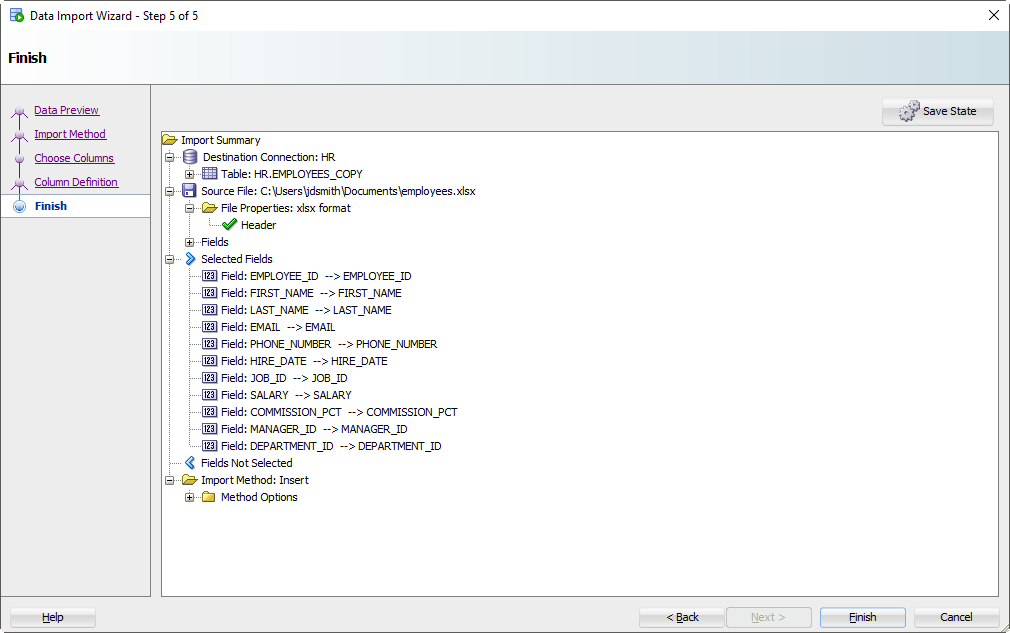
Click on the ‘Finish’ button.
If the Wizard runs into any problems doing the INSERTs, you’ll see this:
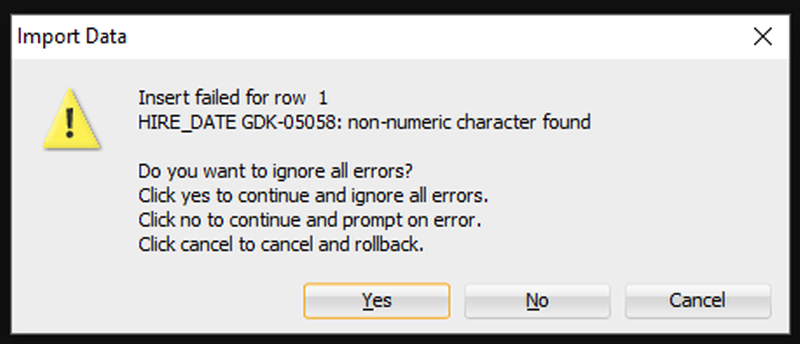
I’m going to say ‘Yes’ to ignore all the errors. But, if you need EVERY single row – you need to say ‘Cancel’ to start over. Then you can either fix your data in the Excel file, or make changes to your table so the data will fit/work.
After clicking ‘Yes’, we’ll get to the end of our story, and our data!
Step 7: See What Worked and What Didn’t
First, any bad news?
If there were rows rejected by the database, we’ll see those now.
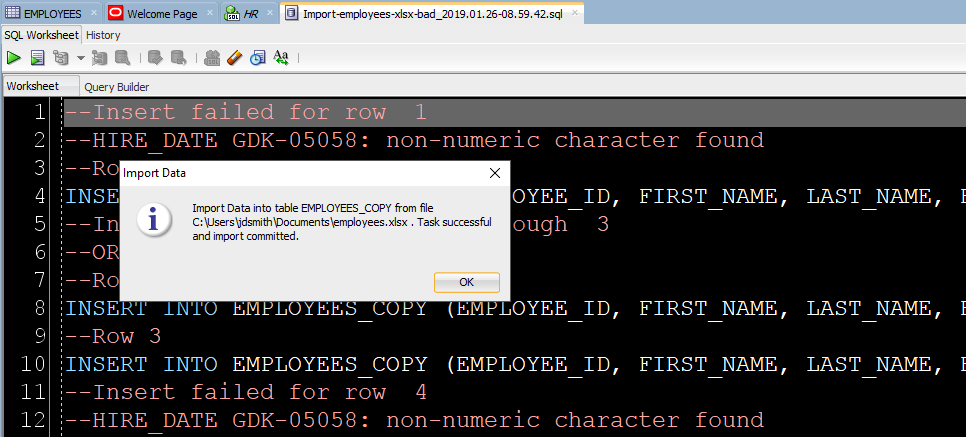
Now let’s go look at our new table data!
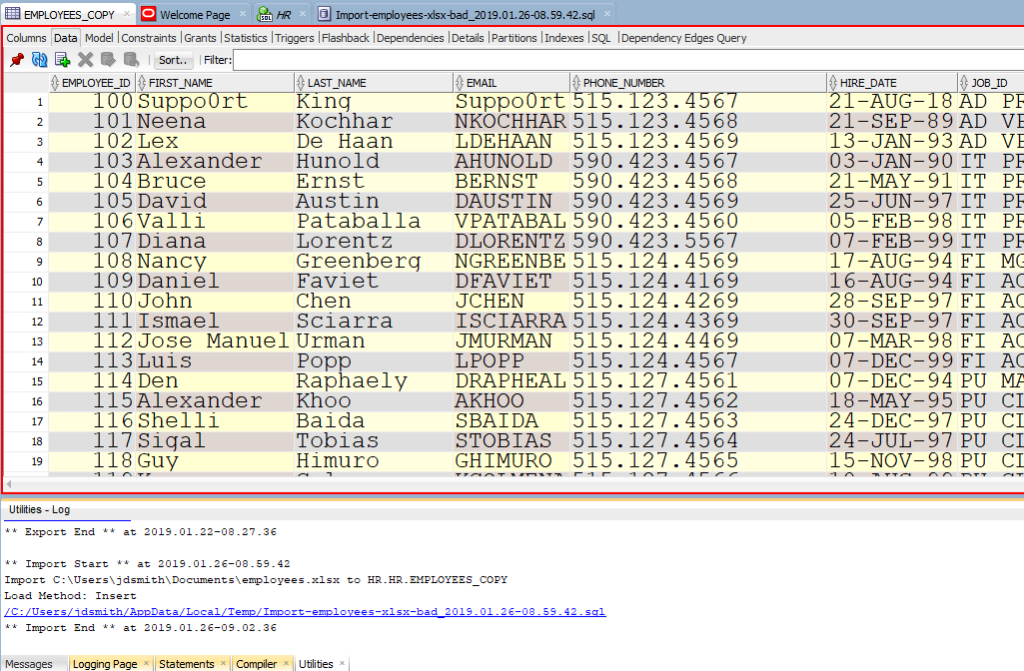
Note the ‘Log’ panel. We’ll show you the file we worked with, and how much time it took to load the data.
Just a few more pointers when it comes to Excel
- Storing data in Excel can be…dangerous
- If you have a lot of data or if this will be a repeating process, consider External Tables or SQL*Loader instead
- If you like to put data in Oracle because you understand SQL better than Excel macros, then welcome to the club 😉
- Here’s 11 more tips on Importing Excel/CSV into your database



359 Comments
Hi
I am trying to import data from csv file which have extra columns other than the columns for the corresponding table. So i just exclude those columns and manually mapped all the columns with the columns in table. Then I tried to save the state using “Save State” option.
Next time when I tried to import the data using “Restore State” option again its asking to map the columns.
How can i fix this ? Every time I cant go and map the columns right.. Do you have any solution for it.. ?
I tried to import data and the following message displayed: No se puede abrir el archivo [Ruta del archivo] debido al siguiente error: Java heap space. How do I fix it?
How big is your Excel file? it’s saying it can’t open it due to memory. Try saving the XLSX as a CSV and try again with that.
but what if my oracle table is NOT empty?!
Makes no difference. Rows will be inserted…unless you have constraints which reject rows that don’t pass your requirements.
How can I automate this stuff?
Say I get Excel data on a regular basis and upload it into a specific directory. Is there a chance to have a cron job that automatically does the import without me having to touch any GUI?
If it were csv/delimited it would be easy to setup an database job to import the data via external tables.
With a excel, you could setup a sqldev cli based job to do an import.
Hi ,
Thanks for the nice post, I am trying to import using sql loader.
I’ve exported a table data to an xlsx file, and created the ctrl file using the export functionality in sql developer.19.2.1.247.
When I try to import the data into another table, I don’t have the SQL loader option the only options available in the Import method are Insert and InsertScript.
Do I have to install a specefic plugin to get that option.
Thanks in advance
SQLLoader has to have a plain text file, which Excel is not. So save your Excel file as a CSV.
Hi,
I need to use xls file(s) from a shared path/folder and load it into the table(s) in Oracle.
Please suggest best solution for this.
we don’t care where the file is, just open it, and use the feature as normal
now, if your network sucks, and it’s a huge file..then it won’t be fun
Is there a way to import into views? As of 19.2 there is no right click Import option for Views. For insertable views, the obvious workaround is to use the underlying tables. But no easy workaround if the view has instead of triggers calling plsql. Thank you.
Kind of, do it for the table, and then use the INSERT SCRIPT method – then search/replace the table name with the view name.
Thank you so much!
This method works very well with many tables, but it s not working with table (3676 Ko), it freeze in the process . Is there any limits for importation with an Excel file?
Tell me more about this table and your Excel file. How big (columns/rows) are they?
You can also try saving your Excel file as CSV, and import that – it should be quicker/require fewer resources.
The table has 32 columns and 25726 rows.
I’ll try with .csv.
Thanks a lot
Hi Jeff:
I’m trying to import an Excel into an existing table T1.
– Excel has same columns as T1.
– Excel has a column called DATE1 with no values.
– T1 is not an empty table.
– T1 has a column called DATE1 which is NOT NULL which means, it contains values.
I followed your instructions, but when getting to the step “Column Definition” the “Format” textbox is enabled. However, the “Nullable” checkbox and the “Default” textbox are disabled. How can I let SqlDeveloper know that I want to use SYSDATE as a default value for the new rows from the Excel? I know there’s SQL*Loader or PL/SQL Developer, but is this possible using SqlDeveloper? HOW? Thanks in advance.
set a default value for the table column itself
Hi Jeff,
what s the max limit to use the Data import functionality.
I have an xlsx file which is ~ 48 MB having 183K rows.
When I try the Data Import and select the File I get The Heap space issue.
ANy Pointers to tackle this.
You can either add memory (a lot!) to the JVM for SQL Developer, or you can save your xlsx file to CSV and Import that.
XLSX files are really just XML…it takes a ton of memory to parse large spreadsheets.
Hi Jeff,
I followed the same process to import a CSV into my Oracle database. I received a “missing left paranthesis” error.
— Import Data into table systemproceeds from file C:\Users\RegCorp 95\Documents\01RegistrarCorpJAN\split\01RegistrarCorpJAN_chunk1.csv . Task canceled and import rolled back. Statement Failed: CREATE TABLE systemproceeds ( ENTRY_LINE VARCHAR2(26),
ARVL_DATE VARCHAR2(15),
SBMSN_DATE VARCHAR2(9),
FDA_DISTRICT VARCHAR2(25),
COUNTRY_OF_ORIGIN VARCHAR2(2),
PRDCT_CODE VARCHAR2(7),
PRDCT_CODE_DESC_TEXT VARCHAR2(31),
FEI_NUM NUMBER(10),
MANUFACTURER_LGL_NAME VARCHAR2(128),
LINE1_ADRS VARCHAR2(33),
LINE2_ADRS VARCHAR2(12),
CITY_NAME VARCHAR2(30),
STATE_CODE VARCHAR2,
ISO_CNTRY_CODE VARCHAR2(2),
FEI_NUM_1 NUMBER(10),
FILER_LGL_NAME VARCHAR2(128),
LINE1_ADRS_1 VARCHAR2(17),
LINE2_ADRS_1 VARCHAR2,
CITY_NAME_1 VARCHAR2(9),
STATE_CODE_1 VARCHAR2(2),
ISO_CNTRY_CODE_1 VARCHAR2(2),
PNDNG_TEXT VARCHAR2(17),
FNL_DSPSTN_ACTVTY_DATE VARCHAR2(15)) ORA-00906: missing left parenthesis
Please help
Thanks,
Sabarish
you forgot to specify a size for LINE2_ADRS_1
Also, please please please don’t store dates as a varchar2 – use the DATE data type
Any tips on escaping special characters on import?
Like…?
Hi Jeff!
I like to try another time.. and tell you my problem.
At work my boss wants me to collect requirements for a program.
The program should check and import (insert, update and delete) data from a (Excel) table in the program to the Oracle database table. The Background of this is that the specialist Department regular send requests to the IT Department to make a update of his data (more than 400 data records; to much Manual work)
These are the steps:
1. Login at the application
2. Request to the IT Department (request, which table?, how many data records?…)
3. Which columns should have the table?
4. create a blank table with the scheme of the Destination table (Access to the Destination table and get the needed metadata to create a table which has an identical scheme to the Destination table)
5. edit the table in this program (edit Manual or copy and paste) and fill the table with the data from the Excel list
6. check the data
– technical test (Primary key not null? correct data type? correct size of the data type?)
7. upload the table to the Oracle database table
My Question now is: How can I realize the upload from the table in our program to the Destination table in Oracle?
I would love to get a response.
I think you should look at building an APEX application.
Then your user can manage their data directly, online. No need for Excel.
SQLDev can do imports to a table based on Excel, but not updates or deletes.
Hi Jeff,
it’s not my task to work with an already existing application.
I have to garner ideas for the need of an new application.
And I got almost all ideas, but there is one point I don’t know what to do.
4. create a blank table with the scheme of the Destination table !! maybe I can realize this with Java Jtables?
5. edit the table in this program (edit Manual or copy and paste) and fill the table with the data from the Excel list
..
7. upload the table to the Oracle database table ??
Have you got an idea? Thanks.
We wrote our own code to build a table from an Excel file and so has APEX.
I think you might end up doing the same.
Hi Jeff,
in your video you import data from your excel sheet into a new table in your database.
Is it also possible to import data in a already existing table with a lot of data records?
Thanks, Swantje
Just scroll up this page – I show you how there.
Or short answer, yes. Right click on your table and use the Import item.
Thanks. And is it also possible to update or delete data records? Not just to Import data…
Hi Jeff,
I needed to update a section of my data.
I exported to excel, corrected the data and now I want to update the columns. Please guide
Once the data is in Oracle, why would you go back to Excel?
Open the data panel for your table and do your edits there.
Or, truncate the table and do the import again.
Thank you for the posting. I have use cases where the input data is delimited – not just an excel file. Typically, we have users who access the standby database for their read only queries. Sometimes, these users will have an input file that needs to be loaded into a temp table to join with other tables. This process is repeated periodically, the only variant being the input data.
I would like to automate the process of importing the data into a temp table followed by the queries instead of a manual/interactive process like described above. Can we use SQL Developer to automate this import into temporary tables?
So a delimited file, yes. You can use SQL Developer to setup that as an external table scenario.
So what you’d want is to have an external table on the database defined and a process to move those delimited text files to the oracle directory where the external table is reading from.
Then you could create a job to do an insert as select from the external into your perm table.
Thank you. An external table is not an option since the clients will not have write access to the multi-tenant database server. It would be great if we could script the interactive process that is used for importing data.
That’s the best option though. Otherwise, I’d say you could setup sqlldr scripts.
Hi Jeff,
Actually I have an Excel file containing the records which will populate various tables in my database.
It works with the sql developer. What I intend to do is to write a generic sql script for selecting and inserting data from the excel file.
My question is how to convert this procedure of clicks to an executable script?
I have two ideas:
1 – instead of Excel files, work with CSVs. Then put those files in an Oracle Directory on the database server. Then you can create external tables over those and just use SQL to do your updates.
2 – find out where the raw data is coming from. If that is a system, create a API on those systmes and have the database reach out to where the data is. In other words, cut out the Excel middle-man.
A process to automate the clicks would be very valuable. Typically, self service analytics involves using a set of external/personal files that are used to constrain the result set from the database. IT policies and network segmentation does not allow the use of External tables, though it may be an option. SQL Loader does not work with loading this data into global temp tables, since the load happens in a separate session. I hope SQL Developer will consider this automation feature.
Hi,
I am having the following problem when inserting data.
I have used this method seamlessly for months now, the new data always comes in an excel and i just inert the excel.
I am now getting this error that says “Data is not compatible with column definition or is not available for a not nullable column”
Please note that none of th erows are null, and the table is set up to allow nulls anyways…
Any Help?
Thnaks
I’d really need to see your table and Excel file to help, but:
Hi,
It TOAD it was an option to commit every Number records while loading from Excel. Is there similar option in Oracle Developer?
Thank you.
I have an auto generated sequence (PK) column that I need to exclude during import from file. Is there a way to exclude that column from the target table during import? There is no guarantee that the header column will be consistently the same or match the column name so I have to use the position during import.
Yes, just don’t map a column to that bit of the data.
I had 7500 records in the excel , but the script inserted nearly 50k records , the remaining were all null records, how do I prevent it
Delete the blank lines or use not null constraints on your table
Thank you, Not null constraints worked well.
Hi Jeff,
I am trying to load a date column in a Table from a csv file. I have labelled the column as a DATE column and explicitly specified the format as ‘MM/DD/YYYY’. It works fine for most of the rows but in cases where the date is null, it is giving me an error.
It is creating an INSERT statement that looks something like this :
Insert into table (id, date_col) values (123, to_date(”,”MM/DD/YYYY”));
The column is allowed to have NULL values in the table definition but it is still giving an error. Is there a work around that I can use to overcome this issue.
Thanks
Please share a few rows of your CSV, thanks.
person_id admit discharge Performedon Profession
100 02/01/2018 RESPIRATORY THERAPIST
101 02/15/2018 02/18/2018 02/15/2018 RESPIRATORY THERAPIST
102 02/15/2018 02/16/2018 RESPIRATORY THERAPIST
103 02/18/2018 RESPIRATORY THERAPIST
In the above rows, Person_ID 101 has all the columns filled and rest of the rows have some date elements missing. These are all valid rows, so the table is built to accept NULL values for these columns. However, when I am trying to do the import using SQL Developer. I am getting an error related to null values being present in Date columns.
ok, but if it’s CSV, then you would need
100,02/01/2018,,,RESPIRATORY THERAPIST
Yes, the commas are there. Sorry I just copied it from the open sheet and pasted it here. The file loads fine except the rows where dates are null. Is there a way of fixing this problem while doing the import from SQL Developer.
It worked for me.
and after the load…