

Did you miss the big news yesterday? We released the next version of Oracle SQL Developer, 3.1. SQL Developer is the IDE for the Oracle database. Millions have downloaded it, more have used it. We try to do one to two releases a year and look to support those folks doing development, management, modeling, migrations, reporting, data mining, … you get the idea! Don’t have version 3.1 yet? Go download it NOW. Today I wanted…
No, not your code. I want you to take a quick look at the visual preferences for SQL Developer. In an earlier post I pontificated on the top 10 options to tweak before starting to use SQL Developer. Now once you have the tool operating the way you want, I think it’s time to make it look the way you want as well. So I suppose this would be #11! If you’re going to spend…
No matter how many monitors you have or how large they may be, sometimes you just need more real-estate for your coding. You can have a whole lot going on in your IDE, and SQL Developer is no exception. Of course you can always close or hide the offending panels and windows, but then it’s a real pain to get them back. WordPress has a nice fullscreen editor I can use when writing these posts.…
Just so you don’t think I’m crazy, you should know that I’m a father to a wonderful two year old daughter. She’s awesome, except when she wants to act her age. When we get desperate, we turn on her favorite show. I have seen about 200 different episodes of Dora the Explorer. My Spanish is getting better, but I’ve got these really bad songs stuck in my head. I’m going to share one of these…
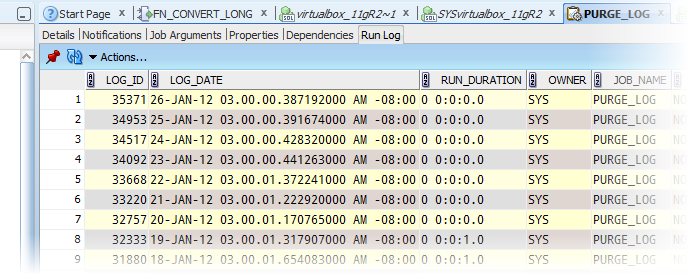
Starting with 10g and the introduction of DMBS_SCHEDULER, Oracle database began tracking and storing the execution duration of a job. By default this information is kept around for 30 days. You can of course change the logging level and the retention period for the job runs – read the docs! The job runs can be viewed via the dba_scheduler_job_run_details SYS view. Oracle SQL Developer shows this data in the job details panel of the schema…
Updated: April 13, 2015 Reports are great ways to access data on demand without having to write and run the code over and over. Sometimes you want to take the results of a query and feed it to another query as an input or parameter. Wouldn’t it be great if you could fire off a report based on the selected value of another report? This is the basic premise of a Master/Child report. For this…
It’s a relational database, so it’s only a matter of time before you stumble across an object that’s dependent on another object, right? If you are looking at a table in the browser, be sure to check out the ‘Dependencies’ page. This page displays the database objects that will be upset if the selected table were to ‘go away.’ You’re probably familiar with these related objects, but if not, then there’s a quick ‘trick’ to…
SQL Developer is built by Oracle, for Oracle. It’s the database IDE. That’s my current elevator pitch, at least. But, SQL Developer is also a fully featured data modeling solution (have you been enjoying my data modeling posts?) AND a 3rd party database migration platform. The migration piece is the Migration Workbench. Since we support migrations from these other database platforms, wouldn’t it be neat if SQL Developer could connect and query those 3rd party…
Welcome to WordPress. This is your first post. Edit or delete it, then start blogging!
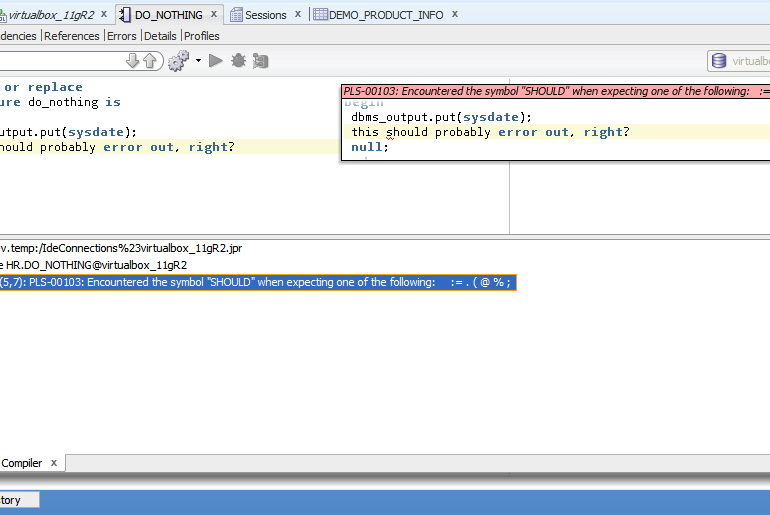
A question that comes up fairly frequently revolves around how to see your errors when working with PL/SQL in SQL Developer. Most folks are probably working in the worksheet – this is the default editor for your connection. Let’s take a look at this sample program 171647508369a5d4f3cb5fb_000005 If we were to create this procedure, we would probably expect some errors. So let’s run this in the Worksheet. I’m using Ctrl+Enter to execute this single statement.…