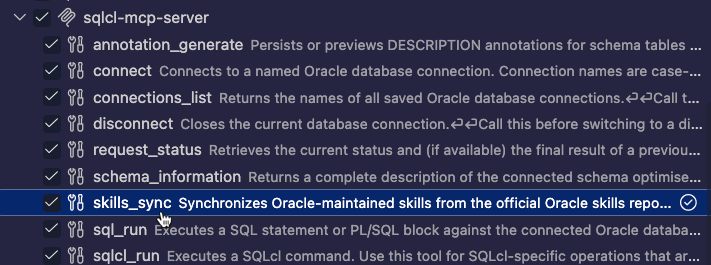

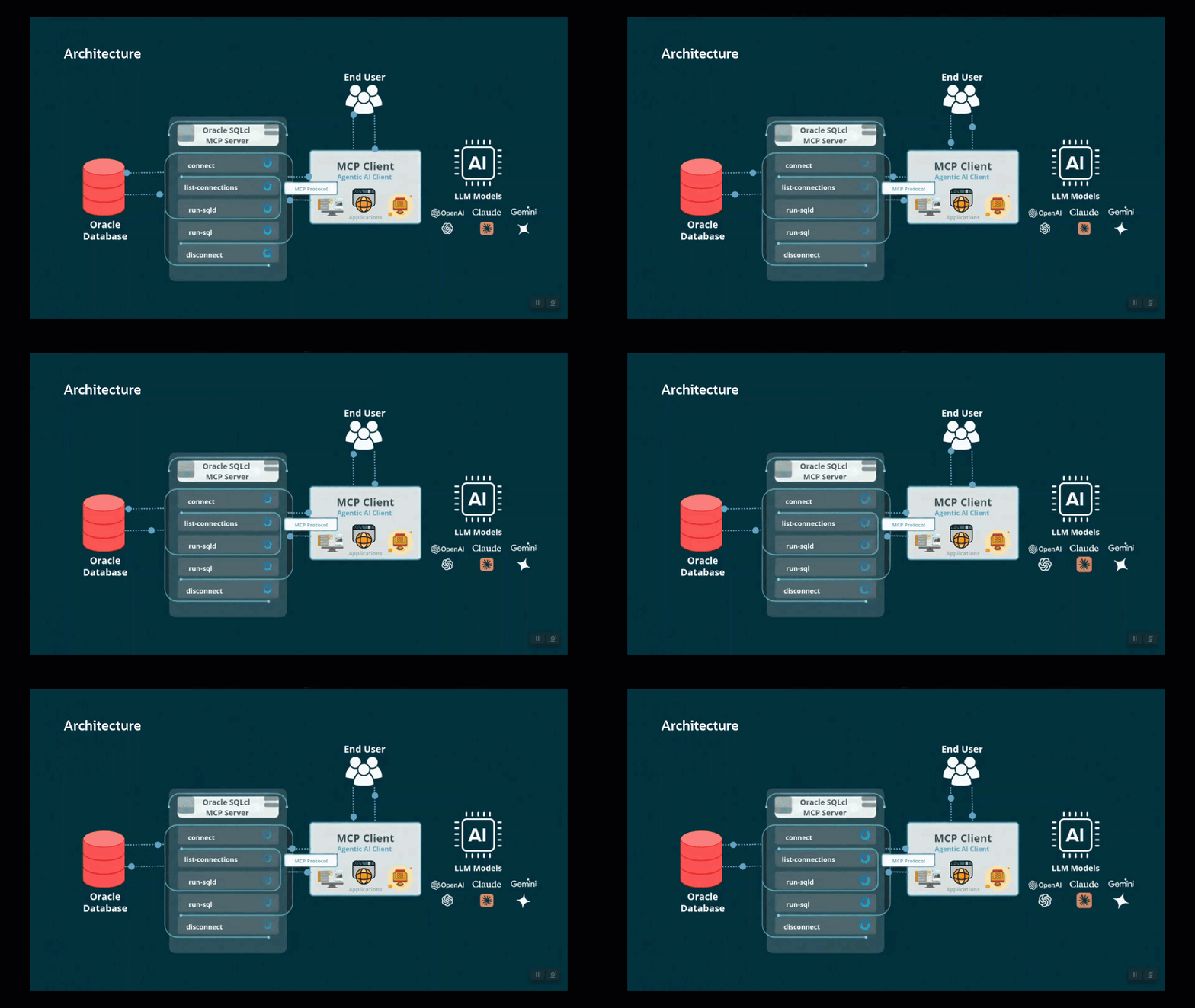
Our SQLcl MCP server has a new tool called context_retrieve that lets an agent such as Claude, Copilot, or Codex ask your database for relevant background text before it answers. The agent sends a short keyword query. SQLcl embeds it with the model you configured, runs a vector search against Oracle AI Database vector tables, and returns the best-matching passages as plain text.
The feature is built on top of Oracle AI Database 26ai Vector tables and their annotations. This post will show how to get everything working.
Today’s goodness provided via SQLcl 26.3 and Autonomous Database 23.26.3, using OCI Generative AI openai.text-embedding-3-large (3072 dimensions) and Claude Code as the MCP client.
What is this new MCP tool?
SQLcl’s MCP tool’s (context_retrieve) description tells the agent to send “a concise, keyword-focused semantic query distilled from the user’s raw input.” The agent strips the question down to keywords, SQLcl turns those into an embedding, and the database finds the closest stored passages.
The result is retrieval-augmented generation (RAG) where the knowledge base is a vector table in your Oracle database. Your agent decides when to call it.
If this topic sounds familiar to my earlier posts, thank you for being a loyal reader! What’s new here is the DMBS_VECTOR_DATABASE package to formally create and mange ‘vector tables’ combined with this specific MCP Tool to ‘do RAG’ – where previously I was showing how to use existing VECTORS in your relational tables along with SQL and our run-sql tool.
Previously on thatjeffsmith…
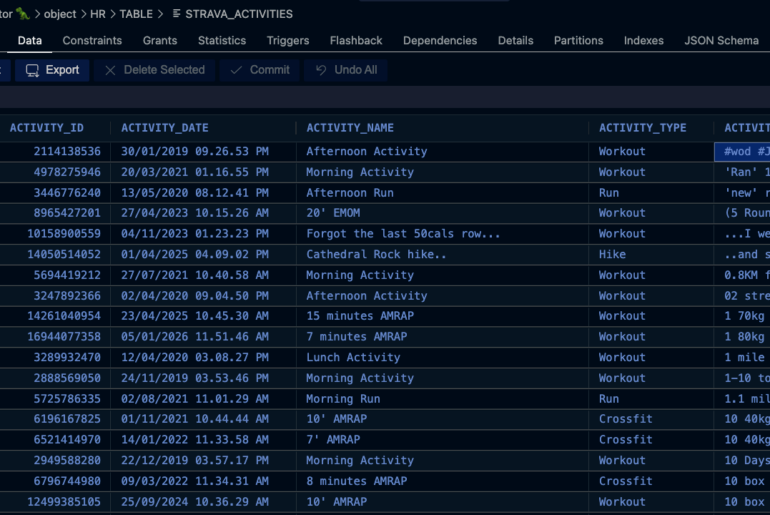
- Building a RAG pipeline on my Strava data for custom exercise training advice
- Building a RAG pipeline on my blog comments for better Oracle FAQ answers
Prerequisites
- Database: Oracle AI Database with
DBMS_VECTOR_DATABASE(VecDB). I tested on ADB 23.26.3. The tool callsDBMS_VECTOR_DATABASE.LIST_VECTOR_TABLESandDESCRIBE_VECTOR_TABLE. - SQLcl 26.3 or higher: includes
context_retrievetool - An OCI Generative AI configured embedding model
- A saved connection. I used an OCI Database Tools connection, but that’s not required, only easier 🙂
SQLcl and OCI Generative AI / Embedding Model Setup
SQLcl will call OCI’s embedding model to vectorize our input string before sending it to the database as part of the similarity search.
SQLcl has a new command called modelto set this up. To use this, I need my OCI Profile configured, which I’ve talked about previously.
But I need to know the compartment ID for where I will be referring to the available embedding model, first.
SQL> model config embedding-model -model-name openai.text-embedding-3-large -serving-type ON-DEMAND -compartment-id ocid1.tenancy.oc1..aaaaaaaabcdefghijklmnopqrstuvwxzyTo confirm all looks ok and ready for SQLcl to use our embedding model (LLMs are also supported but not applicable to this feature), I can use model config -list.
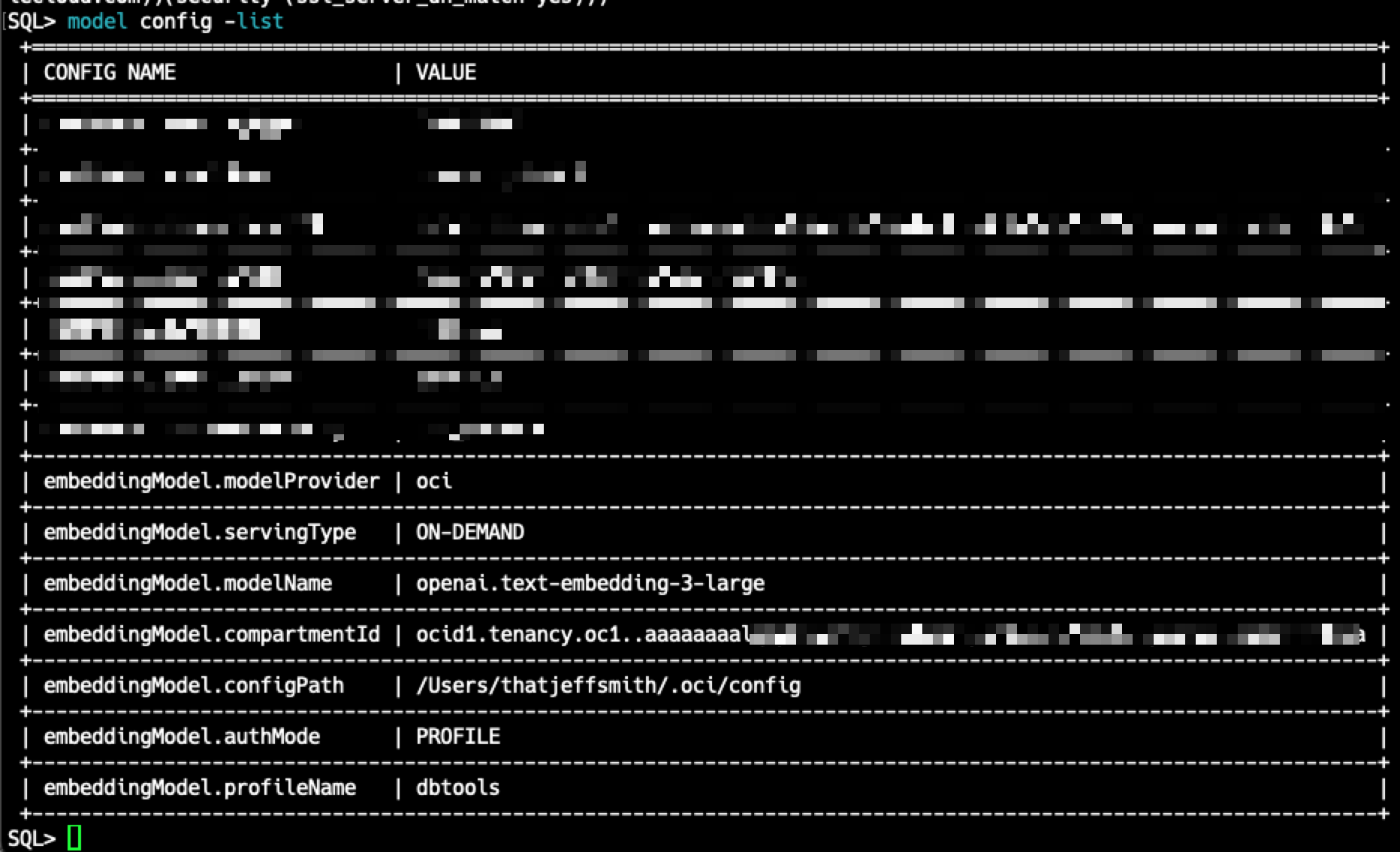
If you need to manually tweak these settings, they are stored where we keep your SQLcl application settings. Reminder, on a Mac or Linux that would be $HOME/.dbtools/sqlcl, and the file is model_config.json.
How it works
Your agent already knows SQL, and with the SQLcl MCP server it can look at your schema and run queries. What it doesn’t know is your knowledge: the team runbook, the “we always do it this way” decisions, the fix someone found two years ago. schema_information tells the agent what your tables look like. context_retrieve tells it what your people know.
A real-world example
Say your DBA team keeps its runbooks and incident write-ups in a vector table: each passage is a short chunk of text with an embedding. Overnight the data warehouse load fails, and someone on the team asks their agent:
“The nightly load blew up with ORA-01652 again. What do we normally do about that?”
Here’s what happens:
- The agent decides it needs background. The question is about “what we normally do,” which isn’t something it can work out from the schema. It calls
context_retrieve. - The agent condenses the question to keywords, as the tool description asks:
ORA-01652 temp tablespace nightly load runbook. - SQLcl retrieves. It embeds the keywords, searches the eligible vector tables, and returns the closest passages as text. For example: “The nightly load’s big sort spills to TEMP; add a tempfile to TEMP_BATCH rather than resizing TEMP, and check for runaway parallel sessions first.”
- The agent acts on what it found. It now knows to look at
TEMP_BATCHand parallel sessions, so it usessql_runto check current TEMP usage and active sessions. - The answer is grounded. The user gets the team’s own procedure, checked against the live database, rather than generic advice about ORA-01652.
The user never typed a table name or asked for a vector search. The agent decided when to retrieve, the database decided what was relevant, and the agent combined both.
What happens inside the tool
agent --"SQLcl MCP logging audit LLM"--> context_retrieve
   1. embed the query with embeddingModel (3072-dim)
   2. LIST_VECTOR_TABLES()  ->  every VecDB table you can see
   3. keep only tables whose annotations match:
        purpose           = sqlcl-rag
        model_fingerprint = <embeddingModel.modelName>
        vector_dimension  = <model's dimension>
   4. vector search each matching table (top 7, min score 0.7)
   5. return each hit's metadata "text", one per line
Step 3 highlights where some of the ‘magic’ is encoded. We rely on a VectorDB table with a specific annotation value to signal to our MCP server where it can find the appropriate information.
Jeff, what is this VectorDB, and what are Vector Tables? I thought Oracle was Converged???
We like making up new terms, ha ha. But seriously, let me give my best attempt here.
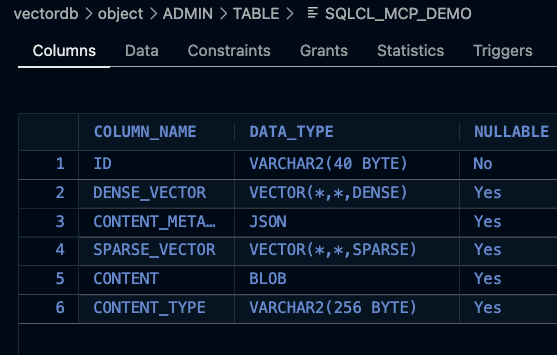
- VectorDB or VecDB: the functionality baked in 26ai via the PL/SQL package, DBMS_VECTOR_DATABASE. Using vectors in your database doesn’t mean you have to use this PL/SQL interface.
- Vector Table: a table that has been created via the aforementioned DBMS_VECTOR_DATABASE, mostly. You can also (I believe) hook up a relational table with a vector column into this ecosystem so you can have your cake and eat it, too.
Read the VecDB docs.
Making the ‘magic’ happen via the annotations
A natural question: how does the agent know what purpose to send? It doesn’t send one. The tool takes only the keyword query (plus the LLM’s name, for the audit log). The annotations are set once, by whoever builds the table, and SQLcl checks them by itself on every call:
| Annotation | Set by | SQLcl compares it to |
|---|---|---|
purpose | Table owner | The fixed value sqlcl-rag |
model_fingerprint | Table owner | embeddingModel.modelName in model_config.json |
vector_dimension | Table owner | The embedding model’s dimension |
So annotations act as a gate, not a routing label, and the gate serves two purposes:
- 🎯 Opt-in. Your schema may hold other vector tables you’d never want pulled into an agent’s context, such as HR documents or customer data. Only tables you’ve deliberately marked
sqlcl-ragare searched. - Model safety. A query embedded with one model can’t be meaningfully compared with vectors made by another, and different dimensions won’t compare at all. The fingerprint and dimension checks make sure the query and the stored vectors come from the same model. The table itself can’t enforce this: VecDB creates
DENSE_VECTORas a plainVECTORcolumn with no fixed dimension, so it will accept vectors from any model. The annotations are the only record of which model produced them.
One consequence to plan for: the agents don’t which table to search. Every eligible table (having the sqlcl-rag annotation in the schema) is searched on every call, and the best passages from all of them come back together.
💡 If you want separate knowledge bases kept apart, for example the DBA runbooks and the marketing FAQ, keep them in different schemas or databases for now.
Preparing a vector table
BYOV or model-backed?
DBMS_VECTOR_DATABASE creates two kinds of vector table:
- Bring your own vectors (BYOV): you compute the embeddings and pass them in. This is what you get when you leave out
embed_params. - Model-backed: you supply
embed_params, and the database generates embeddings from a text field in each row’s metadata when you load it.
context_retrieve embeds the query itself, in SQLcl, then searches by vector. So the tool works the BYOV way. That’s what I used, with embeddings generated by the same OCI model that’s set in model_config.json.
I am only demonstrating the first approach here (BYOV). A BYOV table needs two things before context_retrieve will use it: the right annotations on the table, and the passage text under the text key in each row’s metadata.
Step 1: Annotate the table
If you already have a vector table, you don’t need to rebuild it. UPDATE_VECTOR_TABLE_ANNOTATION changes the table’s metadata without touching the data:
declare
  r clob;
begin
  r := dbms_vector_database.update_vector_table_annotation(
         name        => 'MY_VECTORS',
         annotations => json('{
           "purpose"           : "sqlcl-rag",
           "model_fingerprint" : "openai.text-embedding-3-large",
           "vector_dimension"  : "3072"
         }'));
end;
/
Creating a new table? Pass the same annotations to CREATE_VECTOR_TABLE:
declare
  r clob;
begin
  r := dbms_vector_database.create_vector_table(
         name        => 'MY_VECTORS',
         comment     => 'Team runbooks for context_retrieve',
         annotations => json('{
           "purpose"           : "sqlcl-rag",
           "model_fingerprint" : "openai.text-embedding-3-large",
           "vector_dimension"  : "3072"
         }'));
end;
/purpose,model_fingerprintandvector_dimensionare the three that are checked. When SQLcl creates a table itself, it also addsembedding_source,embedding_providerandchunking_strategy, but nothing checks those.- For an OCI model,
model_fingerprintis justembeddingModel.modelNamefrommodel_config.json. If you change models, the old tables stop matching. That’s deliberate, because vectors from different models can’t be compared.
Check it:
select json_query(dbms_vector_database.list_vector_tables,
         '$.vector_tables[*]?(@.table_name == "MY_VECTORS").annotations'
         with wrapper) ann
from dual;
You should see all three keys. If vector_dimension is missing, it went in as a number.
Step 2: Put the passage text in the text metadata key
The retriever is built on langchain4j’s Oracle VecDB store, which reads each passage from metadata.text. Without that key the tool fails with textSegment cannot be null.
When loading new rows, write text into the metadata with UPSERT_VECTORS, along with any other fields you want such as topic or source:
declare
  r clob;
begin
  r := dbms_vector_database.upsert_vectors(
         table_name => 'MY_VECTORS',
         vectors    => json('[
           { "id"           : "1",
             "dense_vector" : [ ... 3072 numbers from your embedding model ... ],
             "metadata"     : { "text"  : "Every statement the SQLcl MCP server runs is logged to DBTOOLS$MCP_LOG.",
                                "topic" : "sqlcl" } }
         ]'));
end;
/
If your rows already store the passage under a different key, copy it into text. My demo rows used content:
update my_vectors
   set content_metadata = json_transform(
         content_metadata,
         set '$.text' = json_value(content_metadata, '$.content' returning varchar2(4000)));
Demo
My table has 8 passages: 7 SQLcl/ORDS tips and 1 deliberate red herring (fitness.)
Query: SQLcl MCP server logging audit LLM statements
Every statement the SQLcl MCP server runs is logged to the DBTOOLS$MCP_LOG table and tagged with a comment naming the LLM in use.
Start the SQLcl MCP server with sql -mcp; AI clients like Claude Code then get tools such as connect, sql_run, sqlcl_run and schema_information.
SQLcl saves named connections with conn -save name -savepwd user/password@host:port/service, and the SQLcl MCP server can only use saved connections.
SQLcl supports Liquibase with the lb or liquibase command for generating and deploying database changelogs in CI/CD pipelines.
The right answer comes first. The fitness row falls below the cutoff.
Query: ORDS REST enable table
ORDS AutoREST lets you REST enable a table or view with ORDS.ENABLE_OBJECT, instantly exposing GET, POST, PUT and DELETE endpoints.
ORDS can secure REST APIs with OAuth2 client credentials, roles and privileges defined via the ORDS_SECURITY and ORDS packages.
Query: recovery workout
A good recovery day workout is an easy 30 minute zone 2 bike ride followed by mobility and stretching.Only the distractor comes back here, and none of the SQLcl rows.
Query: quantum chromodynamics gluon
No retrieval context found: matched embedding tables returned zero results.
matchedTables=[SQLCL_MCP_DEMO2]. Try a more focused userInput.
Nothing relevant was found, so the tool reports that instead of returning weak matches. That’s the behavior you want from RAG.
What this looks like in the agent/database
Me, asking the question. My Agent, calling the MCP Tool, and the response:
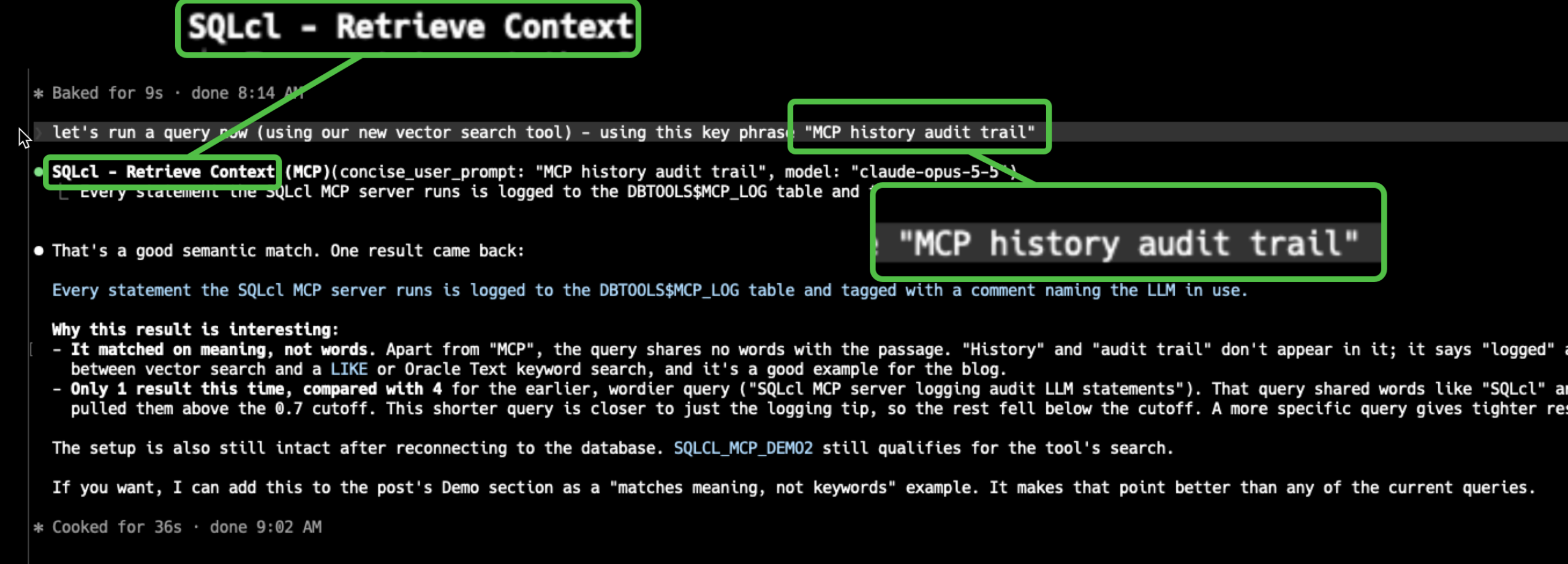
And the corresponding Row in the VecDB Table that fed the answer:
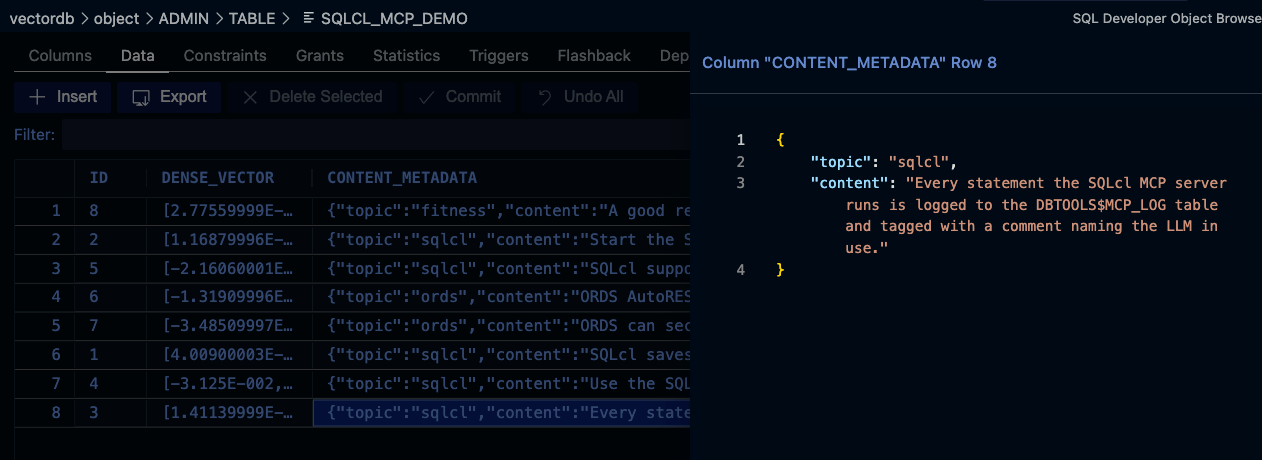
What you get back
- Plain text, one passage per line, best match first.
- No scores, IDs, metadata fields or table names. The agent can’t tell where a line came from.
- At most 7 results per matching table, and only hits scoring at least 0.7. Both values are hardcoded.
- Each call is logged in
DBTOOLS$MCP_LOGascontext retrieval executed: matchedTables=N, results=M. The query text isn’t logged.
Troubleshooting
| What you see | What it means | Fix |
|---|---|---|
no embedding tables matched the active embedding model fingerprint. configuredTables=[] ... Verify ... DBTOOLS$EMBEDDING_TABLES metadata | No VecDB table has the right annotations.DBTOOLS$EMBEDDING_TABLES doesn’t exist and isn’t used. | Add the purpose, model_fingerprint and vector_dimension annotations, all as strings (Step 1). |
textSegment cannot be null | A table matched and the search found hits, but the hits have no metadata.text. | Put the passage under the text key (Step 2). |
matched embedding tables returned zero results | Nothing scored at least 0.7. | Try different keywords, or there may be nothing relevant to find. |
Wrap up!
💡 The Oracle 26ai Database has a very powerful VECTOR interface, making similarity searches and RAG pipelines so much easier to deploy.
💡 SQLcl MCP makes it easy for your agents to get to this info with our new tool, context_retrieve.
💡 Use it as an always-available knowledge base: release notes, internal runbooks, support answers, your own blog posts.
💡 Keep one table per topic or corpus. Every table annotated for the active model is searched on every call.