

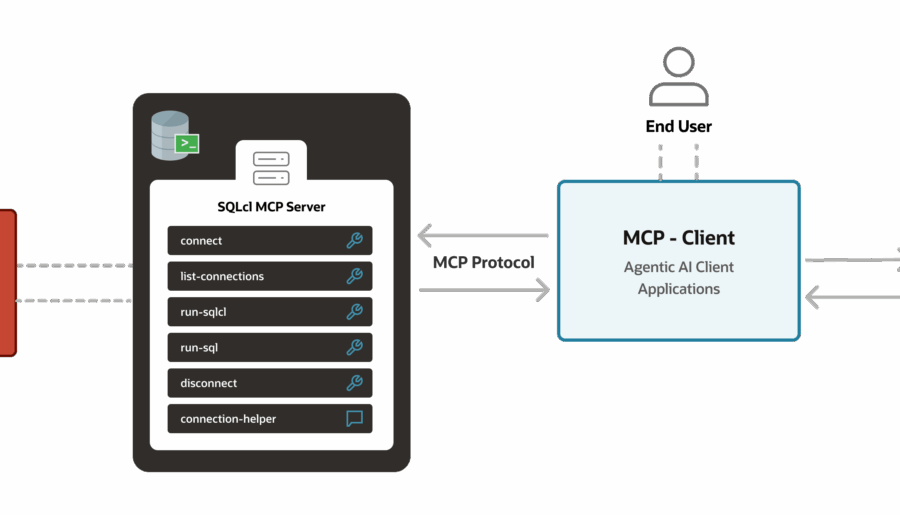
SQL Developer has had a command-line interface of sorts. The primary use cases were for formatting files and running unit tests. However, we wanted to expand the support to include things like generating Carts and running reports. Instead of just creating a few more one-off interfaces, we kind of started over and built a new CLI from scratch. Random Observation: Developers get very excited when they get to redo something. Rather than call the main…
A new feature in Oracle SQL Developer version 4.0 offers to address grammatical issues with your SQL statements. We call these indicators ‘Semantic Analysis Info Tips.’ The easiest way to see one of these ‘tips’ is to try out your favorite sql statement in a worksheet: 11173411386ad90e7a31f52_000000 Accessing the ‘Tip’ Place your mouse over the red squiggle line indicator… Once the tip is available, you can invoke the grammar ‘fix’ by clicking on the hyperlinked…

So go download it. I’m at the beach this week, not working. Mostly. I’ll be talking about our newest addition to the family, pretty much non-stop, starting next week and stopping when version.NEXT is released. You have plenty to look forward to 🙂 For now, just a few points: We’re not distributing the JDK on Windows 32 bit distributions anymore We now require Java 1.7 JDK by default Windows installs will attempt to auto-find the…
Oracle Open World 2012 left me exhausted. Apart from the social and fun stuff like running across the Golden Gate with a few co-workers and keeping up with social and business dinners, we had a ton of presentations, Hands On Labs, and of course the demo pods to man in the Exhibitor Hall. 2013 takes it up a notch or three. We’ll have 8 official SQL Developer-themed sessions, 5 Hands-On Labs, and 3 Demo Pods.…
Organizing your data model makes the information easier to consume. One of the organizational tools provided by Oracle SQL Developer Data Modeler is the ‘SubView.’ In a nutshell, a SubView is a subset of your model. The Challenge: I’ve just created a model which represents my entire ____________ application. We’ll call it ‘residential lending.’ Instead of having all 100+ tables in a single model diagram, I want to break out the tables by module, e.g.…
As you may have heard, Oracle Database 12c is now available. In addition to the binaries and docs going out, we also published a few new Oracle By Example (OBE) chapters. You can find those links here on our product page. Do you know who found these, practically the minute they were published? An enterprising DBA-extraordinaire who was just happening to be presenting at the ODTUG KScope13 conference in New Orleans. He thought it would…
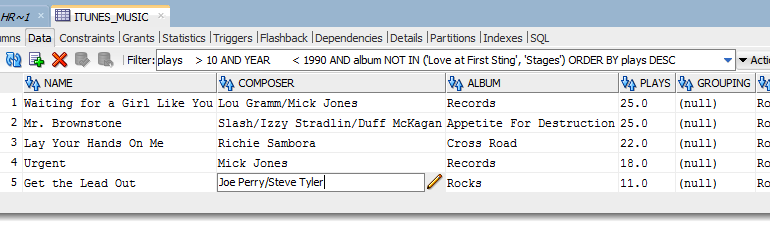
You’re doing some data clean-up, or maybe you’re just trying to answer a business question for a user, and you notice the data doesn’t look quite right. You want to click in that ‘(null)’ cell and tell the world that Tyler and Perry composed that song! But, we’re in a query result set, and not a table editor. I’m the ultimate lazy-dev, so what’s the easiest way to get what I want? Throw In a…
Oracle SQL Developer Data Modeler has a multi-user repository that makes it very easy to control and version changes to your data models and designs. However, it’s stored in a Subversion (think files) repository. Many of our users are accustomed to having EVERYTHING stored in the database. And when something is in a database, then it can be accessed via SQL. So how can I leverage all the data in my designs without having to…
Interesting question from the forums: I’m doing multiple Inserts on a table using a script file (.sql) in SQL Developer. Since it has a lot of statements, I would like to check the progress of it somewhere in the application window. But I don’t see any progress of lines being displayed anywhere. The focus simply stays on in the first line. It would be helpful if the script execution either points to the current DML…
Another post from the FAQ files: HOW TO OPEN MULTIPLE TABLES IN SQL DEVELOPER SIMULTANEOUSLY I’m guessing the user is in a hurry, hence the shouting and lack of punctuation. But that’s OK, I think we’ve all been there. There’s a couple of different ways to get this end result: Use the Pins Change the Preferences Pinning Objects At the top of every editor in SQL Developer, you’ll see a push pin button in the…