

In the current issue of Oracle Magazine, I have an article that discusses how to copy and compare Oracle objects using Oracle SQL Developer. ‘Make the Easy Move‘ was written using Oracle SQL Developer v3.1. As you know, version 3.2 was released several weeks ago, and one of the significant changes included was an update to the Database Diff feature.
The short story:
Previous versions of SQL Developer required the login of the schema that owned the destination objects for the compare. So if you wanted to compare an APPS development to an APPS production installation, you would need the APPS login for prod.
As you can imagine, this was a non-starter for many of our users. So for version 3.2, the Database Diff interface has been enhanced to allow for comparisons sans the destination object owner login. Continue reading if you’d like to see how 3.1 works versus 3.2.
Version 3.1
Database Diff is accessible from the Tools menu. You supply connectivity information for the ‘Source’ and ‘Destination’ locations of the objects you want to compare.
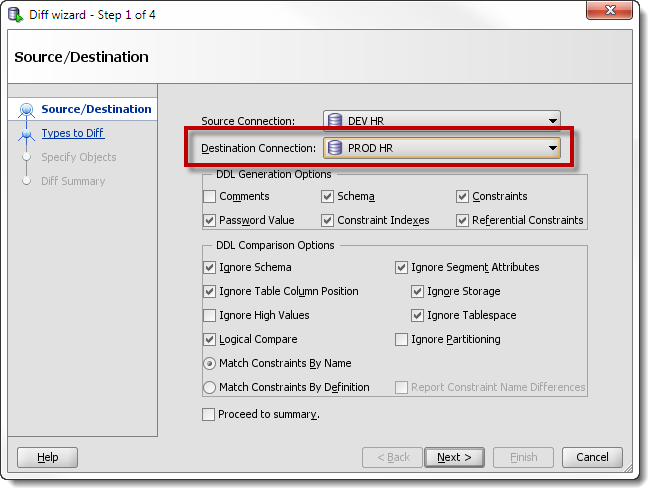
I want to compare a ‘HR’ user and its objects in a development environment to a corresponding ‘HR’ user in a production environment. To make this happen requires that I supply the ‘HR’ user and password for production. In version 3.1 if you do not have the password for prod, you’ll either:
- not perform the compare
- ask your DBA to run the compare for you
If you supply a connection for the target connection other than HR, we’ll assume the same objects are in the schema assigned to that connection. You’ll probably see something like this in the results:
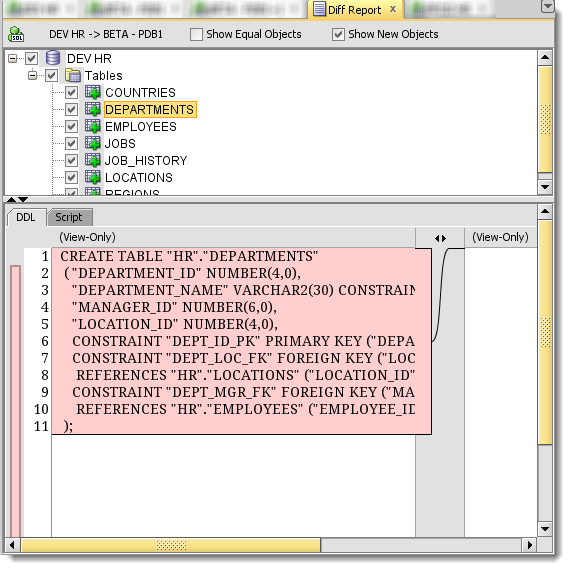
The report shows that all of my tables are missing because SQL Developer isn’t looking in the ‘HR’ schema in the ‘Destination Connection.’
We recognized this wasn’t a tenable scenario for most of our users. So for version 3.2 we introduced the following change.
Version 3.2
Now when configuring a compare scenario, you can tell SQL Developer to ‘Maintain’ the schema across to the destination connection. So even though I have used a SYS connection to my beta environment, SQL Developer will maintain ‘HR’ as the context for identifying the objects and running the compare. Notice also that ‘Schema’ option for the DDL generation options is enforced when using the ‘Maintain’ method.
Generate schema simply says to generate the schema name on all DDL. It is required in order to use the comparison option for maintain schema (because you have to have the schema in order to maintain it). Having the schema name in the source objects allows us to find it in the destination database.
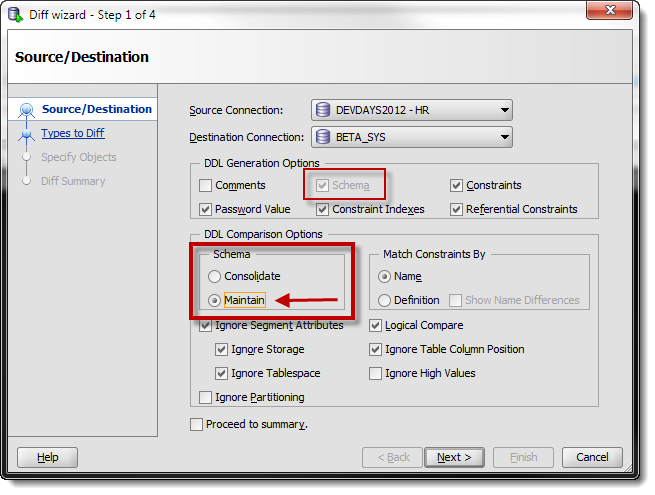
I don’t have the HR connection information for my production environment, but I do have a highly privileged user in prod, so I’ll use that connection instead. Since I used ‘maintain’ in the diff scenario, it will find my HR objects even though I’m not logging in as HR.
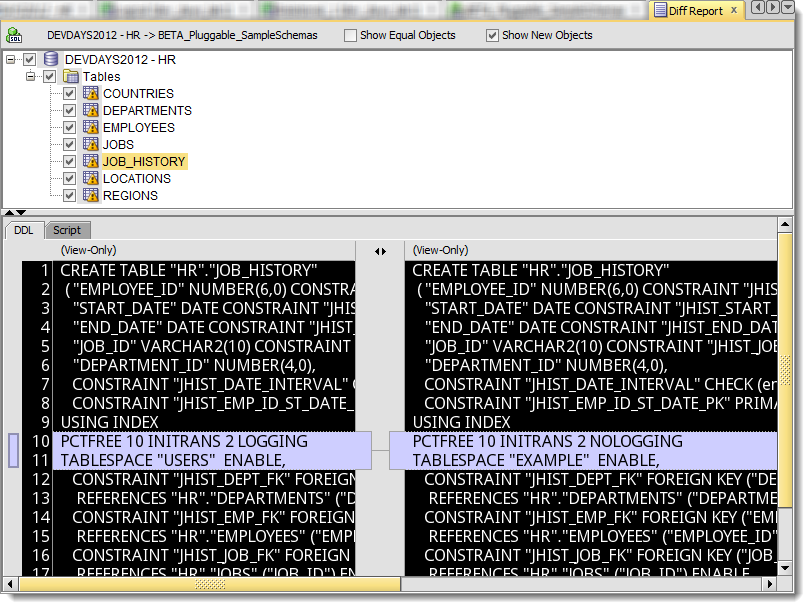
And here’s the comparison results I expect:
Clear as mud?
To summarize, if you want to compare some objects in an environment you don’t have the login information for, use the ‘maintain’ option in version 3.2 of Oracle SQL Developer. We’re looking to make this an even simpler interface for future releases, so stay tuned!
Need More Convincing to Give SQL Developer a Try?



41 Comments
Hello, I hit the same problem. It happens also if you check SQL tab (sql table crate script) in some table definition – shows empty screen.
I have tried step-by-step to execute the same SQL that SQL Developer executes (there is a “Statements – Log” in SQL Developer). There was 6 separate SQL statements and, finally, one of them gives me the correct error: “**ORA-01652: unable to extend temp segment by 128 in tablespace TEMP**”.
Fixing this by extending the tablespace (for example by following: https://dba.stackexchange.com/questions/240774/how-to-increase-size-of-temp-tablespace-in-oracle-12c-rac-with-asm) corrects this error, and some other misbehaviors.
Now I can generate SQL create script for a able, make a diff between schemas, etc.
Nice catch! Thanks for sharing your solution.
We have SQL Developer 19.2 version and I am trying to compare Package Body from one instance to another using Database Diff. Though same schema is been used for comparison we are getting below error.
This is an EBS APPS Account and we are doing a comparison in the lower instance using APPS schema (dev/qa)
Do you need DBA role to do the comparison.
—–
Unable to compare objects.
Ensure that you have the required permissions.
You must own the objects or have select_catalog_role.
if you login as the schema owner, it should work
Hi All,
I have dev and prod database access with login credentials. I am using SQL Developer for schema comparison, after successfully done with schema comparison with all objects, I am getting the below error shows that “Unable to compare objects.
Ensure that you have the required permissions.
You must own the objects or have select_catalog_role.”
Can someone tell me how to resolve the issue.
Hi Jeff,
Hope you can help. I’m running version 4.1.3 and I used the Database Copy Wizard to copy an Oracle 10g (10.2.0.5.0) schema to Oracle 12c (12.1.0.2.0). In both cases I was using the schema user to connect.
I believe the copy worked perfectly but when I try to do a Database Diff between the two schemas the result is that all objects are considered new. It seems that the difference between all the objects is that the source object names are quoted and the destination object names aren’t. Any idea on how to resolve (or avoid) this behaviour?
Thanks,
Claudio
can you show me?
if that was the difference, they’d show as MISSING or NEW objects.
EMP /= “EMP” /= “emp” /= “Emp”
EMP would be shown as MISSING in the schema, because we wouldn’t recognize “EMP” as being the same table.
Thanks for the quick response Jeff, it prompted me to do further testing (and reading) and I now realize that I misunderstood how the Maintain vs Consolidate options work, including the fact that the Schema option has no effect when you choose Maintain! Is the following statement accurate: only use the Maintain option when the target and destination schema names are the same, in all other case use the Consolidate option.
Thanks again,
Claudio
In general, YES – only use the MAINTAIN when the target schema name will = the source schema name for the compare. It’s generally to allow you to do a COMPARE when you don’t have the login privs for your target database.
When taking database diff, I see a lot of difference between DEV and UAT tables since virtual columns which were created due to “Analyze table” is considered as a difference. Is there any option or any way to avoid these list of objects which differ only by virtual columns.
Please help
To add, I am using version 4.0.19
Yes, I’d consider the virtual columns to be false positives. If you take the create scripts and compare them, the virtual columns are excluded.
after schema comparison, not showing diff report
how about some details? starting with, what version are you using?
Jeff, I am using SQL Developer 4.1.0.19. I have a Dev env and a Prod env. I have a highly privileged user in both prod and dev. I have Select any Table, and Select any Dictionary. I tried to do a diff, using the ‘maintain’ method, where I use my user account to query on a separate schema that I do not ‘own’. However every single time I do it, I get a error saying it cannot do it because I do not have the ‘SELECT_CATALOG_ROLE’.
I have gone back and explicitly been given that role from our DBA’s in both environments but the error persists. Any input?
Ditto, any solution?
you have the role, is it set to DEFAULT? it might not be active for your session
Is there a way to compare the tables of two different schema on the same database?
Yes, does this help?
I’ve got how-to scenarios for a LOT of things already here – use the Search to find them faster.
Can this solution compare metadata from XML files that come from tables in 2 different DBs where one DB is SQL-based and the other is derived from a proprietary DB language ?
No, you’d get closer with SQL Developer Data Modeler. But you’d need to get your metadata into a design by importing from generated SQL scripts or doing a database import.
Thanks for the reply so fast! With regards to this topic, can full automation (re-usable/editable scripts) be accomplished with SQL Developer Data Modeler?
Jeff,
Many thanks for your excellent series of blog posts on SQL Developer. Please keep them coming.
I wonder if I can pick your brains on something a little orthogonal to this post.
I would like to build into our release management processes the ability to bring a target schema objects in line with the definition of some DB objects in a particular “release pack”. Hence I’m looking for a tool that can take a definition file of some sort showing the target object(s) DDL (or equivalent metadata) and then compare that to a destination schema and generate the a file containing the DDL necessary to bring the destination schema into line with the definition file.
Is there anyway to call SQL Developer from the command line to achieve this – or, in the course of your work on the above, are you aware of any tools that could achieve this – they need to be callable from a Unix script so we can run this as part of our automated deployment program.
Regards,
– Matt Symes
We’re not there yet, but it’s on our short-term list of things to build.
That’s terrific to hear. As I said if it can be scriptable from command line it would be hugely powerful. Is there anywhere to go to submit feature requests for SQL Developer (or am I already in the right place???)
– Matt
Definitely command-line-able. We’re adding some additional features to our CLI for the next release, but the DB DIFF didn’t make the cut. You can share your ideas and vote up others’ over at our Exchange.
Hi Jeff, this was promising; It seems to read all of the 2000 objects from both databases and brings up the diff report, but when I select an object, at the bottom under DDL I see (View Only) and the following message:
“Unable to compare objects.
Ensure that you have the required permissions.
You must own the objects or have select_catalog_role.”
We didn’t have that role when we were doing schema compares with TOAD. We can’t use TOAD anymore and we didn’t have the generate DDL option anyway. SQL Developer seems to have that option and is free, yay! But our Senior Prod DBA says select_catalog_role is too large for the Data Modeler’s needs.
Will that change in a future release?
Your Senior Prod DBA – I would ask him to do the compare for you?
Hi Jeff, I hadn’t considered that option but I will. 🙂
One thing I was trying to point out was how come SQL Developer requires that role to do schema compares while TOAD apparently didn’t. Perhaps SQL Developer’s diff report returns more thorough/detailed information?
They don’t use dbms_metadata, we do. Hence the one of MANY differences.
After comparing Diff Report tab is not coming 🙁
What happens after you finish the Diff? What exactly do you see?
You can also try v4 EA2 to see if it performs any better.
Hi Jeff,
I’m not getting drop Statements for objects that are only the target Schema. Am I doing something wrong or does SQL Developer don’t do that at all?
You mentioned DROP Statements in this: http://www.oracle.com/technetwork/issue-archive/2012/12-sep/o52sqldev-1735911.html
I recall Database Diff working in 3.1, but ever since I upgraded to 3.2, the objects are being compared but the Diff Report window never appears… Strange.
That would be a bug, as you’re describing it. Please open an SR with MOS or start a thread on the Forums and we’ll see what we can do.
Well, from another article you posted, I see that you can specify a schema, but from the behavior I see, that appears to require the DBA role? Because the schema dropdown is grayed out, even though I have SELECT_CATALOG_ROLE. Is there some other permission required? Because the chance of my getting the DBA role granted is about the same as the chances of the sun going nova tomorrow. 😉
Well, I got all excited, but this still doesn’t do what I or my team need. I need to compare objects in two different schemas on the same database. And either maintain or consolidate seems to want to only look at the schema I connected to as source.
Looks to me like you guys are making this a much harder task than it needs to be. It should be as simple as “Specify source connection and schema”, “Specify target connection and schema”, optionally specify a subset of objects to compare and how, run.
Forcing the schema to be the same as the connection in -either- case is the problem. It’s almost like you’re trying to code an IDE for people who don’t understand what a schema is…and all I can say is “please don’t do that.” Or if you must do that, let me turn it off and supply the intelligence myself.
I’m very happy to see this. While I currently have connections for all of our production instances we are looking to move away from this so the credentials for our prod instances are only held by a more limited group.
It’s going to get better too! Thanks for the feedback.
Hi Jeff!
Do you know if it is possible to compare the records between two tables from source to destination database. e.g. I would like to know if values of one or more columns in the development database match with the values in the production database.
///Felix
Not with the GUI. But you can use SQL to answer that question using a MINUS. SELECT * FROM … MINUS SELECT * FROM … – will show you records in SetA and not SETB. And if you union all that with B – A, you can see differences in both directions.
There are several 3rd party tools out there that automate this and put a nice graphical interface on it, but we do not offer this yet. You could probably build this with a report though.