

Today we released the latest version of Oracle SQL Developer – v3.2.09.23.
The official resources:
I’ll showcase a few of my favorite new features and tweaks in the next several days and weeks, but I thought I’d kick things off right now with a new ‘trick!’
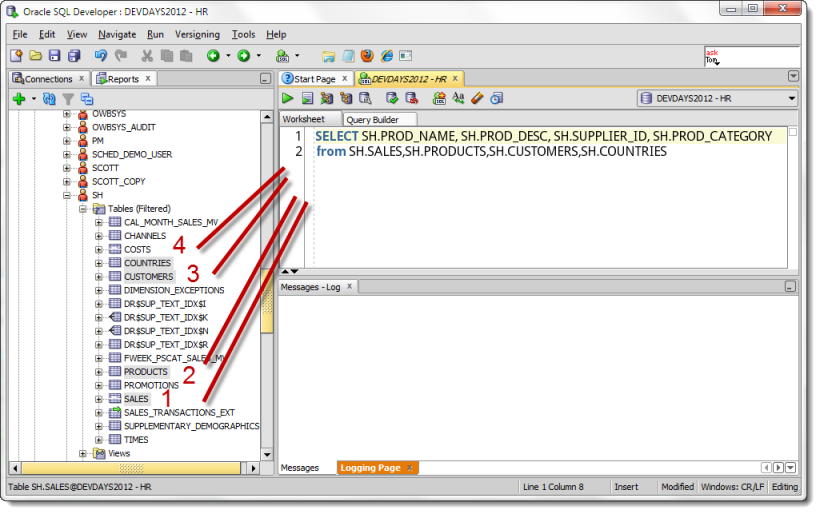
Easily Drag and Drop Multiple Object or Column Names to the Worksheet
We’ve supported Drag and Drop (DnD) from the tree to the worksheet from the very beginning. One of my favorite ‘tricks’ involves building SQL statements with the JOINs automatically generated via the WHERE clause.
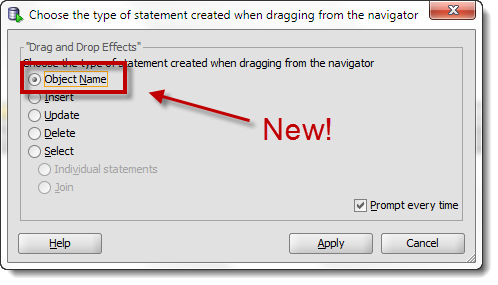
Version 3.1 and Older DnD Context Menu
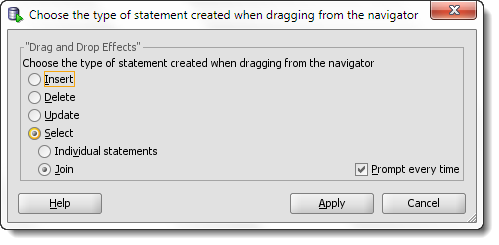
Very nice, but what if I just want the table or object names copied over? Yes, I could use the Intellisense feature in the worksheet. But sometimes I like to mouse things instead of keyboard them.
Version 3.2 DnD Context Menu
When I select my tree objects and drag them over, it simply copies the names over – in the order I clicked them!
Pretty simple, right? But I’m a big advocate of simple and basic features. I think they can have a much larger impact on the end user’s productivity. This is an example of a feature you might use several times a day/session/hour. Versus using a feature like our Data Pump wizard that you might use just a few times a month.
Simple Feature, But Still Intelligent
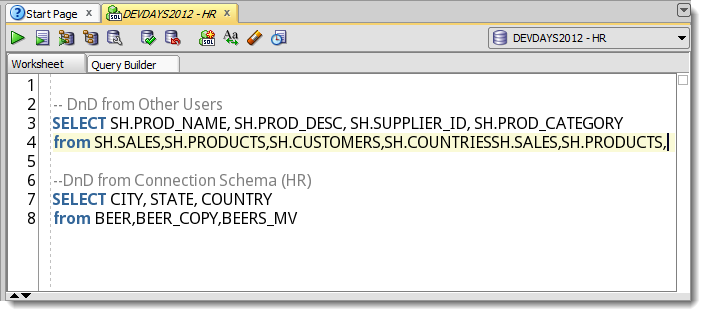
If I drag objects or columns from my connection schema, no schema prefix is added. However, anything I DnD from the ‘Other Users’ tree nodes WILL prefix the schema name.



19 Comments
Got the version numbers the wrong way round. Should have read:
XP: 3.0.04
Win7: 3.2.20.09
Sorry about that!
Probably. With SQL Developer closed on both machines, just copy the XML (SQLHistory.XML).
Thanks for that, Jeff. Turns out that each query is stored in a separate XML file, but I got the job done anyway by copying the entire contents of the XP history folder to the equivalent on Win7. Thanks for your advice.
Thanks for not getting stuck by my horrible answer. That’s what I get for trying to answer w/o thinking!
A very useful and informative article; thank you. Is there a way to migrate SQL history between two PCs? I’ve had to upgrade from an XP box to Win7. The SQL Developer versions are:
XP: 3.2.20.09
Win7: 3.0.04
Many thanks
Is there a more detailed list of all the new features. The document on the Oracle web site is too generic, I would like to know and consequently test all the new features.
Thanks,
The only new features to speak of are the APEX Listener interface, support for 12c and Oracle Cloud, and enhancements to existing features like Database Diff. You can get a more complete set of changes in the Release Notes.
You can also export you settings. I don’t like multiple SQL developer directories around so I usually export my settings, delete the old version, unzip the new, then re-import my settings. And with the export you have a backup copy in case anything else goes wrong 🙂
Thanks for the assist Jim! After a few weeks being happy with the new version, I’ll nuke the old ones. Having the backup is always a good idea though! Just be sure it includes your reports, SQL History, etc.
Good that you reference the new features on your blog! When I clicked on “Startseite –> Was ist neu?” in a german version (AddVMOption -Duser.language=de), I only reached the 3.1 new features!
Ok, not reproducible in English
Where are you seeing this, exactly? I’ll try to fix it ASAP.
in c:\sqldeveloper\sqldeveloper\doc\welcome\de\welcome.html , the new feature link is pointing to sqldev31
Here’s the official 3.2 New Features page
And I’ll look into the translations to ensure if we have a patch it doesn’t go out wrong, again.
thanks!
Great stuff Jeff! DnD for multiple join is amazing!
I know every feature can’t be my favorite, but that one definitely makes my Top 5 list 🙂
Is there any way I can upgrade from 3.1 to 3.2 without losing my settings?
Allan,
Install 3.2 to a new directory.
Run SQL Developer and it will prompt you to migrate your settings from 3.1.