

Ever wonder why Database Diff isn’t called Schema Diff? One reason is because SQL Developer actually allows you to select objects from more than one schema in the ‘Source’ connection for compares.
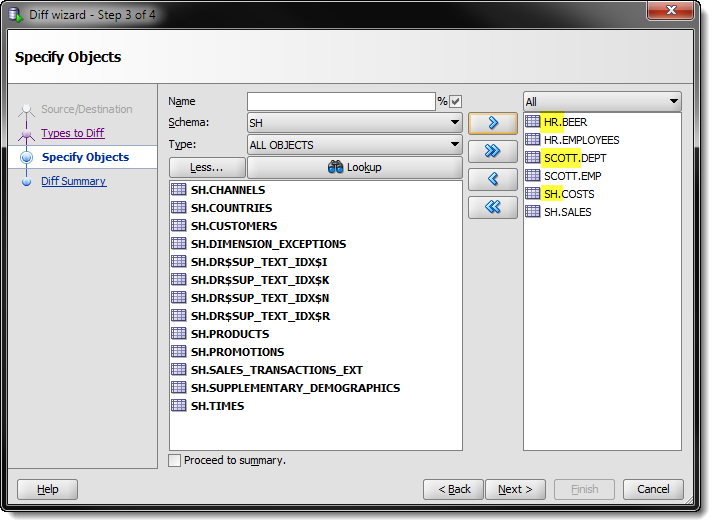
Now, before you get around to testing this – as you should never believe what I say, trust but verify – two things you need to know:
- I’m using SQL Developer version 3.2
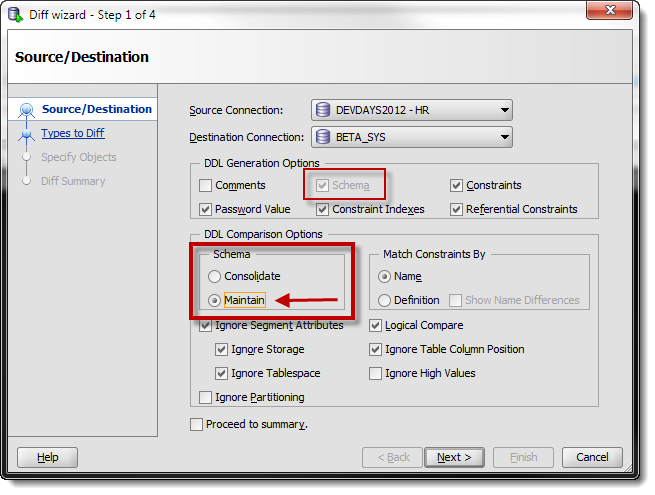
- On the initial screen you need to use the ‘Maintain’ option
Maintain tells SQL Developer to use the schema designation in the source connection to find the same corresponding object in the destination schema.
So after you’ve selected your databases, your diff preferences, and your objects – you’re ready to perform the compare and review your results.
The DIFF Report
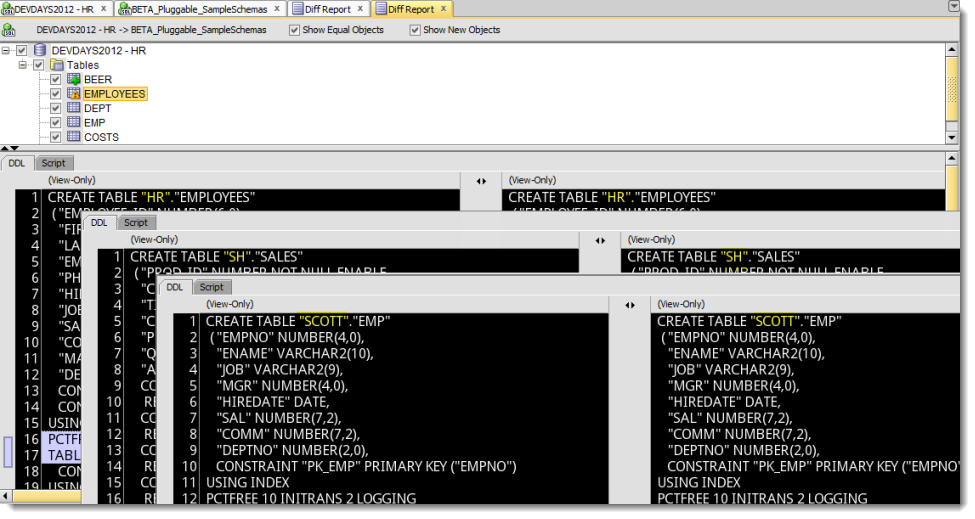
Short and sweet. That’s pretty much all there is to doing a compare with SQL Developer with multiple schemas involved.
You may have noticed in some posts lately that my editor screenshots had a ‘green screen’ look and feel to them.
What’s with the black background in your editors?
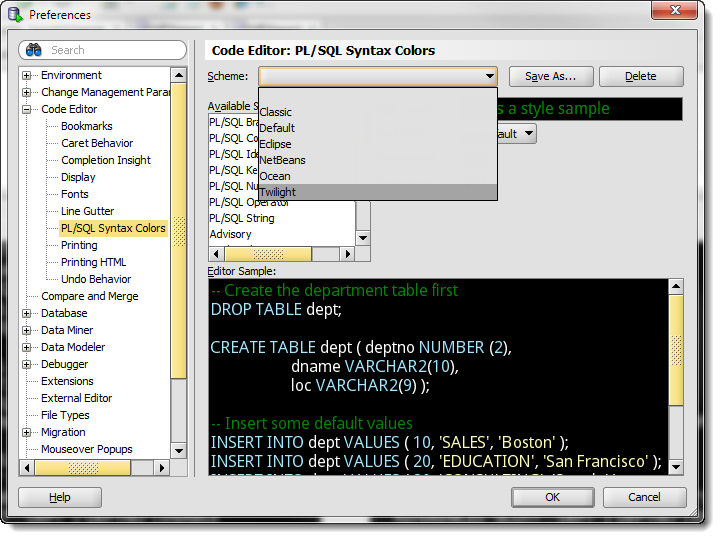
In the SQL Developer preferences, you can set your editor color schemes.
I started with the ‘Twilight’ scheme (team Jacob in case you’re wondering) and then customized it further by going with a default green font color. You could go pretty crazy in here, and I’m assuming 90% of you could care less and will just stick with the original. But for those of you who are particular about your IDE styling – go crazy!


103 Comments
All good and nice but is there any way in SQL Developer we can quickly compare _database_ specific settings or configuration?
E.g. differences between init parameters.
No, sorry.
Schema compare is very slow in SQL developer it takes around 1.3 hours same in Toad only 2 mins. Is there any specific setting to speed it up.
Settings wise, yes you could select fewer things to compare? I’d look at the log/statements panel to see where the performance bottleneck is.
Hi Jeff,
I’m using this feature (using v19.4) just as you’re saying but the report is showing icons with warning sign over identical objects, package bodies in specific. Those are compiled (not for debug) and without errors.
So, what could be happening?
Thanks!!
Hi Jeff,
I’d like to compare two users to check/synchronize their privileges.
I’ve already created second user with Create like.. function, but users complains they are not getting any data from their tables.
Is there a simple way how to compare two users?
Thank you for the suggestion,
Robert
Did you check the ‘Copy Object Privs’ box on the Create Like dialog?
The ‘easiest’ way would be to go to the SQL page for each User, and copy the DDL script out for both and do a file diff
Might be easier to just write some SQL though, esp if someone already wrote some you could borrow off the innerwebs.
Hi Jeff
Is there a way to use database diff from a command? or from SQLcl ?
and are you using DBMS_METADATA_DIFF?
The guys here want to use it from the TFS.
I told them to use sqldeveloper but they want some API to use from the TFS so it can be automated.
Thanks
from command line – no
do we use dbms_metadata_diff – no
we do use dbms_metadata to generate XML objects but then we pass that through some OEM code to do the diff
we’re working on a replacement/upgrade for this entire work flow but it will take awhile to get there – stay tuned
There’s an outdated SQL Developer version where this checkbox is missing.
I’ll try to get the new version there first.
Thanks anyway.
I am not seeing options to select Source and Destination databases on 1st screen of Diff Database. What am I missing to perform. I have connected to both the databases in object browser.
Please help me.
What do you see? Post a screenshot to an img sharing site and put the URL back here.
Hi,
Please find URL of screen shot of the issue I am facing while trying to select Databases as Source and Destination.
https://drive.google.com/open?id=19BdAOCThJQS7zV590ySkVHxfIlAQak2r
Please help me here to get this working.
Regards,
Niraj
Something is ‘wrong’ – do you have more than one connection defined in SQL Developer?
What version of SQL Developer, OS, and Java are you running?
We have multiple schemas within a database (Dev env), and there are times when we need to do a diff between the schemas on the same database, usually against a golden copy of the metadata, but there does not seem to be a way to do that. The Diff Wizard insists on having two different databases. Is there a way to do a diff within the same database that maybe I am overlooking? Security constraints make doing a diff between Development and another database a painful process.
I have a connection on DEV in DB1 and a connection on PROD in DB1, DB DIFF lets me pick DEV and PROD connections, no problem.
what are you trying to do, exactly?
I’m trying to diff two different schemas in Dev, one a development schema and one a golden copy. “We have multiple schemas within a database (Dev env), and there are times when we need to do a diff between the schemas on the same database” So, I am trying to diff between DEVDB.schema01 and DEVDB.schema02. Diff Wizard does not appear to have an obvious way to do that. I’m hoping it is just something I am missing.
can’t have the same schemas in the same connection for the diff
so do schema 1 in dev to prod then run again for schema 2…if I understand you correctly
Yes, you can.
Create a connection for DEVDB.schemaa01 and DEBDB.schemaa02. Do the diff, pick those two connections, and you’re off and running.
Due to security constraints, running a diff against production is a time consuming process, so we keep a schema with a golden copy of the current production metadata in our Dev environment. If I understand correctly, I can’t do a diff between two different schemas in the same DB, which is fine; I just need to find another tool that will do that. Thank you for your time! Have a wonderful weekend!
Using version 18-something.
Have a database and copy in a second database and need to compare.
There are a 42 schemas in the destination, now after about 45 minutes I succeeded to select all objects of the first 6 schemas. Really!
And now I wonder how long it will last, to create the diff.
So unfortunately, object selection is incredible slow.
Even when selecting all objects in a small schema it lasts minutes to add them to the list.
The diff itself was finished in the few minutes as I was writing this, so this is ok, but why does it last that long to select objects?
42 or 6?
It’s basically setup to do 1 to 1. What exactly are you needing to do?
And yes, the schema compares are not fast. There’s both database code running via DBMS_METADATA, and then we take the results and run it through some OEM code to generate the DIFF reports and DDL scripts.
Well, there are 42 schemas in total, and after the object selection of the first 6 schemas lastet that long, I stopped further selection and started the diff for the first 6 schemas.
Then I started a second and a third diff, also with smaller schemas it is faster. The speed also depends on the object type. Two larger Packages may last longer the a dozen tables.
With many schemas 1 to 1 comparison is not efficient. If it would be possible to simply select several or all but “Oracle maintained” schemas with all objects option, and start making all the work in background after starting the actual diff, that would be nice.
I still don’t understand what you’re doing.
6 schemas.
You’re picking 6 schemas, every object, in one database, to compare to 6 schemas, every object, in another database?
We’re setup to do 1 to 1 comparisons, this post shows a variation, but it’s not meant to imply you should pick every object in more than several schemas to do a compare.
“You’re picking 6 schemas, every object, in one database, to compare to 6 schemas, every object, in another database?”
Yes, I was doing exactly that, and it lastet 45 minutes to add all the objects to the diff.
Ok, well then, depending on how many object we’re talking about, 45 minutes is about what I would expect.
In the Compare functionality, is there a way to keep matching lines lined up in the results? In other tools we have used, if there were lines in 1 object and not the other, it would show blank likes to keep matching code in sync.
Is there a way to export a report of the database Diff Command?
Just the scripts.
I ran a diff on 2 schema’s X and Y and when it was halfway though I clicked Run in Background (Hide), but Now I cannot see it on my screen and I don’t even know if it finished.
View – Task Progress
If it’s finished there will be a new editor open in your tab group with the results.
Thanks it ran for about for about 4 hours, nothing showed up, and I ended up killing the sqldeveloper on my machine and then ran it on server, but thanks for responding quickly.
How do I save the output from the ‘diff report’. It shows on my screen but , then what do I do with it? I need to send it to the director that requested it.
You can save the diff scripts by checking the ones you approve and using the save button on the toolbar. There’s no diff report per se that you can save.
Hi,
The UX has been a biggest issue with SQL Developer. I run a compare tool and it gave me a list of objects, now I need to go though all objects (approximately 70) and scroll to right and then to left to see the whole DDL script. Why not add a wrap text to the result? Or add export to text, so I could use more friendly text editors?
>>Or add export to text, so I could use more friendly text editors?
You mean the ‘Save’ button on the toolbar?
That scroll annoys me too, i’ll log a bug.
The best scenario for Oracle would be to buy tool from other vendor, e.g. Intellij. Trying to develop some tool is a waste of time, you would never do something like IntelliJ.
I wish you’d have told us that 12 years ago.
Since we’re here, what data grip features do you enjoy?
The schema & Table comparison works but well. The DDL tab provides the differences between source and target table. The script tab provides the actual script to use to make the objects same.
This is where it goes wrong.
The script generated fails to consider the sequence of columns from the source and haphazardly provides the ALTER statements in a random order.
I am using sql developer 4.1.1.19
You can’t re-order columns in an Oracle table without rebuilding it. Maybe that’s why the ALTER scripts generated don’t go that route.
Hi Jeff,
Scenario: I am logged in scott in both databases but i want to compare the HR schemas. scott has the select any table , select any dictionary,catalog_role roles.
Can i do compare for HR schemas using sql developer?
That might not be enough privs, but you can try:
define connections, SCOTT to each database.
set DDL Comparison Options, Schema, to ‘Maintain’
select objects from HR schema in source.
Maintain tells SQLDev to use the schema attached to the object in the source to ID the schema of the object to compare it TO in the target. Since they’re both ‘HR’, you should be good to go.
May I respectfully suggest that “maintain” should be the default behavior? Maybe?
john3