

I’ve done a couple of posts on how to use SQL Developer to load your Excel files to an Oracle table. However, I always wonder how many folks realize there may be a ‘better way.’ If you are loading data to Oracle on a regular basis, there’s a few things I want you to know about:
SQL*Loader is a client tool. It runs on your desktop and connects to the database over SQL*Net. It’s part of the Oracle Client installation. It reads one or more files, parses the data, and loads it to your tables. A control (CTL) file that defines how the data is to be read does most of the hard work. Actually, you’ll do most of the hard work by creating the CTL file. Are my strings single or double-quoted? What delimits a value, commas or pipes perhaps?
I think one of the reasons folks tend to stick with ‘the GUI’ is that they like running a wizard, answering a few questions, and then hitting ‘Go.’ I’m guessing you didn’t know you could use SQL Developer’s Import Data Wizard to look at your data, build the CTL file, and then give you a batch or SH file to execute to kick things off. I’m guessing that because until today, I didn’t know either 🙂
Here’s what a CTL file can look like
load data
infile 'C:\Users\jdsmith\Documents\table_exports\beer_pipe_delimited2.dsv' "STR '\r\n'"
append
into table BEER_COPY
fields terminated by '||'
OPTIONALLY ENCLOSED BY '"' AND '"'
trailing nullcols
           ( BREWERY CHAR(4000),
             STATE CHAR(4000),
             COUNTRY CHAR(4000),
             CITY CHAR(4000),
             ID CHAR(4000)
           )
This file was created by SQL Developer. Now the ‘beer_pipe_delimited’ file was ALSO created by SQL Developer via the Export Wizard. Once I have a pipe-delimited file, what the ‘best’ way to load that to Oracle?
If you have access to your database server, then I’d say an External Table is probably a good way to go. But, if you’re just a ‘lowly developer’ who can’t put stuff on the server and you don’t have a SAMBA directory setup, then SQL*Loader is a nice fall-back position.
Building the SQL*Loader Control File
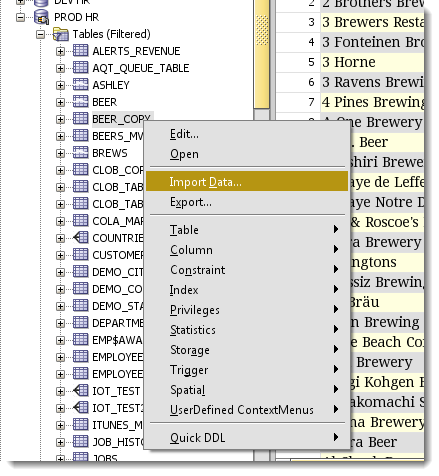
Once you open the Import Data wizard from your table context menu, you’ll be asked to supply the file that holds the data to be loaded.
Define the Record and String Delimiters
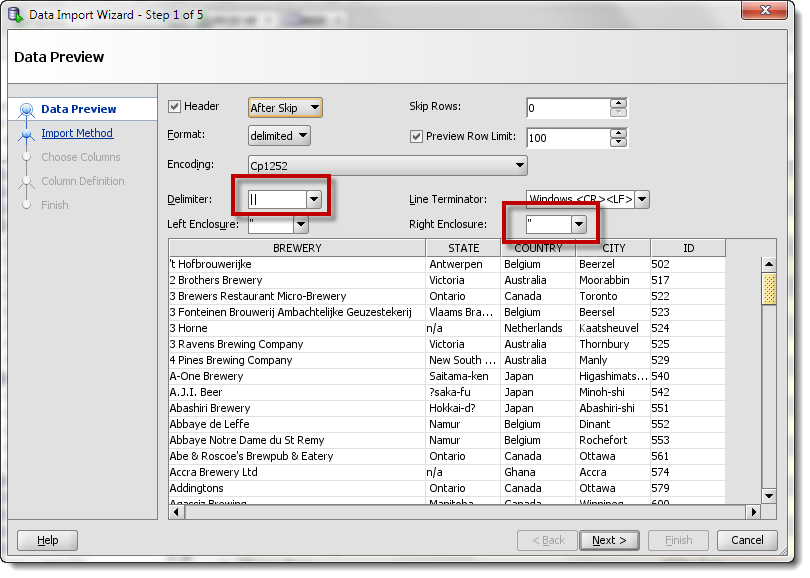
If you have the settings correct, you should see your records in the grid. If they look ‘funny,’ stop. Don’t pass go. Make sure the Enclosure and Delimiter settings are correct. Otherwise you’re going to have some bad data inserted, if it happens to insert at all.
If your data looks kinda ‘funny,’ then make sure your file Encoding scheme is right. If it’s set to Unicode and your file isn’t Unicode, you’ll know right away you have a problem.
Choose Your Import Method
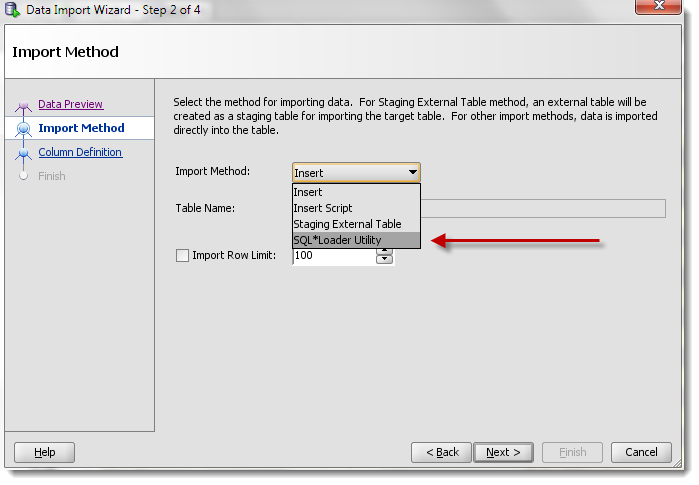
You’ll notice that ‘Insert’, ‘Insert Script,’ and ‘Staging External Table’ are also available. Insert will work just fine, but if you’re dealing with a large amount of records, it will take much longer to run than SQL*Loader or using an External Table.
Map the Columns
The wizard defaults to loading the source columns to the target table columns. If they are named differently, you’ll just need to map them manually using the dropdown control.
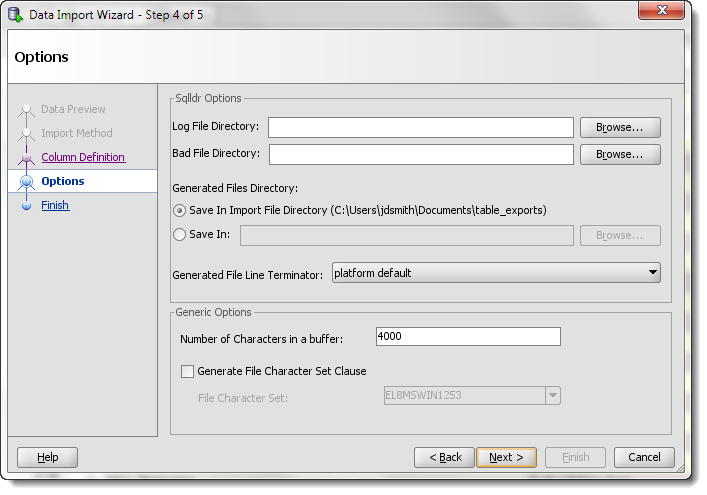
Defining the SQL*Loader Options
You’ve already done the ‘hard’ work. Now you just need to tell SQL Developer where to write the CTL and batch script files to. And where you want to log the SQL*Loader session to. And how big to make the buffer and to ID the characterset.
Once you click ‘Finish,’ you won’t find your new records in your table. No, what you’ll find are the files you need to start your SQL*Loader session.
The Generated Files
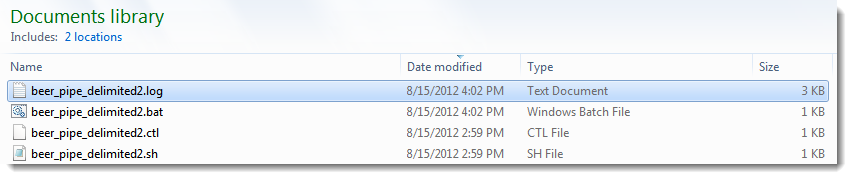
You’ve already seen what the CTL file looks like. Since I’m on Windows, let’s take a look at the generated .BAT file.
sqlldr CONTROL=beer_pipe_delimited2.ctl LOG=C:\Users\jdsmith\Documents\beer_pipe_delimited2.log BAD=C:\Users\jdsmith\Documents\beer_pipe_delimited2.bad skip=1
This basically tells Windows to fire up ‘sqlldr,’ which is the EXE that runs SQL*Loader. It sends the CTL file, tells it where to LOG, where to write failed records to.
Now on my machine, I had a problem. I don’t have $ORACLE_SID setup, because Oracle isn’t running there. So to get this to work, I needed to put in my connect string. So I modified the file to
sqlldr hr/[email protected]:1521/orcl CONTROL=beer_pipe_delimited2.ctl LOG=C:\Users\jdsmith\Documents\beer_pipe_delimited2.log BAD=C:\Users\jdsmith\Documents\beer_pipe_delimited2.bad skip=1
Gotta love that password, huh? Of course you can use this batch file or create your own. The expected parameters will show if you run SQLLDR by itself.
SQL*Loader: Release 11.2.0.1.0 - Production on Wed Aug 15 16:52:15 2012

Copyright (c) 1982, 2009, Oracle and/or its affiliates.  All rights reserved.


Usage: SQLLDR keyword=value [,keyword=value,...]

Valid Keywords:

    userid -- ORACLE username/password
   control -- control file name
       log -- log file name
       bad -- bad file name
      data -- data file name
   discard -- discard file name
discardmax -- number of discards to allow          (Default all)
      skip -- number of logical records to skip    (Default 0)
      load -- number of logical records to load    (Default all)
    errors -- number of errors to allow            (Default 50)
      rows -- number of rows in conventional path bind array or between direct p
ath data saves
               (Default: Conventional path 64, Direct path all)
  bindsize -- size of conventional path bind array in bytes  (Default 256000)
    silent -- suppress messages during run (header,feedback,errors,discards,part
itions)
    direct -- use direct path                      (Default FALSE)
   parfile -- parameter file: name of file that contains parameter specification
s
  parallel -- do parallel load                     (Default FALSE)
      file -- file to allocate extents from
skip_unusable_indexes -- disallow/allow unusable indexes or index partitions  (D
efault FALSE)
skip_index_maintenance -- do not maintain indexes, mark affected indexes as unus
able  (Default FALSE)
commit_discontinued -- commit loaded rows when load is discontinued  (Default FA
LSE)
  readsize -- size of read buffer                  (Default 1048576)
external_table -- use external table for load; NOT_USED, GENERATE_ONLY, EXECUTE
 (Default NOT_USED)
columnarrayrows -- number of rows for direct path column array  (Default 5000)
streamsize -- size of direct path stream buffer in bytes  (Default 256000)
multithreading -- use multithreading in direct path
 resumable -- enable or disable resumable for current session  (Default FALSE)
resumable_name -- text string to help identify resumable statement
resumable_timeout -- wait time (in seconds) for RESUMABLE  (Default 7200)
date_cache -- size (in entries) of date conversion cache  (Default 1000)
no_index_errors -- abort load on any index errors  (Default FALSE)

PLEASE NOTE: Command-line parameters may be specified either by
position or by keywords.  An example of the former case is 'sqlldr
scott/tiger foo'; an example of the latter is 'sqlldr control=foo
userid=scott/tiger'.  One may specify parameters by position before
but not after parameters specified by keywords.  For example,
'sqlldr scott/tiger control=foo logfile=log' is allowed, but
'sqlldr scott/tiger control=foo log' is not, even though the
position of the parameter 'log' is correct.
The Output
Ok, so I have my batch file ready to go. I just double-click on it, Windows launches SQL*Loader and I sit back and watch! But it’s a very short show. It takes less than 2 seconds for Oracle to load the almost 12,000 beer records.
Table BEER_COPY:
  11955 Rows successfully loaded.
  0 Rows not loaded due to data errors.
  0 Rows not loaded because all WHEN clauses were failed.
  0 Rows not loaded because all fields were null.


Space allocated for bind array:                 240120 bytes(12 rows)
Read   buffer bytes: 1048576

Total logical records skipped:          1
Total logical records read:         11955
Total logical records rejected:         0
Total logical records discarded:        0

Run began on Wed Aug 15 16:55:38 2012
Run ended on Wed Aug 15 16:55:40 2012

Elapsed time was:     00:00:01.79
CPU time was:         00:00:00.31
This is a good bit faster than loading my data via the Excel importer, which is the same as doing a bunch of straight INSERTS. If you want to know why this is faster, we can go back to the docs.
A conventional path load executes SQL INSERT statements to populate tables. In contrast, a direct path load eliminates much of the database overhead by formatting data blocks and writing them directly to the database files. Direct writes operate on blocks above the high water mark and write directly to disk, bypassing the database buffer cache. Direct reads read directly from disk into the PGA, again bypassing the buffer cache.
I Realize You Probably Will Still Like the Excel Importing Better
But, I hope you also know you have alternatives available when you run into problems with Excel imports. You can easily save an Excel file to CSV and load it up as an External Table or with SQL*Loader.
Can we make our interfaces with SQL*Loader and Data Pump better? Let us know about it in our Exchange or here via the comments section.



81 Comments
SQL stands for Structured Query Language. SQL lets you access and manipulate databases. SQL became a standard of the American National Standards Institute (ANSI) in 1986, and of the International Organization for Standardization (ISO) in 1987
What is true for $100, Alex?
SQL*Loader: Release 12.1.0.2.0 – Production on Tue Dec 24 11:55:19 2019
Copyright (c) 1982, 2014, Oracle and/or its affiliates. All rights reserved.
Path used: Direct
^Z^CSQL*Loader-2028: load discontinued to user interrupt (Ctrl-C) [4]
please help in resolving above error
Don’t hit Ctrl+C while it’s running?
This may seem to be a very basic question. Once the batch file is generated, where do you run the script? Sorry I am new to this.
That bat script is going to call sqlldr.exe which has a command line interface…so you’re going to do everything from a CMD window (assuming you’re on Windows OS)
Hi,
Very helpful information Jeff!!
I have nclob column in my table, when tried to export table data into csv file I am getting “File contains invalid format data”.
can you suggest how we can handle thins ?
Thanks,
Avinash Nagawade
Would need some sample data to have a play at it.
Hi Jeff,
I tried to export data using the sql develope’s loader option, got succeed into data export but failed into reimport.
Data export from sqldeveloper exported the nclob data of each row into separate file with the different -different file names and reference of those files added into the main loader file.
example – “0|TEST_LOADER_NCLOBcfe88253-0163-1000-814d-ac1839e22321.ldr|”
when I tried to reimport the data sqldeveloper imported the rest of data perfectly but nclob column is showing the filename(“TEST_LOADER_NCLOBcfe88253-0163-1000-814d-ac1839e22321.ldr”) instead of actual data in the file which is created separately to store nclob data.
I am not sure what did I missed. please help.
Thanks,
Avinash
Ok so it sounds like it’s all working up until you go to import it. If you open one of the NCLOB data files, is the data there as expected?
Also
>>when I tried to reimport the data sqldeveloper imported the rest of data perfectly but nclob column is
This doesn’t make sense. Did you mean when you tried to reimport the data, SQL Loader…?
Sorry, yes you are right.
when I tried to reimport the data, sqldeveloper imported the rest of data perfectly but nclob column is showing the filename(“TEST_LOADER_NCLOBcfe88253-0163-1000-814d-ac1839e22321.ldr”) instead of actual data in the file which is created separately to store nclob data.
Hi jeff,
I ran the bat file with correct user name and pw, still i am getting the error
SQL*Loader-128: unable to begin a session
ORA-01017: invalid username/password; logon denied
can you please help on this.
might be a TNS issue, can you get sql*plus to connect using the same connect string? You might need to set ORACLE_SID in your session.
Hello, just a quick note to say the links to the Oracle help center in your post describing the different methods do not work (ERROR 404), in case you would like to update it.
Thanks!
No, thank you! Just updated those 3 links, they should be working now.
Hi Jeff.
I find it strange that when SQL Developer generates the SQL*Loader control file using the “import” wizard, it uses CHAR(4000) as the type for all of the columns (I know the size of the buffer can be modified), but when the control file is created by the “export” wizard, the data types are defined according to the actual columns’ data types.
Is there a reason for that behavior?
Using 17.3.1 – running, SELECT * FROM LOCATIONS, export to Loader, I don’t see this. I see each column sized as it’s defined in the table.
Yes, that is exactly my point.
When you export, the loader control file is created with the appropriate data types, but when you import, the control file that is created creates always CHAR() columns.
It shows CHAR(4000) as the type for all of the columns in the CTL Files. Thanks
And…?
Hi Jeff,
Thanks for the awesome information.
However, I am stuck at one thing. I have Oracle server 11g and SQL Developer client 3.2. When I follow your steps, under Import Methods I can not see sqlldr option. I have kept sqllder.exe in sql developor’s BIN folder (which is right or wrong I am not sure).
Can you please let me know from where I can download sqlldr file which is compatible with sql developer 3.2 ? Or will I need sql developer re-installation ?
Waiting for your inputs on this.
Thanks,
Sanket Kelkar.
what type of file are you loading into the import wizard?
I am loading a .xlsx file.
SQL*Loader and External Table only available for CSV imports.
In SQL developer I am trying to import XML file into my database using import data option.
When I browsed for my XML file I get the Open File Error ‘Could not open File____ because of the error:null’ Please help.
We don’t offer an importer for XML
Thanks for finally talking about > Using Oracle SQL Developer
to Setup SQL*Loader Runs <Liked it!
Hi Jeff – great post! I’m running a very recent version of SQL Developer (I really like SQL Developer BTW) on a text file and it’s just saying:
File _______ cannot be opened due to the following error: null
I’ve tried a couple of different files and tables. The files look fine. They are pipe-delimited text files and the tables were correctly created.
@M. Whitener I received the same error. My solution was to rename the file from .txt to .csv. Unfortunately, the interface is strongly type to a file type. You’d think that a person could just click a few buttons to setup an import with a .txt file or what not.
Fixed for v4.2