

Looking at data can get tedious. Your eyes start to hurt. Your mind starts to wander. You start humming the theme song to The A-Team. Wouldn’t it be nice if the data you started your day with could be jazzed up a bit?
We’ve seen in an earlier post how you can use gauges and hyperlinks in your queries and grids. But maybe you didn’t realize that just plain jane HTML tags would also work.
Yes folks, you can get Comic Sans MS in your grids.
Here’s an example:
SELECT FIRST_NAME ,
LAST_NAME ,
EMAIL ,
PHONE_NUMBER ,
HIRE_DATE ,
JOB_ID ,
CASE
          WHEN Salary > 5000
          THEN '<html><strong><font color="green" face="Comic Sans MS" size=5>'
               ||SALARY
               ||'</font></strong>'
          ELSE '<html><font color="blue" face="Comic Sans MS" size=5>'
               ||SALARY
               ||'</font>'
     END salary
FROM HR.EMPLOYEES
fetch FIRST 20 ROWS ONLY
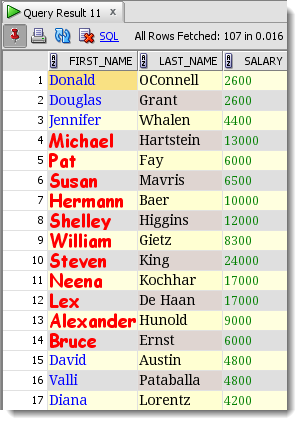
Running this in a SQL Developer worksheet with F9 or ctrl+enter will produce output that looks like this:
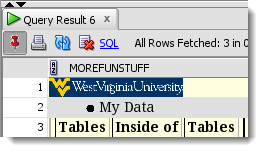
So what else can it render? Let’s find out!
SELECT '<HTML><li>My Data</li></html>' MoreFunStuff FROM dual
UNION
SELECT '<HTML><img src="http://www.wvu.edu/images/wvu.png" height=23 width=134></HTML>' MoreFunStuff FROM dual
UNION
SELECT '<HTML><table cols="3" border=2><th>Tables</th><th>Inside of</th><th>Tables</th></table></HTML>' MoreFunStuff FROM dual;
What’s This Really Good For Though?
This might fall more on the trick side of the tip vs trick scale. But, if you get creative with reports like @ba6dotus has done here with a Log Switch Frequency Map, then I think you might see some true potential with this.
Don’t Forget to Permanently Save These For Later
After you’ve built a few of these, save them as Snippets. Select the code, right click, ‘Save as Snippet…’ Use the ‘Custom’ category, then you can recall them on demand and not have to worry about pulling them from your SQL History list.


18 Comments
Hello Jeff,
Would you know if it is possible to display result formatted as HTML, for queries that produce HTML results?
For e.g. when I run select output from table(dbms_workload_repository.awr_global_report_html(…..)), the results display the output as “plain text”. I can obviously export it as HTML and open it in browser but given above article I was wondering whether there is a way to display HTML output in results or even as the output of a user-defined report.
Yes – user defined reports are what you’re looking for.
Tried exporting the formatted results (right click on results, then Export…) to excel and html, in both cases the html outputs as plain text. Would be nicer if the html rendered correctly in the export output as well.
This still exists:
however when I run the SQL in SQLDeveloper with F9, I get an outline with the red X in a box. Is there some sort of setting in Sql Developer that must be turned on?
Just to clarify, after “This still exists:” I typed the img src html, not sure why it didn’t show up.
Remind me what we’re talking about JC? Note for the images to show, they have to be REALLY small, like small enough to fit in your grid cell.
I’m using sql developer Version 4.1.5.21. When I type the three UNION lines above and run (ctrl+enter), I get the second and third lines rendering as shown, however the wvu.png line comes up as a red X in a square, like the old HTML days when a graphic file was not at the address coded in the img src tag. However, entering the img src url in a browser itself does render the wvu.png file, so I know it’s there. SQL Developer just won’t render it, no matter what size height and width I give it in the sql.
Well I wrote this post post 5 years ago, it’s possible things have changed. Are you wanting to render an actual image in a data grid using this trick? Let’s try with that vs the WVU logo…although I have no problem supporting my Mountaineers.
Hmm.. Interestingly enough, perhaps in a cyber “Backyard Brawl”, I have no problems running the code using a Pitt Panthers logo at:
web-smg.athletics.pitt.edu / images/ siteimages/ Pitt_Script_Gold.jpg
This is a great way to enhance data and reports. Is there any way to keep the colors when exporting the data? I am frequently sending the data out via Excel so it would be great if the colors/formatting would export.
Is there a way to automatically adjust the column width when a column is formated with html?
It seesm that SQL Developer adjusts the width not only to the data, but also to the html markup, which makes the column much wider than necessary.
Thank’s for the cool tip.
I noticed that as well. For the screenshots, I used the column header context menu ‘Auto-fit All Columns – On Data’
Didn’t know this is also possible. Nice playing with colors 🙂
Thanks for info.
Regards,
Marko
I should have known after experimenting with the hyperlinks to the object tree, but @krisrice had to remind me.
In previous comment I was referring to HTML in general not only to colors, but I must say that the colors stuck to my mind 🙂
It’s a very nice feature! Colors are a very nice addition for emphasizing specific data.
It would be really great if when exporting to HTML, EXCEL would keep the colors.
Is this functionality still not available in sqldeveloper?
It should still be there…grid rendering of HTML?
What are you trying?