

DBMS_OUTPUT is one of the most well-known and least understood SYS packages. If you have questions about how it works in general, you might want to read my previous post on the subject.
What I want to show you today is a ‘trick’ that will help you bypass the step of enabling polling for DBMS_OUTPUT for all of your connections.

I’m all about saving clicks, so let’s save you 3 clicks right now.
Instead of clicking the ‘Enable’ then selecting the connection then hitting ‘OK,’ we’re going to enable capture of the output be DEFAULT in SQL Developer.
We support SET SERVEROUTPUT
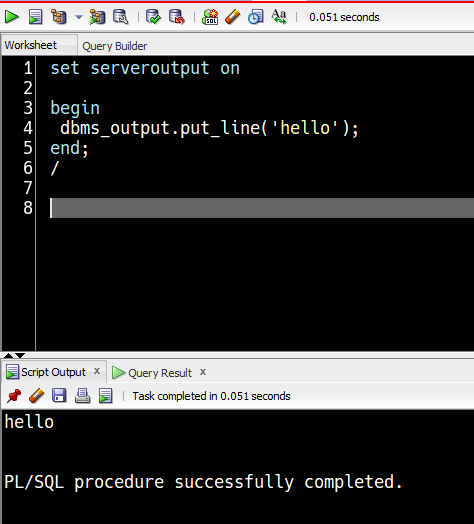
So try this. In your script use
SET SERVEROUTPUT ON

BEGIN
 Dbms_Output.Put_Line(Systimestamp);
END;
/
Now run the script using F5.
Let’s check the DBMS_OUTPUT panel.

Instead of checking the DBMS_OUTPUT panel, check the ‘Script Output’ page.

But how do I get this to work by default?
- Open a new worksheet.
- Code this line
- SET SERVEROUTPUT ON
- Save to ‘startup.sql’
- Open Tools – Preferences
- Go to the Database page
- On the ‘Filename for connection startup script’ – point to the ‘startup.sql’ file you just created.
- Restart SQL Developer.
- Open a connection and run your code.
You’ll see your DBMS_OUTPUT code with no more work!
An ad hoc example –

62 Comments
Is there a way to do this same thing with the VS Code extension?
Yes, add it to your login.sql script
But next version will switch this on for you, by default
Thanks! I just found this: https://www.thatjeffsmith.com/archive/2024/01/logins-tns-dbms_output-dates-in-sqldev-for-vs-code/
I got a special kind of headache trying to debug a PIPELINED function… From SQL worksheet I execute SELECT * FROM pipelined_func(); ..and there is zero output, neither in dbms_output window nor in script output window.
It almost seems that SQLDeveloper is not polling for output in this case? Output does get saved into buffer, and I see it next time I execute a normal, non-pipelined function. Perhaps there are other side-effects in work here. But dBeaver just works. SQLDev 23.1; Oracle 19c.
Do you have a RETURN? Then just call it from SQL like demonstrated here.
SQL Developer has no problem showing the results
MY_STRING----------------------------------------------------------------------------------------------------
abc
Any chance to get DBMS_OUTPUT enabled by default, each time i run an anonymous block without the need of doing this setting….?
For SQLDev Next, yeah for sure
I do have to note that I was not able to get anything in the ‘script output’ page until I followed the procedure Jeff mentioned for ‘startup.sql’
Once I did that, it worked.