

You run a query. You wait patiently for your query and results to return. You want the results in Excel. You ask SQL Developer to ‘Export.’ SQL Developer seems to start over by running the query again. You are no longer waiting patiently.

How can you avoid this?
The solution is to ensure all of the data has been fetched into the grid before you ask for the Export.
What the heck is he talking about, fetched?
Running a query in Oracle has several distinct steps.
You submit your query.
The database engine parses the query and identifies an execution plan. If it doesn’t already have one cached, it will build a new one. Hopefully this shouldn’t take but a millisecond or two.
The database runs your query. It may spawn 1 or more processes to get the data, do all the sorts, merges, etc. You don’t really care about how it gets your data, but it’s there to see in the plan.
The database tells the requestor that their query has executed.
You ask for the data.
You asking for the data is usually an assumed part of running the actual query. What good is running a query without seeing the results? However this last phase is what is known as a ‘fetch.’ Records are retrieved in batches. The size of the batch is dependent on what you have ‘Sql Array Fetch Size’ set to. The default is ‘100.’

This means that SQL Developer will by default return the first 100 rows of your query. You can read more of the JDBC nitty-gritty here if you’re morbidly curious.
We consider this a low-level preference that shouldn’t be tweaked unless explicitly advised to do so by Oracle Support.
What’s really most important to understand here is that that many of your queries return MORE data than what is shown on the initial display of the results grid.

So how do you get the rest of the records?
Click in the grid so it has focus.
Ctrl+End
This will force the rest of the records back into the grid.
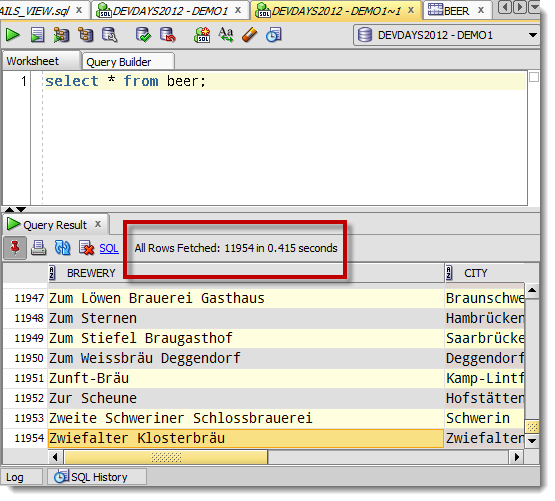
And now you will see something like this

Now with all records returned, Export will use the data in the grid instead of re-querying the database.
Clear as mud?
But WHY does SQL Developer force the 2nd query execution?
Good question.
If you do force all of the rows back into the grid, you are going to be consuming a decent amount of memory. Some query result sets are larger than others, and not all of us have 64 bit monsters to run our tools on. So, in order to conserve machine resources and memory, we just run the query again and write the data directly to the destination and bypass the data grid.



66 Comments
Thanks Jeff – you just added back several days to my life with this CTRL-End tip 😀
Awesome, I hope things are going OK now!
Hi, that is interesting. I’ll try it. Is there a way to bypass the grid altogether and just run the query as an export to excel. I run the same queries every day to produce extracts for reporting via MS Access Database, I know they work.
Yes, spool a csv file – will be MUCH faster.
So for a large query, where I am not interesting in view the results within SQL Dev, would you recommend running as a query and then Ctrl + End in the results or just running as a spool script with the results minimized? If it matters, it is a rather complex query but the actual record count is only in the 200-300k ballpark.
The first option will put those 200k records into memory for the grid…that might suck.
I’d probably spool to a file in the worksheet… we’ll quit printing to screen after 5 or 10k records, but the spooling will continue.
It’s encouraged that gamers verify the references of the website and start from activities using low stakes to
make sure superior productivity.
Actually, there is another trick to get around it in Windows.
Click (anywhere) on the results set in the output window, then click on FILE in the menu bar, and select PRINT. Select the option ‘Microsoft XPS Document Writer’ for the Print Service Name /file type. Click PRINT, and go into where ever it stores the file. I was able to save a 150,000 row output result set this way when all the ‘EXPORT’ options clipped the results at 15,000. It is an .xps file. This works on the 2013 version of sql developer, at least.
>>way when all the ‘EXPORT’ options clipped the results at 15,000
Say what?
Hello Jeff
Is there a way, how to sort data in the grid without re-running the script? Even all the dtata is fetched, when I asked SQL Developer to sort the data for me, it runs the script again, which takes time
Thanks
Mmmmm, asking for a sort does a database level sort, i.e. ORDER BY…which of course means you need to run the query again.
If that’s too painful, maybe copy your data to Excel?
Hi Jeff,
This is a really helpful tip. I would love to do this on my Mac but I can’t find a keyboard shortcut to go to the last record in the grid. Is there one?
CMD+PgDn? Or End…im away from my Mac until Monday.
Hi Jeff,
do you know whether it is possible to export to csv using a semicolon as a delimiter when spooling the export?
In sqlcl, yes. You can say say set sqlformat delimited ;
Sadly that doesn’t work in sql developer
alter session set current_schema = abc;
set sqlformat delimited ;
spool l:\voorbeeldcsv.txt
select /*csv*/’*
from table;
–spool off
This is a simple form of the query I’m using.
And the output:
session SET altered.
line 3: SQLPLUS Command Skipped: set sqlformat delimited
Use sqlformat or /*format*/ but not both
Right, in sqlcl it will though.
In sqldev today you would use the grid export wizard to get a delimited file with the ;
That Jeff! 🙂 You helped even a novice like me! Jeff, I appreciate your posting this valuable information. It is easy to understand and I got the results I needed! Thanks, Carol
Hello sir,
I’m having a query result that has around 5 millions rows and it takes me like forever to export it to csv (I’m using SQL Developer).
Is there anything I can do to optimize it?
Probably. Use SPOOl and a /*CSV*/ in your statement, and execute as a script. Minimize the script output panel first though.
Hello sir,
Thank you for your instruction. I followed it. But my SQL Developer stopped writing data when it reached a certain amount of data. The progress bar keeps running but no data exported.
If I try to use Export wizard, it would be freezed when 2400 rows are exported, and with the same symptom: The progress bar keeps running but no more data are exported.
Please kindly review my case.
Thank you
I need more information.
But, it sounds like the jvm is running out of memory.
What file format are you trying to export your data to?
Hello sir,
I’m trying to export to csv file. And data size has been optimized to around one hundred thousand rows.
By the way, I’ve discovered a method to export my data by using Rstudio. So this is not my big problem anymore. But yes if SQL Developer can do it itself, it would be more convenience.
Thank you
100k rows to csv shouldn’t present a problem to SQLDev.
You can try this as a workaround.
In a worksheet:
spool c:\your_file.csv
select /*csv*/ * from your_table where…;
spool off
execute via F5, minimize the script output panel
How can i extract out put data in user defied format in excel without using any other language except SQL or PL / SQL queries.
Sounds like a popular StackOverflow question. I know it can be done…
Hello
I have the same issue. Rather than select /*csv*/ can you export as text (perhaps select /*txt*/ ) ?
Thanks
G
Not sure what your issue is Greg, but you would use /*text*/ not /*txt*/
Thanks Jeff, I’ll try that.
Awesome!! I can’t wait for my current export to finish, c. 2047-2048? so I can try this out. Thank you so much for this article!
You’re welcome, I think?
It was a compliment not sarcasm. My exports have been taking forever. Now I know both the why that is and how to fix it. Cheers!
hi Smith,
is there any way i can export the ddl statements of a table to a text file programatically(using java)?
for example i have a table X with 2 columns A and B so i want to export the insert statements to a file
ie
insert into X (A,B)values(value1,value2);
Thanks for the above post it really helped me .. 🙂
yeah, in java connect to the db and then run dbms_metadata package to generate the DDL and get that clob back and write it to a file
hi smith,
I have tried your suggestion, i was able to get the create statement for a table.
SELECT DBMS_METADATA.GET_DDL(‘TABLE’,’EMP’,’SCOTT’) FROM DUAL;
but i dint find a way to get the insert statements from a table.
actually i’m trying to make a small data movement app.. which will reduce the manual effort of moving data to test environment.
i tried hard coding using string buffer and other stuffs.. in java it works but not efficient and need to write lot of code… since database has lot of tables.
If u know a better online material for my query please share the link.
thank you 🙂 .
why build a data movement app when that’s already been built?
How does datapump, sqlldr, sqlplus, or SQL Developer fail to meet your needs?
Hi ,
Because if you want to move a small data to test environment you have to move so many related table data’s, since the application is large and the number of tables are more, its very difficult to move data manually for each table.
some times test environment may not have some master table data,so such things need to take care programmatically.
right, so try our Cart feature. you can apply where clause filters to grab related data, and it’s got a CLI
But if you run a query which returns lots of rows, if our aim is to save the results to a file, why can’t we just define the Export options straight up and run the query (instead of first having to fetch results to the grid, wait till the query ends in 20 mins for the Export button to become available, and then wait another 20 mins to re-run the query). Hello ?!
Populating the data grids with the data is expensive. When fetching the records down on the 2nd execution, we write them directly to the file/buffer/clipboard w/o populating the grids.
hi jeff, yes indeed it’s expensive – and that was the point of my rant, why not bypass completely the 1st execution into the grid?
Maybe we should start over, but we put data into the grid because people want to see the data when they run their queries.
If you want to just send your data straight to a file, run it as a script and do something like this…
spool c:\data.csv
select /*csv*/ col1, col2, … coln from table where…;
And minimize the script output panel.
That will do everything you want in one step.
Hi Jeff,
Thanks its working for me.
Hallo,
I’m trying to download my table from the server to the local disk with script like below, but no output file is created. What causes the problem. Thanks in advance
spool C:\erasmus.txt;
select /*csv*/ * from Erasmus;
spool off;
that should work, what version are you running?
take off the ‘;’ from the two spool commands – you don’t need them
Thanks for the information.
I used thte same command, but I get following message.
Cannot create SPOOL file c:\data.csv
I am using Oracle SQL developer Version 3.2.20.09
are you sure you have write privs to your C:\ ?
v3.2 is like 4 or 5 years old…can you try again in version 4.1?
Hi Jeff,
Thanks a lot for your help. Still I want to ask about logical flow of a export to excel functionality. I mean that how the process should get followed. i.e first It should executes a query and then adds data one by one column into the excel file. Could you please provide me a abstract logical flow that will help me to understand the functionality and to implement the same if required.
Thanks.
the logic is up to you
Hi Jeff
I have to implement export to excel functionality in oracle procedure. Actually I am running a query inside a procedure and wants to put a data of that cursor query into the excel file, generated excel file will be placed on file server.
I am not able to implement this functionality. Could you please guide me?
Thanks a lot.
You’ll need to write some code to do that. Google found me this in about a half second.
Jeff: I’m trying to create job and schedule that will export data from a table on a nightly basis. I’m not quite sure how to do this. I’ve got SQL to create table but don’t know how to create job or program to automate. Could you show me steps to do this in SQLDEVELOPER please ?
I could direct you to the wizards – just right click on the Scheduler node in your database tree and use the New Job Wizard.
Otherwise, I would advise you to read the DBMS_SCHEDULER docs.
What you want to do is possible. I’m betting Tim over at ORACLE-BASE already even has an example for you to place with.
You directed me back here 🙂 – on purpose ?
If so then both of the above scenarios (Query + Export and Query + Ctrl-End + Export) both execute the query twice, and forces me to monitor the extract in order to start the extract 🙂
ugh, no, not on purpose – i wasn’t paying attention
What version are you on? That should be working as described here, but I haven’t tried it since v3.2 probably.
Thanx Jeff,
I am using: Version 4.0.1.14 – Build MAIN-14.48
I just traced both scenarios, and despite my perception that it executed twice, the latter suggestion (Ctrl+End) actually only executes once (it just takes a long time buffering the data (350k rows) in mem 🙂
For a scenario like mine, where the query takes close to two hours, it would be nice if it wasn’t a three step process to get from query to exported Excel file (Query, Ctrl+End, Export). E.g. Make Ctrl-+Shift+Enter pop the export dialog and voila – more happy (heavy) users 🙂
Thanx for your time and an invaluable product !
I know this is an old question but I have a huge query and wan’t it in Excel. It takes 6000+ seconds to run (optimized :)) and returns 350k rows.
I would love to avoid having to run the query once to see 50 rows, and only then getting the option to export to Excel, and having to run the full query again.
Is there a way?
It’s an old question, but it’s a good question 🙂 And I answered it here.
Many thanks. What you described is working really cool for me. I wish oracle add those tips in the help section. In otn forum, it was said to add AddVMOption -Xmx1024M to conf file, but sql developer will not start with that param.
Thanks again. This was a great help.
I’m guessing SQL Developer wouldn’t start with that conf item because you don’t have enough free memory. Are you trying to export to Excel? If so, try exporting to CSV instead and let Excel convert the file on opening it. No extra memory necessary (probably!) and should run much faster.
I’m commenting now! Checking the notify box!
I hope this works!
Nice gravatar synergy-leveraging to grab my sweet ‘stache.
I’m working on a stache-approved badge for our blogs that pass your test.