More is better. But more of what, exactly?
I’d rather have more test data than less, say 100 rows of data in my table versus 3.
Wait, why exactly is a bunch of data better than a little?
- ‘it works/scales in dev!’ – famous last words when you push to production and the system falls over because you have 1,000,000 transactions vs 10
- it’s more likely to expose problems with your data model – more on that later
- it’ll remind you to consider things like pagination, to keep from overwhelming your network and clients with “SELECT * FROM” APIs
- we’re using an Agent, we might as well have high expectations and get our money’s worth, right? No excuses when you have a little butler running around tending to your needs!
To reliably get there, I’m going to need to provide more instruction or context to my Agent.
Let’s listen to an expert talk about ‘Context Engineering.’
It wasn’t too long, and I did watch, I hope you did as well. But if it was TL;DR, then let me summarize, poorly –
The LLMs are programmed to make us happy, but they can’t read our minds. If you want them to do something specifically or in a particular manner, you need to tell them about it.
Building apps or reports is fine, but it’s hard to get very far without some play or test data. I wanted to share a few things I’ve observed over the past few weeks and months as I’ve been pushing agents to accomplish database tasks via our MCP Server.
A brief tangent, let’s talk Data Modeling
Is data modeling, dead? I would say ‘absolutely not!’ but I would also concede much has changed in the industry, and the advent of LLMs has only poured gasoline on the 🔥.
Yes, you can ask your favorite Agent to ‘build you a schema,’ and it will probably have been trained on proper data modeling techniques, but YOU need to review those models, just like you would be reviewing any code. It might ‘know’ about the retail industry, but does it really understand how YOUR business or operation works?

In a prior exercise I gave fairly minimum details for the schema I wanted, but it did some things I appreciated. The LLM generated temporal data types TIMESTAMP (vs VARCHAR) for storing date/times, used plurals for table names (which I LIKE), and did reasonable amount of normalization – we have FOREIGN KEYS!
Note: fixing your data model can be expensive, especially the farther along your applications, APIs, and reports progress. You need to scrutinize this just as much as you would your code. And yet, that’s also true for JSON (noSQL) environments as well! If you disagree, come find me, and we can ‘fight’ over 🍻.
If you want or prefer PLURALS, and if you want or require all PII data identified as such via a comment or annotation, then you need to say that out loud, in your prompt.
Give me some test data, please
Here’s a generalization, which I’ve come to understand with a bit of experience here. If you ask for test data, you’re likely to get somewhere between 1 or 3 or maybe even 10 items/rows/records. I’ve observed this across a lot of different AI providers and platforms.
Sometimes I’ve explicitly asked for 100 samples, and yet it still only gave me 3.
And even, the LLMs seem to be quite good at coming up with test data. It’s however, NOT random. It’s data it’s been trained on – popular movies, songs, books, the automotive industry, airlines, .. pretty much EVERYTHING.
If you truly want ‘random data,’ I would suggest using the lorem ipsum phrase in your prompt. But asking for plausible but fictitious data, most likely will result in some real world information popping up into your system.
🤔 Fictitious data – if I asked for 15 fictitious records for employees, would I get the 13 dwarves, 1 hobbit, and 1 wizard from The Hobbit?
Some prompts I’ve had luck with
Idea #1: Generating CSV and then shoving it into new/existing tables with our LOAD command.
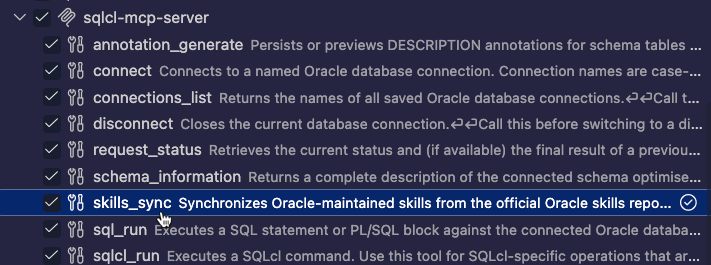
I wanted some real data, in this case, World Currencies, with their current exchange rate with the US Dollar. I told the LLM to go find that data, and write it to a local file, and then ‘teach’ itself to process it with the LOAD command using the run-sqlcl MCP tool.
Look up the current currencies around the world, and store them alongside their US Dollar exchange rate, in a file called currencies.csv.

Include a header line with columns names - no spaces.

Wrap strings with single quotes, and use a US Comma as the delimiter.

Use the currencies.csv file to create a new table in my raptor database. Use the run-sql mcp tool to accses the load command. If you use it without parameters, it will send back help text you can use to figure out the syntax to create a new table called CURRENCIES.
And it very happily did just that –
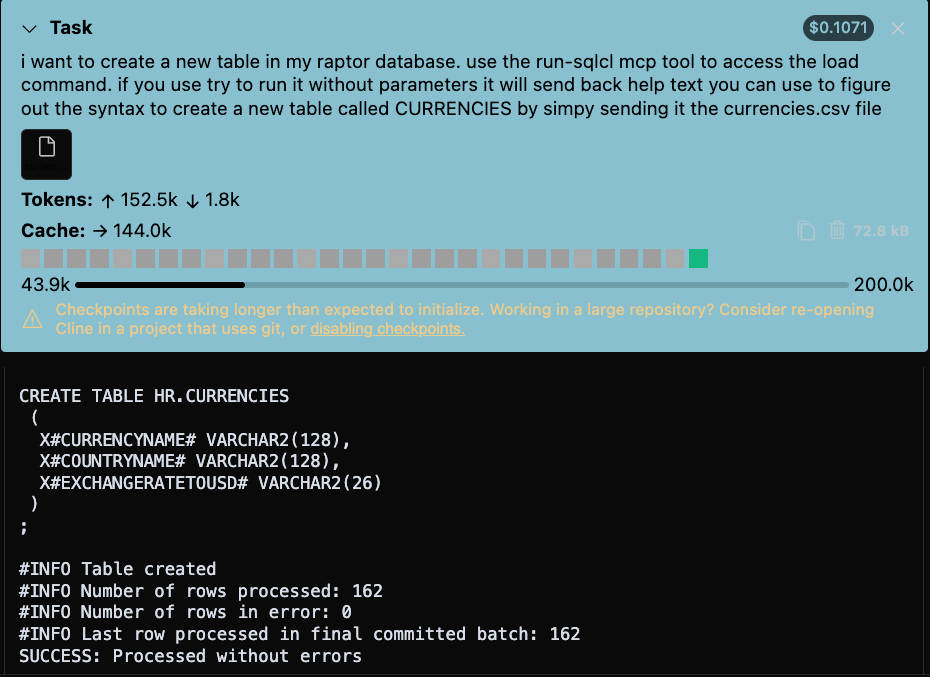
If I had 10,000 rows, this would be much better for both the user and the MCP Client/Server relationship (compared to 1 BIG insert or esp 10,000), as we’re using WAY fewer tokens and interactions, and ALL of the work is directly offloaded to SQLcl.
I’ve also seen the LLMs perfectly happy to take the CSV files and put together accompanying SQLLDR scripts to load up the data, but you’ll need an Oracle Client to take advantage of that, and then you’ll need to task your Agent to kick off the terminal command to run it.
Idea #2 Telling it EXACTLY WHAT I WANT and EXACTLY HOW TO PUT IT INTO MY TABLE.
I want 50 new records for my CARS table. It’s joined up to an existing MANUFACTURERS table via a FOREIGN KEY constraint, and it has a PRIMARY KEY. So we need to accomodate existing data when coming up with the new records.
NOTE: Ensure that no integrity constraints will be violated. Parent keys, in referred tables, should be verified of their existence before being used in any fictitious data. As an example, make sure the manufacturer_id exists across the various tables.

NOTE: For simplicity, include Internal Combustion Engine (ICE) vehicles only.

Inserting data
Create 50 unique entries each (in each table) of fictitious, but plausible data for the following tables(please review the two "NOTE" notes in this section before inserting the table data):

car
truck
motorcycle
NOTE: When performing the inserts, bulk insert the data with syntax such as this:

INSERT INTO t(col1, col2, col3) VALUES
('val1_1', 'val1_2', 'val1_3'),
('val2_1', 'val2_2', 'val2_3'),
('val3_1', 'val3_2', 'val3_3');
NOTE: Take care to not create duplicate data in any of the tables.
And by golly, on the first try, the Agent planned an executed said plan, perfectly. It ran the generated SQL across our MCP run-sql tool.

The beauty of this 23ai feature, multi-row INSERTs, is that the LLM handles it in a single interaction, not 50 that I should need to review and approve one-by-one, which I’ve seen it do vs submitting an entire script for 50 INSERTs.
And reviewing the data –

Final thoughts
Having data and lots of it, I think gets you more curious about your model and your application. You’re going to think of more creative and useful reports and APIs to support those business entities.
My CARS table – it also has 17 columns. So tasking the Agent to generate 100 test records saved me a bunch of time and typing.
Don’t rely on the ‘replay’ or history from your Agentic tooling. Ask your Agents to save the data (and data models!) you’re generating to local files. If it goes anywhere close to being ‘real,’ you’ll want those in your Git projects, and ready to be included in your CI/CD pipelines, at least for TEST and DEV.
And finally, build in the prompts that you want the work saved in files. I’ve noticed asking for these files, after the fact, sometimes results in the AGENTre-generating them like it’s doing the task again, or it might ask the database to spit it out – which will work, but it will also take more time.