

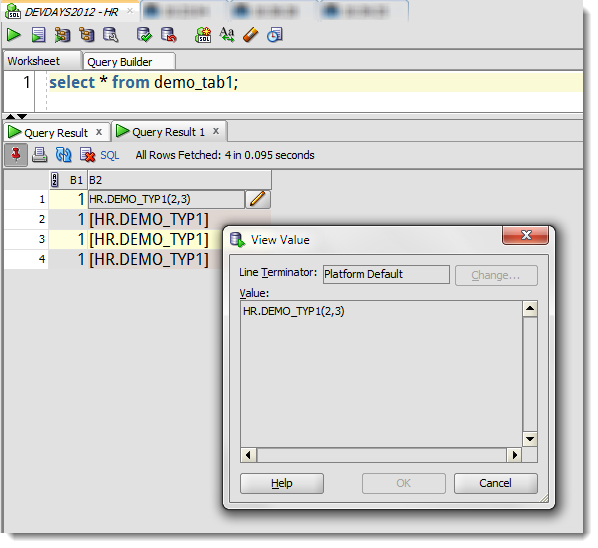
A ‘quick’ question came in this morning: “Jeff, does SQL Developer show contents of Object type columns? I’m advised not…”
I wanted to say ‘Yes’ and then just run away laughing maniacally, but I thought maybe I should put together a quick example instead. So here goes. And by the way, welcome to 2013 everyone 🙂
Creating a USER TYPE
From the DOCS –
CREATE TYPE demo_typ1 AS OBJECT (a1 NUMBER, a2 NUMBER);
Create and Populate a Table using the new Type
CREATE TABLE demo_tab1 (b1 NUMBER, b2 demo_typ1);

INSERT INTO demo_tab1 VALUES (1, demo_typ1(2,3));
Querying and Viewing the TYPE data using SQL Developer
Now I’m not a fan of ‘SELECT *’ from queries, but in this case I’ll give you a pass. Or, just open the table editor in the connection tree and go to the Data tab. I’ll use the SELECT * from method.
So a quick and dirty post, but now I have one less scenario to code up when needing to answer FAQ SQL Developer questions 🙂




7 Comments
is it possible to get the same output as in SQL Plus to this select * from demo_tab1?
I mean to see data without using “Click on the ‘Pencil’ icon to drill into the object type data.” but actual data
if you want SQL*Plus style output, execute with F5
Thanks, It solved my problem. I just recompiled the types and now I can see the objects values in debug tab.
Hi Jeff,
Many times when we debug object types which are inherited from a base Oracle object type sqldeveloper will show it as OPAQUE. Can you please guide on this regard.
Regards,
PPS
Sounds like that OBJECT TYPE hasn’t been compiled with DEBUG. And make sure all of the dependent objects have been. At least, that’s what I would check first.
…and when will we be able to see the contents of types and tables of types when debugging PL/SQL? (Or if this is already possible but I’m doing something wrong, please let me know!)
Allan, when I hear PL/SQL tables, I think collections…so maybe I’m not answering your questions directly, but check this out
http://www.thatjeffsmith.com/archive/2012/08/inspecting-plsql-collections-with-oracle-sql-developer/
If you’re doing something differently, please provide a code sample and I’ll see what the deal it.
Thanks and Happy New Year!
Jeff