

Our stored procedures often capture information and store that data as a string or number. But sometimes we need to process more than just a single value. PL/SQL allows you to do this via collections. Now, if you’re looking for help getting started with collections, I would start with
- Using PL/SQL Collections and Records Oracle Docs
- The PL/SQL Guru, Steven Feuerstein
Once you have a program working, and you want to know what your data looks like before it processes or passes the data to another program, I recommend using our PL/SQL debugger. The debugger allows you to run your program, step-by-step, and inspect what the code is doing, line-by-line. If you need a quick, ‘Debugger 101‘, then you’re in luck 🙂
Once you’re debugging, you’re ready to ‘watch.’ Need help figuring our how watches work, and when to use a watch versus the Data or Smart Data panel?
Stepping Through the ‘Table’
Your PL/SQL table has one or more rows, and now you want to know what’s in those rows, right?
Your code may look a little something like this:
   OPEN c1; --c1 is a cursor tied to a query that is executed
   LOOP
      FETCH c1 INTO tab (len + 1); -- tab is a 'table of table%rowtype'
      EXIT WHEN c1%NOTFOUND;
      len := len + 1;
   END LOOP;
Once you invoke the debugger in SQL Developer, you’ll notice the Smart Data Panel has an entry that matches our ‘tab’ object:

Now Expand the TAB Tree Node
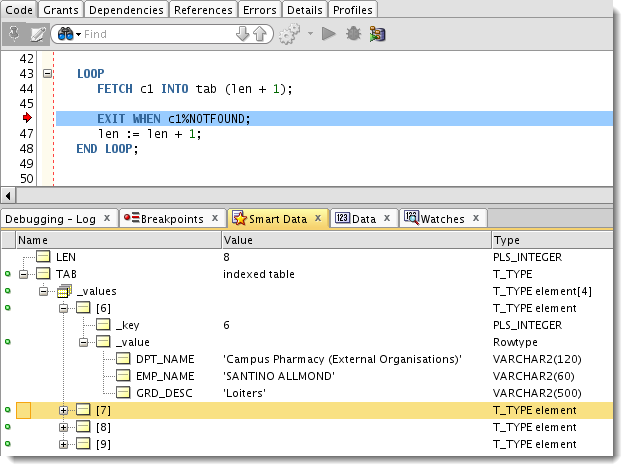
My indexed table happens to be indexed by an integer. This integer grows as my cursor loop runs. I can drill into one of the rows and see the data being stored.
As I step through the loop, I’ll see more and more rows appear.
Quick Inspect
Now maybe I don’t want to click and expand to see what’s happening. You can instead do a ‘Quick Inspect’ or a ‘peek’ to see what’s being stored. That’s what the ‘little green dots’ indicate.
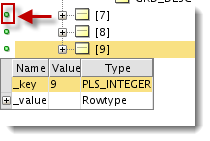
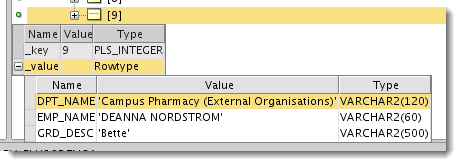
Having trouble getting the watches or data panels to show anything? You’ve remembered to compile your procedure ‘For Debug,’ right?



15 Comments
How do I view a table type that is in SELECT statement using SQL Developer? The output variable shows it as
Address Collection:
oracle.jdbc.proxy.oracle$1jdbc$1proxy$1NullProxy$2java$1sql$1Array$$$Proxy@7fbefb9a
Hours Collection:
oracle.jdbc.proxy.oracle$1jdbc$1proxy$1NullProxy$2java$1sql$1Array$$$Proxy@3204094d
Contact Collection:
oracle.jdbc.proxy.oracle$1jdbc$1proxy$1NullProxy$2java$1sql$1Array$$$Proxy@18fee7d9
I am not able to look at the rows in those collections.
I think this is a bug.
Two questions:
There is an inconsistency between the watches and smart data tabs (it may be by design, that is fine). There is no left column for the green dots. Why I bring it up has to do with the next question.
If I add a watch for an entire table of table of record type, that works fine . However, if I expand the tree to my_package#.t_thing._values[1]._value._values[1]._value.record_item and right-click add to watch, it does not get shown in the watch, instead, the watch is populated with: _values[0]._value._values[0]._value.record_item and though there is a value displayed in the original watch, when I expand all of the way to the record item, there is nothing in the new watch that I added with a right click. Is it something that I’m doing incorrectly?
Having the ability to see what is going on in package 1 while I’m tracing through package 2, would be a super feature.
Having the ability to see what is going on in package 1 while I’m tracing through package 2, would be a super feature.
The scope changes when you go from executing pack2 from pack1 – I don’t think you can watch one unit’s variables while executing another’s…but I’m on vacation until next week. I’ll double-check when I get back.
Hey Jeff,
A gentle reminder about the above question? How can one add a watch at a lowe eg my_package#.t_thing._values[1]._value._values[1]._value.record_item rather than only on the top most level my_package#.t_thing_values?
Furthermore, I want to be able to specify that I want to look at the global variables of a specific package (maybe two packages have the same global variable name).
if you tried your watch at that level and it didn’t work, it’s probably not possible
i don’t understand what you’re asking about the global vars
Jeff,
Is there any way to view collections in SQL Developer 4’s PLSQL debugger? I keep getting opaque values when I try to look at the real time values of data created from types like this:
CREATE TYPE my_type IS OBJECT (
colA VARCHAR2(100),
colB VARCHAR2(100)
);
CREATE TYPE my_type_list IS TABLE OF my_type;
Dave,
if you have an idea how to solve this: please post!
I’m using the newest version of the SQL Developer.. and it’s driving me nuts not to see the values of data types like above.
A bug?
I need some code guys, what exactly are you trying to debug?
Here’s something I borrowed/hacked up from Steven from Oracle Magazine…declares a type and uses bulk collection into a collection of said %type.
[sql]
create or replace PROCEDURE process_all_rows
IS
TYPE employees_aat
IS TABLE OF employees%ROWTYPE
INDEX BY PLS_INTEGER;
l_employees employees_aat;
BEGIN
SELECT *
BULK COLLECT INTO l_employees
FROM employees;
FOR indx IN 1 .. l_employees.COUNT
LOOP
— analyze_compensation (l_employees(indx));
dbms_output.put_line(l_employees(indx).hire_date);
END LOOP;
END process_all_rows;
[/sql]
I’m able to see these values…
If this isn’t what you’re looking for, give me a quick stub of code using scott.emp as an example…
Dave, see my response below to Robert.
Perhaps the package which contains the type which you need to debug is not compiled with debug?
yes you are right
Hey i found the solution for the opaque values..
Do – compile for debug for both package/function/procedure AND for TYPE from SQLDEVELOPER.
In this case below my_type
CREATE TYPE my_type IS OBJECT (
colA VARCHAR2(100),
colB VARCHAR2(100)
);
I’m compiling all the objects and the variable is still OPAQUE.
Can you give further details on what you did? Do you think I need a privilege (other than debug) enabled?
It looks like my WP plugin SyntaxHighlighter isn’t working for some reason. Oh joy. Thanks for bringing it to my attention Salvador!