

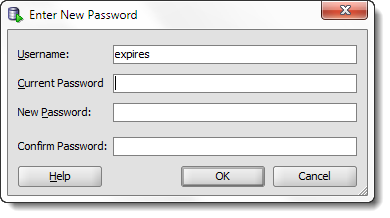
STOP. DO NOT PASS GO – if you do not have version 4.2 of SQL Developer, I suggest going and getting it.
It makes this 100% easier. You can see for yourself here. But it’s basically, just right click on your connection, and use ‘Reset Password.’ That’s it.
Or watch the movie.
When you reset your password with the GUI, we change it in your connection properties, too!
You don’t have to update your password twice – that is, you just use the Reset option on the right-click, and we’ll change it in the database, AND update your connection details in one go.
If you’re stuck on on an older version of SQL Developer – please, continue on with the post!
The OLD Instructions – Version 4.1 and Earlier
There’s nothing more annoying than having to email, call, or log a support ticket to have one of your accounts reset. This is no less annoying in the Oracle database. Those pesky security folks have determined that your password should only be valid for X days, and your time is up. Time to reset the password!
Except…you can’t log into the database to reset your password.
What now?
Wait a second, look at this nifty thing I see in SQL Developer:
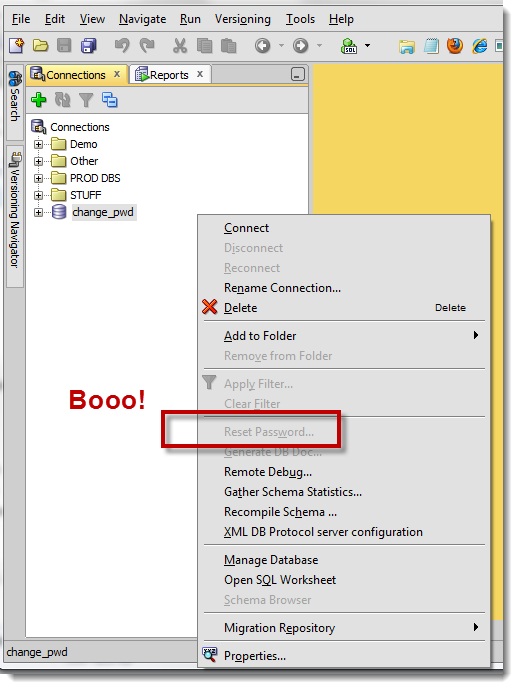
The JDBC Driver Doesn’t Support This Operation
We can’t make this call over the Oracle JDBC layer, because it hasn’t been implemented. However our primary interface, OCI, does indeed support this. In order to use the Oracle Call Interface (OCI), you need to have an Oracle Client on your machine.
The good news is that this is fairly easy to get going.
The Instant Client will do.
You have two options, the full or ‘Lite’ Instant Clients. If you want SQL*Plus and the other client tools, go for the full. If you just want the basic drivers, go for the Lite.
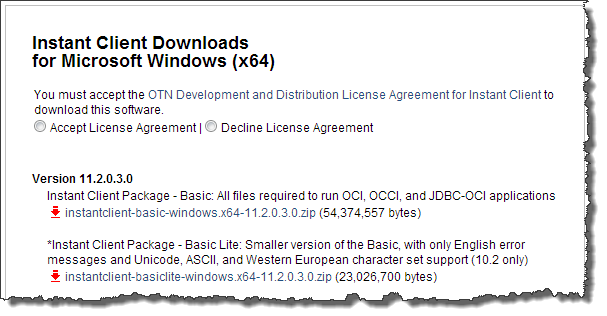
Make sure you get a 32 bit Instant Client if you run 32 bit SQL Developer or 64 bit if you run 64
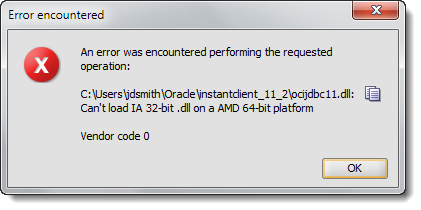
Mind the version of Oracle too!
You want to be at the same level or higher of the database you’re working with.
You can use a 11.2.0.3 client with 11.2.0.1 database but not a 10gR2 client with 11gR2 database.
Clear as mud?
Download and Extract
Put it where you want – Program Files is as good as place as any if you have the rights. When you’re done, copy that directory path you extracted the archive to, because we’re going to add it to your Windows PATH environment variable.
The easiest way to find this in Windows 7 is to open the Start dialog and type ‘path’. In Windows 8 you’ll cast your spell and wave at your screen until something happens.
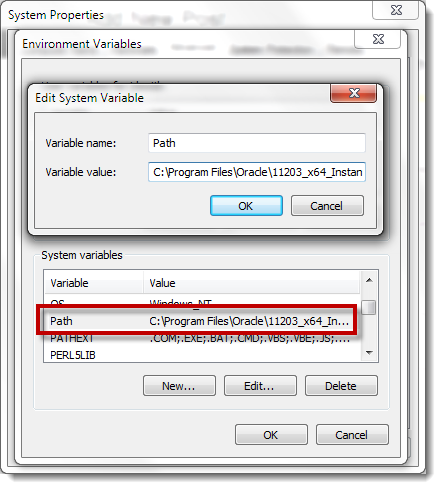
Now with that set, let’s start up SQL Developer.
Check the Connection Context menu again
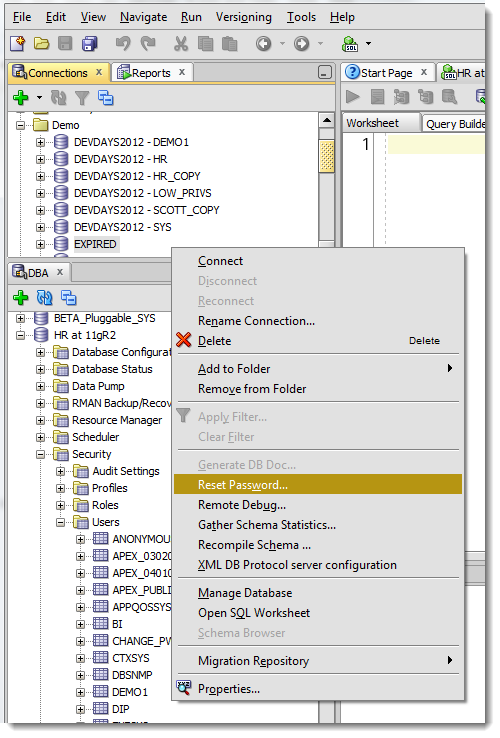
What happened there?
SQL Developer looks to see if it can find the OCI resources. Guess where it looks? That’s right, the PATH. If it finds what it’s looking for, and confirms the bit level is right, it will activate the Reset Password option.
We have a Preference to ‘force’ an OCI/THICK connection that gives you a few other edge case features, but you do not need to enable this to activate the Reset Password.
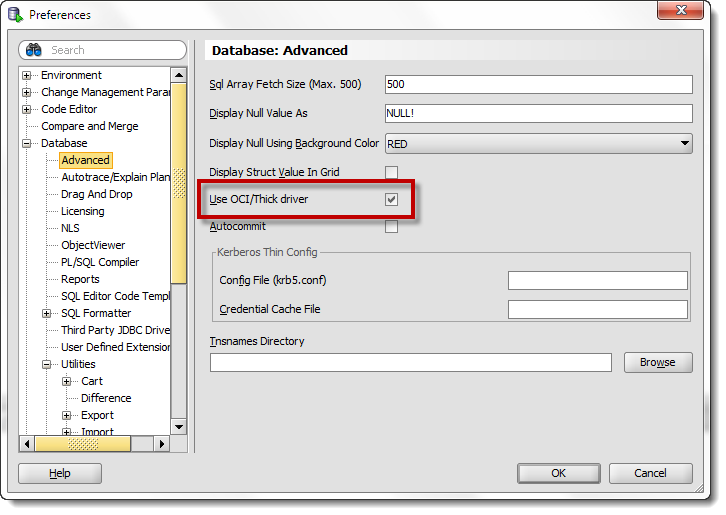
There are a few actual benefits to using OCI powered connections, but that’s beyond the scope of today’s blog post…to be continued.
Ok, so we’re ready to go.
Now, where was I again?
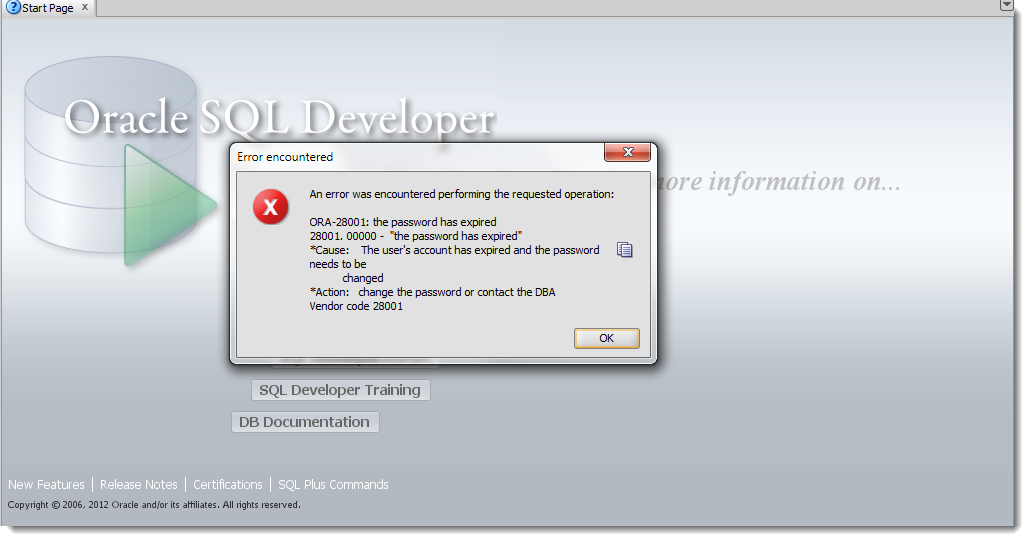
Right click on your connection and now choose ‘Reset Password’
I Need Another Option, This Ain’t Working!
If you have another account in the database, you can use the DBA Panel to reset a user’s password, or of course you can spark up a SQL*Plus session and issue the ALTER USER JEFF IDENTIFIED BY _________; command – but you knew this already, yes?
I need more help ‘installing’ the Instant Client, help!
There are lots and lots of resources out there on this subject. But I also know from personal experience that many of you have problems getting this to ‘work.’ The key things to remember is to download the right bit level AND make sure the client install directory is in your path. I know many folks that will just ‘install’ the Instant Client directly to one of their ‘bin’ type directories. You can do that if you want, but I prefer the cleaner method. Of course if you lack admin privs to change the PATH variable, that might be your only option.
Or you could do what the original ORA- message indicated and ‘contact your DBA.’

77 Comments
I have to manage my database passwords in several hundred Oracle databases. I have a method outside of SQL Developer to make the password change in the Oracle databases. Then I change the properties for one connection in SQL Developer to the new password. In SQL Developer I would export all my connections, edit the XML file to replace all other encrypted password values with the encrypted password value of the one connection I changed to align with my new database password.
In older versions of SQL Developer when the connections export was XML formatted, the encrypted passwords would be the same string for all the database connections that had the same passwords.
Now that SQL Developer went to JSON format, it appears the encryption algorithm has also changed. Each encrypted password in the exported JSON file is a different string even though the actual database passwords were the same. This makes it unfeasible to maintain the way I described above… because though hundreds of Oracle databases have the same password/userid, I cannot do a global edit – search – replace type of operation on the JSON file.
What can I do to change my password (in SQL Developer connection properties) on a large scale for hundreds of connections using version SQL Developer 19.2 if the connection definition is for the same userid/password???
Hopeful Regards,
Jerry
I don’t think you can.
Jeff,
So here’s an issue with this. A competing tool traps ORA-28001, tells the user their password has expired and offers them the option to reset it.
The interaction is not so nice in SQL Developer. Attempting to logon returns the error message with “Action: change the password or contact the DBA Vendor code 28001”
It would be nicer if it suggested “Right click on the connection and select the Reset Password option”.
Better still if it trapped the error and offered the user the option to reset without supplying the old password…
One for your wish list?
Hello Jeff.
I created a read only account that I use with SQL Developer for students to run SELECT statements only against a set of tables that I created.
Here is my issue. I have 1 account for 100 students. I want to deactivate the Reset Password option (or revoke the ability it change the password) so that a student cannot change the password. How can I do that for just this one account? (Other students have accounts where they are required to change the password.
See this thread, specifically the idea to use a profile and password verification function
also wondering why not just let each student have their own account, and they could proxy connect through the main account perhaps…
Nice, however it does not work, when Connection Type is SSH, with working port forwarding, I am getting the error:
Bei der Ausführung des angeforderten Vorgangs ist ein Fehler aufgetreten:
Required property ‘hostname’ cannot be null or empty
Herstellercode 0
I’m not sure it works over a port forward, have you tried with a normal connection?
Hello Jeff,
yes sure, it is working fine on a normal connection, that is TNS or Easy/Simple connect type.
In oracle database if the password is expired or locked .instead of reset the password by admin or somebody the user itself has to reset password. if you have solution for it kindly posted your resolution
If your account is not already locked or expired and you’re able to Connect to your instance, the ‘password’ command just like you would do in SQL*Plus:
Open a SQL Worksheet.
Type: password
Double-Click to highlight ‘password’
Click on the ‘Run Statement’ icon (green arrow).
The ‘New password’ window will open for your current account login and prompt you to enter your “Old password” followed by your “New password” twice.
ayup – the challenge is always, how to do it W/O being connected though
I tried this a few times, but it silently fails (i.e. it looks like the pw reset works, but in fact it doesn’t do anything). Any idea how to figure out why it’s not working?
Hi thatjeffsmith! 🙂
I have to reinstall multiple copies of PL SQL v 7.0.2.1076 on upgraded PC’s
Is there any way I can pre-install one copy of the the software with my Windows 10 Image then add the individual product codes and serial numbers as I deploy those imaged machines? (they have several 5 license code/serial combinations to be applied)
Best regards – Col. Sanders … not *** the*** Colonel Sanders 🙁
Very easy, just unzip Oracle SQL Developer to their desktops. There’s no licensing mechanism, because the tool is a no-cost feature of your Database. Or in other words, it’s free.
I am using unix box with oracle instance client vesion “instantclient-basiclite-linux.x64-12.1.0.2.0.zip” and “instantclient-basiclite-linux.x64-11.2.0.3.0.zip”, I can changed a expired password for oracle 12c, 11.2.0.4,11.2.0,3 db user, But it is not working if any password changes(expire case only) from oracle 11.2.0.2 and getting “ORA-01017: invalid username/password; logon denied” while i am sure i am passing correct password
Any one have similar issue , I tried to add 11.2.0.2 library to my program same a other one but did not get success, Using java and OCI driver (Thik driver)
the jdbc driver we ship with sqldev 413 isn’t compatible with a 11202 thick connection, needs to be 11203 or higher
Thanks Jeff for response , I want little bit more details about driver support. can you please share more details about “sqldev 413 isn’t compatible with a 11202 thick ”
I am already using higher version 12.1.0.2 and 11.2.0.3 for my program and it is working good for all oracle version 12c, 11204,11203 except 11202 only and getting always error “ORA-01017: invalid username/password” please suggest .
Pl help or get password changed in global account.
What is a ‘global account?’
An oracle password is an oracle password – the syntax for changing it is the same.