

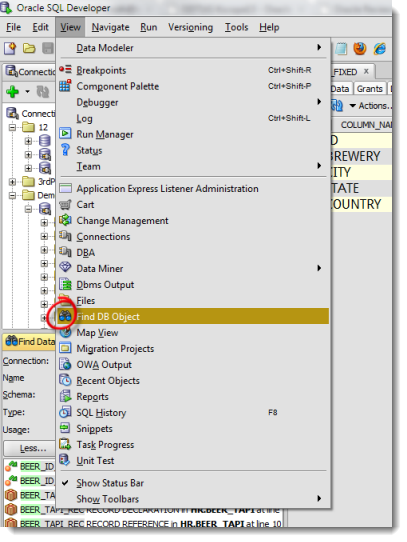
You can access this panel from the ‘View‘ menu. It’s a good bit down the screen, so I don’t blame you if you haven’t seen it before. It makes finding ‘stuff’ in your database so much easier. Let’s say I want to find my ‘beer’ objects.
I simply need to type my search string and the context (in this case I want it to search EVERYTHING), and hit enter.
The search results are listed below and clicking on an object automatically opens it!
I know it seems very simple, but I get asked this question a LOT.
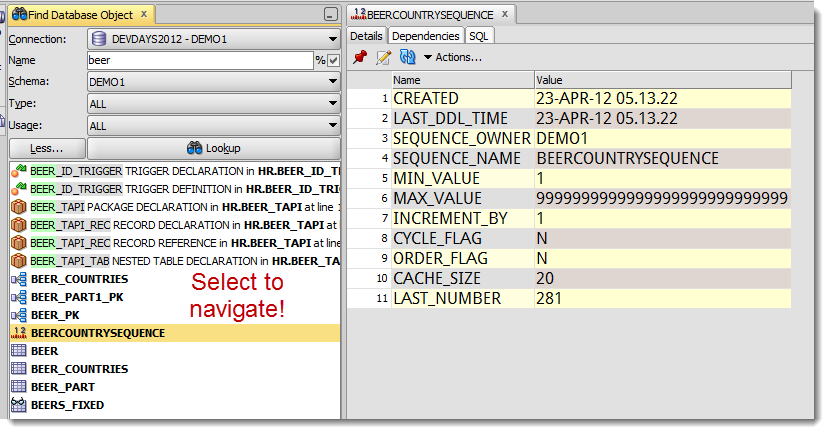
Finding too much? Be sure to toggle off the ‘%’ wildcard check box before doing a search.
Working on a Project?
I bet you use common column names, or codes, throughout your tables. You could take advantage of this knowledge and use the Find Database Object panel as a substitute connection tree or schema browser. Working on your HR project and want to look at your employee objects? Do a column search for your column ID/key.
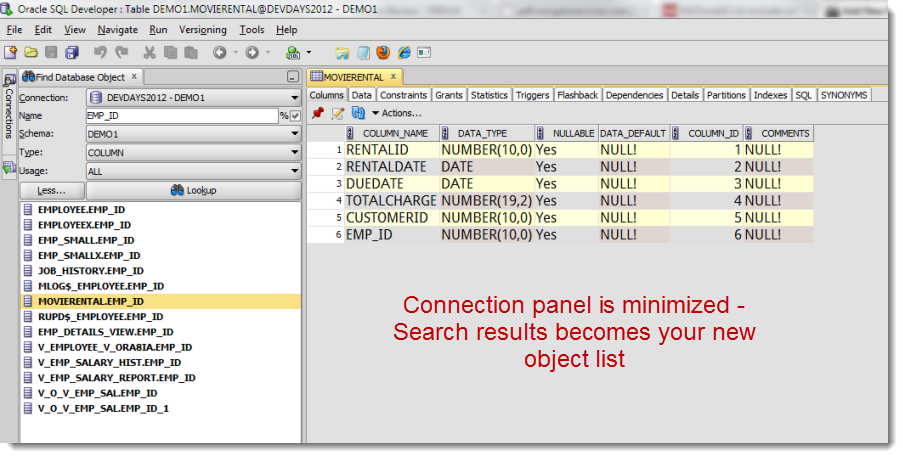
Sometimes thinking outside the box actually works!
Don’t be afraid to tackle a problem from a weird angle, or re-purpose your tools. I do it all the time 🙂 And I drive the developers nuts trying to do things with the tools they were never designed to do. But I digress. Back to your coding!



27 Comments
Hi Jeff –
Ok, we are updated to v.18.2.0.188, build 183.1748
Upon launch, I verify the version is 18.2.
Using Oracle DB 12c (12.2)
I use SQLDeveloper both on the PC and on Solaris. This test is on the PC side but will also be needed/useful on the Solaris side.
When I bring up the Find Database Objects panel, it *still* looks just like it did for v. 4.2. Sorry I can’t give you a screenshot but our system is not connected to the internet.
“there is only a dropdown to choose the [connection name] and a textbox to type in what I’m searching for. There are no labels for the 2 fields that do show and no wildcard indicator. Well, there is one label called “Go”. ”
Can you tell from this little description why that panel still looks the same? and what do I have to do for a remedy so it will give me fields and wildcard indicator as in your explanation toward the top of this page?
Thanks.
Email me the screenshot, [email protected] – so i can see EXACTLY what you can see.
Ok, sent. Thanks again.
I have version 4.0.0.13 (Build Main-13.80). When I bring up Find Database Objects, there is only a dropdown to choose the schema and a textbox to type in what I’m searching for. There are no labels for the 2 fields that do show and no wildcard indicator. Well, there is one label called “Go”. Is there a way I *can* get it (like my dba (who is now on vacation) sets some permission for my access?) or did oracle remove this capability?
I believe we are about 2 versions old but seems like the FDO capability should still be there.
Thanks a lot.
Marie, can you self-upgrade? As in, download the zip, and extract it on your machine?
If not, put in a service request with your IT, because you’re not two versions back. There’s been 4.1, 4.2, 17.2, 17.3, 17.4, 18.1, and 18.2 since your version, and that’s not including some patches.
We’ve completely redone the object search since 4.0.
Oh boy! Way more than two!
No, *I* can’t – as in not-allowed – but I know who can. We lowly software engineers have to work with what we’re given. But I surely will ask for it to be made current! Good thing they usually listen to us when we need something.
Thanks for your quick reply. I noticed that your original article is many years old. So, big kudos and extra thanks to you for still helping someone six years later. You probably should have a gold star on your badge.
It appears that this function does not search the View code? That is how I found this post, looking for a way to search the view code since it is a datatype LONG.
Sure it does. You just need to probably upgrade and enable the search at that level.
Thanks Jeff. I upgraded and it worked great!
We have several databases in our project and would like to search them all in one hit. Unfortunately, this tool only searches one database at a time.
Yup, that’s how connections work. SQL works on one at a time.
In the Find DB Object editor I could select several schemas and all schemas .
With all I also see public objects. Is there a way to search for several schemas and public, but not for all?
Nope, interesting use case 🙂
We use abbreviations for tablenames with public synonyms. Find DB Objects would be a quick help, if I can get rid of the clutter from other schemas.
Therefor I would ask for such an enhancement in a future version 😉
If you use (popup describe) to go to another package e.g. and you see this package in the editor. That’s nice.
But can you lookup this newly opened package in the tree?
Perhaps with a rightclick on the package source.
We’re running version 4.1.2.20.
Can SQL Developer search a specific string/value for all columns and all table directly?
you want to search every column and every table for a string?
ummm, no
think about how expensive that would be
you COULD do it, you just have to write the ugly SQL to do it for you
Yes i got the solution from oracle community
https://community.oracle.com/message/11163181#11163181
DECLARE
ncount NUMBER;
vwhere VARCHAR2(1000) := ”;
vselect VARCHAR2(1000) := ‘ select count(1) from ‘;
vsearchstr VARCHAR2(1000) := ‘[email protected]’;
BEGIN
FOR k IN (SELECT a.table_name
,a.column_name
FROM user_tab_cols a
WHERE a.data_type LIKE ‘%VARCHAR%’)
LOOP
vwhere := ‘ where ‘ || k.column_name || ‘ = :vsearchstr ‘;
EXECUTE IMMEDIATE vselect || k.table_name || vwhere
INTO ncount
USING vsearchstr;
IF (ncount > 0)
THEN
dbms_output.put_line(k.column_name || ‘ ‘ || k.table_name);
END IF;
END LOOP;
END;
Is there a way to export results ? I want the list of all the tables having a particular column, there are 100 results. I couldn’t find a way to export it nor copy paste it as text.
Not today, but it sounds like a good report to have.
Just right click on the table that is obtained in the output as a result of your query, there is an export option. Press that, and you will be asked for the format of your export file and the destination of that file.
The “Find Database Object” utility just stopped working for me in that it won’t find columns or tables that I know are in connected database–I can simply use the table tree and find them. Is there some sort of search index function that needs to turned on to refresh the search index. It was working fine and then just stopped, I’ve already tried restarting SQL Developer. Thanks in advance!
There was a bug where if you had ran a report, the Find DB Object editor would stop working. Have you ran a report? Does restarting the app fix the problem? I think this is fixed in 4.0.3, but I know for sure it’s fixed in v4.1
“It will even search through your PL/SQL code!” – is relative.
It finds declaration of variables in packages and other stored Pl/SQL modules using the content of “Name” field, but doesn’t fine declaration of functions and procedures in the same packages. That is really pity. It looks like the definition of term “Object” is not fully extended to cover procedures and functions declared within packages. Finding such “internal objects” is much more helpful as finding local variables in stored procedures.
I knew that line was going to get me in trouble. And you’re right, we don’t search ALL_SOURCE, we instead look at views like ALL_ARGUMENTS. We’re going to fix that. And I’ll try to send you a note when it’s available to you.
Hi Jeff!
I use SQL Developer with version Version 17.3.1.279 and Build 279.0537.
I tried to use ‘Find DB Object’ to find function or procedure in package. It didn’t find anything.
Did I something wrong or this problem hasn’t been fixed yet?
No idea, you have to show me what you’re doing.