


Parent – Child reports are pretty straightforward in Oracle SQL Developer. You have a ‘parent’ report, and then one or more ‘child’ reports which are based off of a value in a selected row or value from the parent. If you need a quick tutorial to get up to speed on the subject, go ahead and take 5 minutes 🙂
Shortly before I left for vacation 2 weeks agao, I got an interesting question from one of my Twitter friends.
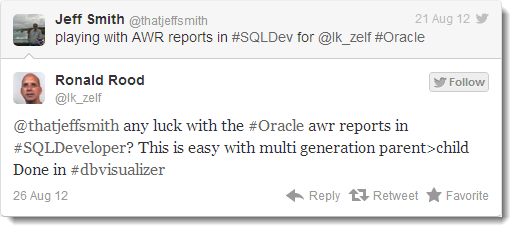
Now that I’m back from vacation, I can tell Ronald and everyone else that the answer is ‘Yes!’
And here’s how 🙂
Time to Get Out Your XML Editor
Don’t have one? That’s OK, SQL Developer can edit XML files. While the Reporting interface doesn’t surface the ability to create multi-generational reports, the underlying code definitely supports it. We just need to hack away at the XML that powers a report.
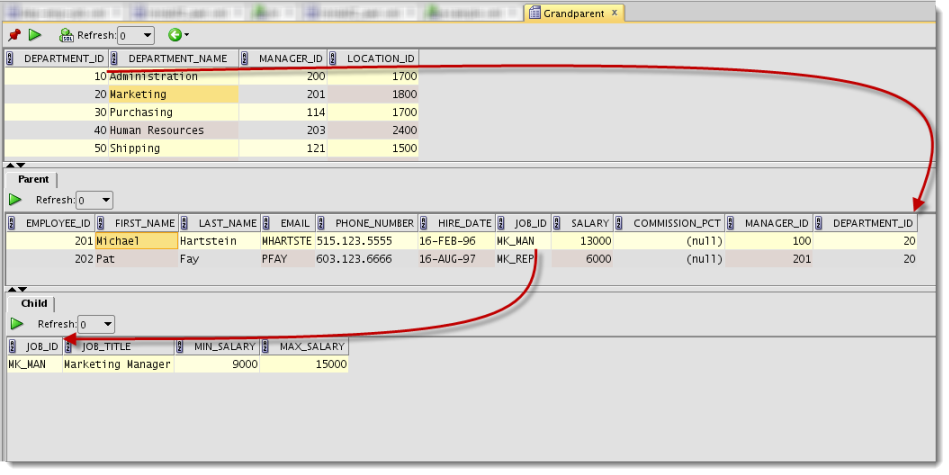
For this example I’m going to start simple. A query that brings back DEPARTMENTs, then EMPLOYEES, then JOBs.
We can build the first two parts of the report using the report editor.
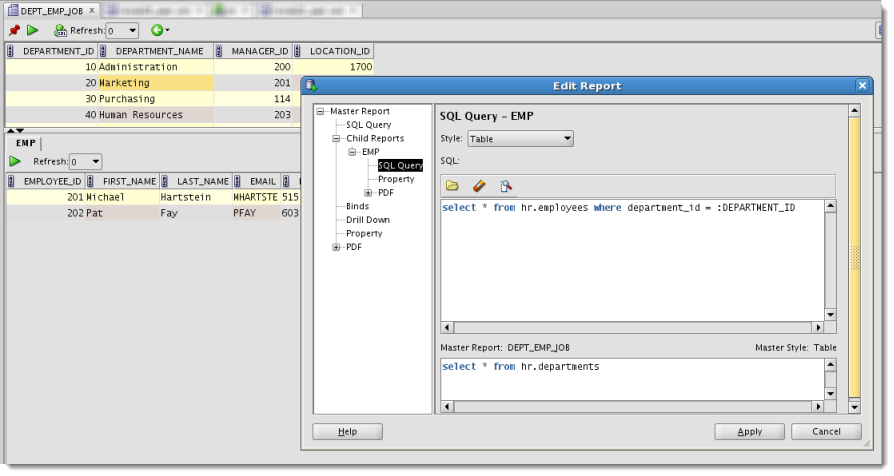
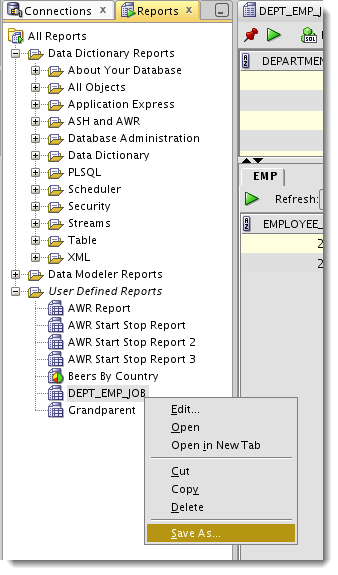
Save the Report to XML
Once you’ve generated the XML file, open it with your favorite XML editor. For this example I’ll be using the built-in XML editor in SQL Developer.
Right after the PDF element in the XML document, we can start a new ‘child’ report by inserting a DISPLAY element. Now this is technically an undocumented (read: unsupported) feature, but it works. So take this as one of those use at your own discretion tips.
Once the XML is open, you can probably see for yourself how it all works. One of the nice qualities of XML is that it’s somewhat self-documenting – especially if the developers practice good naming conventions. In this case I can vouch for them as I pretty much figured out the structure on my own with just a quick nod from @krisrice.
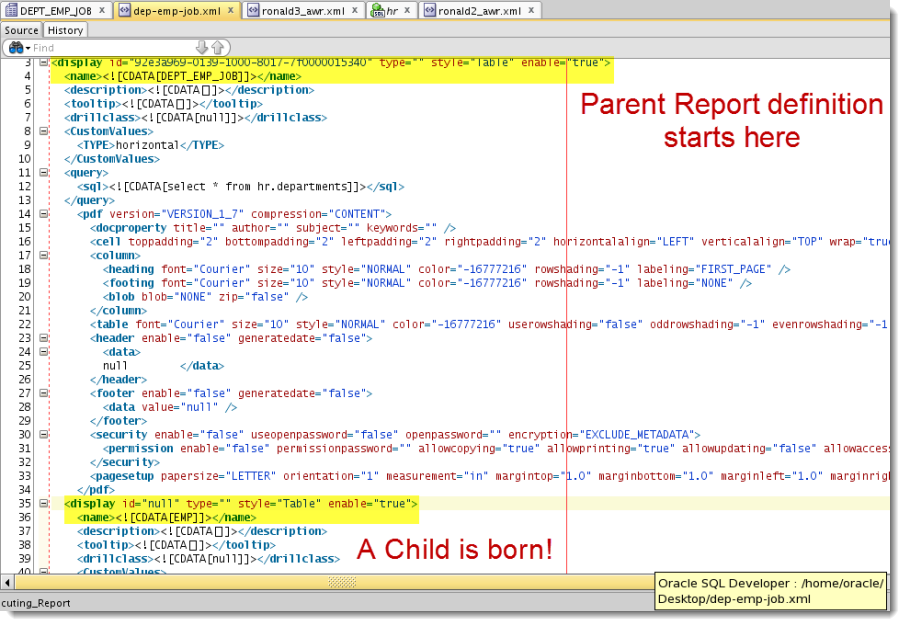
I just copied and pasted the existing ‘display’ down so I wouldn’t have to worry about screwing anything up. Note I also needed to change the ‘master’ name so it wouldn’t confuse SQL Developer when I try to import/open a report that has the same name.
The Grandparent – Parent – Child Report Source XML
<?xml version="1.0" encoding="UTF-8" ?>
<displays>
<display id="92857fce-0139-1000-8006-7f0000015340" type="" style="Table" enable="true">
<name><![CDATA[Grandparent]]></name>
<description><![CDATA[]]></description>
<tooltip><![CDATA[]]></tooltip>
<drillclass><![CDATA[null]]></drillclass>
<CustomValues>
<TYPE>horizontal</TYPE>
</CustomValues>
<query>
<sql><![CDATA[select * from hr.departments]]></sql>
</query>
<pdf version="VERSION_1_7" compression="CONTENT">
<docproperty title="" author="" subject="" keywords="" />
<cell toppadding="2" bottompadding="2" leftpadding="2" rightpadding="2" horizontalalign="LEFT" verticalalign="TOP" wrap="true" />
<column>
<heading font="Courier" size="10" style="NORMAL" color="-16777216" rowshading="-1" labeling="FIRST_PAGE" />
<footing font="Courier" size="10" style="NORMAL" color="-16777216" rowshading="-1" labeling="NONE" />
<blob blob="NONE" zip="false" />
</column>
<table font="Courier" size="10" style="NORMAL" color="-16777216" userowshading="false" oddrowshading="-1" evenrowshading="-1" showborders="true" spacingbefore="12" spacingafter="12" horizontalalign="LEFT" />
<header enable="false" generatedate="false">
<data>
null </data>
</header>
<footer enable="false" generatedate="false">
<data value="null" />
</footer>
<security enable="false" useopenpassword="false" openpassword="" encryption="EXCLUDE_METADATA">
<permission enable="false" permissionpassword="" allowcopying="true" allowprinting="true" allowupdating="false" allowaccessdevices="true" />
</security>
<pagesetup papersize="LETTER" orientation="1" measurement="in" margintop="1.0" marginbottom="1.0" marginleft="1.0" marginright="1.0" />
</pdf>
<display id="null" type="" style="Table" enable="true">
<name><![CDATA[Parent]]></name>
<description><![CDATA[]]></description>
<tooltip><![CDATA[]]></tooltip>
<drillclass><![CDATA[null]]></drillclass>
<CustomValues>
<TYPE>horizontal</TYPE>
</CustomValues>
<query>
<sql><![CDATA[select * from hr.employees where department_id = :DEPARTMENT_ID]]></sql>
<binds>
<bind id="DEPARTMENT_ID">
<prompt><![CDATA[DEPARTMENT_ID]]></prompt>
<tooltip><![CDATA[DEPARTMENT_ID]]></tooltip>
<value><![CDATA[NULL_VALUE]]></value>
</bind>
</binds>
</query>
<pdf version="VERSION_1_7" compression="CONTENT">
<docproperty title="" author="" subject="" keywords="" />
<cell toppadding="2" bottompadding="2" leftpadding="2" rightpadding="2" horizontalalign="LEFT" verticalalign="TOP" wrap="true" />
<column>
<heading font="Courier" size="10" style="NORMAL" color="-16777216" rowshading="-1" labeling="FIRST_PAGE" />
<footing font="Courier" size="10" style="NORMAL" color="-16777216" rowshading="-1" labeling="NONE" />
<blob blob="NONE" zip="false" />
</column>
<table font="Courier" size="10" style="NORMAL" color="-16777216" userowshading="false" oddrowshading="-1" evenrowshading="-1" showborders="true" spacingbefore="12" spacingafter="12" horizontalalign="LEFT" />
<header enable="false" generatedate="false">
<data>
null </data>
</header>
<footer enable="false" generatedate="false">
<data value="null" />
</footer>
<security enable="false" useopenpassword="false" openpassword="" encryption="EXCLUDE_METADATA">
<permission enable="false" permissionpassword="" allowcopying="true" allowprinting="true" allowupdating="false" allowaccessdevices="true" />
</security>
<pagesetup papersize="LETTER" orientation="1" measurement="in" margintop="1.0" marginbottom="1.0" marginleft="1.0" marginright="1.0" />
</pdf>
<display id="null" type="" style="Table" enable="true">
<name><![CDATA[Child]]></name>
<description><![CDATA[]]></description>
<tooltip><![CDATA[]]></tooltip>
<drillclass><![CDATA[null]]></drillclass>
<CustomValues>
<TYPE>horizontal</TYPE>
</CustomValues>
<query>
<sql><![CDATA[select * from hr.jobs where job_id = :JOB_ID]]></sql>
<binds>
<bind id="JOB_ID">
<prompt><![CDATA[JOB_ID]]></prompt>
<tooltip><![CDATA[JOB_ID]]></tooltip>
<value><![CDATA[NULL_VALUE]]></value>
</bind>
</binds>
</query>
<pdf version="VERSION_1_7" compression="CONTENT">
<docproperty title="" author="" subject="" keywords="" />
<cell toppadding="2" bottompadding="2" leftpadding="2" rightpadding="2" horizontalalign="LEFT" verticalalign="TOP" wrap="true" />
<column>
<heading font="Courier" size="10" style="NORMAL" color="-16777216" rowshading="-1" labeling="FIRST_PAGE" />
<footing font="Courier" size="10" style="NORMAL" color="-16777216" rowshading="-1" labeling="NONE" />
<blob blob="NONE" zip="false" />
</column>
<table font="Courier" size="10" style="NORMAL" color="-16777216" userowshading="false" oddrowshading="-1" evenrowshading="-1" showborders="true" spacingbefore="12" spacingafter="12" horizontalalign="LEFT" />
<header enable="false" generatedate="false">
<data>
null </data>
</header>
<footer enable="false" generatedate="false">
<data value="null" />
</footer>
<security enable="false" useopenpassword="false" openpassword="" encryption="EXCLUDE_METADATA">
<permission enable="false" permissionpassword="" allowcopying="true" allowprinting="true" allowupdating="false" allowaccessdevices="true" />
</security>
<pagesetup papersize="LETTER" orientation="1" measurement="in" margintop="1.0" marginbottom="1.0" marginleft="1.0" marginright="1.0" />
</pdf>
</display>
</display>
</display>
</displays>
Save the file and ‘Open Report…’
You’ll see your new report name in the tree. You just need to double-click it to open it.
Here’s what it looks like running
Now Let’s Build an AWR Text Report
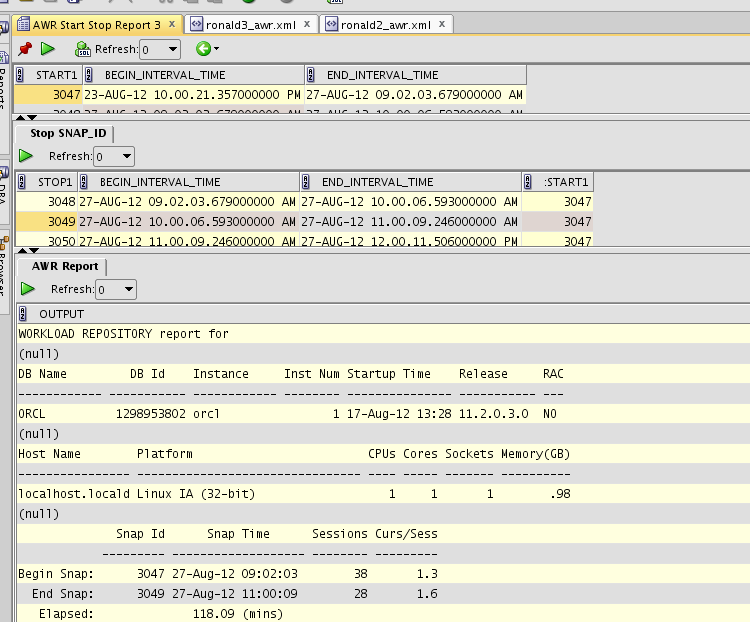
Ronald wanted to have the ability to query AWR snapshots and generate the AWR reports. That requires a few inputs, including a START and STOP snapshot ID. That basically tells AWR what time period to use for generating the report.
And here’s where it gets a litle tricky, so please bear with me.
We’ll need to use aliases for the SNAP_ID column. Since we’re querying SNAP_ID in both the grandparent and parent reports, AND since we need to reference both values in the grandchild report, we need to use different bind variable names. Fortunately for us, SQL Developer’s clever enough to see a column name has been aliased and use the alias for the bind.
Here’s what I mean:
Grandparent Query
SELECT snap_id start1, begin_interval_time, end_interval_time
FROM dba_hist_snapshot
ORDER BY 1 ASC
‘snap_id’ here is aliased as ‘start1’
Parent Query
SELECT snap_id stop1, begin_interval_time, end_interval_time, :START1 carry
FROM dba_hist_snapshot
WHERE snap_id > :START1
ORDER BY 1 ASC
‘snap_id’ here is aliased as ‘stop1’
And the ‘tricky’ continues!
We can’t reference a bind variable from outside the parent query. Or in other words, my grandchild report can’t reference a value from the grandparent report. To get around this limitation, i just carry the selected value down to the parent. In my parent query SELECT you see the ‘:START1’ at the end? That’s making that value available to me when I use it in my grandchild query.
To complicate things a bit further, I can’t reference a bind in a report query that alread has a ‘:’ in the name. SQL Developer will just get confused when I try to reference the value of the variable with the ‘:’ – and no, ‘::Name’ doesn’t work either. But that’s OK, just alias it!
Grandchild Query
Select Output From Table(Dbms_Workload_Repository.Awr_Report_Text(1298953802, 1,:CARRY, :STOP1));
Ok, and the last trick – I hard-coded my report to use my database’s DB_ID and INST_ID into the AWR package call. Now a smart person could figure out a way to make that work on any database, but I got lazy and and ran out of time. But this should be far enough for you to take it from here.
Here’s what my report looks like now:
The Raw XML for this AWR Report
<?xml version="1.0" encoding="UTF-8" ?>
<displays>
<display id="927ba96c-0139-1000-8001-7f0000015340" type="" style="Table" enable="true">
<name><![CDATA[AWR Start Stop Report Final]]></name>
<description><![CDATA[]]></description>
<tooltip><![CDATA[]]></tooltip>
<drillclass><![CDATA[null]]></drillclass>
<CustomValues>
<TYPE>horizontal</TYPE>
</CustomValues>
<query>
<sql><![CDATA[SELECT snap_id start1, begin_interval_time, end_interval_time
FROM dba_hist_snapshot
ORDER BY 1 asc]]></sql>
</query>
<display id="null" type="" style="Table" enable="true">
<name><![CDATA[Stop SNAP_ID]]></name>
<description><![CDATA[]]></description>
<tooltip><![CDATA[]]></tooltip>
<drillclass><![CDATA[null]]></drillclass>
<CustomValues>
<TYPE>horizontal</TYPE>
</CustomValues>
<query>
<sql><![CDATA[SELECT snap_id stop1, begin_interval_time, end_interval_time, :START1 carry
FROM dba_hist_snapshot
WHERE snap_id > :START1
ORDER BY 1 asc]]></sql>
</query>
<display id="null" type="" style="Table" enable="true">
<name><![CDATA[AWR Report]]></name>
<description><![CDATA[]]></description>
<tooltip><![CDATA[]]></tooltip>
<drillclass><![CDATA[null]]></drillclass>
<CustomValues>
<TYPE>horizontal</TYPE>
</CustomValues>
<query>
<sql><![CDATA[Select Output From Table(Dbms_Workload_Repository.Awr_Report_Text(1298953802,
1,:CARRY, :STOP1 ))]]></sql>
</query>
</display>
</display>
</display>
</displays>
Should We Build Support for Multiple Levels of Reports into the User Interface?
Let us know! A comment here or a suggestion on our SQL Developer Exchange might help your case!


34 Comments
Support for multilevel is very welcomed. It would be nice to see it in next release.
Kind Regards
Tomasz
In case anyone read the comments down to here: Voting for this feature to become official is still open!
Please vote for the feature request at https://apex.oracle.com/pls/apex/f?p=43135:7:6710823533598
Thanks for the explanation, Jeff! Using this hack, I created a report that allows for drilling down from a Statspack graph to the top waits and then further down to top SQL for the given wait and interval.
Cheers,
Uwe
Hi Jeff,
First of all, thank you very much for your great blog, I return to it quite often.
I did get all of this to work BUT…
a) If I add a drill-down to a child or grandchild, it also comes up on the parent (respectively grandparent). I’d like to change that since the specific drill-down doesn’t apply there but can’t seem to get it out even though I put removeFromParent=”true” in the XML (attribute doesn’t do what I hoped it would but it was worth a try…)
b) What’s worse; the drill-down from a child doesn’t work the first time I call it. Well, it opens up the report but the binds are not passed. The only way I can get a functional drill-down from child so far is: first drill down from parent, after the report opened click “back”, select a record in the child and do the drill-down from child. So if I make my selection in parent and child and drill down from the child first time around, the binds come up as Null; I always have to do the round-trip from parent first.
c) If I do a drill-down from a child, the “back” button doesn’t work.
d) Drill-down from the toolbar never passes binds, regardless of the selection and sequence of events/clicks.
That’s quite a couple of issues to put in one reply but if you could give me a hint on how to resolve b), that would be really, really appreciated 🙂
Now I realize this post was about multiple levels of child reports hence all the drill-down questions may be a bit out of place but the functionality just screams to be used this way; get to a specific item/selection with a couple of clicks in your dashboard report and run a detailed (drill-down) report without having to pass all those binds by hand (copy-paste).
(Version 4.0.3.16)
Hi, I used this method to create multiple levels of child reports in the past. When I just tried in the latest version of SQL Developer, it doesn’t seem to work. Is that right or am I possibly doing something wrong?
Thanks.
Hi, I managed to get grandparent-parent-child report and it works. But when I generate HTML report the child portion of the report is not there. I’m on SQLDeveloper 4.0.0.13.
Is this going to be supported in the new release?
Hi, and what about drill down from a child report?
You can probably add it by hand by editing the XML
Why not make it a simple master detail with the master query being:
SELECT * FROM
(SELECT dbid, instance_number inst_id,
LAG(snap_id) OVER (PARTITION BY startup_time ORDER BY snap_id) prev_snap_id, snap_id, begin_interval_time, end_interval_time
FROM dba_hist_snapshot
ORDER BY 3
and the child query being:
SELECT output FROM TABLE (dbms_workload_repository.awr_report_text(:DBID, :INST_ID, :PREV_SNAP_ID, :SNAP_ID))
Sure – but the main reason I wrote the post was to show how to do multiple levels of child reports.
horizontal
null
horizontal
null
horizontal
null
horizontal
null
horizontal
null
Hi Jeff,
I was able to “hack” the XML as per this post and get Grandparent=>Parent=Child to work.
I’m even able to have 2 tabs at the Parent level (each with it’s own child).
Basically I’m asking at the Grandparent level for the user to tell me the “Batch Job” they want to know about.
Parent level then gives the “executive summary” of what happened
Grandchild level will allow a further drill into the details.
Is there a way I can have the selection of “Job” at the Grandparent level also select the right TAB at the parent level? By default it always passes the data from GP to the leftmost Parent Tab (which is only appropriate for 1 choice at the GP level).
If I have 20 reports at the GP level
I’ll have 20 tabs with the right query at the Parent Level
Then 1 Child for each parent that has the right detail query at the child level.
I was hoping there might be some sort of
onclick=”onSelectChildTab(this, 1)
type syntax like you get when doing and export of a report that has a Parent => multiple children when viewing the HTML output
Thanks,
Greg
I don’t THINK so. But I’ll ask 🙂
Would you be willing to share your report? You have my curiosity piqued!
I can send a “mockup” in .xml form and not get myself into trouble. I think it will give you the idea.
How can I post/send the xml and/or screenshots ?
Posting the XML didn’t seem to work. If you email me I can send you email with the .XML and some screenshots.
Greg
email it to me at [email protected], if you want, no worries
Interested in multi parent report, please share .xml with me.
It’s in the post.
Hai friends am using oracle sql server…am create two tables with foreign key support
but.after finish my work.try to delete table.while deleting.it’s show some error message first delete child table . i don’t know how to find which is child table ..please help me. anybody……..
integrity constraint (SYSTEM.FK1) violated – child record found
02292. 00000 – “integrity constraint (%s.%s) violated – child record found”
*Cause: attempted to delete a parent key value that had a foreign
dependency.
*Action: delete dependencies first then parent or disable constraint.
I’m guessing you mean Oracle SQL Developer 🙂
You can’t delete a parent record if it will leave orphan rows. You say you created two tables with foreign keys – have you already forgotten those two tables?
You can see the referential integrity constraints for each table on the table editor. Open a table, go to the Constraints page. Look for constraint_type of ‘Foreign_Key.’ Then scroll over for the R_TABLE_NAME – that will tell you where your parent record is. If you want to know what the child tables are, you should be able to import your DD to a data model and see that visually.
Greetings Jeff!
I’m a SME in accounting/finance. I have to tell a programmer what I want in my database and what “machinations” I want done in it. Can you suggest a pro-forma document I could provide to the programmer? ( maybe direct me to an example).
Thanks.
Luc (Montreal, Canada)
My first instinct was to suggest building a logical data model…but I think I need to know more about what you mean by a ‘machination.’
Thanks Jeff.
What reports will be produced…source of the data for each report. Some forms will be multi-level…need to enter an asset then another one and so on.
Some fields will have drop-down choices. How do I present all of this in a document to the programmer? That’s what I’m looking for. Hope you can help.
Luc
I would create a requirements doc for each report where you describe the business problem you’re trying to solve. You could mock up screenshot examples, but trust the developer to handle the implementation/tech stuff.
Thanks Jeff!
-Luc
I was able to add drill down report to a child (inserted … within tag for child) but it appeared in a menu for parent report as well and when I put several child reports there and defined drill down for them the same as for other children, for parent report I got it duplicated several times
Hi Jeff,
is it possible to configure Drill Down feature for child reports through edition of reports XML?
Andrey.
The developer says ‘Yes,’ but I haven’t confirmed that independently, yet. A topic for tomorrow perhaps?
Hi Jeff,
Thanks for sharing this. I had a go, and what a difference it made having the ability to drill down to another level.
Are we ever going to see this type of feature (nested child reports, grandparent reports) built into SQL Developer? I’d be hanging out for that release if/when it came…
Stuart.
I just need more people asking for it. I’m already sold on the idea. We have some exciting stuff for reports in 4.0 due soon. This won’t be in it, but maybe we can stir up some excitement for multiple-level reporting.
Maybe people just don’t know about the user defined reporting in SQL Developer?! Pity,… it is such a great feature. Only limiting SQL Developer to Parent-Child reports is one reason why people at our site don’t use it (it simply doesn’t provide enough drill down capabilites).
Thanks for the info on SQL Developer 4. I must say that reporting enhancements is the first thing I look for in the new features list.
Stuart.
I spend a lot of time on promoting existing features to users. Folks use what they know, do what works, etc. If you look for it though, it’s very hard to miss. It’s a popular feature for many folks, so I think anything we do here has large potential to benefit many people. By that I mean, for the folks that like the reporting, they build LOTS of reports. I can think of 2 things you’ll like A LOT in 4.0, stay tuned.
I’ll try to remember to email you when it’s out so you don’t miss it, or the features.
BTW, I miss the pumpkin soup and toast that is so good in NZ 🙁 I need to make it back someday.
Maybe get a free trip down under by being a guest speaker t the next NZOUG? 😉
We just had one in March, so expect the next one to be late 2014.
Get me an invite, and I’ll have a hard time saying ‘no!’ This has been my secret plan for awhile. Just waiting for the kids to get a bit older before I leave town for a few weeks with their momma back to our favorite place.
Hi Jeff,
I just added a few tweaks to make it generally usable. It makes sure that the dbid, instance_number and startup_time are the same for both queries. I hope it is usable for others too. It would not hurt to make awr reports accessible for humanoids using SQLDeveloper. It’s a nice tool with growing power.
horizontal
horizontal
:START1
and startup_time = :SUPT1
and instance_number = :INUM1
and dbid = :DBID1
ORDER BY 1 asc]]>
horizontal