

After a VNC session with the always brilliant @bamcgill, I now know how to rename a worksheet.
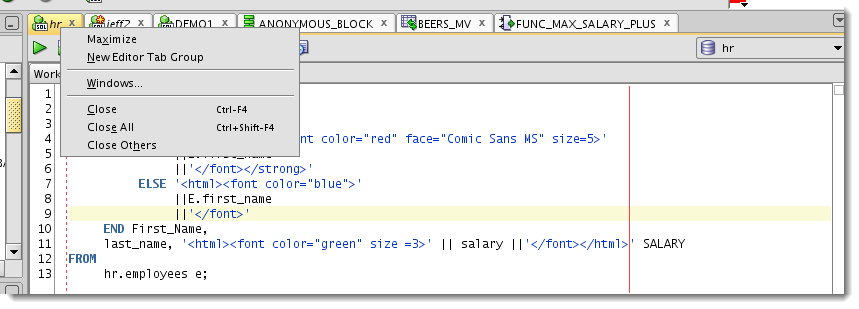
So when you open a worksheet, it’s attached to a database connection. The worksheet name is a property, and it defaults to the connection name. So you DO you have a lot of control over the worksheet name. This is the primary reason I advocate using well thought out names for your connections.
But maybe you want to take a screenshot of a worksheet and not show where you’re connected. Or maybe you have 5 worksheets open and you want to be able to give them a logical name for easier navigation.
Just because there’s no ‘Rename’ available in the worksheet tab context menu, doesn’t mean you can’t do it 🙂
And the Trick Is…
…
SET worksheetname NAME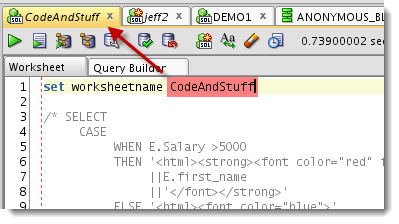
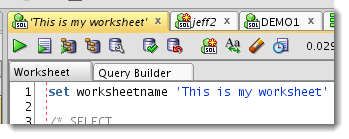
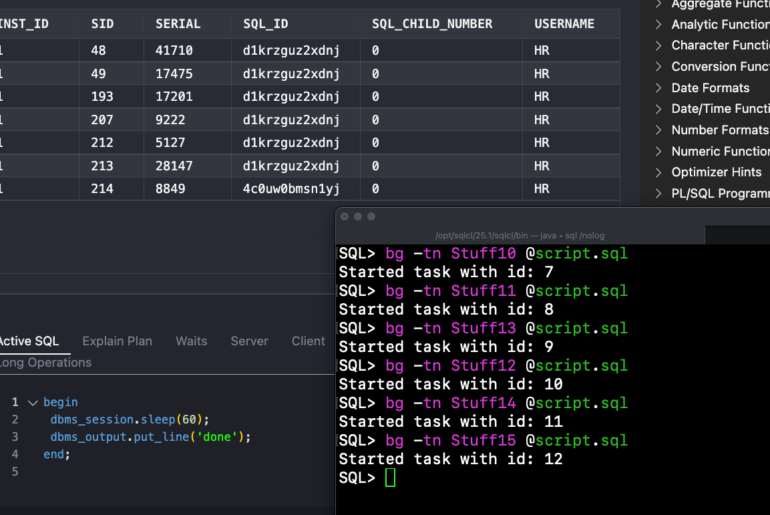
And because I know someone will ask, ‘Yes, you can do this too.’



29 Comments
Hi Jeff
My SQLD version: 21.2.0.187.
Just noticed that SET worksheetname TEST sets the name of tab to ‘SET worksheetname TEST’ instead of ‘TEST’.
It is a case-sensitive issue
https://community.oracle.com/tech/developers/discussion/4318323/set-worksheetname-hello-with-strange-results
I love this feature and use it often
I have a request related to this that falls under nice to have.
I would like some kind of special hint or comment magic that would automatically rename my query result
Example
select * from jobs
results
tab reads Query Result
displays result set
Enhancement
select * From jobs — ** Jobs
results
tab is pinned and reads Jobs
displays result set
This way I can save my query sheets and run them all at once and know what sheets i’m looking at
because i’m lazy
Thanks!
Sorry. I just saw the answer in the related articles section.
Remember that lazy part?
Thanks!
adding a comment to your query (the name) and then a mouse over on the result tab…i’m hoping that’s the answer you saw
And I see that it doesn’t quite work the way people would like it. But i’m sure that’s in the future.
Nice tip!
I like (and tend) to work with more than two worksheets and, due to screen size, well, I sometimes lost record about which worksheets has the data I queried a few moment ago.
Thanks! 🙂
Another request for it on a context menu please, since I can’t use SET WORKSHEETNAME in otherwise uneditable worksheets!
Specifically, I’m using subversion, and ending up with names of the style: jdevbrowser.extension
where the only bit that’s accurate is the extension (.java, .sql etc). Having the actual filenames would be a lot more helpful!
Are you saying you’re opening a file from subversion and it’s not showing the filename by default? If so, that’s a bug. You shouldn’t have to manually re-label the document tab to make it useful.
If I check out or export the files to my PC file system, and then open them in SQL Developer, then my PC gets the file with the correct filename, and this filename becomes the tab name in Developer. Pretty much as you’d expect.
But if I use the Versions panel to browse the remote repository, and then open the file directly from the panel, it is temporarily downloaded, under a name such as jdevbrowser983263764387083895.sql, and this then becomes the (unchangeable) name shown in the tab. The only part of the name that’s accurate is the extension; in this case, the original file was converis_dump.sql
hello jeff,
i have an enhanchement request.
can this be included in the right click menu option on the tab?
it would be very welcome!
ideal would be ……
right click on tab
choose rename
pop up -> type name -> press ok / cancel
Hi Jeff
Is there a set command that allows to rename a Worksheet Tab. It would be a cool feature in case in a script with several statements you can set specific Tab name for every SQL output.
Regards
— Kirill
you can rename the worksheet itself but not the query output tabs, with a command that is. I think.
Hi,
The SET WORKSHEETNAME behavior seems to have changed in 4.2. When I for example execute the command SET WORKSHEETNAME TEST;, the worksheet name becomes SET WORKSHEETNAME TEST; as opposed to just TEST (like it used to be in 4.1.3.
Do I need to do something to get the old behavior back?
Thanks, Marie
It’s working for me, but I have a newer version of 4.2 than you…
Thanks. I will just wait until the newer version is available for the rest of us then 🙂
I just upgraded to 4.2.0.17 and it works, but not the same as in 4.1.
Now it is case sensitive and set worksheetname has to be in lower case. Also, you no longer can have the semi colon at the end.
It works though, so I’m good. Just a little strange that the old syntax doesn’t work any more.
Marie,
In Version Version 18.4.0 this command seems to be case sensitiv.
SET WORKSHEETNAME TEST change title to “SET WORKSHEETNAME TEST”.
set worksheetname TEST change title to “TEST”.
For any connection to DB, show in the TAB, [user@instanceDB]
like login.sql for sqlplus
Ex:
user@SID >
Just to make sure you’re not missing this, if you mouse over a document, it will show you the connection.
You can color code your connections such that user@instanceDB is always colored in RED – so you can add a visual indicator.
If you want a prompt, you’ll need to use SQL*Plus or SQLcl.
Ok, i will try with SQLPlus,
Thank you for your help.
Hi Jeff and thanks for this tricks.
I tried to include “set workshetname” in my login.sql but when i clic in connections for open SQL Worksheet, this SET doesn’t work.
But, when i write in SQL WorkSheet this commande :
set worksheetname &_GNAME
it work 🙁 [worksheetname change for “system@CWDEV8”]
I would like the worksheet name change automaticlly.
Thank for your help.
SQLDeveloper Version 4.1.0.19 Build MAIN-19.07
Here is my login.sql
set serveroutput on
define _GNAME=idle
column global_name new_value _GNAME
select lower(user) || ‘@’ || substr( global_name, 1, decode( dot, 0, length(global_name), dot-1) ) global_name
from (select global_name, instr(global_name,’.’) dot from global_name );
set worksheetname &_GNAME
set timing on
set sqlformat ansiconsole
that login script is running before your worksheet opens, and it doesn’t run through the worksheet itself, so you can’t manipulate a worksheet via that mechanism
Thanks you.
Do you know if exist another mechanism for manipulating a worksheet name?
Kinda, open a file. The tab will always take the name of the file I think.
Hello Jeff,
is it possible to include variables? I would like to set the name dynamically in a script. The best I get is
COLUMN tabname NEW_VALUE tabname NOPRINT;
SELECT ””||USER||TO_CHAR(SYSDATE,’ dd.mm’)||’ Bug 23748”’ tabname
FROM dual;
SET WORKSHEETNAME &tabname
But then the tab is named “SET WORKSHEETNAME ‘MYUSER 16.04 Bug 23748′”
It’s almost what I want, except for the SET WORKSHEET 🙂
Version 4.0.3.16
Regards
Marcus
It still happens in 4.1.3.20.
yeah, i never logged a bug or an enhancement here – it would prob be an enhancement request, and a low priority one