

There’s nothing worse than the ‘white screen of panic.’ You’re faced with the prospect of actually writing some code from scratch. Or even worse, you’re doing a presentation or demo, and everyone gets to see what a horrible typist you are.
Yes, this is about Snippets, and Snippets are cool. But if you’re a keyboard person, then you’re gonna like SQL Templates even better. Go read this and come back. -TJS 3/13/15

Yes, you could browse your SQL History, but that could contain several hundred or even thousands of statements. And let’s face it, you probably don’t recognize code you wrote even a few days ago when you see it.
Wouldn’t it be nice if you could take your favorite statements or scripts, and save them to recall later? Even better, let me name and document them?
Enter the Snippets
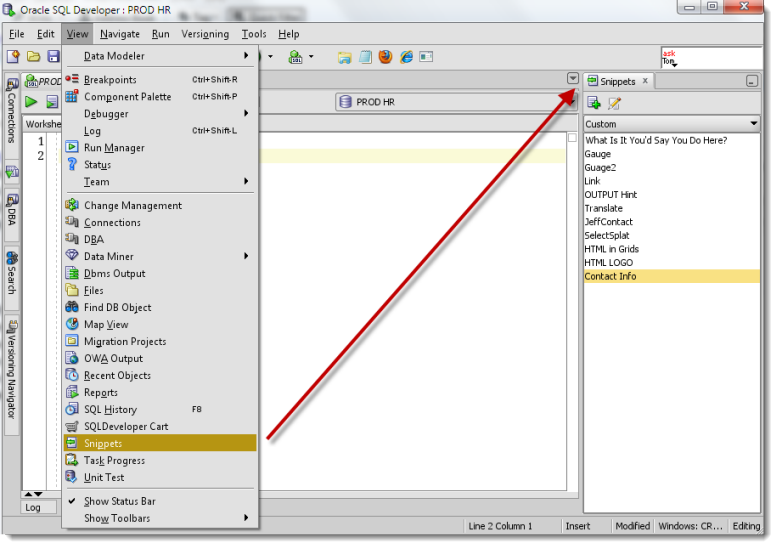
Access your snippets via the View menu. There’s a few included ‘out of the box,’ but you’ll want to add your own to the ‘Custom’ category.
Add a Snippet
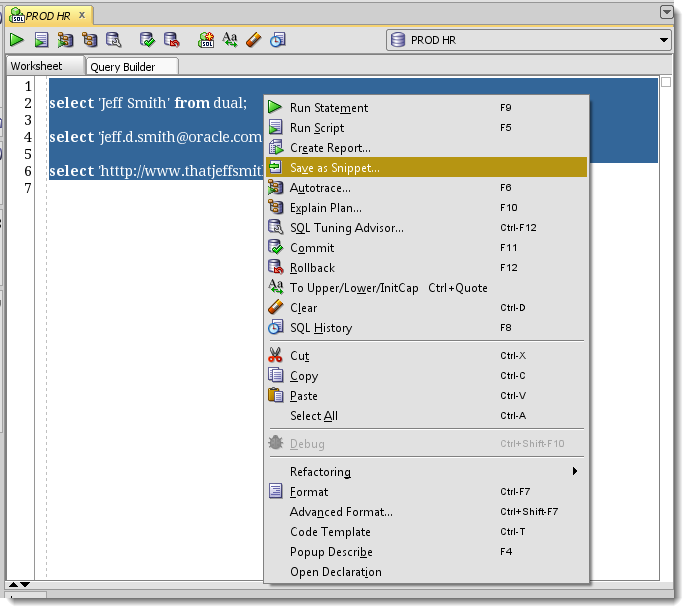
The easiest way to add a snippet is to select your code and right-click. Choose ‘Save as Snippet…’
Define the Snippet
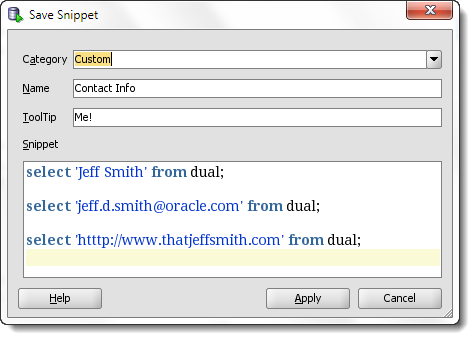
Place it into the proper category, give it a name, and define the tool-tip that will appear if you mouse-over the snippet.
Snippets in Action
Now when you get back to the white-screen-of-panic, remember your trusty statements and scripts are accessible via the Snippets panel. Select your snippet and drag and drop (d-n-d) it into the worksheet or Procedure Editor. The d-n-d will respect any code you already have in your editor, meaning you can drag it exactly where you want to drop it and preserve your existing code.
Power Tip: Did you know you can share your favorite snippets with other SQL Developer users at the Exchange? Browse and download your favorite snippets or upload your own here. We don’t support or endorse these snippets, so use at your own risk.



23 Comments
It’s a shame there is no way to search snippets makes it near impossible to use them effectively once you have more than a handful.
It’s why i suggest code templates instead, then you can bring them up by keyboard
Hi I have just upgraded to latest SQL Developer 21.4.3
Snippets have disappeared
No Snippets under “View” as before
No “Save as Snippet”
Tried “Reset Windows to Factory Settings” under the Window menu
Did not bring back Snippets
Started reusing older 21.4.2,
but next week gave another chance to
newest 21.4.3 and surprise there, Snippets appeared.
—
Note for next time>
There exists file “ide-extension-prefs.xml” with key “featuresToReloadAtStartup”
in Windows file location is at user home “.\AppData\Roaming\SQL Developer\system….” folder/folders
If needed line can be addded according to
https://community.oracle.com/tech/developers/discussion/4042640/sqldev-4-2-missing-snippets-menu-entry-solution
Thank you,
Hi, I’m using SQL developer on mac os Big Sur. Do you know what is the path where I can find UserSnippets.xml? Thank you so much!
everything will be under a .sqldeveloper folder in your $HOME directory.
Hi Jeff: I have just upgraded to SQL Developer 20.2.0
Snippets have disappeared
No Snippets under “View” as before
No “Save as Snippet”
Please advise ASAP
Try resetting your desktop, under the Window menu. The feature is still there.
It would be nice if you can pass on the value of a parameter when invoking a snippet or adding a code template, eg to replace the [(parameter)] to the actual value you want to use.
You can almost do this with a code template – you can have a portion of the code highlighted for strikeover once it goes into the editor.
If I am moving to another pc is there a way of taking my snippets to the new pc? Thanks
All of your files can be found in the AppData folder for your Windows user. Look for ‘UserSnippets.XML’
I use snippet a lot. I found it is quite hard to find and edit a snippet since I have a long list for each category. Is there an easy way to search my snippet?
Could a preference be added to let Snippets default to a user selected category ? In my case I use Custom the most, and have to change the category to Custom almost every time I am using a snippet.
Hi Mr. Smith,
Your blog came up during a SQL Fundamentals I class at Austin Community College. I <3 it! One of the best recommendations our instructor has made.
My question is this:
I'm kind of a pacifist and by nature write SQL in all lower case (unless I'm writing something I intend to share with others in which case I try to use CAPS when writing keywords and commands).
Aside from writing my own version of snippets, is there a way to re-format existing ones so that they are more aesthetically pleasing (all lower case, all upper case, camelCase, whatever)?
I suppose I can F7 after inserting the snip, just wanted to ask if there was any way to re-format prior to inserting it.
You want all of the snippets set to lowercase?
I have an easier solution, I THINK
Tools – Preferences – Code Editor – Completion Insight
Chase Case As You Type – lowercase
That should satiate your pacifist nature, I hope 🙂
It won’t affect quoted strings, but will touch everything else – not just the snippets.
Your other option is to open the snippets xml file and just lowercase everything using SQL Dev or your favorite text editor.
Hi Jeff.
I’m an Oracle developer spending much time on SQL Developer.
I really like this tool but i miss one thing from the tool i used before (PL Dev, not to name it) and it is the ability to affect an “accelerator” for a snippet.
For exemple when you type “s*” and press the space bar after it, the “s*” turns into “select * from “. It can save so much typing !
They have the same thing in eclipse (e.g. : syserr = system.Err.println..)
Do you thing it can be possible to implement this feature in SQL Dev ?
I mean it can just be a property of a snippet.
Anyway, keep up the good work on SQL Dev, cause it’s getting more and more powerfull and i really appreciate the product and your blog.
Thanks
Do you mean like what we have for SQL Editor Code Templates? You invoke them with the auto-complete keystroke, which is ctrl+spacebar by default. They’re defined in the Preferences under the Database page.
Also, thanks for not naming ‘the other tool’ 🙂
Ah, snippets, quite an underused feature of SQL Dev. I’ve been using Snippets since my earliest SQL dev days – especially so since I had a bunch of SQL statements that I’d run to verify my data before starting a humongous data conversion job.
Any suggestions for making our snippets ‘better’ or more useful Sathya?
Jeff,
I think your blog post about Snippets is good enough 😉 The only other tips I’d suggest is
– If you’re using the snippets often, it’d be a good idea to keep the window docked
– I believe you can also add custom categories – having snippets categorized instead of having them all under “Custom” allows for easy discovery of snippets.
– The snippets are stored in %appdata%\SQL Developer\UserSnippets.xml file, it’d be prudent to keep the file backed up regularly. Or have a bunch of snippets pre-built and saved in the folder to save time
Hi Jeff
I have a question…Can I shared your information in Spanish in my blog..? obviously I will write source and put link. Thank you so much I think is very interesting here Colombia.
Thanks for the offer Ivan, but I’m not looking to have my content syndicated/translated at this point just yet. I’d be happy to guest post on your blog though, just give me a topic you and your readers would like to know more about!
And again – thanks for asking. Many folks just grab content they want, and act offended when you ask them to stop.