

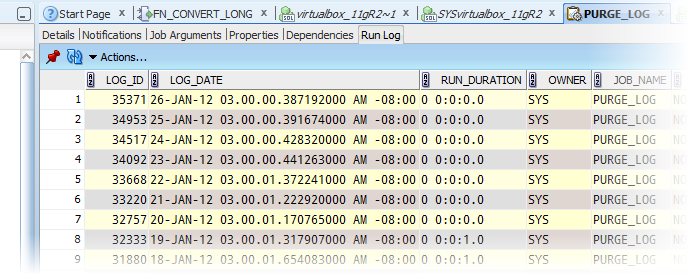

The job runs can be viewed via the dba_scheduler_job_run_details SYS view. Oracle SQL Developer shows this data in the job details panel of the schema browser even. So, answering the question, ‘How long does this job normally take to run?’ should be relatively easy to answer.
It is, if you can think in terms of INTERVAL. You see, Oracle doesn’t store the time a job takes to run in seconds, it uses the INTERVAL datatype.
DESC dba_scheduler_job_run_details
Name              NULL TYPE
----------------- ---- ----------------------------
LOG_ID                 NUMBER
LOG_DATE               TIMESTAMP(6) WITH TIME ZONE
OWNER                  VARCHAR2(30)
JOB_NAME               VARCHAR2(65)
JOB_SUBNAME            VARCHAR2(65)
STATUS                 VARCHAR2(30)
ERROR#                 NUMBER
REQ_START_DATE         TIMESTAMP(6) WITH TIME ZONE
ACTUAL_START_DATE      TIMESTAMP(6) WITH TIME ZONE
RUN_DURATION           INTERVAL DAY(3) TO SECOND(0)
INSTANCE_ID            NUMBER
SESSION_ID             VARCHAR2(30)
SLAVE_PID              VARCHAR2(30)
CPU_USED               INTERVAL DAY(3) TO SECOND(2)
CREDENTIAL_OWNER       VARCHAR2(65)
CREDENTIAL_NAME        VARCHAR2(65)
DESTINATION_OWNER      VARCHAR2(128)
DESTINATION            VARCHAR2(128)
ADDITIONAL_INFO        VARCHAR2(4000)
So what is an INTERVAL?
Technically it’s INTERVAL DAY TO SECOND. From the docs –
INTERVAL DAY [(day_precision)] TO SECOND [(fractional_seconds)]
Stores a period of time in days, hours, minutes, and seconds, where
day_precision is the maximum number of digits in the DAY datetime field. Accepted values are 0 to 9. The default is 2.
fractional_seconds_precision is the number of digits in the fractional part of the SECOND field. Accepted values are 0 to 9. The default is 6.
The size is fixed at 11 bytes.
So if I’m looking at an entry in dba_scheduler_job_run_details, and it shows ‘0:0:1.0’, we can read that as ‘Zero days, zero hours, and 1.0 seconds.’ As you can imagine, asking for an average using the avg() function doesn’t turn out so well –
SELECT avg(run_duration) FROM dba_scheduler_job_run_details;

ORA-00932: inconsistent datatypes: expected NUMBER got INTERVAL DAY TO SECOND
00932. 00000 -  "inconsistent datatypes: expected %s got %s"
*Cause:
*Action:
Error at Line: 3 COLUMN: 11
How do I get a number out of an INTERVAL?
Oracle provides a function called EXTRACT(). It allows you to pull DAYS, HOURS, or SECONDS from an INTERVAL. BONUS FEATURE: It also works for TIMESTAMPS! However, there is no direct conversion function that would take an interval and return the total number of seconds or minutes or hours, or a fraction thereof. So we have to do some MATH. I know, I know – that hurts. But, we can always cheat and ‘borrow’ from the great Tom Kyte 🙂
Using Tom’s math – basically taking the number of days and hours in a day and multiplying out to get seconds and then adding to the seconds field gives me total number of seconds. In my case I’m OK with seconds b/c most of my jobs don’t take very long to run. You could adjust the math and get an avg number of hours or days instead. I’m going with seconds.
So here is my borrowed query from Tom:
SELECT job_name,
       job_name,
       avg(EXTRACT( DAY FROM run_duration )*24*60*60 + EXTRACT( HOUR FROM run_duration )*60*60 + EXTRACT( MINUTE FROM run_duration )*60 + EXTRACT( SECOND FROM run_duration ))
FROM dba_scheduler_job_run_details
GROUP BY job_name, job_name
HAVING avg(EXTRACT( DAY FROM run_duration )*24*60*60 + EXTRACT( HOUR FROM run_duration )*60*60 + EXTRACT( MINUTE FROM run_duration )*60 + EXTRACT( SECOND FROM run_duration )) > 0
ORDER BY 3 DESC
Why did you put JOB_NAME in there twice?
Because I wanted a chart report!
I like pretty pictures – it’s why my career path looks so bright (this is a joke about managers, they love charts.)

So clicking into my …_MAINTAIN_STATS job I can see that it ran in an avg of 5.25 seconds for a total of 4 times in the past 30 days. Averages can be misleading though. Four runs from 0 to 10 seconds is quite the range. You may want to build some logic in your report to restrict any average that doesn’t have at least a statistically significant number of data points.
Thanks to my Twitter friends for giving me something to chew on (and blog about!) this morning 🙂


7 Comments
This works great, but now I have the opposite problem… I have a number of seconds in a column that I need to convert to a time interval.
Any wisdom on this?
This works great for small values, but crashes on large values:
select to_char(to_date(39044,’sssssss’),’dd hh24:mi:ss.sssss’) from dual;
Hi, how did you manage to get the graph, is it possible in Toad? I need exactly the same for My manager 😛 ; He wants to see the trend of the jobs.
Regards
Nashit
Toad?
Toad is an IDE for oracle sql/plsql development.
Yes, I know. I’m the product manager for sql developer. I can’t help you with 3rd party tools.
Hi,
Thanks for a good blog!
Could be that I haven’t read this post thoroughly but is the parameter > the number of seconds in a day?
In addition how did you manage to get graphs on the output in SQL Developer?
Regards,
Jabba
Jabba, > is just an encoding issue with the code being displayed on the page. It is encoded for ‘Greater Than’ … so just replace with >