

It’s worth a few moments to get your bearings when using a new program. Or maybe you’ve been using SQL Developer Data Modeler for awhile now, and just haven’t taken the time to understand how designs, models, and diagrams are handled.
This short post will fill in a few gaps and increase your comfort level with the tool, so please bear with me!
Organization and Navigation
Navigation is handled by the Browser. The Browser displays your designs, models, and diagrams in a ‘tree.’
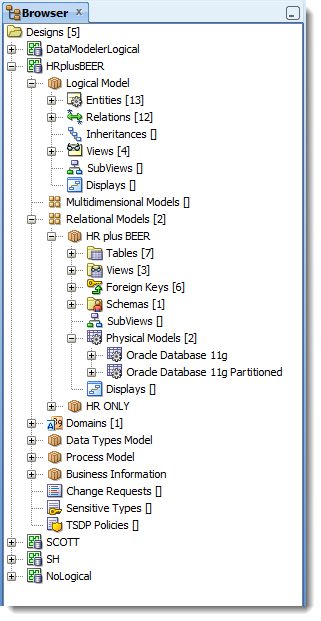
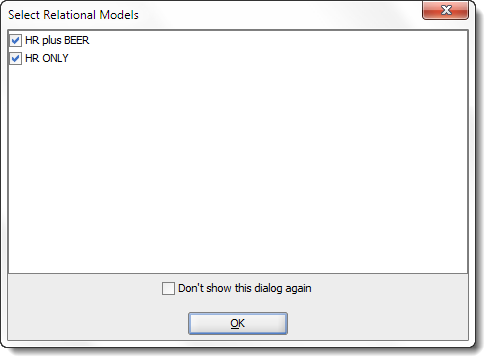
When you open a design, it will prompt you to select one of more relational models. Those models will be opened, added to the tree, and the diagrams will be displayed.
SQL Developer Data Modeler’s Logical Model
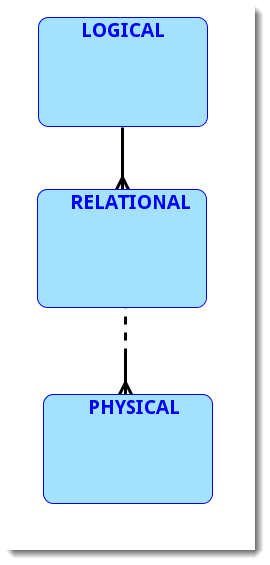
Every relational model has a logical model, even if that logical model is null or empty. Wait, let me clarify that point further. Every design has a single logical model. So if you have 2 or more relational models, they ‘share’ a single logical model.
The diagrams are opened by default. If you want less clutter in your desktop, you can ‘hide’ the logical model and save the design. When you open the design again, the logical model diagram will not be shown. Another reason to ‘hide’ your logical models is the size of its diagram. If it has many entities, it can take a long time draw this on opening the design. ‘Hide’ it, and only open it on demand.
Your relational model can have zero, one, or many physical models. Physical models do not have diagrams.
It occurs to me, maybe a diagram will help describe how designs are organized?
This diagram uses the Barker Notation (although we also support Bachman and Information Engineering notations.) Thanks to @KentGraziano for the help getting this right. If you don’t have your own Oracle ACE Director available, try EntityModelingOrg for a quick primer on one-to-one, one-to-many, etc. relationships and how they’re represented in diagram form.
Opening, Saving, Showing Designs
As you open a design, it’s added to the tree. You can see in my first screenshot that I have 5 designs open. If I want to save a change to a design, the easiest way is to right-click on the design in the tree and select ‘Save Design.’ Otherwise, if you use the File > Save dialog, SQL Developer Data Modeler will prompt you for a design.
You can hide or show diagrams by right-clicking on the model. Hiding it doesn’t ‘close’ it – it just saves you space in your desktop.
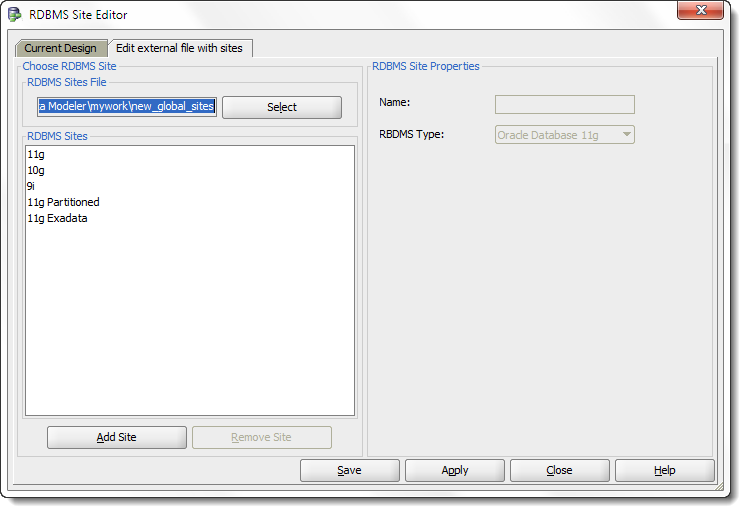
Another fun fact: some of the application preferences are tied to specific designs. For example, if I create a new ‘Site’, it will prompt me for a design first. That’s right, you can have sites, domains, and other ‘preference’ or ‘setting’ level items tied to a particular design.
What’s a site? Read this to learn more about managing different physical implementations of your relational models.
In the case of sites, you can create a ‘global’ sites listing which is stored in an external file – a file that is external to the design.
Sharing Your Designs
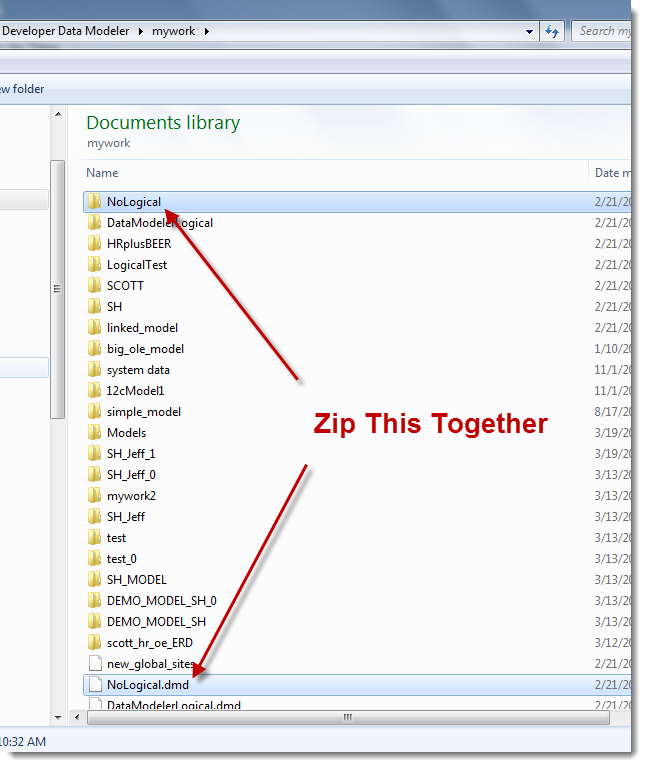
The design is defined by a single xml file having a .dmd file extension. This file contains the listing of the many xml files used in the design. So when you want to email your design to someone else, you need the dmd file AND the directory containing all the XML files.
What About Datatype, Process, and Multidimensional Models?
I think that’s enough content for one post! We’ll pick this subject up at a future date 🙂


24 Comments
Hi,
I am trying to comit my design changes using the git tool in SQL Developer Data Modeler, but a version control error appears with an *Error: Index 84 out of bounds for length 84* .
Do you have any idea what can be the problem?
Thank you,
Amine
Can you export SQL Developer data models in XMI format ?
XMI or XML? Closest we have is the XMLA.
Hi Jeff it’s possible save a Design Model in a single xml file or everytime SqlDeveloper/Oracle Data Model Save Function save, it save in a multy folder structure ?
“Model in Single File” versus “Model in Many Files”.
This is set in Design Properties –> Model Persistence.
When Model Persistance property is set to “Model in Single File”, it means that for each model there is one file that contains all definitions.
Escuse me, i open a Design Model saved in Many Files change the Design Persistent properties in Save in Single file but when i save my Design Model i again find a Multi File structure saved….that’s something i fail….
I’m out on personal leave, please post your question to our product forums or open a ticket with my Oracle support.
Hi Jeff, i read again your post “Sharing Your Designs”, and this got me a dubt about the structure obtained when i change the Model Persistent property.
With some test i think to have understand that when i set the Model Persistent to the value “Model in one file” ODM don’t create only a single file for all the structure/model include Logical Relation a Phisical Model but howhere it save the model with some subdirectories businessinfo datatypes files logical etc etc and inside this 4 files one with xml extension and 3 with local extension, it’s right?
so if i want save an unique file for all my project i need to make a zip
I have a lot of objects in the logical, relational and physical models. Are there some keyboard shortcuts to quickly find/move between an object (that originates from the same logical object) located in these models in the Browser. I know I can do a search, but this doesn’t move where I am in the Browser. I can also start typing an object name within a model (e.g. logical), but I would like to jump quickly to this object e.g. in the physical model.
Thanks.
When I drag and drop tables/views into a relational model, there are different colors. What do those colored tables represent or what do the colors stand for? Query versus view versus table?
I’m getting the following error while saving the model:
“Some objects are not saved correctly!
See the log file for details.”
and in the log file is the below error message
————————————————————–
ERROR XMLTransformationManager – Can not write document to file C:\Programs Files (x86)\datamodeler\datamodeler\types\defaultdomains.xml
java.io.FileNotFoundException: C:\Program Files (x86)\datamodeler\datamodeler\types\defaultdomains.xml (Access is denied)
that error message is pretty clear – there’s not a file where ti thinks there should be a file OR it can’t write it to that folder. ensure you have write privs, ensure your default domains file in your design preferences is pointing to the write file
Run .exe as the administrator and see
Hi,
I’m having problems creating domains and using them for columns in my design.
Which domain file do I mention initially while creating and new model?
I mentioned a randon name and tried creating domains, when an error popped up saying it was not the right file and default file name will be considered.
Then domains were not shown during creation of columns.
How do I solve this problem?
there is a little bug within sql data modeler. display inside sub views are only visible the first time you show the actual sub view . If you hide it once and you ask again to show . It will show the sub view ok but the display will not be visible and as there is no option to show or hide the display. the workaround that I found is to close the project and re-open .
Let me know if you can reproduce the behavior and if it can fix on a future release it will be great . as a personal request I think it will be great to have the same option to show or hide a display the same way you do for the relational model and subview.
Thanks Jeff.
Ricardo
thanks for the report Ricardo – what version are you on?
I use to have the 4.1.2 but just downloaded the 4.1.3 same behavior.
Thanks
Would like to create relationship in er diagrammer that is 1 to 1 and doesn’t display as 1 to many <———-< in diagram how if possible is this done?
Are you sure it’s set to 1 to 1?
I’ve a UML diagram.
It is saved as xml.
It is possible to import this in Oracle data Modeler ?
Thanks
Mcgram
I’m sorry, no we do not support that.
Okay – so you got your optionality reversed on the relationship between Relational and Physical (at least via Barker Notation anyway).
The logical model **bucket** exists in the tree, yes, but there is no model in the bucket, therefore it does not exist. It’s kind of a a Zen thing (like What is the sound of on hand clapping?)
So that relationship should be fully optional as you are not required to have a Relational Model either if you have a Logical, and you can definitely define a Relational Model without have a Logical to start from.
So to your point about the logical model: Did you really mean that One Relational Model Must have One or More Physical Models and that One Physical Model May have One and Only One Relational Models? Isn’t possible to have a Relational Model w/o a Physical?
One the mandatory Logical/Relational question, if a Logical Model is empty (NULL) does it really exist?
I meant to say that a relational model will always have 1 Logical Model (even if it’s empty), and that a relational model can have no physical models, one physical models, or many physical models.
Does the logical model really exist, if there’s nothing in it? Try deleting it from the tree 🙂 I reckon it’s always there as a placeholder, and that’s a requirement of our design. So practically speaking it doesn’t exist, but it’s there if you use it or not.