

Apologies for slacking on the blogging front here lately. Still mentally hung over from Open World, and lots of things going on behind the scenes here in Oracle-land. Whilst (love that word) blogging is part of my job, it’s not the ONLY part of my job 🙂
So a super-quick and dirty ‘trick’ this morning.
Copying Query Result Record as New Row in Table
Copy and paste is something everyone ‘gets.’ I don’t know we have to thank for that, whether it’s Microsoft or Xerox, but it’s been ingrained in our way of dealing with all things computers. Almost to the detriment of some of our users – they’ll use Copy and Paste when perhaps our Export feature is superior, but I digress.
Where it does work just fine is when you want to create a new row in your table that matches a row you have retrieved from an executed query.
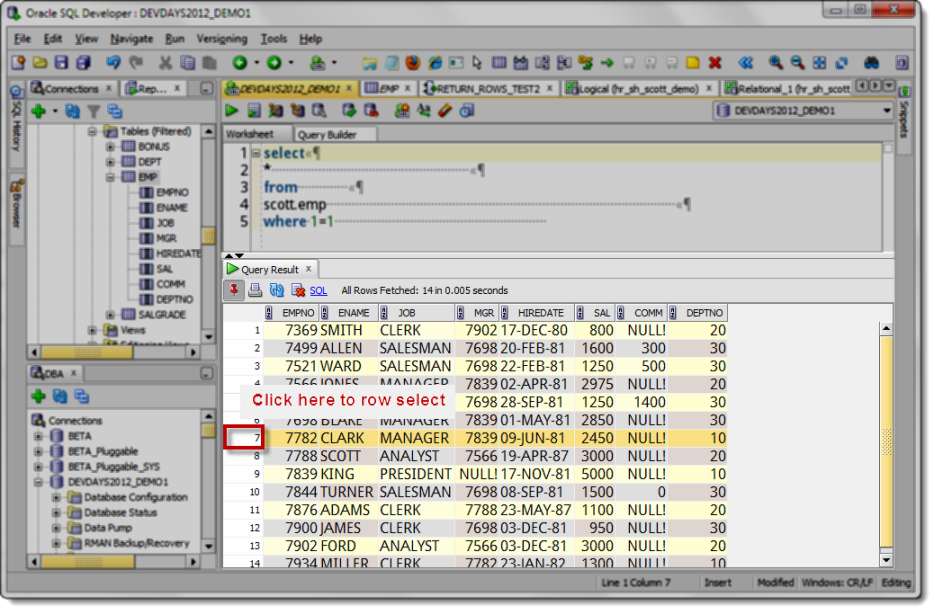
Once you have your data selected, do your thing, i.e. ctrl+C or Command/Apple+C or whatever.
Now open your view or table editor, go to the data page, and ask for a new row.
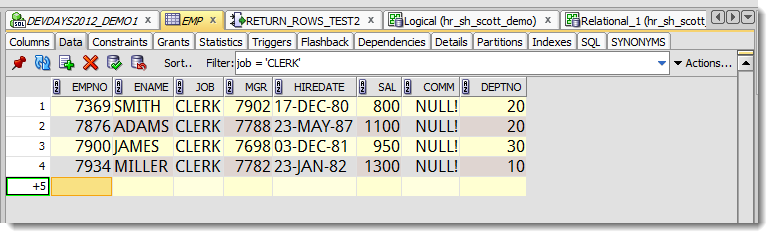
Paste in the data from the clipboard.
It’s smart enough to paste the separate values out to the separate columns.
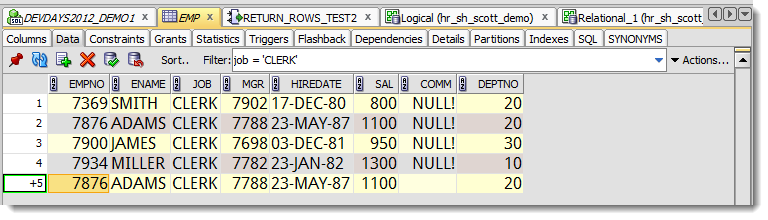
If your columns orders are different, just change the order in the grids. If you have extra information, don’t copy the entire row.
I know, I know – Jeff this is too simple, why are you wasting our time here? It seems intuitive, but how many of you actually tried this before reading it just now?
I seem to get more positive feedback from the very basic user interface 101 tips than the esoteric click-click-click-ctrl-shift-click tricks I prefer to post.
Lots of interesting stuff on tap, so stay tuned!





8 Comments
How do I select, copy & paste multicell in oracle.. Is it regular process of copy and paste..
example,
| 10 |15| 20|
here three cell in one row, I want to select these three cell and copy then paste, but i can’t..
How can I copy & paste Multicell in oracle,,,,,, please
where do you want to paste?
Hi, i’m using Oracle SQL Developer (3.2.20.09). Is there a way to copy and paste the results of a SQL query which includes the column headers? I was using another client until recently that allowed me to right-click on the results and simply export it to excel with the headers and the SQL statement–much easier.
Use the grid export to save to excel..it will grab the headers and there’s an option to include the query.
Or use ctrl+shift+c to copy data and column headers to the clipboard.
Thanks for your reply. I forgot to mention that I’m using sqldeveloper 3.0 and that option seems to be missing for this version. I’ll download the latest version and try it out there.
Hi,
Some of your screenshots show the grid rows in alternate colors. Can you please tell me how you managed to do that. I’ve gone through most of the setting in the preferences but couldn’t find anything about grid row color. I guess its possible in sqldeveloper but I dont know how.
I hope you don’t mind me answering your question in the form of a blog post 🙂
Hello Jeff,
This works fine, except for copying (overwriting) an existing value with NULL does not seem to work.
Best regards,
Joop