

I know, who has errors in their code? I don’t have errors because I don’t write code. But for the rest of you, it’s possible you have inherited someone else’s problem. And that problem might be an invalid VIEW.
You can tell your view has a problem because of the big, sad, red X
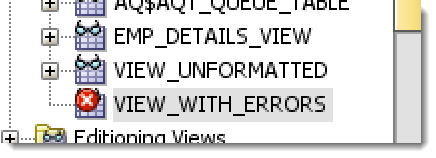
Oracle stores these errors in a data dictionary view, ALL_ERRORS. You just need to query them. Or if you’re in SQL*Plus and you just issued the CREATE OR REPLACE FORCE…you can also execute ‘SHOW ERRORS’
But you’re not in SQL*Plus and you didn’t create the view, and you’re too lazy to query it manually in a worksheet. Wouldn’t it be nice if you had a report right there to view your errors?
Wait a Second, I Can Build My Own Custom Extension!
That’s right, if there’s some information you want to see that’s not displayed in the object viewer, you can create a user defined extension using XML and SQL.
A customer asked me how to view errors for their views, and I didn’t have a great answer. So I decided to write up a quick extension. Here’s the source:
<items>
<item type="editor" node="ViewNode" vertical="true">
<title><![CDATA[ERRORS]]></title>
<query>
<sql><![CDATA[SELECT
ATTRIBUTE, LINE
|| ':'
||POSITION "LINE:POSITION", TEXT
FROM
All_Errors
WHERE
type = 'VIEW'
AND owner = :OBJECT_OWNER
AND name = :OBJECT_NAME
ORDER BY
SEQUENCE ASC
]]></sql>
</query>
</item>
</items>
To activate the extension, add a new entry to the preferences. You’ll want to add an ‘EDITOR’ and point to the location of the XML file that has the above code.
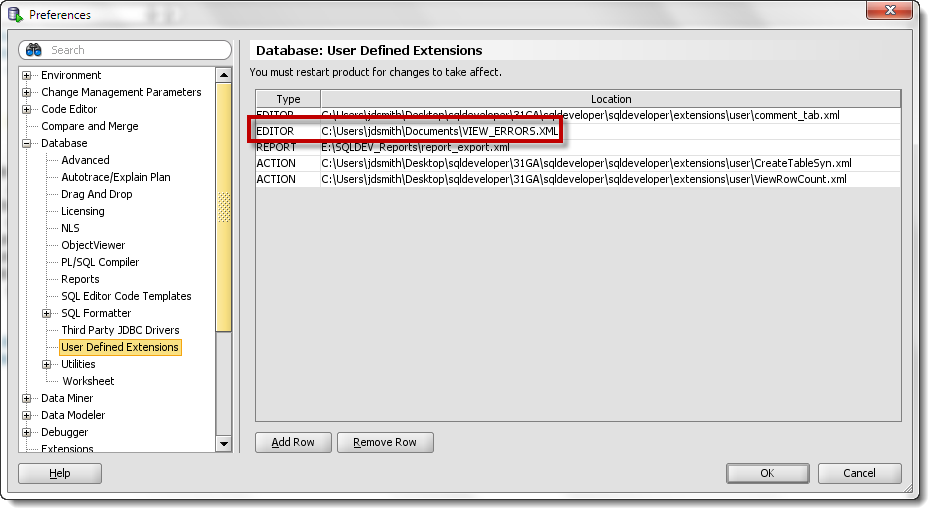
After you restart SQL Developer, we can now easily see the errors for all of our views. Hopefully your errors are about as easy to diagnose and fix as are mine.
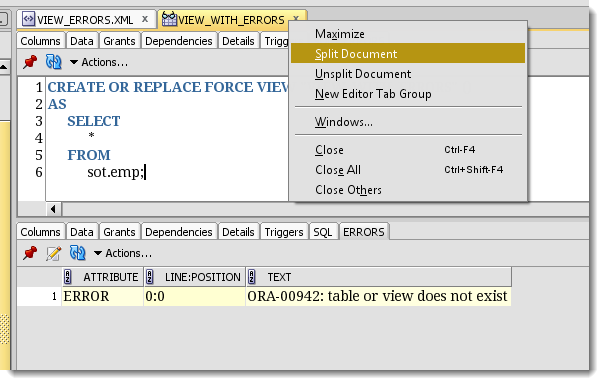
I want to see the errors in the code on one screen, so I ‘split the document.’ That gives me 2 independent looks at the view in one area. Very handy, and one of my favorite tricks!
As always, you can trust me, but don’t trust my code. Make sure it suits your needs, and feel free to improve upon it.


21 Comments
Thank You!!!
Thanks, it still works in 4.1.2.20.
I use the extension but get an error saying, ATRIBUTE invalid identifier i hope you can give me some advice on what’s happening thanks in advanced
well, just a guess, but you misspelled ATTRIBUTE
I added the extension accordingly. But seems it shows error contents to all other view (even they are with no error icon). Wonder if it’s related that I removed the part :object_name/owner (since I don’t know what to fill). Thanks.
Why did you remove the :OBJECT_OWNER and :OBJECT_NAME bits? Those are supplied by SQLDev – it knows what the object owner and object name is. Put it back in, it will work as advertised.
Thanks for the prompt reply. This is time sqldeveloper recognizes the object, and it works well.
great!
Jeff, I’m on 4.1.0.19.
When I ask SQL Developer to check for updates, it points to 4.0.1.
I’m downloading 4.1.1 now. Thanks for pointing it out. I assume it will work as you describe.
Skip
Hi Jeff,
I added the view errors extension in an earlier release of SQL Developer a few years ago. Now the ERRORS tab is on the far left, before the Columns tab.
Your screenshot shows it on the far right.
I don’t see anything in the XML for positioning it.
How would I get it to be on the far right, next to the SQL tab?
What version are you on? We fixed that in our 4.1.1 patch, I think.
Hi Jeff. This is a great extension, but I’m not seeing the errors pane when I loaded it and restarted sql developer. I’m running 4.0.2.15. I put the xml code into a local directory, went into database preferences to add the editor with the pointer to the xml file and restarted the app. When I go into the materialized view editor, I don’t see any tabs other than the default ones. Any suggestions?
What I wrote works for Views, not Materialized Views.
Why can’t there be an ERRORS tab in SQL Developer the same like how there is for packages?
Please can I get some assistance, I am getting a timeout in 1 of my xml jobs which executes via sql sentry, if I execute as a batch on the nodepool server the job works fine.
Wow, it’s awesome! Is there any similar solution for the triggers? Because on the trigger view it also shows a big red X, and a similar tool whould be useful instead of using ‘show errors trigger my_trigger’.
Triggers show errors by default in the procedure editor, and check out the Errors panel.
Just what I’ve needed for ages – thanks!
Thanks Tony! What else do you need? I’m always open to new ideas and suggestions!
Thanks for another informative post Jeff.
Out of choice, I do not use SQL Developer but your posts on custom extensions for SQL Developer might just turn me into a user.
I respect your choice and look forward to the day when you change your mind 🙂
Thanks for hanging out here and sharing your opinion. Especially since you don’t even use the tool yet!