

In a perfect world, there would be no software bugs. Developers would always test their code. QA would find any scenarios and bugs the developers hadn’t already thought of. Regression tests would be complete and flawless. But alas, we can only afford to pay mere humans here, so we will have bugs from time to time.
Or sometimes you are trying to do something the software wasn’t designed for, or perhaps your machine has exhausted it’s resources trying to build the un-buildable.
When you run into problems, you will need help.
Developers need your help so they can help you. Surprisingly enough, feedback like this isn’t very helpful:
Your program isn’t working. How can I make it work?
When you are ready to work with us on the SQL Developer OTN forum, you will most likely be asked to run SQL Developer and capture the output from the command console. In case you need help with this, here is a step-by-step process you can follow in Windows 7 (should work in XP too.)
Open a windows command window
Start – Run – CMD
Once it’s open, click on the window icon and select ‘Defaults.’ Change the default buffer size to be something bigger, much bigger.
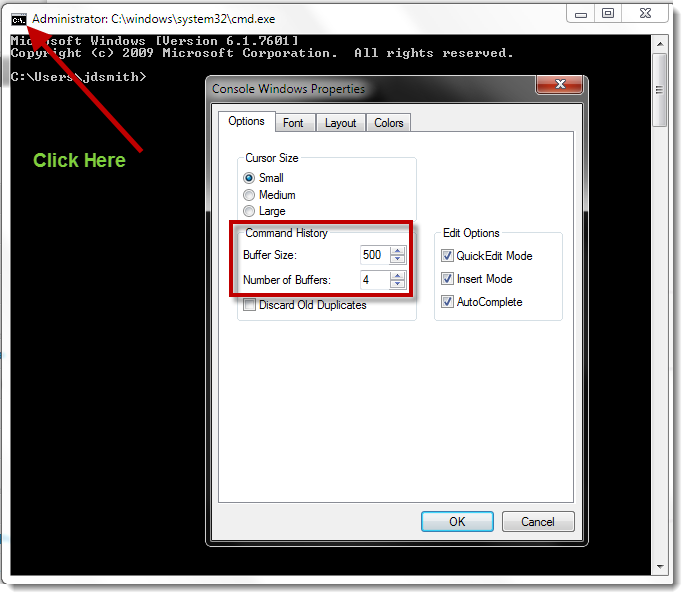
Note: you only need to do this once.
Navigate to your SQL Developer Installation Folder
Instead of running the ‘sqldeveloper.exe’ file in the root directory, we are going to go several sub-directories down. Find the ‘bin’ sub-directory and run the ‘sqldeveloper.exe’ there.
When you do this, a CMD window will open, and then you’ll see the SQL Developer application load.

Use SQL Developer as normal, until it ‘breaks’ or ‘hangs’
Now, you are ready to grab the nitty-gritty information that MIGHT tell the developer what is going wrong or happening in your scenario.
Click back into the CMD window
Send a Ctrl+Break or a Ctrl+Pause.
If you on a newer laptop that doesn’t have this key, be sure to check the ‘Fn’ subset of keys. If you need to map the BREAK or PAUSE buttons, this article might help.
You can also try the on-screen keyboard in windows – just type ‘OSK’ in your START – RUN prompt.
Copy the logging information from the command window – all of it
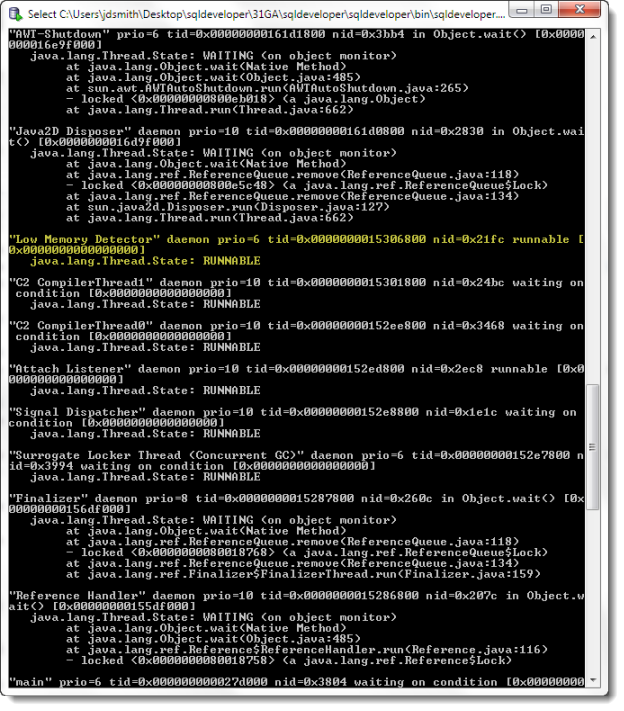
Open a case with Oracle Support or Start a Thread on the Forums
Or email me. If you’re on my blog reading this, it’s the least I can do to help 🙂
Now, before you hit ‘Send’ or ‘Post’ or ‘Submit’ – be sure to add a brief description of what you were doing in the application when you ran into the problem. Even if you were doing ‘nothing,’ let us know how many connections you had open, what windows were active, etc. The more you can tell us, the higher your odds go up to getting a quick fix or at least an answer as to what is happening.
Also include the following information:
- The version of SQL Developer you are running
- The version of the JDK you are using
- The OS you are using
- The version of Oracle you are connected to
Now, don’t be surprised if you get asked to upgrade to a supported configuration, say ‘version 3.1 and the 1.6 JDK.’ Supporting older versions of software is fun, and while we enjoy a challenge, it may be easier for you to upgrade your way out of the problem at hand.

36 Comments
Hi, sql developer sqldeveloper-21.2.1.204.1703-x64 is crashing with this error:
LoadLibrary failed with error 126: The specified module could not be found.
Any ideas?
Same I said on your StackOverflow post…
Jeff,
Is there a way to start the command shell automatically?
start cmd.exe @cmd /k “C:\Users\\Downloads\sqldeveloper-20.4.1.407.0006-x64\sqldeveloper\sqldeveloper” starts a separate command shell but Ctrl&Fn&Pause/break does not return the call stack information.
I want to have a .CMD file on the desktop to start SQL*Developer with this capability, or even add it to the Startup folder.
Regards,
John T
You say cmd shell, but then reference SQLDev…so do you want a desktop shortcut for SQLcl or SQL Developer?
Hi Jeff,
I am getting the below error on trying to launch sqldeveloper.exe and the splash screen gets hung .I upgraded JDK recently .
ERROR: Maximum number of simultaneous IDE processes exceeded.
JDK version :jdk 1.8.0_181
Oracle version: 12C
SQL deveoper:18.1.0.095.1630
OS:wINDOWS 8.1
Please advise.
I experience the following error when trying to start sql developer. (basically the application does not start)
Exception in thread “main” java.lang.UnsatisfiedLinkError: C:\Program Files (x86)\sqldeveloper\jdk\bin\javaaccessbridge.dll: Can’t find dependent libraries
at java.base/java.lang.ClassLoader$NativeLibrary.load(Native Method)
at java.base/java.lang.ClassLoader.loadLibrary0(Unknown Source)
at java.base/java.lang.ClassLoader.loadLibrary(Unknown Source)
at java.base/java.lang.Runtime.loadLibrary0(Unknown Source)
at java.base/java.lang.System.loadLibrary(Unknown Source)
at jdk.accessibility/com.sun.java.accessibility.internal.AccessBridge$3.run(Unknown Source)
at jdk.accessibility/com.sun.java.accessibility.internal.AccessBridge$3.run(Unknown Source)
at java.base/java.security.AccessController.doPrivileged(Native Method)
at java.base/java.security.AccessController.doPrivileged(Unknown Source)
at jdk.accessibility/com.sun.java.accessibility.internal.AccessBridge.(Unknown Source)
at jdk.accessibility/com.sun.java.accessibility.internal.ProviderImpl.activate(Unknown Source)
at java.desktop/java.awt.Toolkit.lambda$loadAssistiveTechnologies$0(Unknown Source)
at java.base/java.security.AccessController.doPrivileged(Native Method)
at java.desktop/java.awt.Toolkit.loadAssistiveTechnologies(Unknown Source)
at java.desktop/java.awt.Toolkit.getDefaultToolkit(Unknown Source)
at java.desktop/java.awt.Toolkit.getEventQueue(Unknown Source)
at java.desktop/java.awt.EventQueue.isDispatchThread(Unknown Source)
at java.desktop/javax.swing.SwingUtilities.isEventDispatchThread(Unknown Source)
at oracle.ide.osgi.boot.SplashScreenImpl.SynchronizeWithEdt(SplashScreenImpl.java:529)
at oracle.ide.osgi.boot.api.SplashScreen.createInstance(SplashScreen.java:66)
at oracle.ide.osgi.boot.OracleIdeLauncher.showSplashScreen(OracleIdeLauncher.java:828)
at oracle.ide.osgi.boot.OracleIdeLauncher.main(OracleIdeLauncher.java:109)
I am using windows 10, the latest java JDK and sql developer(just downloaded)
The screen reader software isn’t happy. Are you actively configuring it? Also, are you using 32 or 64 bit java?
Hi Jeff,
I just got a new computer and installed the latest SQLDeveloper 17.4.1 with bundled JDK. I cannot get it to start and there are no error messages. I cannot figure out how to debug this. I have used SQL developer for years without any major issues and have always been able to debug installation problems, but this one has me stumped.
System: Windows 7
SQL Developer 17.4.1
Java: 1.8 bundled with SqlDeveloper
I start sqldeveloper from the icon or command prompt and I see the Java icon for a few seconds and then it disappears. No errors. I am looking for a log file or something to help me debug the issue, but no joy yet. Any help would be appreciated.
FYI – I copied the MSVCR100.dll into BIN just to make sure that was not the issue.
Any thoughts?
Thanks
Bob
Fixed my own problem. I don’t know why, but deleting everything and downloading again fixed my issue. Works fine now.
i Jeff,
I ran to similar problem when try to run SQL Developer version 17.4.0 (I downloaded it from the Oracle website yesterday). I have done the diagnostic steps above. Here are some details:
i) Oracle Database 12c
ii) my laptop is running Windows 10
iii) SQL Developer version 17.4.0
The funny thing is that all the while I was running SQL Developer (an older version) perfectly fine until recently I was prompted to upgrade my Java on my laptop. I noticed that the problems started happening after that. I downloaded the latest version of SQL Developer (17.4.0), but the problem persists.
Custom UI class oracle.bali.ewt.olaf2.OracleLookAndFeel not found
2018-01-10 11:42:27
Full thread dump Java HotSpot(TM) 64-Bit Server VM (25.102-b14 mixed mode):
“Flushing caches” #17 prio=1 os_prio=-2 tid=0x000000001bd4b800 nid=0x2340 in Object.wait() [0x000000001e6ff000]
java.lang.Thread.State: TIMED_WAITING (on object monitor)
at java.lang.Object.wait(Native Method)
at org.netbeans.Stamps$Worker.run(Stamps.java:872)
– locked (a org.netbeans.Stamps$Worker)
“Thread-2” #28 daemon prio=5 os_prio=0 tid=0x000000001bd4c000 nid=0xddc in Object.wait() [0x000000001e5ff000]
java.lang.Thread.State: WAITING (on object monitor)
at java.lang.Object.wait(Native Method)
– waiting on (a java.util.LinkedList)
at java.lang.Object.wait(Object.java:502)
at java.util.prefs.AbstractPreferences$EventDispatchThread.run(AbstractPreferences.java:1482)
– locked (a java.util.LinkedList)
“Inactive RequestProcessor thread [Was:Default RequestProcessor/org.netbeans.core.windows.WindowManagerImpl$4$1]” #27 daemon prio=1 os_prio=-2 tid=0x000000001bd4a800 nid=0x2e90 in Object.wait() [0x000000001e0ff000]
java.lang.Thread.State: TIMED_WAITING (on object monitor)
at java.lang.Object.wait(Native Method)
– waiting on (a java.lang.Object)
at org.openide.util.RequestProcessor$Processor.run(RequestProcessor.java:2002)
– locked (a java.lang.Object)
“Inactive RequestProcessor thread [Was:Netigso Events/org.netbeans.core.netigso.Netigso$1]” #26 daemon prio=1 os_prio=-2 tid=0x000000001bd4a000 nid=0xb60 in Object.wait() [0x000000001dede000]
java.lang.Thread.State: TIMED_WAITING (on object monitor)
at java.lang.Object.wait(Native Method)
– waiting on (a java.lang.Object)
at org.openide.util.RequestProcessor$Processor.run(RequestProcessor.java:2002)
– locked (a java.lang.Object)
“Inactive RequestProcessor thread [Was:NbStatusDisplayer/org.netbeans.core.NbStatusDisplayer$MessageImpl]” #25 daemon prio=1 os_prio=-2 tid=0x000000001bd48800 nid=0xf74 in Object.wait() [0x000000001dddf000]
java.lang.Thread.State: TIMED_WAITING (on object monitor)
at java.lang.Object.wait(Native Method)
– waiting on (a java.lang.Object)
at org.openide.util.RequestProcessor$Processor.run(RequestProcessor.java:2002)
– locked (a java.lang.Object)
“Framework Event Dispatcher” #24 daemon prio=5 os_prio=0 tid=0x000000001bd47800 nid=0x1d14 in Object.wait() [0x000000001dcdf000]
java.lang.Thread.State: WAITING (on object monitor)
at java.lang.Object.wait(Native Method)
– waiting on (a org.eclipse.osgi.framework.eventmgr.EventManager$EventThread)
at java.lang.Object.wait(Object.java:502)
at org.eclipse.osgi.framework.eventmgr.EventManager$EventThread.getNextEvent(EventManager.java:400)
– locked (a org.eclipse.osgi.framework.eventmgr.EventManager$EventThread)
at org.eclipse.osgi.framework.eventmgr.EventManager$EventThread.run(EventManager.java:336)
“State Data Manager” #23 daemon prio=5 os_prio=0 tid=0x000000001bd49000 nid=0x19f8 waiting on condition [0x000000001dbdf000]
java.lang.Thread.State: TIMED_WAITING (sleeping)
at java.lang.Thread.sleep(Native Method)
at org.eclipse.osgi.internal.baseadaptor.StateManager.run(StateManager.java:297)
at java.lang.Thread.run(Thread.java:745)
“Framework Active Thread” #22 prio=5 os_prio=0 tid=0x000000001bd47000 nid=0x9d4 in Object.wait() [0x000000001d8df000]
java.lang.Thread.State: TIMED_WAITING (on object monitor)
at java.lang.Object.wait(Native Method)
at org.eclipse.osgi.framework.internal.core.Framework.run(Framework.java:1870)
– locked (a org.eclipse.osgi.framework.internal.core.Framework)
at java.lang.Thread.run(Thread.java:745)
“Inactive RequestProcessor thread [Was:Default RequestProcessor/org.netbeans.core.CoreBridgeImpl$1]” #21 daemon prio=1 os_prio=-2 tid=0x000000001902d800 nid=0x22e0 in Object.wait() [0x000000001b63f000]
java.lang.Thread.State: TIMED_WAITING (on object monitor)
at java.lang.Object.wait(Native Method)
– waiting on (a java.lang.Object)
at org.openide.util.RequestProcessor$Processor.run(RequestProcessor.java:2002)
– locked (a java.lang.Object)
“RequestProcessor queue manager” #20 daemon prio=5 os_prio=0 tid=0x0000000018da7000 nid=0x2e0c in Object.wait() [0x000000001b53e000]
java.lang.Thread.State: TIMED_WAITING (on object monitor)
at java.lang.Object.wait(Native Method)
– waiting on (a java.lang.Class for org.openide.util.RequestProcessor$TickTac)
at org.openide.util.RequestProcessor$TickTac.obtainFirst(RequestProcessor.java:2282)
– locked (a java.lang.Class for org.openide.util.RequestProcessor$TickTac)
at org.openide.util.RequestProcessor$TickTac.run(RequestProcessor.java:2258)
“Active Reference Queue Daemon” #18 daemon prio=1 os_prio=-2 tid=0x0000000018d4d800 nid=0xccc in Object.wait() [0x000000001ab3e000]
java.lang.Thread.State: WAITING (on object monitor)
at java.lang.Object.wait(Native Method)
– waiting on (a java.lang.ref.ReferenceQueue$Lock)
at java.lang.ref.ReferenceQueue.remove(ReferenceQueue.java:143)
– locked (a java.lang.ref.ReferenceQueue$Lock)
at org.openide.util.lookup.implspi.ActiveQueue$Impl.removeSuper(ActiveQueue.java:93)
at org.openide.util.lookup.implspi.ActiveQueue$Daemon.run(ActiveQueue.java:131)
“TimerQueue” #16 daemon prio=5 os_prio=0 tid=0x0000000018b4a800 nid=0x2270 runnable [0x0000000019e3e000]
java.lang.Thread.State: TIMED_WAITING (parking)
at sun.misc.Unsafe.park(Native Method)
– parking to wait for (a java.util.concurrent.locks.AbstractQueuedSynchronizer$ConditionObject)
at java.util.concurrent.locks.LockSupport.parkNanos(LockSupport.java:215)
at java.util.concurrent.locks.AbstractQueuedSynchronizer$ConditionObject.awaitNanos(AbstractQueuedSynchronizer.java:2078)
at java.util.concurrent.DelayQueue.take(DelayQueue.java:223)
at javax.swing.TimerQueue.run(TimerQueue.java:174)
at java.lang.Thread.run(Thread.java:745)
“AWT-EventQueue-0” #15 prio=6 os_prio=0 tid=0x0000000018a78800 nid=0x1e88 waiting on condition [0x000000001989e000]
java.lang.Thread.State: WAITING (parking)
at sun.misc.Unsafe.park(Native Method)
– parking to wait for (a java.util.concurrent.locks.AbstractQueuedSynchronizer$ConditionObject)
at java.util.concurrent.locks.LockSupport.park(LockSupport.java:175)
at java.util.concurrent.locks.AbstractQueuedSynchronizer$ConditionObject.await(AbstractQueuedSynchronizer.java:2039)
at java.awt.EventQueue.getNextEvent(EventQueue.java:554)
at java.awt.EventDispatchThread.pumpOneEventForFilters(EventDispatchThread.java:170)
at java.awt.EventDispatchThread.pumpEventsForFilter(EventDispatchThread.java:116)
at java.awt.EventDispatchThread.pumpEventsForHierarchy(EventDispatchThread.java:105)
at java.awt.EventDispatchThread.pumpEvents(EventDispatchThread.java:101)
at java.awt.EventDispatchThread.pumpEvents(EventDispatchThread.java:93)
at java.awt.EventDispatchThread.run(EventDispatchThread.java:82)
“AWT-Windows” #13 daemon prio=6 os_prio=0 tid=0x0000000018a72800 nid=0xe04 runnable [0x000000001979f000]
java.lang.Thread.State: RUNNABLE
at sun.awt.windows.WToolkit.eventLoop(Native Method)
at sun.awt.windows.WToolkit.run(WToolkit.java:306)
at java.lang.Thread.run(Thread.java:745)
“AWT-Shutdown” #12 prio=5 os_prio=0 tid=0x0000000018ad6000 nid=0x6f8 in Object.wait() [0x000000001959f000]
java.lang.Thread.State: WAITING (on object monitor)
at java.lang.Object.wait(Native Method)
– waiting on (a java.lang.Object)
at java.lang.Object.wait(Object.java:502)
at sun.awt.AWTAutoShutdown.run(AWTAutoShutdown.java:295)
– locked (a java.lang.Object)
at java.lang.Thread.run(Thread.java:745)
“Java2D Disposer” #11 daemon prio=10 os_prio=2 tid=0x0000000018ad5800 nid=0x1c44 in Object.wait() [0x000000001949f000]
java.lang.Thread.State: WAITING (on object monitor)
at java.lang.Object.wait(Native Method)
– waiting on (a java.lang.ref.ReferenceQueue$Lock)
at java.lang.ref.ReferenceQueue.remove(ReferenceQueue.java:143)
– locked (a java.lang.ref.ReferenceQueue$Lock)
at java.lang.ref.ReferenceQueue.remove(ReferenceQueue.java:164)
at sun.java2d.Disposer.run(Disposer.java:148)
at java.lang.Thread.run(Thread.java:745)
“Service Thread” #9 daemon prio=9 os_prio=0 tid=0x0000000018488800 nid=0x2aec runnable [0x0000000000000000]
java.lang.Thread.State: RUNNABLE
“C1 CompilerThread2” #8 daemon prio=9 os_prio=2 tid=0x0000000016b2c800 nid=0x26d8 waiting on condition [0x0000000000000000]
java.lang.Thread.State: RUNNABLE
“C2 CompilerThread1” #7 daemon prio=9 os_prio=2 tid=0x0000000016b29800 nid=0x2138 waiting on condition [0x0000000000000000]
java.lang.Thread.State: RUNNABLE
“C2 CompilerThread0” #6 daemon prio=9 os_prio=2 tid=0x0000000016b27000 nid=0x31c waiting on condition [0x0000000000000000]
java.lang.Thread.State: RUNNABLE
“Attach Listener” #5 daemon prio=5 os_prio=2 tid=0x0000000016b24800 nid=0x2cc4 runnable [0x0000000000000000]
java.lang.Thread.State: RUNNABLE
“Signal Dispatcher” #4 daemon prio=9 os_prio=2 tid=0x0000000016b23800 nid=0xc04 waiting on condition [0x0000000000000000]
java.lang.Thread.State: RUNNABLE
“Finalizer” #3 daemon prio=8 os_prio=1 tid=0x0000000016b0f800 nid=0x24c4 in Object.wait() [0x0000000017e6f000]
java.lang.Thread.State: WAITING (on object monitor)
at java.lang.Object.wait(Native Method)
– waiting on (a java.lang.ref.ReferenceQueue$Lock)
at java.lang.ref.ReferenceQueue.remove(ReferenceQueue.java:143)
– locked (a java.lang.ref.ReferenceQueue$Lock)
at java.lang.ref.ReferenceQueue.remove(ReferenceQueue.java:164)
at java.lang.ref.Finalizer$FinalizerThread.run(Finalizer.java:209)
“Reference Handler” #2 daemon prio=10 os_prio=2 tid=0x0000000004c75000 nid=0xa2c in Object.wait() [0x0000000017d6f000]
java.lang.Thread.State: WAITING (on object monitor)
at java.lang.Object.wait(Native Method)
– waiting on (a java.lang.ref.Reference$Lock)
at java.lang.Object.wait(Object.java:502)
at java.lang.ref.Reference.tryHandlePending(Reference.java:191)
– locked (a java.lang.ref.Reference$Lock)
at java.lang.ref.Reference$ReferenceHandler.run(Reference.java:153)
“main” #1 prio=5 os_prio=0 tid=0x0000000004b85800 nid=0xcd0 waiting on condition [0x0000000000000000]
java.lang.Thread.State: RUNNABLE
“VM Thread” os_prio=2 tid=0x0000000016ae8800 nid=0x1e04 runnable
“GC task thread#0 (ParallelGC)” os_prio=0 tid=0x0000000004b9b000 nid=0xb30 runnable
“GC task thread#1 (ParallelGC)” os_prio=0 tid=0x0000000004b9c800 nid=0x5d8 runnable
“GC task thread#2 (ParallelGC)” os_prio=0 tid=0x0000000004b9e000 nid=0x3214 runnable
“GC task thread#3 (ParallelGC)” os_prio=0 tid=0x0000000004b9f800 nid=0x2e84 runnable
“VM Periodic Task Thread” os_prio=2 tid=0x00000000184b3800 nid=0x6ac waiting on condition
JNI global references: 912
Heap
PSYoungGen total 71680K, used 47585K [0x00000000ef580000, 0x00000000f8180000, 0x0000000100000000)
eden space 66560K, 71% used [0x00000000ef580000,0x00000000f23f8608,0x00000000f3680000)
from space 5120K, 0% used [0x00000000f3680000,0x00000000f3680000,0x00000000f3b80000)
to space 5120K, 0% used [0x00000000f7c80000,0x00000000f7c80000,0x00000000f8180000)
ParOldGen total 87552K, used 10143K [0x00000000ce000000, 0x00000000d3580000, 0x00000000ef580000)
object space 87552K, 11% used [0x00000000ce000000,0x00000000ce9e7d00,0x00000000d3580000)
Metaspace used 24415K, capacity 25428K, committed 25728K, reserved 1071104K
class space used 2739K, capacity 3142K, committed 3200K, reserved 1048576K
————–
Please help! Thanks!
Sorry, this got into my SPAM folder, just now seeing it.
Please delete your install.
Please delete the system17.4 folder under your Windows OS User’s AppData, Roaming Profiles directory.
Then, re-extract SQLDev 17.4 to a FRESH folder. You might want to use a 3rd party Zip tool, some folks have issues with Windows’…
Then try running it again.
SQL Developer crashes randomly, sometimes when doing nothing at all within the application. It appears these issues start after a Windows/Java update.
Oracle SQL Developer v. 4.1.5.21
Build Main-21.78
Java (TM) Platform 1.8.0_102
Oracle IDE 4.1.2.21.78
Windows 7 64bit
Instant Client 12.1.0.2.0
Custom UI class oracle.bali.ewt.olaf2.OracleLookAndFeel not on classpath.
LOAD TIME : 4382017-06-14 11:18:13
Full thread dump Java HotSpot(TM) 64-Bit Server VM (25.102-b14 mixed mode):
“Inactive RequestProcessor thread [Was:Folder recognizer/org.openide.loaders.Fol
derList$ListTask]” #47 daemon prio=1 os_prio=-2 tid=0x000000001df11800 nid=0x17c
4 in Object.wait() [0x000000002132f000]
java.lang.Thread.State: TIMED_WAITING (on object monitor)
at java.lang.Object.wait(Native Method)
at org.openide.util.RequestProcessor$Processor.run(RequestProcessor.java
:1982)
– locked (a java.lang.Object)
“WaitCursor-Timer” #39 prio=6 os_prio=0 tid=0x0000000016326000 nid=0x5f94 in Obj
ect.wait() [0x00000000204af000]
java.lang.Thread.State: WAITING (on object monitor)
at java.lang.Object.wait(Native Method)
at java.lang.Object.wait(Object.java:502)
at java.util.TimerThread.mainLoop(Timer.java:526)
– locked (a java.util.TaskQueue)
at java.util.TimerThread.run(Timer.java:505)
“pool-2-thread-1” #38 prio=5 os_prio=0 tid=0x0000000016324800 nid=0x5b7c waiting
on condition [0x00000000203af000]
java.lang.Thread.State: WAITING (parking)
at sun.misc.Unsafe.park(Native Method)
– parking to wait for (a java.util.concurrent.Sync
hronousQueue$TransferStack)
at java.util.concurrent.locks.LockSupport.park(LockSupport.java:175)
at java.util.concurrent.SynchronousQueue$TransferStack.awaitFulfill(Sync
hronousQueue.java:458)
at java.util.concurrent.SynchronousQueue$TransferStack.transfer(Synchron
ousQueue.java:362)
at java.util.concurrent.SynchronousQueue.take(SynchronousQueue.java:924)
at java.util.concurrent.ThreadPoolExecutor.getTask(ThreadPoolExecutor.ja
va:1067)
at java.util.concurrent.ThreadPoolExecutor.runWorker(ThreadPoolExecutor.
java:1127)
at java.util.concurrent.ThreadPoolExecutor$Worker.run(ThreadPoolExecutor
.java:617)
at java.lang.Thread.run(Thread.java:745)
“Thread-8” #35 daemon prio=5 os_prio=0 tid=0x0000000016322000 nid=0x15ac in Obje
ct.wait() [0x000000001feaf000]
java.lang.Thread.State: WAITING (on object monitor)
at java.lang.Object.wait(Native Method)
– waiting on (a java.util.LinkedList)
at java.lang.Object.wait(Object.java:502)
at java.util.prefs.AbstractPreferences$EventDispatchThread.run(AbstractP
references.java:1482)
– locked (a java.util.LinkedList)
“Scheduler” #34 daemon prio=5 os_prio=0 tid=0x0000000016321800 nid=0x5f88 in Obj
ect.wait() [0x000000001f65f000]
java.lang.Thread.State: WAITING (on object monitor)
at java.lang.Object.wait(Native Method)
at java.lang.Object.wait(Object.java:502)
at oracle.dbtools.raptor.backgroundTask.TaskLinkedList.takeNextTask(Task
LinkedList.java:47)
– locked (a oracle.dbtools.raptor.backgroundTask.Ta
skLinkedList)
at oracle.dbtools.raptor.backgroundTask.RaptorTaskManager$SchedulerThrea
d.run(RaptorTaskManager.java:537)
“Log Poller” #33 prio=1 os_prio=-2 tid=0x0000000016320800 nid=0x58c0 waiting on
condition [0x000000001e91f000]
java.lang.Thread.State: WAITING (parking)
at sun.misc.Unsafe.park(Native Method)
– parking to wait for (a java.util.concurrent.lock
s.AbstractQueuedSynchronizer$ConditionObject)
at java.util.concurrent.locks.LockSupport.park(LockSupport.java:175)
at java.util.concurrent.locks.AbstractQueuedSynchronizer$ConditionObject
.await(AbstractQueuedSynchronizer.java:2039)
at java.util.concurrent.LinkedBlockingQueue.take(LinkedBlockingQueue.jav
a:442)
at oracle.ide.log.QueuedLoggingHandler.take(QueuedLoggingHandler.java:60
)
at oracle.ideimpl.log.TabbedLogManager$4.run(TabbedLogManager.java:333)
at java.lang.Thread.run(Thread.java:745)
“Inactive RequestProcessor thread [Was:Folder recognizer/org.openide.loaders.Fol
derList$ListTask]” #32 daemon prio=1 os_prio=-2 tid=0x0000000016118800 nid=0x595
4 in Object.wait() [0x000000001d48f000]
java.lang.Thread.State: TIMED_WAITING (on object monitor)
at java.lang.Object.wait(Native Method)
at org.openide.util.RequestProcessor$Processor.run(RequestProcessor.java
:1982)
– locked (a java.lang.Object)
“TimedCache-Timer” #28 daemon prio=5 os_prio=0 tid=0x000000001611d800 nid=0x5de8
in Object.wait() [0x000000001c6df000]
java.lang.Thread.State: TIMED_WAITING (on object monitor)
at java.lang.Object.wait(Native Method)
– waiting on (a java.util.TaskQueue)
at java.util.TimerThread.mainLoop(Timer.java:552)
– locked (a java.util.TaskQueue)
at java.util.TimerThread.run(Timer.java:505)
“Framework Event Dispatcher” #24 daemon prio=5 os_prio=0 tid=0x000000001611c000
nid=0x5cc0 in Object.wait() [0x000000001b2ff000]
java.lang.Thread.State: WAITING (on object monitor)
at java.lang.Object.wait(Native Method)
at java.lang.Object.wait(Object.java:502)
at org.eclipse.osgi.framework.eventmgr.EventManager$EventThread.getNextE
vent(EventManager.java:400)
– locked (a org.eclipse.osgi.framework.eventmgr.Eve
ntManager$EventThread)
at org.eclipse.osgi.framework.eventmgr.EventManager$EventThread.run(Even
tManager.java:336)
“Inactive RequestProcessor thread [Was:TimedSoftReference/org.openide.util.Timed
SoftReference]” #23 daemon prio=1 os_prio=-2 tid=0x000000001611b800 nid=0x4abc i
n Object.wait() [0x000000001afff000]
java.lang.Thread.State: TIMED_WAITING (on object monitor)
at java.lang.Object.wait(Native Method)
at org.openide.util.RequestProcessor$Processor.run(RequestProcessor.java
:1982)
– locked (a java.lang.Object)
Jeff, I tried your process above but no joy.
I have a laptop with docking station that switches to WiFi as soon as it’s disconnected.
SQL*Plus sessions survive, but SQL Developer seems to hang. As I say, can’t get logging messages by pressing Crtl&Break. Probably a JDBC thing rather than SQL Dev itself, but it also seems to hang through the day with connections left open and no physical disconnection. Only way out is to kill it with Task Manager.
Version 4.1.2.20 Build MAIN-20.64
java version “1.8.0_73”
Windows 7 Enterprise SP1 connecting to Oracle 11.2.0.4
Regards, JT
Seems I can get a I/O socket error and Closed Connection in SQL*Developer.
Interestingly, in the same “test” a SQLcl connection survived. SQLcl did display the following error when the connection switched, but the query still ran again when reconnected to the physical ethernet.
SQLcl: Release 4.2.0.15.295.1605 RC
Exception in thread “AWT-EventQueue-0” java.lang.ClassCastException: sun.java2d.HeadlessGraphicsEnvironment cannot be cast to sun.awt.Win32GraphicsEnvironment
at sun.awt.windows.WToolkit$3.run(Unknown Source)
at java.awt.event.InvocationEvent.dispatch(Unknown Source)
at java.awt.EventQueue.dispatchEventImpl(Unknown Source)
at java.awt.EventQueue.access$500(Unknown Source)
at java.awt.EventQueue$3.run(Unknown Source)
at java.awt.EventQueue$3.run(Unknown Source)
at java.security.AccessController.doPrivileged(Native Method)
at java.security.ProtectionDomain$JavaSecurityAccessImpl.doIntersectionPrivilege(Unknown Source)
at java.awt.EventQueue.dispatchEvent(Unknown Source)
at java.awt.EventDispatchThread.pumpOneEventForFilters(Unknown Source)
at java.awt.EventDispatchThread.pumpEventsForFilter(Unknown Source)
at java.awt.EventDispatchThread.pumpEventsForHierarchy(Unknown Source)
at java.awt.EventDispatchThread.pumpEvents(Unknown Source)
at java.awt.EventDispatchThread.pumpEvents(Unknown Source)
at java.awt.EventDispatchThread.run(Unknown Source)
If you have SQL*Plus on your machine, try thick connections in SQL Developer. If it is a ‘JDBC thing’ – that might make it go away for you.
How can i fix this error?
When I apply a filter to any object in the connections window returns me error and shows me the list of filtered objects.
This utility is very good especially when working with ERP Oracle EBS 12.1
“returns me error”
That doesn’t give me much to go on.
Exactly what filter are you applying, and what’s the error message?
Hello Jeff.
When open Connections view, i drill down to packages and applied filter, return this error:
An error was encountered performing the request operation:
ORA-01460: unimplemented or unreasonable conversion request
01460. 00000 – “unimplemented or unreasonable conversion request ”
*Cause:
*Action:
Vendor code 1460
The filter applied is:
Select the filter criteria Match Any
Name Like FND_SELAUDIT_LOG
This filter work in version 4.0.3 but in 4.1* not work
You probably need to upgrade your database.
Version 4.1 of SQLDev ships with a 12.1.0.2 JDBC driver – what version is your database?
The version of database is: 9.2.0.8.0, but i don’t change, ’cause is an Instance on my work, but the error only occurred in version minor of 10g database, thanks for your attention.
For that database, you’ll need to use a copy of SQLDev 4.0, or if you want, you could try a thick connection in 4.1 using an 11203 Oracle Instant Client.
What’s up mates, its great article about educationand entirely defined, keep it up all the time.
Hi Jeff!
Sorry about reviving this old post but I needed it just today and I think here would be the best place to ask.
I’m facing problems with freezing (I already found some post about it on OTN but none helped me). So I decided to run the problem myself and send you guys the log info.
When I get to the freeze, I go to the CMD window and hit Ctrl+Pause as you instructed in the step-by-step above, but surprisingly nothing happens. Neither log nor line break or anything but the only line showing the startup load time.
I can get to the freeze very easy but can’t get the precious info you guys may need to find what the real problem is.
Let’s try something else Bruno –
When SQL Developer ‘hangs’ – go into the JDK/bin directory and run ‘jstack’
When it comes up, attach to the SQL Developer process ID (PID)
That should give you the entire ‘stack’ and hopefully shed some light on what’s going on.
Great! It worked, thanks!
I’ll be attaching it to the discussion on OTN Forum
Hope it helps 🙂
yes when i tested OCI, i used OCI thick driver connect option in SQL Developer, using JDBC gave me the same hang issue (but without any trace) . I just check the disabling of the OOB on JDBC and it seems better (AddVMOption -Doracle.net.disableOob=true).
Have to confirm this during peek load. This was an old bug (9373409), and i first think it was corrected in the 3.2 release, but let see … Thanks for your support , will try with MOS for continue.
Hello,
In our company we’re working a lot with SqlDeveloper and get fun with it.
Since somedays we move our development database to a new server, SQLDeveloper hang when we tried to do a Quick DDL from VIEW .
Once it is in his loop we are unable to close the connection or quit the program without killing it or sometimes we got “Erreur d’E/S: Connection reset” (sorry french language).
Our release is now 3.2.20.09 with JDK 1.6.0_24 and it was the same with (3.1) .
Do you have any clue for us to investigate ?
I got the trace from the cmd window as you spécified in your post and can send it to you if you give me your email.
Thanks for answering
Regards
Do you get the same behavior if you simply go to the ‘SQL’ page in the view editor?
My first guess is what we’re querying a data dictionary view and the database doesn’t like it. You could ask your dba when the last time they collected stats on the data dictionary. You could also run SQLDev in debug mode and see what query is causing the db to get upset.
Yes same behaviour from “SQL” or from select dbms_metadat.getddl() , sounds more related to network configuration on WAN , is there any issue that you know ? or any parameter settings somewhere ?
What makes you think it’s a network issue?
Run that getddl() call in sqlplus on the db server: if it hangs there, it’s the db, not the network.
I done that getddl() call directly connected to the db using sqlplus and it works.
I tried with an OCI connection and put trace on it , as soon as the result of the getddl is sent back to the client error like this one is seen :
///////////////////////////////////////////////////////////////
Error found. Error Stack follows:
id:0
Operation code:68
NS Error 1:12547
NS Error 2:12560
NT Generic Error:517
Protocol Error:104
OS Error:0
NS & NT Errors Translation
12547, 00000 “TNS:lost contact”
// *Cause: Partner has unexpectedly gone away, usually during process
// startup.
// *Action: Investigate partner application for abnormal termination. On an
// Interchange, this can happen if the machine is overloaded.
/
12560, 00000 “TNS:protocol adapter error”
// *Cause: A generic protocol adapter error occurred.
// *Action: Check addresses used for proper protocol specification. Before
// reporting this error, look at the error stack and check for lower level
// transport errors.For further details, turn on tracing and reexecute the
// operation. Turn off tracing when the operation is complete.
/
00517, 00000 “Lost contact”
// *Cause: Partner has unexpectedly gone away.
// *Action: Investigate partner application for abnormal termination.
/
Interesting…are you using the OCI thick driver connect option in SQL Developer? If so, if you disable it and go in straight with JDBC, does it ‘work?’
Either way I’d consider opening a ticket with MOS.
Completion insight doesn’t work. Here is the version info from help/about.
Java(TM) Platform 1.6.0_24
Oracle IDE 3.1.07.42
Versioning Support 3.1.07.42
XP
More version info.
select *
from v$version;
Oracle Database 10g Enterprise Edition Release 10.2.0.4.0 – 64bi
PL/SQL Release 10.2.0.4.0 – Production
“CORE 10.2.0.4.0 Production”
TNS for Solaris: Version 10.2.0.4.0 – Production
NLSRTL Version 10.2.0.4.0 – Production
FYI: My java -version is 1.4.
I didn’t contain my SQL as it fails on everything.
debugging info:
java.lang.Thread.State: WAITING (on object monitor)
at java.lang.Object.wait(Native Method)
– waiting on (a java.util.TaskQueue)
at java.lang.Object.wait(Object.java:485)
at java.util.TimerThread.mainLoop(Timer.java:483)
– locked (a java.util.TaskQueue)
at java.util.TimerThread.run(Timer.java:462)
“Swing-Shell” daemon prio=6 tid=0x406d5400 nid=0x1594 waiting on condition [0x42
99f000]
java.lang.Thread.State: WAITING (parking)
at sun.misc.Unsafe.park(Native Method)
– parking to wait for (a java.util.concurrent.locks.Abstra
ctQueuedSynchronizer$ConditionObject)
at java.util.concurrent.locks.LockSupport.park(LockSupport.java:158)
at java.util.concurrent.locks.AbstractQueuedSynchronizer$ConditionObject
.await(AbstractQueuedSynchronizer.java:1987)
at java.util.concurrent.LinkedBlockingQueue.take(LinkedBlockingQueue.jav
a:399)
at java.util.concurrent.ThreadPoolExecutor.getTask(ThreadPoolExecutor.ja
va:947)
at java.util.concurrent.ThreadPoolExecutor$Worker.run(ThreadPoolExecutor
.java:907)
at sun.awt.shell.Win32ShellFolderManager2$ComInvoker$3.run(Win32ShellFol
derManager2.java:492)
at java.lang.Thread.run(Thread.java:662)
“WaitCursor-Timer” prio=6 tid=0x4064d800 nid=0x5f4 in Object.wait() [0x4289f000]
java.lang.Thread.State: WAITING (on object monitor)
at java.lang.Object.wait(Native Method)
– waiting on (a java.util.TaskQueue)
at java.lang.Object.wait(Object.java:485)
at java.util.TimerThread.mainLoop(Timer.java:483)
– locked (a java.util.TaskQueue)
at java.util.TimerThread.run(Timer.java:462)
“Background Parser” prio=6 tid=0x40507800 nid=0x25c waiting on condition [0x421d
f000]
java.lang.Thread.State: TIMED_WAITING (sleeping)
at java.lang.Thread.sleep(Native Method)
at oracle.dbtools.raptor.plsql.BackgroundParser$1.construct(BackgroundPa
rser.java:137)
at oracle.dbtools.raptor.utils.NamedSwingWorker$2.run(NamedSwingWorker.j
ava:115)
at java.lang.Thread.run(Thread.java:662)
“Background Parser” prio=6 tid=0x404fe400 nid=0x6cc waiting on condition [0x420d
f000]
java.lang.Thread.State: TIMED_WAITING (sleeping)
at java.lang.Thread.sleep(Native Method)
at oracle.dbtools.raptor.plsql.BackgroundParser$1.construct(BackgroundPa
rser.java:137)
at oracle.dbtools.raptor.utils.NamedSwingWorker$2.run(NamedSwingWorker.j
ava:115)
at java.lang.Thread.run(Thread.java:662)
“Background Parser” prio=6 tid=0x403d0400 nid=0x1b2c waiting on condition [0x41f
df000]
java.lang.Thread.State: TIMED_WAITING (sleeping)
at java.lang.Thread.sleep(Native Method)
at oracle.dbtools.raptor.plsql.BackgroundParser$1.construct(BackgroundPa
rser.java:137)
at oracle.dbtools.raptor.utils.NamedSwingWorker$2.run(NamedSwingWorker.j
ava:115)
at java.lang.Thread.run(Thread.java:662)
“TextBufferScavenger” prio=6 tid=0x403c8c00 nid=0xb54 in Object.wait() [0x41ddf0
00]
java.lang.Thread.State: WAITING (on object monitor)
at java.lang.Object.wait(Native Method)
– waiting on (a java.lang.ref.ReferenceQueue$Lock)
at java.lang.ref.ReferenceQueue.remove(ReferenceQueue.java:118)
– locked (a java.lang.ref.ReferenceQueue$Lock)
at java.lang.ref.ReferenceQueue.remove(ReferenceQueue.java:134)
at oracle.ide.model.TextNode$FacadeBufferReference$PollingThread.run(Tex
tNode.java:1949)
“Timer queue for AWT thread” daemon prio=6 tid=0x4032a400 nid=0x1a5c in Object.w
ait() [0x41cdf000]
java.lang.Thread.State: WAITING (on object monitor)
at java.lang.Object.wait(Native Method)
– waiting on (a java.lang.Object)
at java.lang.Object.wait(Object.java:485)
at ice.util.awt.TimedAWTExecutor.nextElem(TimedAWTExecutor.java:108)
– locked (a java.lang.Object)
at ice.util.awt.TimedAWTExecutor.runScheduler(TimedAWTExecutor.java:130)
at ice.util.awt.TimedAWTExecutor$1.run(TimedAWTExecutor.java:19)
“Native Directory Watcher” prio=2 tid=0x3e79f800 nid=0x11f0 runnable [0x41bdf000
]
java.lang.Thread.State: RUNNABLE
at oracle.ide.natives.NativeHandler.enterWatcherThread(Native Method)
at oracle.ide.natives.NativeHandler$2.run(NativeHandler.java:252)
at java.lang.Thread.run(Thread.java:662)
“BaseTreeExplorer.NodeOpeningExecutor” prio=6 tid=0x3ec39400 nid=0x1b88 waiting
on condition [0x4271f000]
java.lang.Thread.State: WAITING (parking)
at sun.misc.Unsafe.park(Native Method)
– parking to wait for (a java.util.concurrent.locks.Abstra
ctQueuedSynchronizer$ConditionObject)
at java.util.concurrent.locks.LockSupport.park(LockSupport.java:158)
at java.util.concurrent.locks.AbstractQueuedSynchronizer$ConditionObject
.await(AbstractQueuedSynchronizer.java:1987)
at java.util.concurrent.LinkedBlockingQueue.take(LinkedBlockingQueue.jav
a:399)
at java.util.concurrent.ThreadPoolExecutor.getTask(ThreadPoolExecutor.ja
va:947)
at java.util.concurrent.ThreadPoolExecutor$Worker.run(ThreadPoolExecutor
.java:907)
at java.lang.Thread.run(Thread.java:662)
“pool-2-thread-1” prio=6 tid=0x3e989400 nid=0x31c waiting on condition [0x4261f0
00]
java.lang.Thread.State: WAITING (parking)
at sun.misc.Unsafe.park(Native Method)
– parking to wait for (a java.util.concurrent.SynchronousQ
ueue$TransferStack)
at java.util.concurrent.locks.LockSupport.park(LockSupport.java:158)
at java.util.concurrent.SynchronousQueue$TransferStack.awaitFulfill(Sync
hronousQueue.java:422)
at java.util.concurrent.SynchronousQueue$TransferStack.transfer(Synchron
ousQueue.java:323)
at java.util.concurrent.SynchronousQueue.take(SynchronousQueue.java:857)
at java.util.concurrent.ThreadPoolExecutor.getTask(ThreadPoolExecutor.ja
va:947)
at java.util.concurrent.ThreadPoolExecutor$Worker.run(ThreadPoolExecutor
.java:907)
at java.lang.Thread.run(Thread.java:662)
“Scheduler” daemon prio=6 tid=0x3ef15000 nid=0x15c8 in Object.wait() [0x413af000
]
java.lang.Thread.State: WAITING (on object monitor)
at java.lang.Object.wait(Native Method)
– waiting on (a oracle.dbtools.raptor.backgroundTask.TaskLi
nkedList)
at java.lang.Object.wait(Object.java:485)
at oracle.dbtools.raptor.backgroundTask.TaskLinkedList.takeNextTask(Task
LinkedList.java:47)
– locked (a oracle.dbtools.raptor.backgroundTask.TaskLinked
List)
at oracle.dbtools.raptor.backgroundTask.RaptorTaskManager$SchedulerThrea
d.run(RaptorTaskManager.java:444)
“TimerQueue” daemon prio=6 tid=0x3ecc7800 nid=0xe54 in Object.wait() [0x42e7f000
]
java.lang.Thread.State: TIMED_WAITING (on object monitor)
at java.lang.Object.wait(Native Method)
at javax.swing.TimerQueue.run(TimerQueue.java:232)
– locked (a javax.swing.TimerQueue)
at java.lang.Thread.run(Thread.java:662)
“Thread-5” daemon prio=6 tid=0x3e473400 nid=0x1850 runnable [0x414af000]
java.lang.Thread.State: RUNNABLE
at sun.print.Win32PrintServiceLookup.notifyPrinterChange(Native Method)
at sun.print.Win32PrintServiceLookup.access$100(Win32PrintServiceLookup.
java:32)
at sun.print.Win32PrintServiceLookup$PrinterChangeListener.run(Win32Prin
tServiceLookup.java:302)
“ChangeSetService” prio=2 tid=0x3ef51400 nid=0x910 in Object.wait() [0x412af000]
java.lang.Thread.State: WAITING (on object monitor)
at java.lang.Object.wait(Native Method)
– waiting on (a oracle.jdevimpl.vcs.changeset.ChangeSetServ
ice)
at java.lang.Object.wait(Object.java:485)
at oracle.jdevimpl.vcs.changeset.ChangeSetService.awaitEvents(ChangeSetS
ervice.java:178)
– locked (a oracle.jdevimpl.vcs.changeset.ChangeSetService)
at oracle.jdevimpl.vcs.changeset.ChangeSetService.eventLoop(ChangeSetSer
vice.java:199)
at oracle.jdevimpl.vcs.changeset.ChangeSetService.access$200(ChangeSetSe
rvice.java:56)
at oracle.jdevimpl.vcs.changeset.ChangeSetService$2.run(ChangeSetService
.java:138)
at java.lang.Thread.run(Thread.java:662)
“TimedCache-Timer” daemon prio=6 tid=0x3da6d800 nid=0x1e44 in Object.wait() [0x3
e75f000]
java.lang.Thread.State: WAITING (on object monitor)
at java.lang.Object.wait(Native Method)
at java.lang.Object.wait(Object.java:485)
at java.util.TimerThread.mainLoop(Timer.java:483)
– locked (a java.util.TaskQueue)
at java.util.TimerThread.run(Timer.java:462)
“JarIndex Timer” daemon prio=6 tid=0x3da3f400 nid=0x1430 in Object.wait() [0x3e2
5f000]
java.lang.Thread.State: TIMED_WAITING (on object monitor)
at java.lang.Object.wait(Native Method)
at java.util.TimerThread.mainLoop(Timer.java:509)
– locked (a java.util.TaskQueue)
at java.util.TimerThread.run(Timer.java:462)
“AWT-EventQueue-0” prio=6 tid=0x3da12400 nid=0x1d5c in Object.wait() [0x3e02f000
]
java.lang.Thread.State: WAITING (on object monitor)
at java.lang.Object.wait(Native Method)
at java.lang.Object.wait(Object.java:485)
at java.awt.EventQueue.getNextEvent(EventQueue.java:485)
– locked (a java.awt.EventQueue)
at java.awt.EventDispatchThread.pumpOneEventForFilters(EventDispatchThre
ad.java:236)
at java.awt.EventDispatchThread.pumpEventsForFilter(EventDispatchThread.
java:184)
at java.awt.EventDispatchThread.pumpEventsForHierarchy(EventDispatchThre
ad.java:174)
at java.awt.EventDispatchThread.pumpEvents(EventDispatchThread.java:169)
at java.awt.EventDispatchThread.pumpEvents(EventDispatchThread.java:161)
at java.awt.EventDispatchThread.run(EventDispatchThread.java:122)
“AWT-Windows” daemon prio=6 tid=0x3d9f3000 nid=0x1984 runnable [0x3de1f000]
java.lang.Thread.State: RUNNABLE
at sun.awt.windows.WToolkit.eventLoop(Native Method)
at sun.awt.windows.WToolkit.run(WToolkit.java:293)
at java.lang.Thread.run(Thread.java:662)
“AWT-Shutdown” prio=6 tid=0x3d9f2400 nid=0x184c in Object.wait() [0x3dd1f000]
java.lang.Thread.State: WAITING (on object monitor)
at java.lang.Object.wait(Native Method)
at java.lang.Object.wait(Object.java:485)
at sun.awt.AWTAutoShutdown.run(AWTAutoShutdown.java:265)
– locked (a java.lang.Object)
at java.lang.Thread.run(Thread.java:662)
“Java2D Disposer” daemon prio=10 tid=0x3d9e1400 nid=0xef8 in Object.wait() [0x3d
c1f000]
java.lang.Thread.State: WAITING (on object monitor)
at java.lang.Object.wait(Native Method)
at java.lang.ref.ReferenceQueue.remove(ReferenceQueue.java:118)
– locked (a java.lang.ref.ReferenceQueue$Lock)
at java.lang.ref.ReferenceQueue.remove(ReferenceQueue.java:134)
at sun.java2d.Disposer.run(Disposer.java:127)
at java.lang.Thread.run(Thread.java:662)
“Low Memory Detector” daemon prio=6 tid=0x011f1400 nid=0x100c runnable [0x000000
00]
java.lang.Thread.State: RUNNABLE
“CompilerThread0” daemon prio=10 tid=0x011eb000 nid=0x1fe8 waiting on condition
[0x00000000]
java.lang.Thread.State: RUNNABLE
“Attach Listener” daemon prio=10 tid=0x011e9800 nid=0x1d1c runnable [0x00000000]
java.lang.Thread.State: RUNNABLE
“Signal Dispatcher” daemon prio=10 tid=0x011e8400 nid=0x130c waiting on conditio
n [0x00000000]
java.lang.Thread.State: RUNNABLE
“Finalizer” daemon prio=8 tid=0x011da400 nid=0x1c2c in Object.wait() [0x3d36f000
]
java.lang.Thread.State: WAITING (on object monitor)
at java.lang.Object.wait(Native Method)
at java.lang.ref.ReferenceQueue.remove(ReferenceQueue.java:118)
– locked (a java.lang.ref.ReferenceQueue$Lock)
at java.lang.ref.ReferenceQueue.remove(ReferenceQueue.java:134)
at java.lang.ref.Finalizer$FinalizerThread.run(Finalizer.java:159)
“Reference Handler” daemon prio=10 tid=0x011d5c00 nid=0x16a0 in Object.wait() [0
x3d26f000]
java.lang.Thread.State: WAITING (on object monitor)
at java.lang.Object.wait(Native Method)
at java.lang.Object.wait(Object.java:485)
at java.lang.ref.Reference$ReferenceHandler.run(Reference.java:116)
– locked (a java.lang.ref.Reference$Lock)
“main” prio=6 tid=0x00bc7400 nid=0x1fe4 waiting on condition [0x00000000]
java.lang.Thread.State: RUNNABLE
“VM Thread” prio=10 tid=0x011d1c00 nid=0x1050 runnable
“VM Periodic Task Thread” prio=10 tid=0x01204000 nid=0x1728 waiting on condition
JNI global references: 2687
Heap
def new generation total 39424K, used 21691K [0x03370000, 0x05e30000, 0x108c0
000)
eden space 35072K, 61% used [0x03370000, 0x0489edb8, 0x055b0000)
from space 4352K, 0% used [0x059f0000, 0x059f0000, 0x05e30000)
to space 4352K, 0% used [0x055b0000, 0x055b0000, 0x059f0000)
tenured generation total 87424K, used 33620K [0x108c0000, 0x15e20000, 0x2b370
000)
the space 87424K, 38% used [0x108c0000, 0x12995188, 0x12995200, 0x15e20000)
compacting perm gen total 57856K, used 57633K [0x2b370000, 0x2ebf0000, 0x3b370
000)
the space 57856K, 99% used [0x2b370000, 0x2ebb8568, 0x2ebb8600, 0x2ebf0000)
No shared spaces configured.
I also did the debug and here it is.
+1 for similar Mac instructions.
Joel & Mike – this is on my to-do list. The developers may prefer just a jstack dump – “jstack” Once I find out for sure, I’ll update the post.
Can you spell this out for a Mac?