

There are several ways to get data from a query or a table|view to the clipboard. You know the tried and true, copy and paste. But what if you only want one or more columns, not every column? There are several ways to do this, let’s see if we can’t identify all of them.
Write your query to only include the data you want
Obvious? Yes. Needed to be said? Definitely. The best tuning tip is to only ask for the data you need, only when you absolutely need it. But let’s look at a few more practical ways to do this.
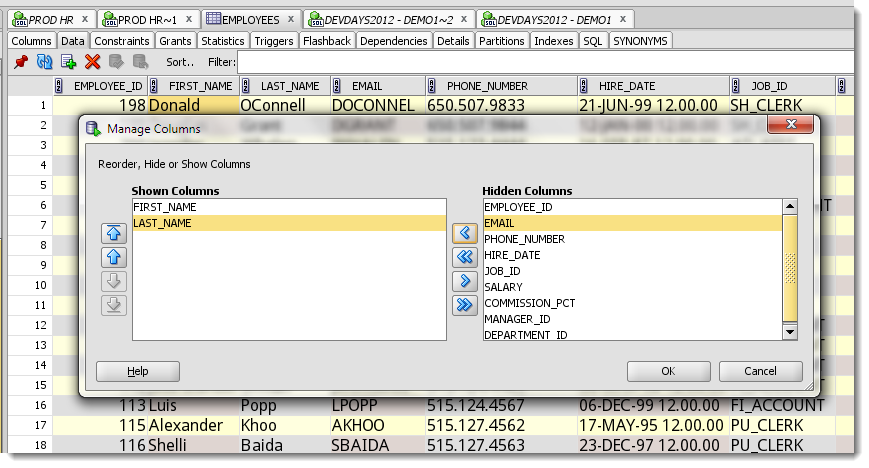
Hide the unwanted columns
Mouse right click on an column header. In the context menu, select ‘Columns.’ Hide the columns you don’t want. Copy and paste.
Mouse select the columns
Obvious, but a bit painful. For a very large dataset, you’ll be holding down the Shift and PageDown buttons – but it works. Remember to use Ctrl+Shift+C to get the column headers with the data.
Use the Export Wizard
This used to be called ‘Unload’ – agreed, not a great name. So, we changed it.
In a grid, right mouse click on the data, and on the context menu, select ‘Export…’
Select your format – I suggest ‘delimited’ or ‘fixed’ for copying data to the clipboard.
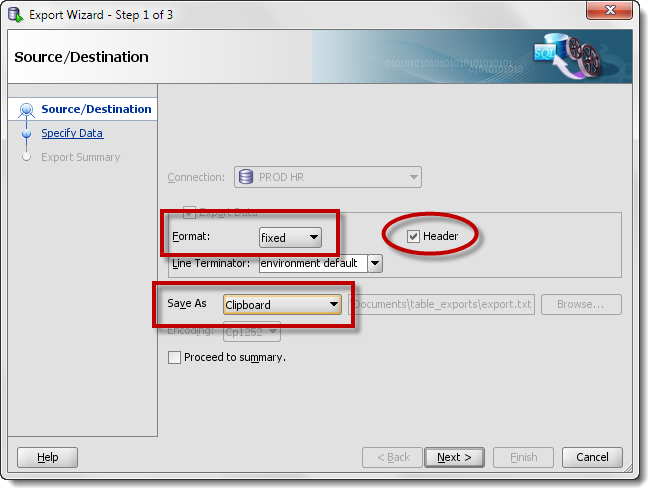
Click ‘Next.’
Click in the Columns dialog, and choose the columns you want copied.
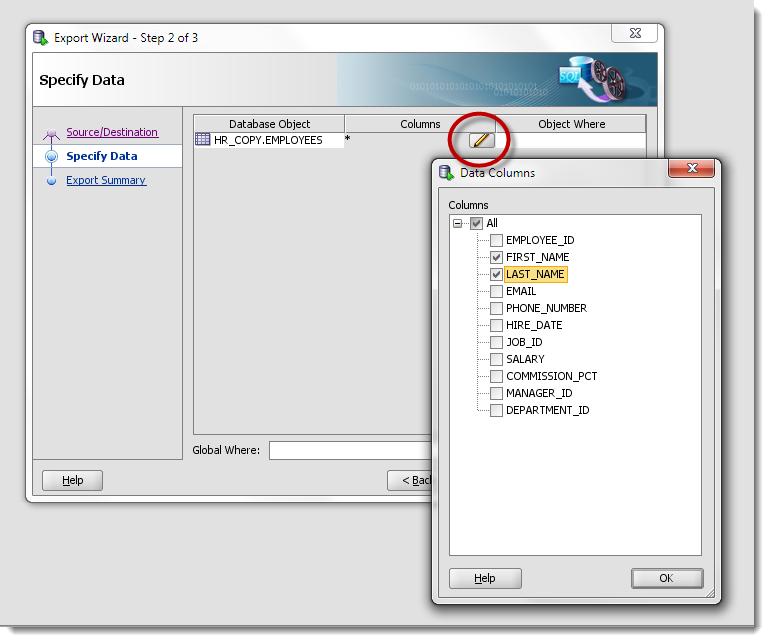
Click ‘Finish.’
Alt or Ctrl tab to your window or application of choice.
And Paste!
[text]
"FIRST_NAME" "LAST_NAME"
"Donald" "OConnell"
"Douglas" "Grant"
"Jennifer" "Whalen"
"Pat" "Fay"
"Susan" "Mavris"
"William" "Gietz"
"Alexander" "Hunold"
"Bruce" "Ernst"
"David" "Austin"
"Valli" "Pataballa"
"Diana" "Lorentz"
"Daniel" "Faviet"
"John" "Chen"
"Ismael" "Sciarra"
"Jose Manuel" "Urman"
"Luis" "Popp"
"Alexander" "Khoo"
"Shelli" "Baida"
"Sigal" "Tobias"
"Guy" "Himuro"
"Karen" "Colmenares"
"Matthew" "Weiss"
"Adam" "Fripp"
"Payam" "Kaufling"
"Shanta" "Vollman"
"Kevin" "Mourgos"
"Julia" "Nayer"
"Irene" "Mikkilineni"
…
[/text]
There’s probably at least 2 or 3 more ways, but…
But, try these and let me know how we can improve things.
I’ve already gotten a request to be able to include the SQL text used to populate the dataset on the the copy to clipboard, and it’s now on our to-do list 🙂



11 Comments
Copying data from grid to clipboard is broken in Version 20.4.1.407 (Feb 2021 Release)
Make sure on 20.4.1 you have a 21c Client or no client at all.
If you need a thick connection, recommend you stay on 20.4.0.
Hi Jeff. First, thanks again for the good work done on SQL Developer, and I mean it. By the way I wish you were working on JDeveloper also so that quality can be better on this software than it is now (talking about using it with ADF).
Anyway, my suggestion is : … I like the Ctrl+Shift+C trick and I like shortcuts also.
But I always forget about this one and I think most people don’t know about it too. So will it be possible to include this as an entry in the right click menu on the datagrid ?
As for now there is only 5 entry and nothing about this possibility.
I know I can also right-click on the header but the “copy header” on this menu doesn’t work the same way (it copies column names separated by commas, which is not very interesting if you want to paste the datagrid and its headers in Excel).
That would be not that much work and can help people.
Thanks
I’m inclined to agree with you. Stay tuned.
I have generally been using an older product called Benthic Golden for basic querying in Oracle, but I’m trying to switch over completely to SQL Developer, since it is a more powerful tool. However, one of the features that makes copying grid results to clipboard so easy in Golden is that I can right-click on the grid and select one of the following options… Copy Selection, Copy All (W/O Titles), Copy Selection with titles, Copy All with titles, Copy Titles Only.
After reading the post above, I now realize that a single click in the grid (to get focus), followed by a Ctrl+A (to select the entire grid), followed by a Ctrl+Shift+C (to copy with headers), will be my equivalent to right-clicking in Golden and selecting ‘Copy all with titles’. Could these right-click options be a future enhancement to SQL Developer?
Welcome to the world of SQLDev!
Did you know you can copy headers only? Right click on the column headers, Copy Selected Column Header(s)
They could indeed be future enhancements. You can add those to our Exchange and see what others think of them.
I used the last method suggested, ie pasting the data (in the one column) then doing text-columns as tab delimited. Now, whenever I paste it puts the data in columns *happy dance*
I found the answer here: http://www.computing.net/answers/office/microsoft-excel-copy-and-paste-problems/11036.html
Hi Monika, thanks for sharing your question and supplying your own answer! I’m wondering what you did to work around your issue? Did you use the text – column trick suggested on that link? I use OpenOffice, and when I do a paste into a spreadsheet it shows the data coming over on the clipboard as tab delimited.
I’m using ctrl + c to copy multiple columns…. but then in Excel it pastes all into one column.
This started when I changed my pc from xp to Win 7… any ideas? It’s driving me insane.
Cool. I had used the export wizard before but missed the little edit icon for selecting columns.
Thanks Jeff!