

You want to run a query or two against an Oracle database.
You want to get the data back into a user-friendly and consumable format, such as a comma separated values file.
You can do this in SQL Developer, VERY easily.
You can watch the movie…
…or read on – your choice!
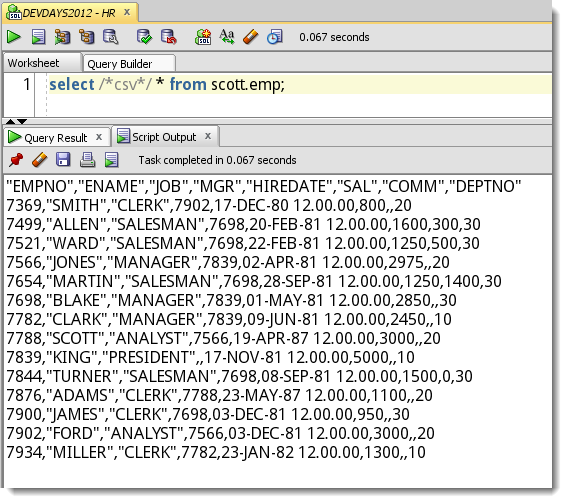
Quick ResultSet Exports as Script Output
I’m too lazy to hit execute > SaveAs > Open File. I just want to get my delimited text output RIGHT NOW!
The ‘old’ way –

And the ‘new’ way (well, new to me!) –

The Code
SELECT /*csv*/ * FROM scott.emp;
SELECT /*xml*/ * FROM scott.emp;
SELECT /*html*/ * FROM scott.emp;
SELECT /*delimited*/ * FROM scott.emp;
SELECT /*insert*/ * FROM scott.emp;
SELECT /*loader*/ * FROM scott.emp;
SELECT /*fixed*/ * FROM scott.emp;
SELECT /*text*/ * FROM scott.emp;
You need to execute your statement(s) as a script using F5 or the 2nd execution button on the worksheet toolbar. You’ll notice the hint name matches the available output types on the Export wizard.
NEW FOR 4.1!!!
You don’t HAVE to add the comment to your code anymore. You can JUST use this instead – and ALL of your script output will be formatted by default.
SET SQLFORMAT csv
When you want it back to normal, run
SET SQLFORMAT
Also, in 4.1, we added JSON, so
SELECT /*json*/ * from blah…will come back formatted as JSON.
…OK, back to the story.
Here’s the raw output from the previous examples in case you’re not sitting at your work desk when you read this (click to expand):
SET sqlformat csv

SELECT * FROM scott.emp;
"EMPNO","ENAME","JOB","MGR","HIREDATE","SAL","COMM","DEPTNO"
7369,"SMITH","CLERK",7902,17-DEC-1980 00:00:00,800,,20
7499,"ALLEN","SALESMAN",7698,20-FEB-1981 00:00:00,1600,300,30
7521,"WARD","SALESMAN",7698,22-FEB-1981 00:00:00,1250,500,30
7566,"JONES","MANAGER",7839,02-APR-1981 00:00:00,2975,,20
7654,"MARTIN","SALESMAN",7698,28-SEP-1981 00:00:00,1250,1400,30
7698,"BLAKE","MANAGER",7839,01-MAY-1981 00:00:00,2850,,30
7782,"CLARK","MANAGER",7839,09-JUN-1981 00:00:00,2450,,10
7788,"SCOTT","ANALYST",7566,19-APR-1987 00:00:00,3000,,20
7839,"KING","PRESIDENT",,17-NOV-1981 00:00:00,5000,,10
7844,"TURNER","SALESMAN",7698,08-SEP-1981 00:00:00,1500,0,30
7876,"ADAMS","CLERK",7788,23-MAY-1987 00:00:00,1100,,20
7900,"JAMES","CLERK",7698,03-DEC-1981 00:00:00,950,,30
7902,"FORD","ANALYST",7566,03-DEC-1981 00:00:00,3000,,20
7934,"MILLER","CLERK",7782,23-JAN-1982 00:00:00,1300,,10

 14 ROWS selected.

SET sqlformat xml

SELECT * FROM scott.emp fetch FIRST 2 ROWS ONLY;<?xml version='1.0'  encoding='UTF8' ?>
<RESULTS>
	<ROW>
		<COLUMN NAME="EMPNO"><![CDATA[7369]]></COLUMN>
		<COLUMN NAME="ENAME"><![CDATA[SMITH]]></COLUMN>
		<COLUMN NAME="JOB"><![CDATA[CLERK]]></COLUMN>
		<COLUMN NAME="MGR"><![CDATA[7902]]></COLUMN>
		<COLUMN NAME="HIREDATE"><![CDATA[17-DEC-1980 00:00:00]]></COLUMN>
		<COLUMN NAME="SAL"><![CDATA[800]]></COLUMN>
		<COLUMN NAME="COMM"><![CDATA[]]></COLUMN>
		<COLUMN NAME="DEPTNO"><![CDATA[20]]></COLUMN>
	</ROW>
	<ROW>
		<COLUMN NAME="EMPNO"><![CDATA[7499]]></COLUMN>
		<COLUMN NAME="ENAME"><![CDATA[ALLEN]]></COLUMN>
		<COLUMN NAME="JOB"><![CDATA[SALESMAN]]></COLUMN>
		<COLUMN NAME="MGR"><![CDATA[7698]]></COLUMN>
		<COLUMN NAME="HIREDATE"><![CDATA[20-FEB-1981 00:00:00]]></COLUMN>
		<COLUMN NAME="SAL"><![CDATA[1600]]></COLUMN>
		<COLUMN NAME="COMM"><![CDATA[300]]></COLUMN>
		<COLUMN NAME="DEPTNO"><![CDATA[30]]></COLUMN>
	</ROW>
</RESULTS>
So that was kind of a ‘trick’ – I’m not sure it’s a documented feature, although Kris did talk about it WAAAAAAAY back in 2007.
Now you can just Run > Copy > Paste!

203 Comments
I got a strange thing. Sometimes I got the header portion (column names) but some times I only got the contents. I compared both sqls and didn’t find any thing wrong:
Could be a bug, but I would need a test case and versions of everything involved to look into it further.
Hi Jeff,
My objective is to Export the results of Multiple queries to a single excel file. I couldnt find solution for this to be precise. So tried if I can write a spool statement with each query and specify the Worksheet path against each one.
When I tried for the very first query, I am getting both query and results in my CSV file. I just want the results in csv file, can that be done?
spool S:\myresults.csv
select /*csv*/ * from EMPLOYEES;
spool off
I am facing a weird issue. When using SETFORMAT csv i get special characters for space and “-” (dash ) like – but when I use default or any other SETFORMAT I dont get special characters. I need to use csv format. Is there anyway to handle this issue using sqlcl-18.1.1?
On vacation until next week. Post to the forums an example of your issue and we’ll take a look.
You can take this a step further by doing the following:
spool c:\test\MyData.csv
SELECT /*csv*/ * from scott.emp;
spool off;
Now hit F5 and when complete your data has been saved as a CSV file and can be opened with xls directly. No need to cut and paste.
Hi there, i reead your blog from time to time and i own a similar one and i was just curious iff you gett a loot off spam remarks?
If so how do you protect against it, any plugin or anything
you can advise? I get sso much lately it’s driving me mad so any help is
very much appreciated.
This is looking great for exporting csv, but the sqldeveloper export has a few things that I can’t seem to replicate in sqlcl
* specifying the export characterset (UTF-8)
* sending the csv to a file without the blank lines at the end and the message of “25 rows selected.”
I also don’t seem to be able to turn off the sending of results to the screen. Am I missing something simple?
>>* sending the csv to a file without the blank lines at the end and the message of “25 rows selected.”
SET FEEDBACK OFF
when placed into a script:
>>I also don’t seem to be able to turn off the sending of results to the screen
when placed into a script…
set termout off
stuff
set termout on
Hey Jeff,
Last week at UKOUG Tech you showed how to define your own format, by specifying the delimiters. What’s the syntax for that? Is it already available in 4.1.5 or do we need to use the early adopter relase of 4.2?
It would be great to have a format for markdown table like this :
| BEER_ID | BEER_NAME |
| — | — |
| 1 | Triple Karmeliet |
| 2 | Grimbergen |
Cheers,
Jerome
SET sqlformat DELIMITED delimiter left_enclosure right_enclosure
there’s no way to pass a null for the string open and close marks using set sqlformat, although you can set to nothing if you use the GUI/Export
Thanks a lot. It doesn’t work in 4.1.0.19 so I guess I need to update it :).
Hi,
This does not work for me in version 4.1.5.21 of SQL Developer.
SET sqlformat DELIMITED | ^ ^
SELECT ‘PLEASE’ COL1,’WORK’ COL2 FROM dual
“COL1″,”COL2”
“PLEASE”,”WORK”
Any idea why the delimiter parameters are ignored? This happens for any select statement that I execute.
Thanks
Yeah, that’s probably a version 4.2 or higher thing.
here’s a really bad way to do it – but gives you an idea
Great, thanks. I’ll have to use SQLCL 🙂
Hi Jeff,
Thanks for your post!
I was studying all this features, and after making some tests i found that after using Export Tool from grid it seems that the /*csv*/ parameters are overwritten after the exportation.
But you wrote here when you are using /*csv*/ feature, it is always taking the DEFAULT options for CSV. However, in my case it is taking the LAST parameters after exportation from grid.
Let me explain this to you with the following steps. I hope you can comment me something related to this:
1. Write SQL such as:
select /*csv*/ id, code from mytable; — note: id is INTEGER, code is VARCHAR2
2. Run it with CTRL + ENTER
Output: grid with values — ok!
3. Run the query with F5
Output: since id is INTEGER and code is VARCHAR2:
“ID”,”CODE”
179018,”1057461″
179097,”32124977″
179102,”2124977″
…
OK!
3. Get back to Query Result view, and export the grid (manually) with csv option and set Left&Right Enclosure as . Uncheck the Header, as well.
Output: your CSV FILE as:
179018,
179097,
179102,
…
OK!
4. Run again the query with F5
Output:
,
179018,

179097,

179102,

…

The expected output should have been like in the number 3…
5. So the /*csv*/ keep the last Export Parameters… Am I right?
It is great for someone who loves the Copy+Paste feature instead of Exporting the grid, because any csv query you run after this steps, will be formatted as the last Export, till you make a new export. And actually for me it’s great since Script Output works faster than Export tool in this kind of job.
Thanks for your time!
Jeff,
Very cool. I just tried “set sqlformat json;” and “select /*json*/*from table_1;”, but all records came back on one line. I was expecting to see something similar to an xml output.
Thanks!
json isn’t formatted, even in a browser, you usually have to install a plugin like this to have it ‘pretty printed’
Jeff it is very cool option, but can we do a job which create a xlsx file from a query view for exapmple in scheduler?
XLSX? No.
But you could create a DB job that launches SQLcl from the db server, connects, runs the query, and spools it to a CSV file.
No, I should create a xlsx , not xls or csv files, could you tell me is possible create this file and send mail as attached.
You can do this, but you’ll have to write a stored procedure to do it, and not rely on SQL Developer to do it for you.
Hi Jeff,
I’m writing a query within a stored procedure utilizing ‘SELECT /*csv*/…’. There are numerous fields selected (some aliased) from numerous tables. I’ve tried, unsuccessfully, to write an output file utilizing ‘utl_file.put_line(OUTPUT_FILE_NAME, output_record) within a FOR LOOP. This stored procedure will be executed by scheduling software and the output file sent to a 3rd party as input for a system we use of theirs. I want to reference a record not all the individual fields in the put_line command. The only time this worked was when I defined a TYPE ……IS RECORD listing all the selected fields, but even then, the output file did not have ticks around the fields or commas separating them. What can I do? Thanks!
the *csv* stuff is client code – a stored procedure doesn’t know what to do with it
if you’re writing a SP to generated csv files, you’ll need to code that yourself. but, i’m guessing you can find code samples of this on StackOverflow, the Oracle Forums, AskTom, Oracle-Base, and a dozen other places
Yes, I’ve done that for years. I was asked to investigate if *cvs* could be utilized. Thanks so very much for the info.
Hi Jeff,
is there any option to set sqlformat to PDF while using spool utility?
My motto to export resultset into pdf file.Need solution asap.
No, text based formats only.
Hi Jeff,
Wanted to know how we can print text in a csv file via oracle starting from any specific cell ? Like for ex I want to print a ‘Disclaimer’ at my csv generated file from the ‘I’ column and not from the ‘A’ column of the csv.
Thanks for the help in advance
Hi Jeff,
I like this feature and have found it useful, but I’ve encountered an oddity when formatting to csv.
In my query, for one output column I specify within my select, “NULL AS “fieldName2”. When I create a csv, “fieldName2″ comes out with a value ,””, as opposed to ,, for a column in the select which has null values from the source.
I’m probably overlooking something obvious, but have searched and haven’t found what I’m missing.
I would suspect that fieldName2 was a varchar and the null is represented by an empty string. If a number you would expect ,, (note that there are surrounding commas)
Steve
I have one shell script.script is used to connect database and run sql quey and result should be send to excel file.My scrpt is working good but after excueting my script the excell file showing results in unformated way. please help me how to solve the issue.
for starters, you’d need to share your script – how you’re getting the data to Excel, and what you mean by ‘unformatted way.’
Hi Jeff. I’m using SQL Developer and wanting fixed column output from my query result. Example: 1st field, position 1 and length 1, 2nd field begins position 2 and with length 6, and so on. And to have results in a .txt file format with output fields in particular column positions. Thanks!
I am running with Version 3.2.20.09. I don’t your results when using csv nor insert. Is there something I can use to get these or similar results? Please advise.
Thanks Jeff…
what exactly are you doing and what exactly are you seeing?
Please also add these export hints to the Ctrl+Enter thing, not just F5. I use the Ctrl+Enter all the time to run single statements.
how would that work? how would we display an insert statement in a grid?
Would it be an alternative to not use the grid and instead do the text output if there is output hints present? I.e. if you write select /*insert*/ … etc it’s clear that you don’t want the result in a grid.
I love the Ctrl+Enter feature and use it all the time for ad hoc queries and while creating scripts. It would be very convenient when one creating scripts to be able to quickly generate e.g. an insert statement with the correct column names etc without doing the F5 thing in a new empty worksheet.
That code only gets invoked when it’s ran as a script, different code path than the grid executes…so this would require some plumbing work.
It may need some plumbing, but I’m sure more people than me would be happy to use it.
I know I have missed it several times. I have just written the hint, pressed Ctrl+Enter, and gotten surprised when it didn’t work. It’s not at all obvious for a normal user that they are fundamentally different under the hood. Especially if you’re switching back and fourth between SQL Developer and SQL Server Management Studio. Running one statement or a script isn’t a big difference in SSMS.
yeah, cause there’s no SQL*Plus in SQL Server world, but I get your point
if we would do that, it would mean you’d have to take the comment out to have your data come back in a grid. so if you wanted one version of your query, and to be able to get a grid to read or the formatted script output out, you’d lose that flexibility
Hello,
I’m having an issue with the text format option, I get a ‘null’ string instead of a tab character as field separator. It’s even on the original post example:
“EMPNO”null”ENAME”null”JOB”null”MGR”null”HIREDATE”null”SAL”null”COMM”null”DEPTNO”
7369null”SMITH”null”CLERK”null7902null17-DEC-80 12.00.00null800nullnull20…
Is there any way around this to get an actual tab character in the output? This should be the default behavior for the text format. I know tha csv would be a better option, but It’s not the case for my locale as we use a comma for the radix point instead of a point, so the numeric fields get messed up.
thanks.
use the wizard and the delimited format, set your delimiter to ‘;’ or something that will be good for your locale
I bumped into the same. What worked for me was to do the export the manual way as explained. Then I did the same again the script way with /*text*/, the ôutput then was correct, tab and not null between the values.
I am not getting any error message, getting task completed in 0 seconds
Now I got this error message.
Error at Command Line:9 Column:36
Error report:
SQL Error: ORA-00904: “REC_IE”: invalid identifier
00904. 00000 – “%s: invalid identifier”
*Cause:
*Action:
But I didn’t specify any field names like “REC_IE”
select /*csv*/ AU_JOB_ID,AU_TSK_ID,REC_IE,SRC_SYSTEM, CORE_SRC_SYS_ID,AU_SITE_NM,CORE_TRD_ID,
BIZ_DT,
BOOK_ID from
When I try to run query as script “select /*csv*/ * from ‘ I couldnt see results and query status shows completed in xx seconds. Query will return 1000000 records. I set the limit in preferences-workbook as well. Pls help
does it work for ANY query, or just not for that one? what if you restrict the resultset down to says 100 rows?
Its not working for any queries. Before I change max limit in preferences it worked, but after the limit set to 100000 its not working. I tried to execute the same worked query after reset the limit to 5000 not working. Just getting the message task completed in 0 seconds if I run query as script. But for the same query getting results if I run query using run statement.
restart sqldev, and try again
Thank you for the update. I tried twice restarting. File-Exit and reopened sql developer. Still facing same problem.
run sqldeveloper in debug mode – in the sqldeveloper.conf file in the bin directory, change the last line to read ‘debug.conf’ vs ‘non-debug.conf’, start up sqldev, try the script execution, and copy the contents of the logging panel here
after restart first run as script produces result and if I trigger the same query again its not running. Getting the message task completed in 0 seconds if I run query as script. But for the same query getting results if I run query using run statement.
and the debug/logging info?
Hello Jeff,
First of all, thank you for all the tutorials you have posted on your blog. I visit your blog frequently when I am looking for solutions in SQL Developer. I tried Select /*loader*/ for one of my script that returns about half a million records, however it always throws Java error (read dead end). The same script worked fine with just over a thousand records.
Do you know what can be the reason that I am getting this error? I am running SQL Developer on citrix received as it is hosted on the vendor site.
Thank you,
2 things stand out in your post ‘half a million records’ and ‘Citrix’…I’m guessing there’s not enough resources allocated to your Citrix workspace for SQL Developer to do what you asked it to do.
In your script, spool that output to a file, and minimize the output panel in SQL Dev – that might help. If not, ask your Citrix admin for more RAM
Thank you JEff, I wll check with them.
Meanwhile, just wanted to share the error message I am getting.
java.io.IOException: Read end dead
at java.io.PipedInputStream.checkStateForReceive(PipedInputStream.java:246)
at java.io.PipedInputStream.awaitSpace(PipedInputStream.java:252)
at java.io.PipedInputStream.receive(PipedInputStream.java:215)
at java.io.PipedOutputStream.write(PipedOutputStream.java:132)
at java.io.BufferedOutputStream.write(BufferedOutputStream.java:105)
at sun.nio.cs.StreamEncoder.writeBytes(StreamEncoder.java:202)
at sun.nio.cs.StreamEncoder.implWrite(StreamEncoder.java:263)
at sun.nio.cs.StreamEncoder.write(StreamEncoder.java:106)
at sun.nio.cs.StreamEncoder.write(StreamEncoder.java:116)
at java.io.OutputStreamWriter.write(OutputStreamWriter.java:203)
at java.io.Writer.write(Writer.java:140)
at oracle.dbtools.raptor.format.ResultsFormatter.write(ResultsFormatter.java:229)
at oracle.dbtools.raptor.format.CSVFormatter.printColumn(CSVFormatter.java:51)
at oracle.dbtools.raptor.format.ResultSetFormatterWrapper.print(ResultSetFormatterWrapper.java:95)
at oracle.dbtools.raptor.format.ResultsFormatter.print(ResultsFormatter.java:176)
at oracle.dbtools.raptor.scriptrunner.SQL.executeQuery(SQL.java:242)
at oracle.dbtools.raptor.scriptrunner.SQL.run(SQL.java:48)
at oracle.dbtools.raptor.scriptrunner.ScriptRunner.run(ScriptRunner.java:170)
at oracle.dbtools.raptor.scriptrunner.ScriptRunner.run(ScriptRunner.java:292)
Thank you again!
If you can make it through the spam, here a quandary…
How can you set your /*insert*/ up to use a DIFFERENT table name?
I’m trying to pull some records for a demo, and wanted to use a selected table name. I tried aliasing, but the /*insert*/ ignores my druthers.
I can’t do
select /*insert*/ * from scott.emp demo_records ;
Aside from doing something crazy like passing the table through a view, are there any ideas?
Ultimately, I can overcome this in a few minutes w/ NotePad++, but it would be better to not have to step out of the tool.
Marc
Use the wizard, write the query as normal, execute with ctrl+enter. On the results grid, right-click, export. Choose INSERT – input your table name.
Also, our editor supports search and replace, so no need for NotePad++, at least not for this task.
Ah, that’s my fault for trying to use the functionality in this post. Sometimes, it’s best just to do it “the old fashioned way”. 😉
> our editor supports search and replace, so no need
> for NotePad++, at least not for this task.
I’ve used the SQL-D editor, but I’m mangled a lot more than I’ve fixed, so I stick to doing it “the old fashioned way”. I’m a wiz at NP++, and it never accidently deleted my queries or substituted items from the query history… both of those still catch me when I’m trying to speed along and hit the wrong CTRL- combination. I know I can turn individual keyboard shortcuts off, but it’s easier just to jump to NP++ for editing, and use SQL-D mainly for initial coding and executing.
Thanks for the super fast response, Jeff!
Marc
>>and it never accidentally deleted my queries or substituted items from the query history
Undo will bring back your query if a SQL History item is brought in an clobbers your text
These formatter comments will work great if you need their default behavior. If you need to tweak them, such as supplying a different table name, then it’s back to the GUI for exporting grid contents.
We did have a bug for inserts on some trickier selects where we we’re getting confused on the table name, that’s been fixed for our 4.1 patch we have in the works.
Aaaand, because I always hit SEND to soon…
I also noticed that the behaviour was different, depending upon the case of the hint.
select /*insert*/ * from my_Demo_taBle_nAME ;
— hastily and poorly typed
My resulting insert statements were “” the table name – a dangerous practice if not used going IN to the subject query. I was getting:
Insert into “my_Demo_taBle_nAME” (…
instead of
Insert into my_Demo_taBle_nAME (…
So, looking back over previous comments, I tried capitalizing the hint:
select /*INSERT*/ * from my_Demo_taBle_nAME ;
and the result is a space-aligned table in the script output.
RECNO UNIQ SYM MCHTY
———- ———————————— —— —–
407231 000024898 198401 2
407232 000024898 198407 6
THAT’S not what the doctor ordered!
Marc
we’re java, so the comments are case sensitive, the formatter type has to match the label EXACTLY as shown in the GUI dialog in the grid context menu…so /*insert*/ and not /*INSERT*/
I’m also getting insert statements with a pair of double-quotes instead of a table name. Is there a SET statement that I can add to fix that?
SQL Developer v 3.2.20.10.20
what’s your query?
I’ve simplified the fields since I’m only pulling some of them:
SELECT
/*insert*/
*
FROM
MATRIX.OCCUPATIONS
WHERE
VERSIONID =
&versionid;
I get output that looks right except for the table name. Here’s some truncated output:
REM INSERTING into
SET DEFINE OFF;
Insert into “” (OCC_CODE,OCC_NAME, ….
Hi Smith,
I am die hard fan of SQL Developer, and really helps me a lot in my day to day life, somehow, I have to work with Java, and write the data of all tables in csv file, so could you please point me to the jar file of oracle sql developer, and the method which does exactly same functionality as the gui tool does. Hoping for your favorable reply.
You want to take our code and use it to put in your application? We’re a ‘free’ app, but not open-source.